ATAN returns an angle from a tangent ratio, but the ratio doesn’t retain every original direction. I keep that limitation explicit when converting its result to displayed degrees.

A ratio contains less information than a direction
Two coordinate pairs can have the same ratio while pointing into different quadrants. Dividing both positive coordinates or both negative coordinates can produce the same positive value. That ratio no longer records both original signs. ATAN cannot recover information already discarded.
ATAN returns the angle in radians whose tangent matches the supplied float expression. Its native output is float. The principal arctangent chooses the angle between negative and positive ninety degrees for finite real input. That interval is part of the mathematical interpretation.
I’d use this function when the input genuinely represents a tangent ratio. A full directional calculation starting from two coordinates needs a suitable quadrant-aware method. This article doesn’t replace that method with a sign guess. Its example begins with the ratio already available.
Keep radian and degree results separate
The script supplies ratios negative one, zero, one and two. A fifth input is NULL. Each ratio is explicitly decimal(7,2), then converted to float for the function. The original value remains visible beside the outputs.
ATAN returns a radian angle first. The query displays it as decimal(12,6). A second expression converts that angle through DEGREES and applies the same display scale. The two columns name their units explicitly.
A ratio of one is expected to display forty-five degrees. Negative one displays negative forty-five, and zero displays zero. A ratio of two displays about 63.434949 degrees. These are principal angles rather than an unrestricted recovery of the original orientation.
WITH Inputs AS
(
    SELECT Id, CAST(Ratio AS decimal(7,2)) AS Ratio
    FROM (VALUES (1, -1), (2, 0), (3, 1), (4, 2), (5, NULL))
        AS v(Id, Ratio)
)
SELECT i.Id, i.Ratio, CAST(a.RadianAngle AS decimal(12,6)) AS DisplayRadians,
       CAST(DEGREES(a.RadianAngle) AS decimal(12,6)) AS DisplayDegrees
FROM Inputs AS i
CROSS APPLY (VALUES (ATAN(CAST(i.Ratio AS float)))) AS a(RadianAngle)
ORDER BY i.Id;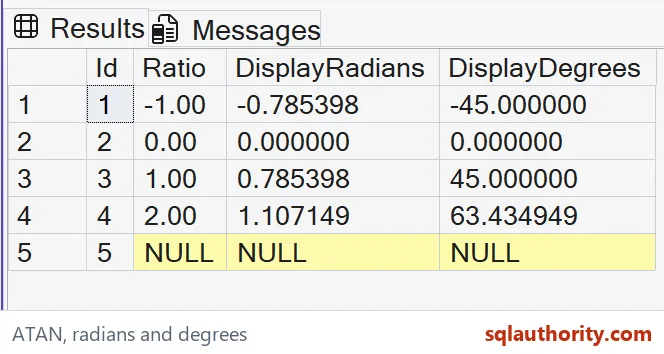

Keep approximate representation in view
The native calculation uses float. Its final decimal cast establishes a displayed precision rather than exact arithmetic. A value such as PI divided by four cannot be represented as an exact finite decimal. A rounded display is suitable for this bounded comparison.
I can justify storing a rounded angle for a report whose precision requirement permits it. Another consumer may need more digits or an error tolerance. Make that decision at the destination boundary. Don’t silently round intermediate coordinates before calculating a ratio.
The original ratio calculation also needs its own denominator and type contract. Integer division can discard a fraction before ATAN receives it. A zero denominator is another separate issue. This script supplies ratios directly and makes no claim to solve those input problems.
Check every unit and missing value
NULL remains missing in both angle columns. It isn’t interpreted as a ratio of zero. That preserves unknown input separately from a real horizontal principal angle. No replacement value is introduced.
The script reads five literal values through a CTE. It creates no objects or changes to session state. ORDER BY fixes the case sequence. Original ratio, displayed radians and displayed degrees stay together for complete tuple comparison.
Compare each full input/output tuple and declared SQL type. Check the sign, units and six fractional digits. Keep the original ratio beside its principal angle. A matching degree magnitude alone could conceal a sign error or an incorrect assumption about the original quadrant.
Keep the ratio in sight, and the angle stays honest.
A principal angle is not a recovered quadrant, it is the selected angle represented by the supplied ratio.
Published by Pinal Dave on SQLAuthority. More of my work at pinaldave.com.
Discover more from SQL Authority with Pinal Dave
Subscribe to get the latest posts sent to your email.