TIMEFROMPARTS interprets its fractions argument using the requested precision. I keep that precision beside the input because the same integer can describe very different fractional times.

Name the unit before supplying a fraction
A fraction value of one doesn’t mean one universal amount of time. Its interpretation depends on the requested precision. At precision three, it represents one millisecond. At precision seven, it represents one ten-millionth of a second.
TIMEFROMPARTS builds a time value from its parts and is available since SQL Server 2012. The final argument selects the time precision. Its return type carries that precision. This example compares two fixed choices instead of mixing them into one output column.
I’d avoid naming the input merely Fraction without documenting its unit. A source that records milliseconds needs precision three with appropriately ranged values. Passing those same numbers at precision seven changes the meaning. A successful function call doesn’t detect that mismatch.
Keep both constructed times visible
The example supplies fraction values zero, one, 123 and 999. Every complete input uses twelve hours, thirty-four minutes and fifty-six seconds. Two outputs construct time(3) and time(7). The original integer remains beside them.
The integer 123 becomes .123 at precision three. At precision seven, it becomes .0000123. These are different times despite using the same visible number. Both complete strings belong in the expected result, rather than a shortened display of seconds.
Two additional rows contain a missing fraction and a missing hour. They expose NULL propagation without manufacturing an invalid range. The script uses only valid non-NULL components. It doesn’t run deliberate errors in the same batch as its result demonstration.
WITH Inputs AS
(
    SELECT Id, HourPart, MinutePart, SecondPart, FractionPart
    FROM (VALUES (1, 12, 34, 56, 0), (2, 12, 34, 56, 1),
                 (3, 12, 34, 56, 123), (4, 12, 34, 56, 999),
                 (5, 12, 34, 56, NULL), (6, NULL, 34, 56, 0))
        AS v(Id, HourPart, MinutePart, SecondPart, FractionPart)
)
SELECT Id, HourPart, MinutePart, SecondPart, FractionPart,
       TIMEFROMPARTS(HourPart, MinutePart, SecondPart, FractionPart, 3)
           AS TimePrecision3,
       TIMEFROMPARTS(HourPart, MinutePart, SecondPart, FractionPart, 7)
           AS TimePrecision7
FROM Inputs
ORDER BY Id;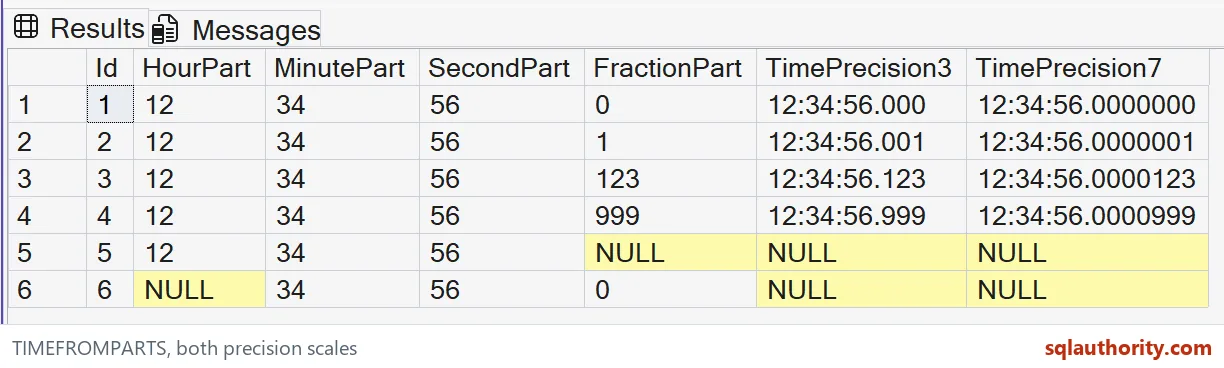

Keep NULL and invalid input separate
A NULL hour, minute, second or fraction gives a NULL result. A NULL precision is a separate error case. The example always provides a literal valid precision. It doesn’t treat a missing hour as midnight or a missing fraction as zero.
Invalid hour, minute or second values can raise an error. Fractions must also fit the selected precision. A fraction valid for precision seven can be too large for precision three. Validate the original unit and range before constructing the output.
I can justify substituting zero for an omitted fraction when the source contract explicitly permits it. That substitution changes a missing value into a precise time. I’d retain a source-quality flag when that distinction matters. The constructor cannot recover the discarded uncertainty.
Choose the destination precision deliberately
A destination column can apply another conversion after construction. That conversion can round fractional seconds to a lower precision. It belongs to a separate storage contract. This demonstration reads both original constructed times without narrowing either one afterward.
The output column names include their precision to make comparison straightforward. Their SQL types are recorded as time(3) and time(7). A client formatting both without fractions would obscure the demonstrated difference. Display formatting shouldn’t define the underlying precision.
These values contain no date or time zone. TIMEFROMPARTS doesn’t attach a calendar day or establish an instant. An event timestamp may need additional information. I would choose the required temporal type before using a time-only constructor.
Read the complete result contract
The CTE supplies literal components and the final SELECT reads them. No objects, settings or transactions are created. ORDER BY fixes the six-row sequence. Each original component stays visible beside both outputs for a complete tuple comparison.
Keep every time value at its full fractional width, including both NULL cases. Compare each component with its resulting time. Check the declared precision beside the fractional argument. A screenshot showing only whole seconds would miss the central distinction.
Name the unit out loud, and the same number stays honest.
A fraction is not a universal time unit, it is a number interpreted through the selected precision.
Published by Pinal Dave on SQLAuthority. More of my work at pinaldave.com.
Discover more from SQL Authority with Pinal Dave
Subscribe to get the latest posts sent to your email.