Your report needs status changes, not every repeated reading. Use LAG to compare each row with the one before it, and keep a row only when the status is different. The catch is NULL, which breaks the obvious version of this query.

Why a status feed gets so long
Picture a monitoring table. Every device reports its status each minute: ready, ready, ready, busy, busy. After a day a manager asks one simple question. “When did it actually change?”
LAG is the tool for this. It lets a row look at the row before it, in the order you choose. The demo has six readings for two devices. Device 10 repeats itself and then reports a NULL. Device 20 reports once.
DROP TABLE IF EXISTS #DeviceStatus;

CREATE TABLE #DeviceStatus
(EventId int PRIMARY KEY, DeviceId int NOT NULL,
 EventAt datetime2 NOT NULL, StatusValue varchar(20) NULL);

INSERT #DeviceStatus VALUES
(1, 10, '2025-01-01T09:00:00', 'ready'), (2, 10, '2025-01-01T09:01:00', 'ready'),
(3, 10, '2025-01-01T09:02:00', 'busy'),  (4, 10, '2025-01-01T09:03:00', 'busy'),
(5, 10, '2025-01-01T09:04:00', NULL),      (6, 20, '2025-01-01T09:00:00', 'ready');
Event 5 has a NULL status on purpose. A device that stops sending a status is common, and it is where most versions of this query go wrong.
Why the obvious query loses rows
The first thing most of us write is “status is not equal to the previous status.” Run it and look at the result. Only event 3 comes back.
WITH P AS
(SELECT EventId, DeviceId, StatusValue,
        LAG(StatusValue) OVER (PARTITION BY DeviceId ORDER BY EventAt, EventId) AS PreviousStatus
 FROM #DeviceStatus)
SELECT EventId, DeviceId, StatusValue, PreviousStatus
FROM P
WHERE StatusValue <> PreviousStatus
ORDER BY DeviceId, EventId;
Events 1 and 6 are gone because LAG returns NULL for the first row of a device. Comparing anything to NULL gives unknown, not true, so the row is dropped. Event 5 disappears the same way. Busy to NULL is a real change, but no error tells you it was missed.
Keep the first row and compare NULLs on purpose
Two small fixes solve it. IS DISTINCT FROM treats two NULLs as equal and treats a NULL and a value as different. ROW_NUMBER marks the first row of each device, because LAG alone cannot tell “no previous row” from “previous status was NULL.”
Order by the time and then by EventId. If two readings share a timestamp, the order between them is otherwise not guaranteed, and the tie-breaker makes the answer repeatable. Six rows shrink to four: events 1, 3, 5 and 6.
DROP TABLE IF EXISTS #StatusTransitions;

WITH P AS
(SELECT *,
        LAG(StatusValue) OVER (PARTITION BY DeviceId ORDER BY EventAt, EventId) AS PreviousStatus,
        ROW_NUMBER() OVER (PARTITION BY DeviceId ORDER BY EventAt, EventId) AS SequenceNumber
 FROM #DeviceStatus)
SELECT EventId, DeviceId, EventAt, StatusValue,
       CASE WHEN SequenceNumber = 1 THEN 1 ELSE 0 END AS IsInitialState
INTO #StatusTransitions
FROM P
WHERE SequenceNumber = 1 OR StatusValue IS DISTINCT FROM PreviousStatus;

SELECT * FROM #StatusTransitions ORDER BY DeviceId, EventAt, EventId;
How long did each state last
Now flip the question. LEAD looks forward instead of back. Run it on the short list of transitions, not on the full history. The next transition is where the current state ended.
The last state of a device has no next transition. I use a reporting cutoff of 10:00 for those. Device 10 was ready for 120 seconds, busy for 120 seconds, and then NULL for 3,360 seconds.
DECLARE @cutoff datetime2 = '2025-01-01T10:00:00';

WITH I AS
(SELECT *, LEAD(EventAt) OVER (PARTITION BY DeviceId ORDER BY EventAt, EventId) AS NextTransition
 FROM #StatusTransitions)
SELECT DeviceId, StatusValue, EventAt AS StateStart,
       COALESCE(NextTransition, @cutoff) AS StateEnd,
       DATEDIFF_BIG(second, EventAt, COALESCE(NextTransition, @cutoff)) AS ObservedStateSeconds
FROM I
WHERE EventAt <= @cutoff
ORDER BY DeviceId, EventAt, EventId;
Be honest about that 3,360. The sample never reported after 09:04. The device may have stayed NULL, or the feed may have died. The query cannot tell you which, and neither can I.
Count the changes per day
A daily count groups the transitions by date and skips the initial row. A first reading is not a change, it is just the first thing you saw. Device 10 has two changes on 1 January. Device 20 has none, so it does not appear at all.
SELECT DeviceId, CONVERT(date, EventAt) AS ChangeDate, COUNT_BIG(*) AS ChangeCount
FROM #StatusTransitions
WHERE IsInitialState = 0
GROUP BY DeviceId, CONVERT(date, EventAt)
ORDER BY DeviceId, ChangeDate;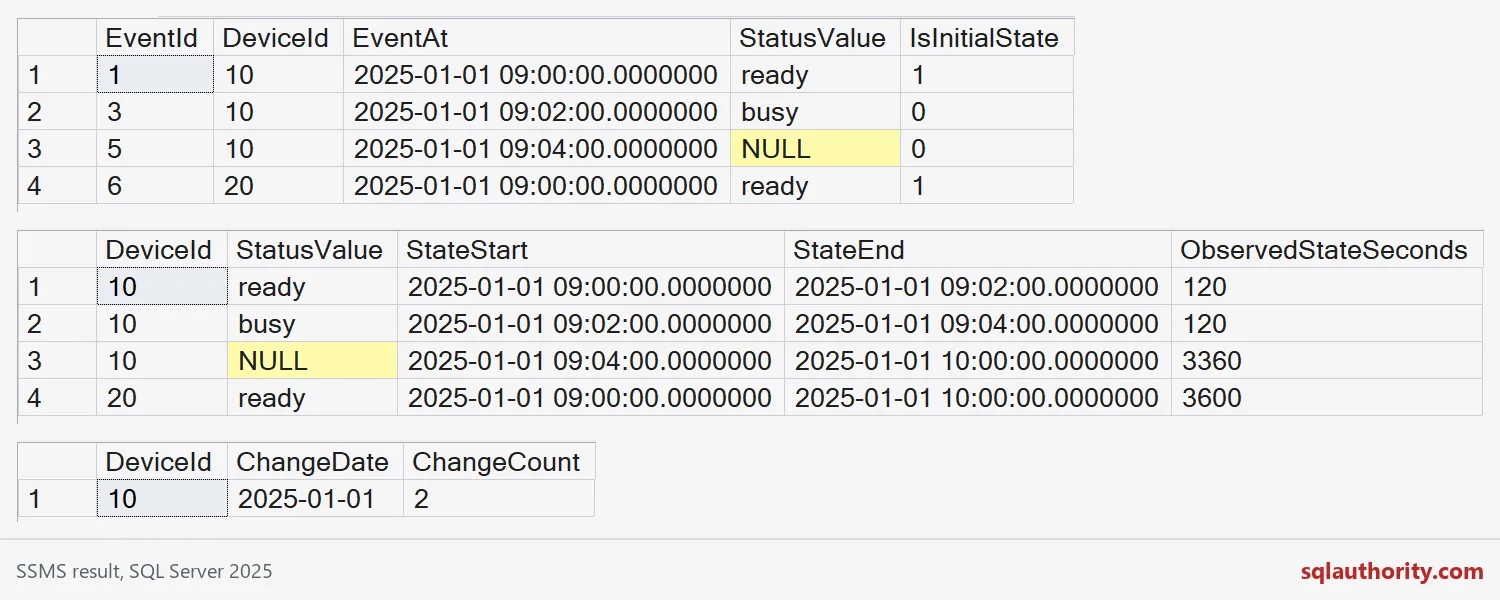
Traps to check before you ship the report
First, do not filter to today before LAG runs. The first visible row then looks like an initial state, even if the device has been in it for hours. Build the transitions from enough history, then filter the result.
Second, a state can cross midnight. Split intervals at the day boundary if you report duration per day.
Third, a long gap in the readings is not the same as a long state. Check gaps on the original rows and report them separately.
To test on your own server, pick one device with a messy day. Compare the retained EventIds with your own eyes, not just the count. One correct total can hide a wrong row. On big tables, an index on device, time and EventId helps. The demo uses only temp tables, and the last block removes them.
DROP TABLE IF EXISTS #StatusTransitions;
DROP TABLE IF EXISTS #DeviceStatus;
Next time a status report looks endless, ask which rows actually changed.
A status reading is not a change, it is one more observation.
Published by Pinal Dave on SQLAuthority. More of my work at pinaldave.com.
Discover more from SQL Authority with Pinal Dave
Subscribe to get the latest posts sent to your email.