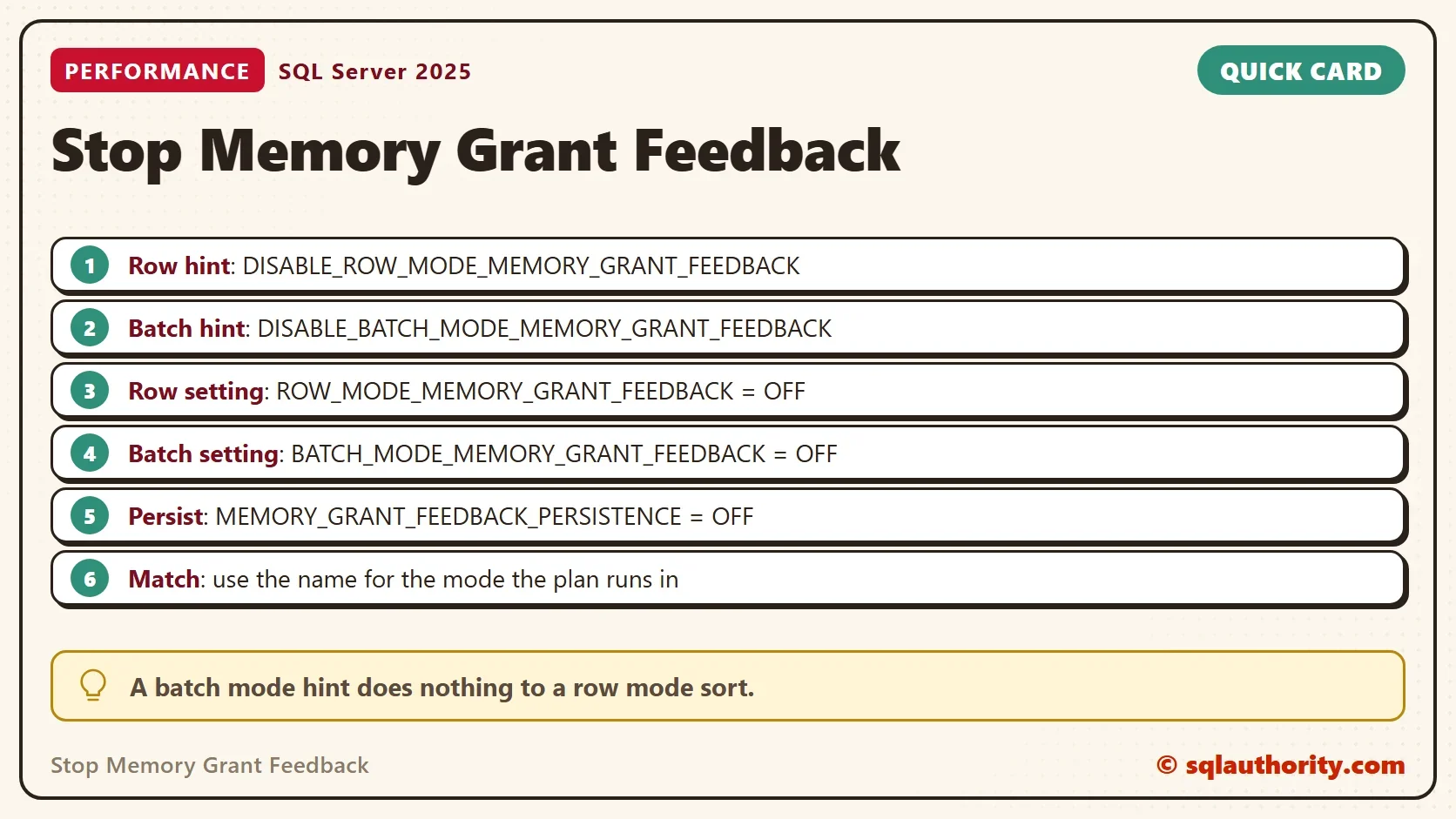
To stop memory grant feedback for one query, add a USE HINT. To stop it for a whole database, change a scoped setting. Each comes in a row mode form and a batch mode form, and the wrong one does nothing.

Think Before You Switch It Off
Feedback is on for a reason. It lowers oversized grants and raises undersized ones, and it needs no code. Turning it off pins the plan to its first grant, so test the query before you stop memory grant feedback. The basics are in Memory Grant Feedback Explained: How SQL Server Learns.
A plan that shows feedback disabled has already given up. The post on Memory Grant Feedback Loop: When SQL Server Stops Adjusting shows when that happens. Switching feedback off yourself is for the rare query that keeps losing to it.
The Names That Work
A natural first try combines the hint name with the setting syntax. It fails.
ALTER DATABASE SCOPED CONFIGURATION SET DISABLE_BATCH_MODE_MEMORY_GRANT_FEEDBACK = OFF;
Msg 102, Level 15, State 1, Line 1
Incorrect syntax near 'DISABLE_BATCH_MODE_MEMORY_GRANT_FEEDBACK'.
The settings and the hints have different names. You can read both from the server. The first query lists the settings of the current database, and the second lists the hints this build accepts.
SELECT name, value
FROM sys.database_scoped_configurations
WHERE name LIKE N'%MEMORY_GRANT%'
ORDER BY name;

SELECT name
FROM sys.dm_exec_valid_use_hints
WHERE name LIKE N'%MEMORY_GRANT%'
ORDER BY name;
| Setting | Value |
|---|---|
| BATCH_MODE_MEMORY_GRANT_FEEDBACK | 1 |
| MEMORY_GRANT_FEEDBACK_PERCENTILE_GRANT | 1 |
| MEMORY_GRANT_FEEDBACK_PERSISTENCE | 1 |
| ROW_MODE_MEMORY_GRANT_FEEDBACK | 1 |
| Hint |
|---|
| DISABLE_BATCH_MODE_MEMORY_GRANT_FEEDBACK |
| DISABLE_MEMORY_GRANT_FEEDBACK_PERSISTENCE |
| DISABLE_ROW_MODE_MEMORY_GRANT_FEEDBACK |
There is no hint for the percentile setting on this build. Use the setting for that one. The row mode and batch mode names match the two kinds of operator. A sort or hash that runs in row mode answers to the row mode name only.
Prove It With Four Runs
The demo database, GrantOffDemo, holds 200,000 orders. Five procedures run the same sort, and each carries the option that one row of the result will test. Run it on a test server.
IF DB_ID(N'GrantOffDemo') IS NULL CREATE DATABASE GrantOffDemo;
GO
USE GrantOffDemo;
GO
DROP TABLE IF EXISTS dbo.Orders, dbo.Sink, dbo.GrantLog;
CREATE TABLE dbo.Orders (
    OrderID int IDENTITY(1,1) NOT NULL PRIMARY KEY,
    Remarks varchar(200) NOT NULL
);
INSERT INTO dbo.Orders (Remarks)
SELECT REPLICATE(CONVERT(varchar(36), NEWID()), 3)
FROM GENERATE_SERIES(1, 200000) AS s;
CREATE TABLE dbo.Sink (OrderID int, Remarks varchar(200));
CREATE TABLE dbo.GrantLog (Id int IDENTITY(1,1), Label varchar(40), Run int, GrantedKB bigint);
CREATE OR ALTER PROCEDURE dbo.OrdersPlain @MinID int
AS
DECLARE @Floor int = @MinID;
SELECT OrderID, Remarks FROM dbo.Orders WHERE OrderID > @Floor ORDER BY Remarks;
GO
CREATE OR ALTER PROCEDURE dbo.OrdersRowHint @MinID int
AS
DECLARE @Floor int = @MinID;
SELECT OrderID, Remarks FROM dbo.Orders WHERE OrderID > @Floor ORDER BY Remarks
OPTION (USE HINT ('DISABLE_ROW_MODE_MEMORY_GRANT_FEEDBACK'));
GO
CREATE OR ALTER PROCEDURE dbo.OrdersBatchHint @MinID int
AS
DECLARE @Floor int = @MinID;
SELECT OrderID, Remarks FROM dbo.Orders WHERE OrderID > @Floor ORDER BY Remarks
OPTION (USE HINT ('DISABLE_BATCH_MODE_MEMORY_GRANT_FEEDBACK'));
GO
CREATE OR ALTER PROCEDURE dbo.OrdersRowOff @MinID int
AS
DECLARE @Floor int = @MinID;
SELECT OrderID, Remarks FROM dbo.Orders WHERE OrderID > @Floor ORDER BY Remarks;
GO
CREATE OR ALTER PROCEDURE dbo.OrdersBatchOff @MinID int
AS
DECLARE @Floor int = @MinID;
SELECT OrderID, Remarks FROM dbo.Orders WHERE OrderID > @Floor ORDER BY Remarks;The helper calls one procedure four times and logs the grant after each call. It reads sys.dm_exec_query_stats, which needs the VIEW SERVER STATE permission.
CREATE OR ALTER PROCEDURE dbo.RunFour @ProcName sysname, @Label varchar(40)
AS
BEGIN
    SET NOCOUNT ON;
    DECLARE @run int = 1;
    DECLARE @sql nvarchar(400) = N'INSERT dbo.Sink EXEC dbo.' + QUOTENAME(@ProcName) + N' @MinID = 199000;';
    WHILE @run <= 4
    BEGIN
        TRUNCATE TABLE dbo.Sink;
        EXEC (@sql);
        INSERT dbo.GrantLog (Label, Run, GrantedKB)
        SELECT @Label, @run, qs.last_grant_kb
        FROM sys.dm_exec_query_stats AS qs
        CROSS APPLY sys.dm_exec_sql_text(qs.sql_handle) AS st
        WHERE st.dbid = DB_ID()
          AND st.objectid = OBJECT_ID(N'dbo.' + QUOTENAME(@ProcName))
          AND qs.max_grant_kb > 0;
        SET @run += 1;
    END;
END;
Now run the first five variants. The settings are database scoped, so each change sits in its own batch. The script puts each setting back right after its test.
EXEC dbo.RunFour N'OrdersPlain', 'Nothing disabled';
EXEC dbo.RunFour N'OrdersRowHint', 'Row mode hint';
EXEC dbo.RunFour N'OrdersBatchHint', 'Batch mode hint';
GO
ALTER DATABASE SCOPED CONFIGURATION SET ROW_MODE_MEMORY_GRANT_FEEDBACK = OFF;
GO
EXEC dbo.RunFour N'OrdersRowOff', 'Row mode setting off';
GO
ALTER DATABASE SCOPED CONFIGURATION SET ROW_MODE_MEMORY_GRANT_FEEDBACK = ON;
ALTER DATABASE SCOPED CONFIGURATION SET BATCH_MODE_MEMORY_GRANT_FEEDBACK = OFF;
GO
EXEC dbo.RunFour N'OrdersBatchOff', 'Batch mode setting off';
GO
ALTER DATABASE SCOPED CONFIGURATION SET BATCH_MODE_MEMORY_GRANT_FEEDBACK = ON;
The last two variants test persistence. SQL Server 2022 and later store what feedback learned in Query Store. The first call clears the plan cache and reruns the plain procedure. The second switches persistence off first.
ALTER DATABASE SCOPED CONFIGURATION CLEAR PROCEDURE_CACHE;
GO
EXEC dbo.RunFour N'OrdersPlain', 'After cache clear';
GO
ALTER DATABASE SCOPED CONFIGURATION SET MEMORY_GRANT_FEEDBACK_PERSISTENCE = OFF;
GO
ALTER DATABASE SCOPED CONFIGURATION CLEAR PROCEDURE_CACHE;
GO
EXEC dbo.RunFour N'OrdersPlain', 'Persistence off';
GO
ALTER DATABASE SCOPED CONFIGURATION SET MEMORY_GRANT_FEEDBACK_PERSISTENCE = ON;
SELECT Label,
       MAX(CASE WHEN Run = 1 THEN GrantedKB END) AS Run1,
       MAX(CASE WHEN Run = 2 THEN GrantedKB END) AS Run2,
       MAX(CASE WHEN Run = 3 THEN GrantedKB END) AS Run3,
       MAX(CASE WHEN Run = 4 THEN GrantedKB END) AS Run4
FROM dbo.GrantLog
GROUP BY Label
ORDER BY MIN(Id);| Label | Run1 | Run2 | Run3 | Run4 |
|---|---|---|---|---|
| Nothing disabled | 13256 | 1536 | 1536 | 1536 |
| Row mode hint | 13256 | 13256 | 13256 | 13256 |
| Batch mode hint | 13256 | 1536 | 1536 | 1536 |
| Row mode setting off | 13256 | 13256 | 13256 | 13256 |
| Batch mode setting off | 13256 | 1536 | 1536 | 1536 |
| After cache clear | 1536 | 1536 | 1536 | 1536 |
| Persistence off | 13256 | 1536 | 1536 | 1536 |
The plain procedure gets 13,256 KB on run one and 1,536 KB from run two on. The row mode hint and the row mode setting both keep 13,256 KB for all four runs. The batch mode hint and the batch mode setting change nothing, because this sort runs in row mode.
The cache clear shows persistence at work. The plan restarts at 1,536 KB, because the learned grant came back from Query Store. With persistence off, the first run is 13,256 KB again. These sizes come from the test server. A second server gave larger grants with the same pattern.
Which Mode Is Your Plan In?
Open the actual plan and read the Actual Execution Mode of the sort or hash. It says Row or Batch. When one plan holds both kinds of operator, set both options. The post on Row Mode Memory Grant Feedback: It Needs Level 150 explains the modes and the compatibility levels.
Both Modes in One Query
A plan can hold a row mode operator and a batch mode operator. One USE HINT can list both names, separated by a comma. SQL Server 2025 accepts the statement below.
SELECT TOP (10) OrderID, Remarks
FROM dbo.Orders
ORDER BY Remarks
OPTION (USE HINT ('DISABLE_ROW_MODE_MEMORY_GRANT_FEEDBACK', 'DISABLE_BATCH_MODE_MEMORY_GRANT_FEEDBACK'));
Hint or Setting?
You could argue that the setting is easier, because it needs no code change. It is also wider. It changes every query in the database, including the ones that feedback helps. A hint touches one statement and travels with the code.
A third route is a lower compatibility level, because feedback needs level 140 or 150. That also switches off every other feature tied to the level. It is a poor tool for one query.
I reach for the hint first when I stop memory grant feedback. A database setting is for the day when you can’t edit the query and the damage is clear. In both cases write down the old value, which is ON for every setting here.
What to Remember
To stop memory grant feedback, use the name that matches the mode. A row mode plan takes DISABLE_ROW_MODE_MEMORY_GRANT_FEEDBACK. A batch mode plan takes DISABLE_BATCH_MODE_MEMORY_GRANT_FEEDBACK. The scoped settings use the same words without DISABLE and take OFF. Persistence has its own setting and its own hint.
To catch the moment a plan gives up, read Memory Grant Feedback Events: Capture Them in T-SQL. When you finish, run the cleanup.
USE master;
GO
IF DB_ID(N'GrantOffDemo') IS NOT NULL
BEGIN
    ALTER DATABASE GrantOffDemo SET SINGLE_USER WITH ROLLBACK IMMEDIATE;
    DROP DATABASE GrantOffDemo;
END;
A disabled feedback loop is not a fix, it is a decision to live with the first grant.
Published by Pinal Dave on SQLAuthority. More of my work at pinaldave.com.
Discover more from SQL Authority with Pinal Dave
Subscribe to get the latest posts sent to your email.