
The parameter sniffing local variable trick copies a parameter into a variable so that SQL Server cannot sniff it. It removes the sniffing. It does not promise a faster query, and the demo below shows why.

What Sniffing Does
When a procedure runs for the first time, SQL Server compiles a plan. It reads the parameter values of that first call and uses them to estimate how many rows each step returns. That is parameter sniffing. The plan is cached, and every later call reuses it, whatever value it brings. The plan fits the first caller. For the other callers it fits only when their values look alike.
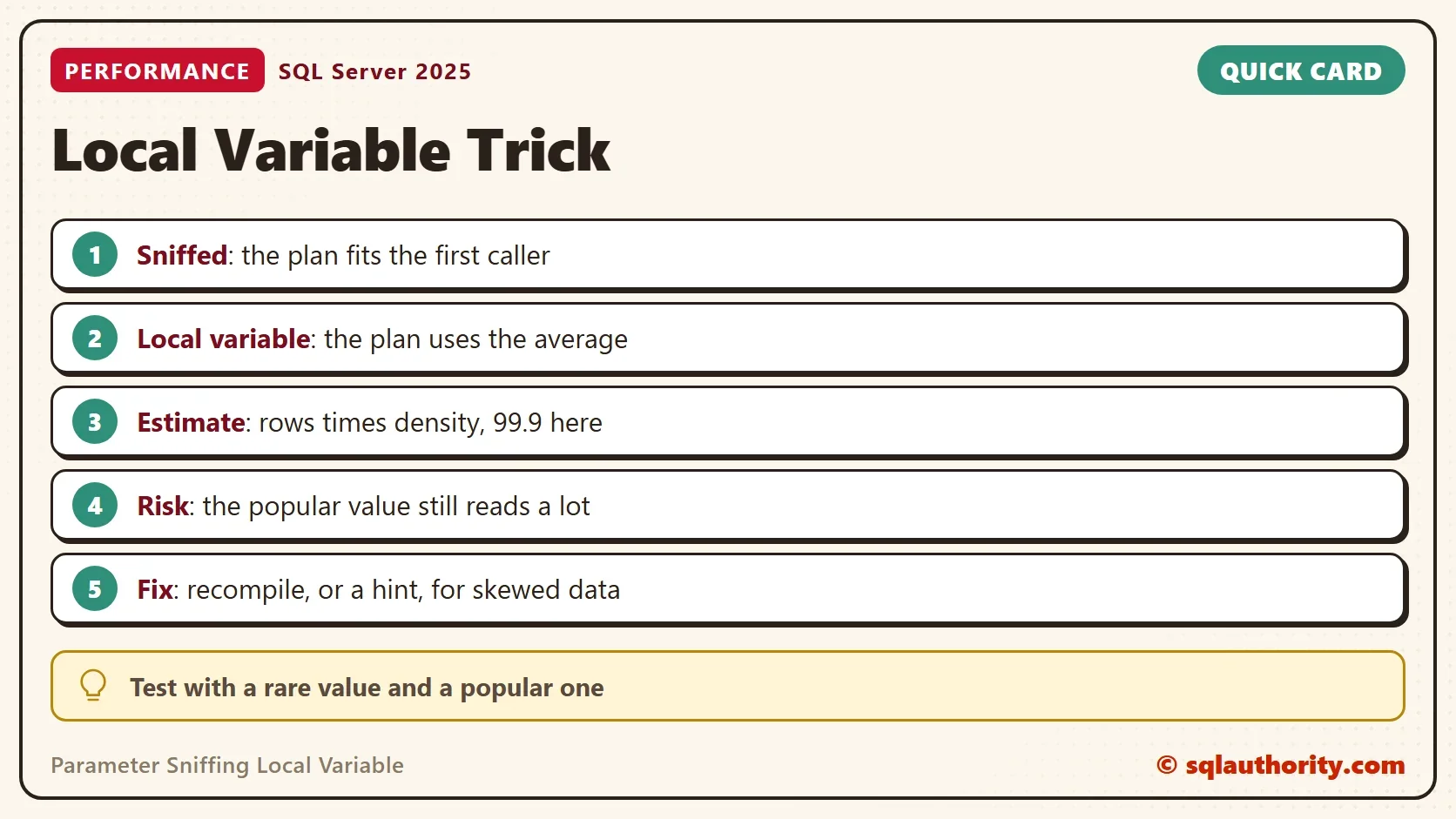
The trick takes the value away. Inside the procedure, the parameter is copied into a local variable, and the query filters on the variable. When SQL Server compiles the plan, the variable has no value yet. The optimizer cannot read a histogram for an unknown value. It uses the average instead: the density of the column, which is the number of rows for a typical value.
A Table With One Popular Customer
The demo needs skewed data. The script creates a database named SniffLocalVarDemo with an orders table of 100,000 rows. Customer 1 owns half of them. A thousand other customers own 50 rows each. The database runs at compatibility level 150, so the classic sniffing behavior is the only one in play. Run the script on a test server.
IF DB_ID(N'SniffLocalVarDemo') IS NULL CREATE DATABASE SniffLocalVarDemo;
GO
USE SniffLocalVarDemo;
GO
ALTER DATABASE SniffLocalVarDemo SET COMPATIBILITY_LEVEL = 150;
DROP TABLE IF EXISTS dbo.Orders;
GO
CREATE TABLE dbo.Orders (
    OrderID    int IDENTITY(1,1) NOT NULL PRIMARY KEY,
    CustomerID int NOT NULL,
    Amount     decimal(10,2) NOT NULL,
    Notes      nvarchar(100) NOT NULL
);
INSERT INTO dbo.Orders (CustomerID, Amount, Notes)
SELECT CASE WHEN n % 2 = 0 THEN 1 ELSE 2 + n % 2000 END, n % 97 + 0.5, REPLICATE(N'x', 100)
FROM (SELECT TOP (100000) ROW_NUMBER() OVER (ORDER BY (SELECT NULL)) AS n
      FROM sys.all_columns AS a CROSS JOIN sys.all_columns AS b) AS t;
CREATE INDEX IX_Orders_CustomerID ON dbo.Orders (CustomerID);
GO
SELECT CustomerID, COUNT(*) AS Orders FROM dbo.Orders WHERE CustomerID IN (1, 3) GROUP BY CustomerID ORDER BY CustomerID;
SELECT COUNT(*) * 1.0 / COUNT(DISTINCT CustomerID) AS AverageOrders FROM dbo.Orders;| CustomerID | Orders |
|---|---|
| 1 | 50000 |
| 3 | 50 |
| AverageOrders |
|---|
| 99.900099900099 |
A typical customer has 50 orders. The average over all customers is 99.9, because customer 1 pulls it up. Remember that number. The local variable plan will use it.
Two Procedures and a Logger
The first procedure is the plain one, and the second copies the parameter into a variable. Both count the orders of one customer and add up their amounts. The Amount column is not in the index, so SQL Server must look each row up or scan the table. The third procedure calls one of them. It then logs the estimated rows and the logical reads of that call.
DROP TABLE IF EXISTS dbo.CallLog;
GO
CREATE TABLE dbo.CallLog (CallID int IDENTITY(1,1) PRIMARY KEY, ProcName sysname, CustomerID int, EstimatedRows float, LogicalReads bigint);
GO
CREATE OR ALTER PROCEDURE dbo.OrdersSniffed @CustomerID int
AS
SELECT COUNT(*) AS OrdersFound, SUM(Amount) AS Total FROM dbo.Orders WHERE CustomerID = @CustomerID;
GO
CREATE OR ALTER PROCEDURE dbo.OrdersLocal @CustomerID int
AS
DECLARE @CID int = @CustomerID;
SELECT COUNT(*) AS OrdersFound, SUM(Amount) AS Total FROM dbo.Orders WHERE CustomerID = @CID;
GO
CREATE OR ALTER PROCEDURE dbo.CallAndLog @ProcName sysname, @CustomerID int
AS
BEGIN
    DECLARE @sql nvarchar(200) = N'EXEC dbo.' + QUOTENAME(@ProcName) + N' @CustomerID = @c;';
    CREATE TABLE #Out (OrdersFound int, Total decimal(18,2));
    INSERT #Out EXEC sys.sp_executesql @sql, N'@c int', @c = @CustomerID;
    WITH XMLNAMESPACES (DEFAULT 'http://schemas.microsoft.com/sqlserver/2004/07/showplan')
    INSERT dbo.CallLog (ProcName, CustomerID, EstimatedRows, LogicalReads)
    SELECT @ProcName, @CustomerID,
           qp.query_plan.value('(//RelOp[@PhysicalOp="Index Seek" or @PhysicalOp="Clustered Index Scan"]/@EstimateRows)[1]', 'float'),
           ps.last_logical_reads
    FROM sys.dm_exec_procedure_stats AS ps
    CROSS APPLY sys.dm_exec_query_plan(ps.plan_handle) AS qp
    WHERE ps.database_id = DB_ID() AND ps.object_id = OBJECT_ID(N'dbo.' + QUOTENAME(@ProcName));
END;
A Rare Customer Calls First
The next script clears both plans with sp_recompile. Then customer 3, who has 50 orders, calls first. Customer 1, who has 50,000, calls second.
TRUNCATE TABLE dbo.CallLog;
EXEC sp_recompile N'dbo.OrdersSniffed';
EXEC sp_recompile N'dbo.OrdersLocal';
EXEC dbo.CallAndLog N'OrdersSniffed', 3;
EXEC dbo.CallAndLog N'OrdersSniffed', 1;
EXEC dbo.CallAndLog N'OrdersLocal', 3;
EXEC dbo.CallAndLog N'OrdersLocal', 1;
SELECT ProcName, CustomerID, EstimatedRows, LogicalReads FROM dbo.CallLog ORDER BY CallID;
| ProcName | CustomerID | EstimatedRows | LogicalReads |
|---|---|---|---|
| OrdersSniffed | 3 | 50 | 194 |
| OrdersSniffed | 1 | 50 | 159470 |
| OrdersLocal | 3 | 99.9001 | 194 |
| OrdersLocal | 1 | 99.9001 | 159470 |
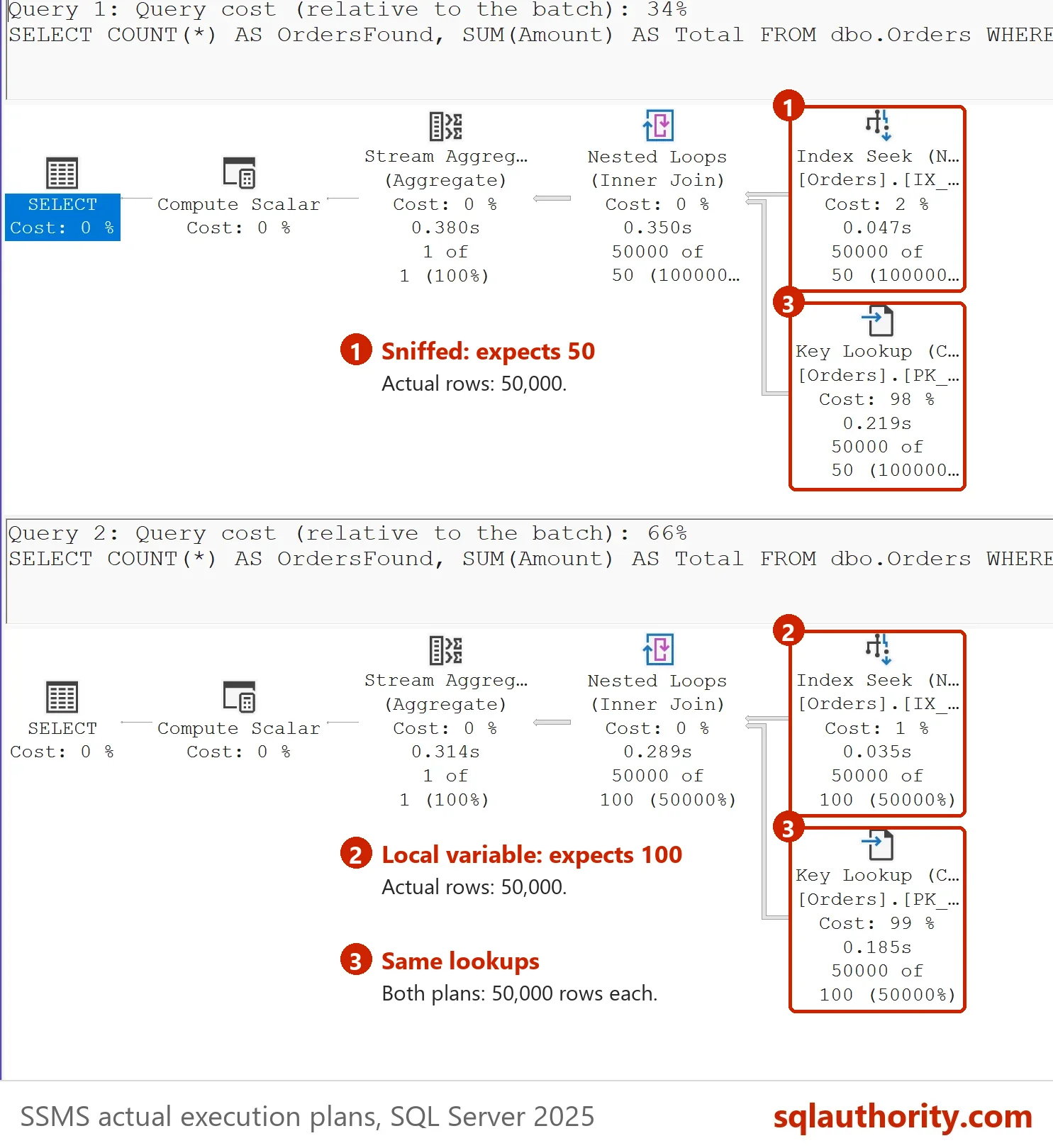
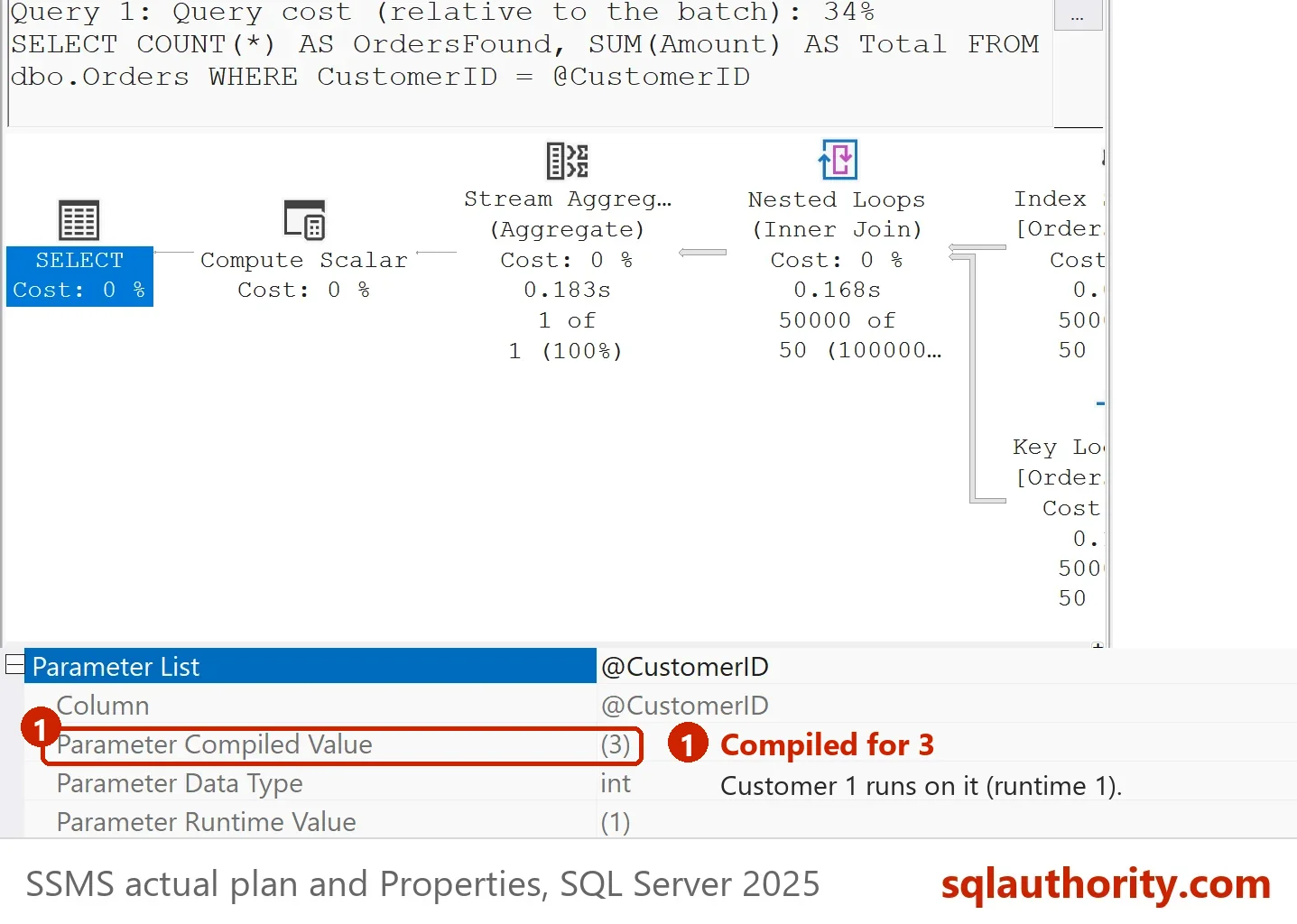
The sniffed procedure built its plan for customer 3. It expected 50 rows and chose an index seek with a lookup for each row. That plan is perfect for 50 rows and terrible for 50,000. Customer 1 pays 159,470 page reads. The local variable procedure expected 99.9 rows, the average, and chose the same kind of plan. The estimate differs, and the result does not. Your page reads can differ by a few pages.
A Popular Customer Calls First
Now reverse the order. Customer 1 calls first, then customer 3.
TRUNCATE TABLE dbo.CallLog;
EXEC sp_recompile N'dbo.OrdersSniffed';
EXEC sp_recompile N'dbo.OrdersLocal';
EXEC dbo.CallAndLog N'OrdersSniffed', 1;
EXEC dbo.CallAndLog N'OrdersSniffed', 3;
EXEC dbo.CallAndLog N'OrdersLocal', 1;
EXEC dbo.CallAndLog N'OrdersLocal', 3;
SELECT ProcName, CustomerID, EstimatedRows, LogicalReads FROM dbo.CallLog ORDER BY CallID;
| ProcName | CustomerID | EstimatedRows | LogicalReads |
|---|---|---|---|
| OrdersSniffed | 1 | 50000 | 2876 |
| OrdersSniffed | 3 | 50000 | 2876 |
| OrdersLocal | 1 | 99.9001 | 159497 |
| OrdersLocal | 3 | 99.9001 | 167 |
This time the sniffed procedure built a scan plan for 50,000 rows. Both customers read the whole table, 2,876 pages. The rare customer reads fifteen times more than before. The local variable procedure did not change. Its plan is the same in either order, and that is the whole effect of the trick.
What the Trick Fixes
Two questions come up. Did the trick remove parameter sniffing? Yes. The plan no longer depends on who called first. Did it make the query faster? No. The popular customer still reads 159,000 pages, and a scan would read 2,876. The plan did not improve. It became predictable. That is what a parameter sniffing local variable change buys you.
Predictable has a value. A procedure that is always slow for one customer is easier to diagnose. A procedure that is slow at random is not. The parameter sniffing local variable trick fits evenly spread data, where the average is close to every real value. It fits poorly when a few values dominate, as in this demo.
Better Tools for Skewed Data
When the data is skewed, ask for a plan that fits each call. OPTION (RECOMPILE) builds one every time. Read OPTION (RECOMPILE) Hint: When a Fresh Plan Pays Off. The database wide switch is in Database Scoped Configuration: Turn Off Parameter Sniffing. The Parameter Sniffing Fixes Compared: Which One to Use post puts all of them in one table.
OPTION (OPTIMIZE FOR UNKNOWN) gives the same average estimate without the extra variable. The comparison post measures it. SQL Server 2022 added a fix of its own. At compatibility level 160 and later, parameter sensitive plan optimization can keep several plans for one query. The demo stays at level 150 so that the classic behavior is visible.
What to Remember
A local variable replaces the sniffed value with the average. The plan stops depending on the first caller, and it stops fitting anyone in particular. Use the parameter sniffing local variable trick when the data is even, or when you want one plan for everyone.
Test every parameter fix with a rare value and a popular one, in both call orders. When you finish, run the cleanup script.
USE master;
GO
ALTER DATABASE SniffLocalVarDemo SET SINGLE_USER WITH ROLLBACK IMMEDIATE;
DROP DATABASE SniffLocalVarDemo;
A local variable is not a cure, it is a decision to guess the same way every time.
Published by Pinal Dave on SQLAuthority. More of my work at pinaldave.com.
Discover more from SQL Authority with Pinal Dave
Subscribe to get the latest posts sent to your email.




2 Comments. Leave new
A helpful post. Thanks. You have the execution plans in the wrong order.
Thank you , I fixed it.