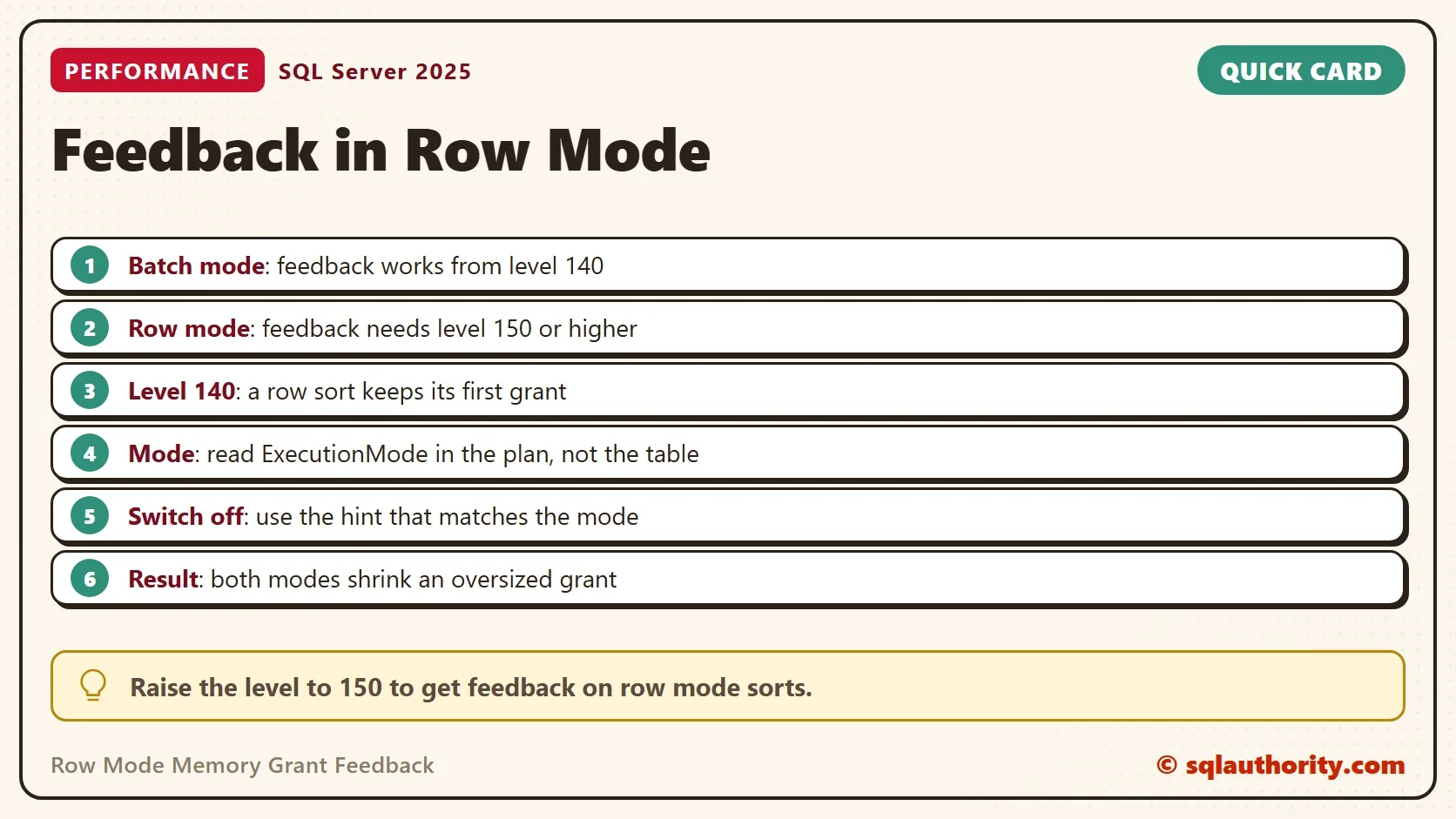
Row mode memory grant feedback works, but it needs compatibility level 150 or higher. Batch mode needs only level 140. The feature also works outside columnstore, and the demo below proves it.

Row Mode and Batch Mode
Row mode passes one row at a time from operator to operator. Batch mode passes rows in groups, which is faster for large scans and aggregates. Batch mode began with columnstore indexes. SQL Server 2019 added batch mode for rowstore tables at level 150.
Row mode memory grant feedback is the newer half. The first posts about feedback used a columnstore table, so the examples ran in batch mode. That left a fair question: does a plain rowstore sort get the same help? It does, from level 150. The basics are in Memory Grant Feedback Explained: How SQL Server Learns.
Build Two Tables
The script creates a database named GrantRowModeDemo. It holds the same 200,000 orders twice: once in a rowstore table and once in a clustered columnstore table. Run it on a test server.
IF DB_ID(N'GrantRowModeDemo') IS NULL CREATE DATABASE GrantRowModeDemo;
GO
USE GrantRowModeDemo;
GO
DROP TABLE IF EXISTS dbo.OrdersRow, dbo.OrdersColumn, dbo.Sink, dbo.GrantLog;
CREATE TABLE dbo.OrdersRow (
    OrderID int IDENTITY(1,1) NOT NULL PRIMARY KEY,
    Remarks varchar(200) NOT NULL
);
INSERT INTO dbo.OrdersRow (Remarks)
SELECT REPLICATE(CONVERT(varchar(36), NEWID()), 3)
FROM GENERATE_SERIES(1, 200000) AS s;
CREATE TABLE dbo.OrdersColumn (
    OrderID int NOT NULL,
    Remarks varchar(200) NOT NULL
);
INSERT INTO dbo.OrdersColumn (OrderID, Remarks)
SELECT OrderID, Remarks FROM dbo.OrdersRow;
CREATE CLUSTERED COLUMNSTORE INDEX CCI_OrdersColumn ON dbo.OrdersColumn;
CREATE TABLE dbo.Sink (OrderID int, Remarks varchar(200));
CREATE TABLE dbo.GrantLog (Id int IDENTITY(1,1), Label varchar(40), Run int, GrantedKB bigint);
Each procedure sorts the last 1,000 orders. The local variable makes SQL Server guess 60,000 rows, so the first grant is far too big.
CREATE OR ALTER PROCEDURE dbo.RowSort @MinID int
AS
DECLARE @Floor int = @MinID;
SELECT OrderID, Remarks FROM dbo.OrdersRow WHERE OrderID > @Floor ORDER BY Remarks;
GO
CREATE OR ALTER PROCEDURE dbo.ColumnSort @MinID int
AS
DECLARE @Floor int = @MinID;
SELECT OrderID, Remarks FROM dbo.OrdersColumn WHERE OrderID > @Floor ORDER BY Remarks;
Run Both at Three Levels
The helper calls one procedure four times and logs the grant after each call. The first script turns off persistent feedback in this demo database, so each level starts from a clean slate.
CREATE OR ALTER PROCEDURE dbo.RunFour @ProcName sysname, @Label varchar(40)
AS
BEGIN
    SET NOCOUNT ON;
    DECLARE @run int = 1;
    DECLARE @sql nvarchar(400) = N'INSERT dbo.Sink EXEC dbo.' + QUOTENAME(@ProcName) + N' @MinID = 199000;';
    WHILE @run <= 4
    BEGIN
        TRUNCATE TABLE dbo.Sink;
        EXEC (@sql);
        INSERT dbo.GrantLog (Label, Run, GrantedKB)
        SELECT @Label, @run, qs.last_grant_kb
        FROM sys.dm_exec_query_stats AS qs
        CROSS APPLY sys.dm_exec_sql_text(qs.sql_handle) AS st
        WHERE st.dbid = DB_ID()
          AND st.objectid = OBJECT_ID(N'dbo.' + QUOTENAME(@ProcName))
          AND qs.max_grant_kb > 0;
        SET @run += 1;
    END;
END;
ALTER DATABASE SCOPED CONFIGURATION SET MEMORY_GRANT_FEEDBACK_PERSISTENCE = OFF;
Each block below sets a compatibility level and runs both procedures. The level change sits in its own batch, because it must finish before the plans compile.
ALTER DATABASE GrantRowModeDemo SET COMPATIBILITY_LEVEL = 140;
GO
EXEC dbo.RunFour N'RowSort', 'Row sort, level 140';
EXEC dbo.RunFour N'ColumnSort', 'Batch sort, level 140';
ALTER DATABASE GrantRowModeDemo SET COMPATIBILITY_LEVEL = 150;
GO
EXEC dbo.RunFour N'RowSort', 'Row sort, level 150';
EXEC dbo.RunFour N'ColumnSort', 'Batch sort, level 150';
ALTER DATABASE GrantRowModeDemo SET COMPATIBILITY_LEVEL = 170;
GO
EXEC dbo.RunFour N'RowSort', 'Row sort, level 170';
EXEC dbo.RunFour N'ColumnSort', 'Batch sort, level 170';
SELECT Label,
       MAX(CASE WHEN Run = 1 THEN GrantedKB END) AS Run1,
       MAX(CASE WHEN Run = 2 THEN GrantedKB END) AS Run2,
       MAX(CASE WHEN Run = 3 THEN GrantedKB END) AS Run3,
       MAX(CASE WHEN Run = 4 THEN GrantedKB END) AS Run4
FROM dbo.GrantLog
GROUP BY Label
ORDER BY MIN(Id);| Label | Run1 | Run2 | Run3 | Run4 |
|---|---|---|---|---|
| Row sort, level 140 | 11888 | 11888 | 11888 | 11888 |
| Batch sort, level 140 | 66720 | 2304 | 2304 | 2304 |
| Row sort, level 150 | 13256 | 1536 | 1536 | 1536 |
| Batch sort, level 150 | 66720 | 2304 | 2304 | 2304 |
| Row sort, level 170 | 13256 | 1536 | 1536 | 1536 |
| Batch sort, level 170 | 66720 | 2304 | 2304 | 2304 |
At level 140 the row sort keeps 11,888 KB for all four runs. No feedback reaches it. The batch sort drops from 66,720 KB to 2,304 KB after the first run.
At levels 150 and 170 the row sort starts at 13,256 KB and settles at 1,536 KB. That is the same shape as the batch sort. Row mode feedback is on from level 150. The sizes come from the test server, and a second server gave larger ones with the same pattern.
Check the Mode in the Plan
The plan says which mode each operator uses. You can read it from T-SQL as well. The query below finds the sort in the cached plan of each procedure. It needs the plans in the cache, so it runs after the demo calls.
WITH XMLNAMESPACES (DEFAULT 'http://schemas.microsoft.com/sqlserver/2004/07/showplan')
SELECT OBJECT_NAME(ps.object_id) AS ProcedureName,
       x.n.value('@PhysicalOp', 'varchar(30)') AS Operator,
       x.n.value('@EstimatedExecutionMode', 'varchar(10)') AS ExecutionMode
FROM sys.dm_exec_procedure_stats AS ps
CROSS APPLY sys.dm_exec_query_plan(ps.plan_handle) AS qp
CROSS APPLY qp.query_plan.nodes('//RelOp[@PhysicalOp="Sort"]') AS x(n)
WHERE ps.database_id = DB_ID()
  AND ps.object_id IN (OBJECT_ID(N'dbo.RowSort'), OBJECT_ID(N'dbo.ColumnSort'))
ORDER BY ProcedureName;| ProcedureName | Operator | ExecutionMode |
|---|---|---|
| ColumnSort | Sort | Batch |
| RowSort | Sort | Row |
The sort on the rowstore table runs in row mode. The sort on the columnstore table runs in batch mode. That is the whole difference between the two procedures, and it explains the table above.
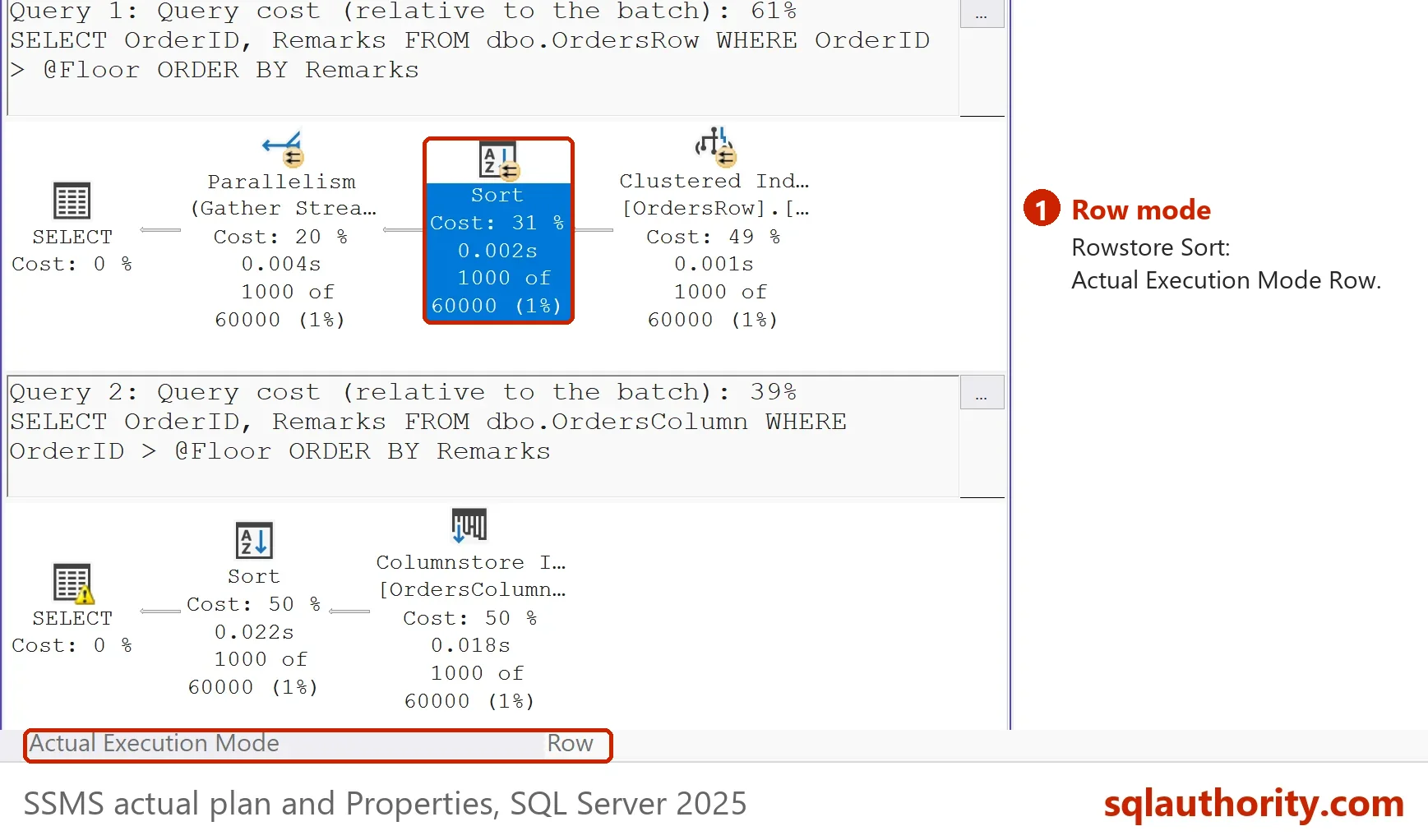
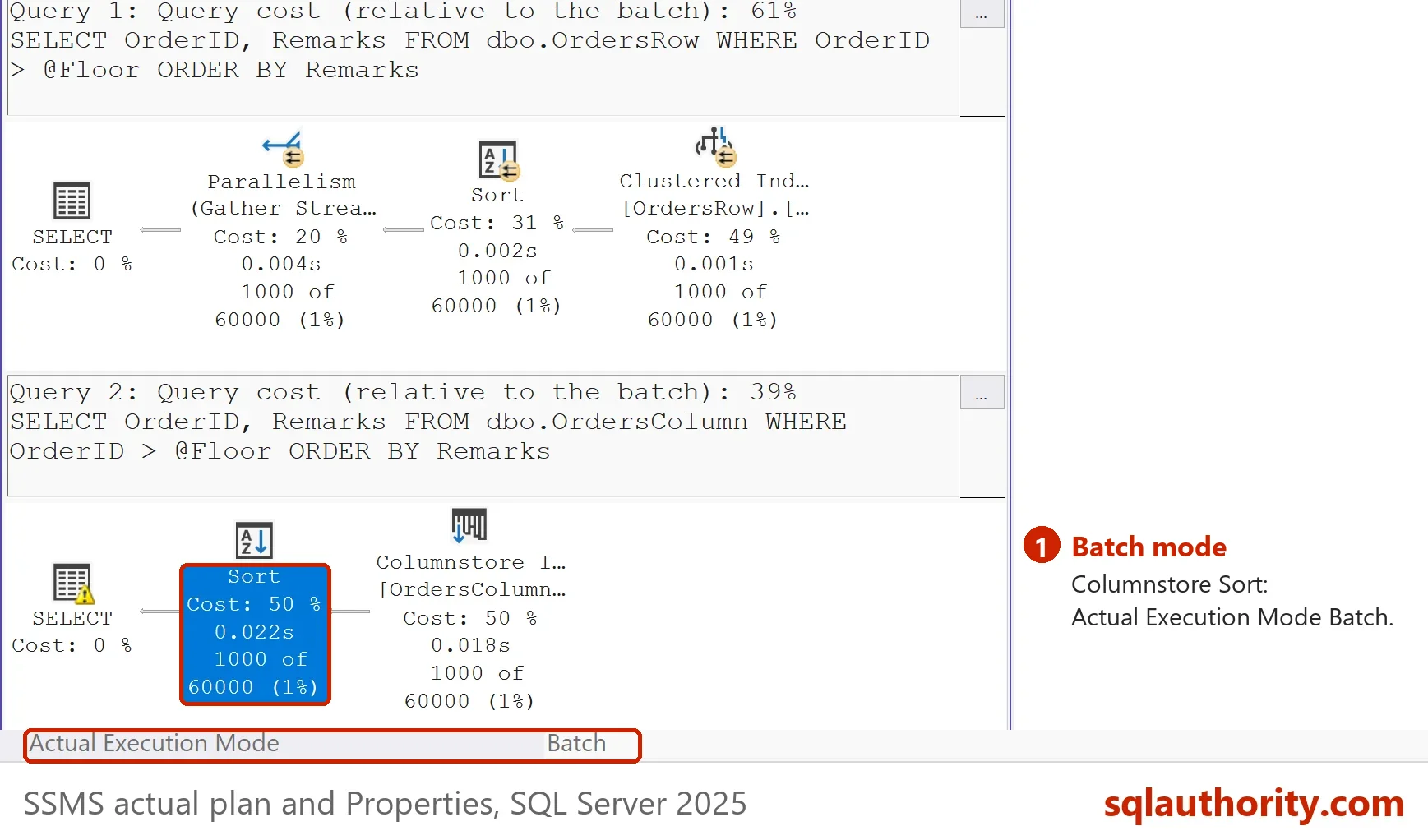
The two modes size memory differently. For the same guess, the batch sort asks for 66,720 KB and settles at 2,304 KB. The row sort asks for 13,256 KB and settles at 1,536 KB. Compare a mode with itself, not with the other. A larger grant in batch mode is a different sizing, not proof of waste.
What This Means for an Upgrade
Row mode memory grant feedback starts only when the level reaches 150. A database restored from SQL Server 2017 keeps its level. Its row mode sorts get no feedback until someone raises the level. A grant that stayed fixed for years can start to move after the change. Test the busiest procedures first, and read their grants before and after.
The same level also allows batch mode on rowstore. So a plan can change its shape as well as its grant. Compare the plans before and after, as the post on IsMemoryGrantFeedbackAdjusted Values: What Each Status Means suggests for statuses.
To find databases that miss row mode feedback, list those below level 150. The query reads only the catalog.
SELECT name, compatibility_level FROM sys.databases WHERE compatibility_level < 150 ORDER BY name;
Row Mode Has Its Own Switch
Row mode feedback has its own database setting and its own hint. A batch mode hint does nothing to a row mode sort. The post on Stop Memory Grant Feedback: Database Setting and Query Hint lists every name and proves it.
Does the Mode Matter?
You could argue that the mode doesn’t matter, because both modes shrink the grant. It matters in two places. It decides which level you need, and it decides which switch turns feedback off. Everything else is the same loop.
What to Remember
Read the execution mode of the operator that holds the memory. Row mode feedback needs level 150. A row mode sort needs level 150 for feedback (tested), and the documentation gives the same rule for hash operators. The same operator in batch mode needs level 140. Write down the old level before you raise it, because setting it back is the undo.
When you finish, run the cleanup. It drops the demo database.
USE master;
GO
IF DB_ID(N'GrantRowModeDemo') IS NOT NULL
BEGIN
    ALTER DATABASE GrantRowModeDemo SET SINGLE_USER WITH ROLLBACK IMMEDIATE;
    DROP DATABASE GrantRowModeDemo;
END;
Feedback is not a columnstore feature, it is a compatibility level feature.
Published by Pinal Dave on SQLAuthority. More of my work at pinaldave.com.
Discover more from SQL Authority with Pinal Dave
Subscribe to get the latest posts sent to your email.