
How to check for an update in SSMS depends on the installed generation. My fintech-customer walkthrough showed SSMS 18 settings.

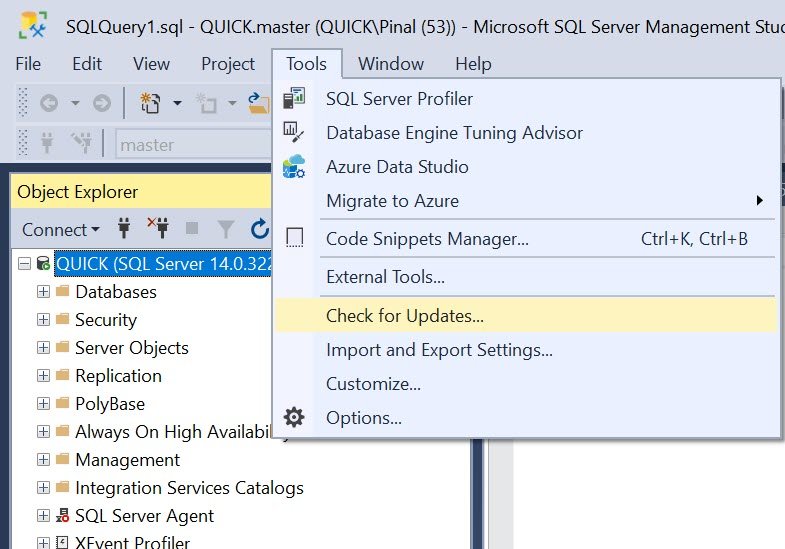
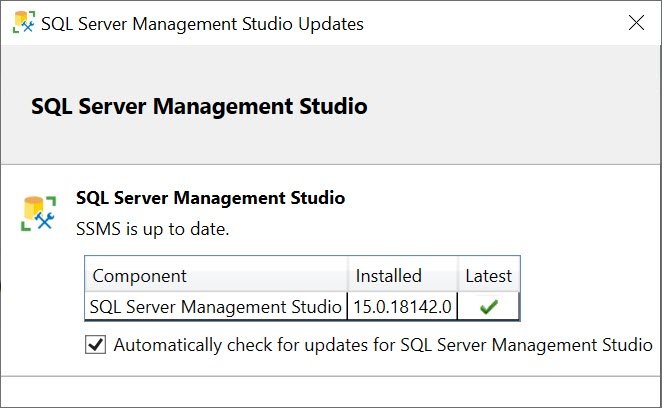
SSMS 22 uses the Visual Studio Installer. Locate the specific SSMS installation and check its update status. Read release notes before completing an approved update. Schedule any required Windows restart separately.
Updating SSMS doesn’t patch the Database Engine. Check engine compatibility against the client release. My old promise of flawless compatibility with every previous engine was too broad.
Use current official installation and release-history pages. Save work before maintenance and test the workflow afterward. The older screenshots and related tips provide historical context.
Reference: Current SSMS update procedure.
Related reading
- Comprehensive Database Performance Health Check
- SSMS: Download SQL Server Management Studio 18.0 (General Availability)
- SQL Download – SQL Server Management Studio (SSMS) – Performance Dashboard
- Download and Install SQL SERVER 2017 Developer Edition for FREE
- SQL SERVER – SSMS – Enable Line Numbers in SQL Server Management Studio
- Database Diagram – Available Again in SQL Server Management Studio 18.1 Onwards
- SQL SERVER – Difference Between Azure Data Studio and SQL Server Management Studio
- SQL SERVER – SQL Server Agent Missing in SQL Server Management Studio (SSMS)
- SQL SERVER – Disable IntelliSense in SQL Server Management Studio
- SQL SERVER Management Studio – Completion Time in Messages
A client update is not an engine patch, it is maintenance of a separate tool with its own compatibility requirements.
Published by Pinal Dave on SQLAuthority. More of my work at pinaldave.com.
Discover more from SQL Authority with Pinal Dave
Subscribe to get the latest posts sent to your email.



3 Comments. Leave new
Perhaps it is worth mentioning that for SQL Server Management Studio 18.0, Windows 10 is required. If you’re on Windows 7 like me, I unfortunately have to miss out on that until the company upgrades!
I know it’s strongly encouraged to have automatic updates enabled. Has anyone discovered a way to disable automatic updates for v18.x? We do controlled releases of software updates to workstations.
Late to the party… Found this article while searching for an option to DISABLE auto-update.
Reason for this: auto-update always recommends the latest version, which is of now SSMS 20. SSMS 20 brings a lot of changes, especially security related, which I do not want on the servers yet