
This Identity Column Quiz looks simple, and most people still get it wrong the first time. It’s about one rolled-back insert and the number that comes after it. Read the setup, pick your answer, and then run the script to check yourself.

The Quiz
A support desk keeps its tickets in a table. TicketID is an identity column that starts at 1 and goes up by 1. The table already holds three tickets, numbered 1, 2 and 3.
Next, a new ticket is inserted inside a transaction. Something goes wrong, and the transaction is rolled back. The ticket never makes it into the table. Then one more ticket is inserted, and this time it commits.
What TicketID does that last ticket get?
A. 4
B. 5
C. 6
D. The insert fails, because SQL Server wants to reuse number 4 first
Take a moment and pick one before you read on.
The Answer
The answer is B. The new ticket gets 5, and number 4 is gone for good.
When an insert asks for an identity value, SQL Server hands it out right away. It doesn’t wait to see whether the transaction commits. A rollback removes the row, but the number stays used. SQL Server never goes back to fill the hole.
This is on purpose. Many sessions insert into the same table at the same time. If SQL Server had to hold every number until each transaction finished, every insert would wait in line. Handing out numbers without looking back keeps inserts fast.
Prove It
Here is the quiz as a script. It creates a small database called SqlQuizIdentityColumn, used only for this example, so run it on a test server.
IF DB_ID(N'SqlQuizIdentityColumn') IS NULL CREATE DATABASE SqlQuizIdentityColumn;
GO
USE SqlQuizIdentityColumn;
GO
DROP TABLE IF EXISTS dbo.QuizTicket;
CREATE TABLE dbo.QuizTicket
(
    TicketID int IDENTITY(1,1) PRIMARY KEY,
    Customer nvarchar(40) NOT NULL
);
INSERT INTO dbo.QuizTicket (Customer)
VALUES (N'Avery'), (N'Jordan'), (N'Riley');

BEGIN TRANSACTION;
INSERT INTO dbo.QuizTicket (Customer) VALUES (N'Morgan');
ROLLBACK TRANSACTION;

INSERT INTO dbo.QuizTicket (Customer) VALUES (N'Casey');
SELECT TicketID, Customer FROM dbo.QuizTicket ORDER BY TicketID;
SELECT IDENT_CURRENT(N'dbo.QuizTicket') AS LastIdentityValue;
On SQL Server 2025, the first query returned these four rows. Morgan is missing, and so is number 4.
| TicketID | Customer |
|---|---|
| 1 | Avery |
| 2 | Jordan |
| 3 | Riley |
| 5 | Casey |
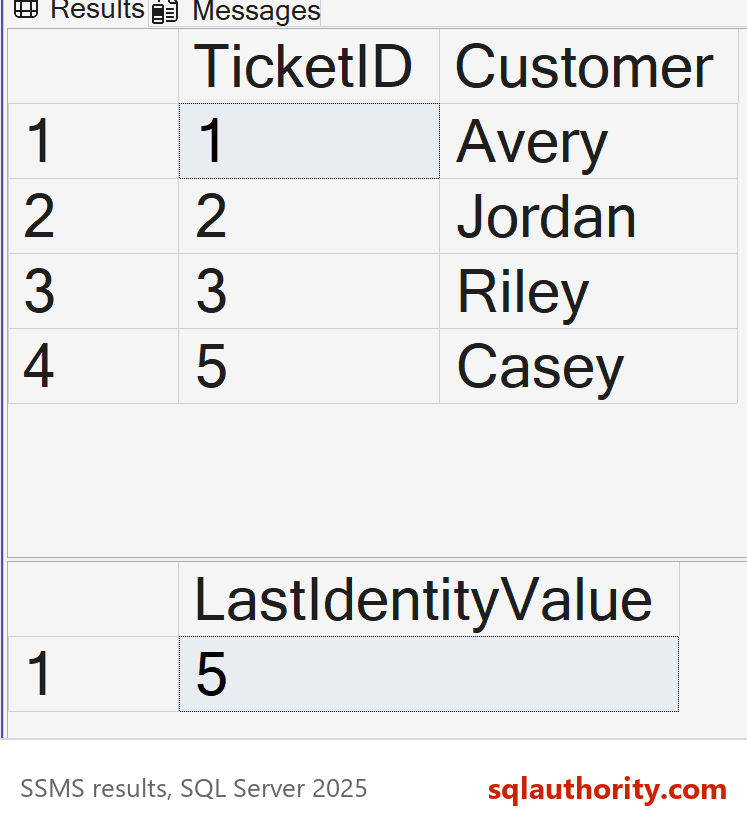
The second query returned 5. IDENT_CURRENT reports the last identity value handed out for the table, whether or not that row was kept.
Why the Other Answers Are Wrong
A is the answer most people pick, because it feels fair. The table has three rows, so the next one should be 4. But the rolled-back insert had already taken 4 before the rollback happened.
C would be right if two numbers had been lost. Only one insert failed here, so only one number is gone.
D describes something SQL Server doesn’t do. An identity column doesn’t keep a list of free numbers, and it doesn’t reuse them on its own. That is also why a deleted row’s number doesn’t come back.
Two More Ways to Lose a Number
A rollback isn’t the only cause. An insert that fails on its own uses up a value too. Run this right after the script above. The first insert breaks the NOT NULL rule on Customer and fails with error 515.
INSERT INTO dbo.QuizTicket (Customer) VALUES (NULL);
GO
INSERT INTO dbo.QuizTicket (Customer) VALUES (N'Quinn');
SELECT TicketID, Customer FROM dbo.QuizTicket ORDER BY TicketID;
Quinn gets TicketID 7. The failed insert took 6 before the NULL check stopped it. So one rollback and one bad row have already left two holes in five tickets.
The second cause is a restart. SQL Server keeps a small block of identity values ready in memory. The IDENTITY_CACHE setting controls this, and it is on by default. After an unexpected shutdown or a failover, the unused part of that block is lost. The next value can jump ahead by a larger step. You can turn the cache off per database, but inserts then do a little more work for every new value.
Deleting rows works the same way. DELETE removes rows and keeps the counter where it was, so the next insert continues from the last number used. TRUNCATE TABLE is different. It resets the counter to the seed, and the next row starts at 1 again.
When You Need Numbers With No Gaps
You could argue that gaps look sloppy. A customer who sees ticket 5 right after ticket 3 will ask what happened to 4. That’s a fair point, and it is the reason to keep two kinds of numbers apart.
Let the identity column supply new key values, fast, and let the primary key keep them unique. When people need to see a neat 1, 2, 3, 4, number the rows when you read them.
SELECT ROW_NUMBER() OVER (ORDER BY TicketID) AS DisplayNumber, TicketID, Customer
FROM dbo.QuizTicket
ORDER BY TicketID;
In my test, tickets 1, 2, 3, 5 and 7 came back as display numbers 1 to 5. Nothing in the table changed. The display number is worked out each time, so it stays gap-free after deletes too.
A SEQUENCE object won’t fix this either. It hands out numbers the same way, and a rollback loses them in the same way. A rule such as “invoice numbers must never skip” needs its own design. That design usually means a counter row updated inside the same transaction, which makes inserts wait for each other. Accept that cost only when the business rule truly demands it.
The primary key matters more than it looks. Someone can reseed the counter with DBCC CHECKIDENT, or insert their own values with IDENTITY_INSERT. In my test, a table with no key was reseeded to 1 after three rows. The next insert gave a second ticket 2. With the primary key in place, the same insert failed with error 2627. The identity column only supplies numbers. It doesn’t check them.
What to Remember
Left alone, an IDENTITY(1,1) column hands out increasing values. It never promises consecutive ones, and it never promises unique ones. The primary key does that. Rollbacks, failed inserts and restarts all leave holes, and that is normal.
When I review a table design, I ask one question about every identity column. Does anyone outside the database care about the gaps? If the answer is no, leave it alone. If the answer is yes, give those people a display number, and keep the key out of their sight.
When you finish testing, remove the example database.
USE master;
GO
ALTER DATABASE SqlQuizIdentityColumn SET SINGLE_USER WITH ROLLBACK IMMEDIATE;
DROP DATABASE SqlQuizIdentityColumn;
An identity column is not a count of your rows, it is a supply of new numbers.
Published by Pinal Dave on SQLAuthority. More of my work at pinaldave.com.
Discover more from SQL Authority with Pinal Dave
Subscribe to get the latest posts sent to your email.



2 Comments. Leave new
Yes identity can be ever decreasing, set Identity Increment to -1.
Pinal,
create table sample
(
id int identity(1,1),
name varchar(100)
)
select IDENT_CURRENT(‘sample’)
Here Identity as 1
begin tran
insert into sample(name)
select ‘udhaya’ union
select ‘ganesh’
rollback
select IDENT_CURRENT(‘sample’)
But here Identity as 2 . I have rollback, why not affected in identity column?