You can sync a lookup table without MERGE by running three plain statements inside one transaction. Update what changed, insert what is new, delete what vanished.
Why people skip MERGE for lookups
Picture a nightly job that refreshes a table of order statuses from a list another team sends you. A teammate says, “Just use MERGE.” Another says, “I only trust what I can read at a glance.” Both are fair.
MERGE does three jobs in one statement. Three separate statements are longer, but each one has its own predicate and its own row count. When the job misbehaves at 2 AM, that is exactly what you want to look at.
Set up a target and a source
The target is the lookup your applications read. The source is the fresh list you want it to match. Here the target holds ids 1 and 3, and the source holds ids 1 and 2. So I expect one update (id 1 goes from Old to New), one insert (id 2, with a NULL) and one delete (id 3).
DROP TABLE IF EXISTS dbo.LookupTarget;
DROP TABLE IF EXISTS dbo.LookupSource;

CREATE TABLE dbo.LookupTarget (Id int PRIMARY KEY, ValueText nvarchar(40));
CREATE TABLE dbo.LookupSource (Id int PRIMARY KEY, ValueText nvarchar(40));

INSERT dbo.LookupTarget (Id, ValueText) VALUES (1, N'Old'), (3, N'Remove');
INSERT dbo.LookupSource (Id, ValueText) VALUES (1, N'New'), (2, NULL);
One rule before any delete runs: the source must be complete. If a feed breaks and sends half the rows, the delete happily removes the other half from your lookup. An empty source is the worst case, so decide what an empty feed means for your business. Here I simply stop.
IF NOT EXISTS (SELECT 1 FROM dbo.LookupSource)
    THROW 50001, 'The source has no rows. Stop before the delete removes everything.', 1;
The primary key on the source helps too. A duplicate id should fail loudly, not let the insert pick whichever value arrives first.
Compare values safely with EXCEPT
The update should touch only rows that really changed. The obvious test is a plain not-equal comparison. It has a trap. When either side is NULL, the answer is unknown, and the row is skipped. A value that changes from New to NULL would never be updated.
EXCEPT treats two NULLs as equal and a NULL against a value as different. That is the behavior you want. Run both tests side by side.
SELECT
    CASE WHEN N'New' <> CAST(NULL AS nvarchar(40)) THEN 'changed' ELSE 'looks the same' END AS plain_compare,
    CASE WHEN EXISTS (SELECT N'New' EXCEPT SELECT CAST(NULL AS nvarchar(40)))
         THEN 'changed' ELSE 'looks the same' END AS except_compare;
The plain comparison says “looks the same”. The EXCEPT test says “changed”.
Run the three statements in one transaction
Now the sync. Order matters a little: update, insert, then delete. The transaction makes the three steps land together or not at all, and XACT_ABORT rolls everything back if a statement fails.
I run the sync twice on purpose. The second pass should find nothing to do. A sync that cannot say “zero changes” on a repeat is hiding a comparison bug.
SET XACT_ABORT ON;
DECLARE @Pass int = 1, @Updated int, @Inserted int, @Deleted int, @Locked bigint;

WHILE @Pass <= 2
BEGIN
    BEGIN TRY
        BEGIN TRANSACTION;
        SELECT @Locked = COUNT_BIG(*) FROM dbo.LookupTarget WITH (TABLOCKX, HOLDLOCK);

        UPDATE t SET ValueText = s.ValueText
        FROM dbo.LookupTarget AS t
        JOIN dbo.LookupSource AS s ON s.Id = t.Id
        WHERE EXISTS (SELECT t.ValueText EXCEPT SELECT s.ValueText);
        SET @Updated = @@ROWCOUNT;

        INSERT dbo.LookupTarget (Id, ValueText)
        SELECT s.Id, s.ValueText FROM dbo.LookupSource AS s
        WHERE NOT EXISTS (SELECT 1 FROM dbo.LookupTarget AS t WHERE t.Id = s.Id);
        SET @Inserted = @@ROWCOUNT;

        DELETE t FROM dbo.LookupTarget AS t
        WHERE NOT EXISTS (SELECT 1 FROM dbo.LookupSource AS s WHERE s.Id = t.Id);
        SET @Deleted = @@ROWCOUNT;

        COMMIT;
        SELECT @Pass AS Pass, @Updated AS UpdatedRows, @Inserted AS InsertedRows, @Deleted AS DeletedRows;
    END TRY
    BEGIN CATCH
        IF XACT_STATE() <> 0 ROLLBACK;
        THROW;
    END CATCH;
    SET @Pass += 1;
END;

SELECT Id, ValueText FROM dbo.LookupTarget ORDER BY Id;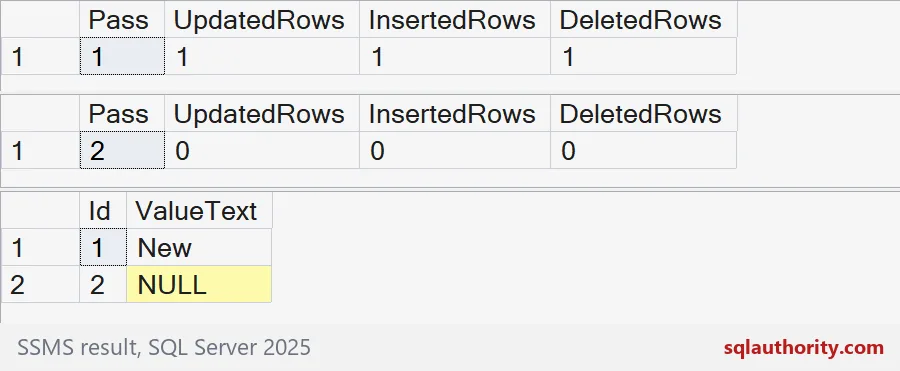
Read the grids from top to bottom. Pass 1 reports one updated row, one inserted row and one deleted row. Pass 2 reports zero for all three. The final grid shows the lookup now matches the source: id 1 says New, and id 2 is there with its NULL.
If your second pass reports changes, look at your comparison first. NULLs are the usual suspect.

See the lock the transaction holds
For a small lookup I take an exclusive lock on the whole target table with TABLOCKX and HOLDLOCK. No other writer can slip a row in between my three statements. You can watch the lock yourself. The block rolls back, so nothing changes.
BEGIN TRANSACTION;

SELECT COUNT_BIG(*) AS rows_locked FROM dbo.LookupTarget WITH (TABLOCKX, HOLDLOCK);

SELECT DISTINCT resource_type, request_mode, request_status
FROM sys.dm_tran_locks
WHERE request_session_id = @@SPID
  AND resource_type = 'OBJECT'
  AND resource_associated_entity_id = OBJECT_ID('dbo.LookupTarget');

ROLLBACK TRANSACTION;
One OBJECT lock in mode X, granted. That is the whole table. I used DISTINCT because a busy server can list the same table lock several times. For a big table this is too heavy. You would need UPDLOCK and HOLDLOCK on a key range, a matching index and a concurrency test on your own server.
MERGE is still a fair choice if your testing says it behaves for your workload. Just choose it on purpose. The demo made two tables, so drop them now.
DROP TABLE IF EXISTS dbo.LookupTarget;
DROP TABLE IF EXISTS dbo.LookupSource;
Run the sync twice before you schedule it, and trust it only when the second run says zero.
A synchronization is not three loose statements, it is one consistent change set.
Published by Pinal Dave on SQLAuthority. More of my work at pinaldave.com.
Discover more from SQL Authority with Pinal Dave
Subscribe to get the latest posts sent to your email.