A unit of measure belongs next to every quantity, or the total means nothing. Five kilograms plus ten pounds plus two boxes is not a number you can put in a report. Convert everything to one base unit per product, and keep a table that says how.

Why one total goes wrong
A warehouse receives rice in kilograms from one supplier and in pounds from another. It also receives pens in boxes of twelve. Someone adds the quantity column and calls it “stock.” The number is wrong, and nobody can say by how much.
Each product gets one base unit. Rice uses kilograms. Pens use each. Pounds convert to kilograms with a physical factor. A box of twelve converts to twelve each, never to kilograms. Mass and count are different dimensions, and they do not mix without a product-specific rule.
The first block drops any earlier copies of the demo tables, then creates a unit table and a product table. Each product points to its base unit.
DROP VIEW IF EXISTS dbo.UnitBaseQuantityDemo;
DROP TABLE IF EXISTS dbo.UnitQuantityDemo, dbo.UnitConversionDemo,
                     dbo.UnitProductDemo, dbo.UnitDemo;

CREATE TABLE dbo.UnitDemo
(
    UnitId int PRIMARY KEY,
    Symbol varchar(20) NOT NULL UNIQUE,
    DimensionName varchar(20) NOT NULL
);

CREATE TABLE dbo.UnitProductDemo
(
    ProductId int PRIMARY KEY,
    ProductName nvarchar(80) NOT NULL,
    BaseUnitId int NOT NULL REFERENCES dbo.UnitDemo (UnitId)
);

INSERT dbo.UnitDemo VALUES (1, 'kg', 'mass'), (2, 'lb', 'mass'),
                           (3, 'each', 'count'), (4, 'box', 'count');
INSERT dbo.UnitProductDemo VALUES (10, N'Rice', 1), (20, N'Pens', 3);
Store the direction with the factor
A factor has a direction. Source quantity times the factor gives the destination quantity. So the table stores FromUnitId, ToUnitId, and a decimal factor that must be positive.
I keep the factor per product. That handles packaging directly, because a box of pens and a box of rice are different things. Then I add three quantities: 5 kg of rice, 10 lb of rice, and 2 boxes of pens.
CREATE TABLE dbo.UnitConversionDemo
(
    ProductId int NOT NULL REFERENCES dbo.UnitProductDemo (ProductId),
    FromUnitId int NOT NULL REFERENCES dbo.UnitDemo (UnitId),
    ToUnitId int NOT NULL REFERENCES dbo.UnitDemo (UnitId),
    Factor decimal(28,12) NOT NULL CHECK (Factor > 0),
    PRIMARY KEY (ProductId, FromUnitId, ToUnitId)
);

INSERT dbo.UnitConversionDemo VALUES
(10, 1, 1, 1.0), (10, 2, 1, 0.45359237), (20, 3, 3, 1.0), (20, 4, 3, 12.0);

CREATE TABLE dbo.UnitQuantityDemo
(
    QuantityId int PRIMARY KEY,
    ProductId int NOT NULL REFERENCES dbo.UnitProductDemo (ProductId),
    SourceUnitId int NOT NULL REFERENCES dbo.UnitDemo (UnitId),
    Quantity decimal(19,6) NOT NULL
);

INSERT dbo.UnitQuantityDemo VALUES (1, 10, 1, 5.0), (2, 10, 2, 10.0), (3, 20, 4, 2.0);
Let the table refuse bad factors
A conversion table is only useful if people cannot put junk in it. Try a factor of zero. The CHECK constraint stops it with error 547. Try a second factor for the same product and units. The primary key stops that with error 2627.
INSERT dbo.UnitConversionDemo VALUES (20, 4, 4, 0);
GO
INSERT dbo.UnitConversionDemo VALUES (10, 2, 1, 0.5);
GO
Convert through a view
The view joins each quantity to its product’s base unit and to the exact factor for that product, source unit, and base unit. It multiplies as decimals and returns both the source and the converted value.
Ten pounds of rice becomes 4.535924 kilograms. Two boxes of pens become 24 each. The factor shows as 0.453592370000 because the column has twelve decimal places.
GO
CREATE OR ALTER VIEW dbo.UnitBaseQuantityDemo
AS
SELECT q.QuantityId, q.ProductId, q.Quantity, u.Symbol AS SourceUnit,
       c.Factor, CONVERT(decimal(38,6), q.Quantity * c.Factor) AS BaseQuantity,
       b.Symbol AS BaseUnit
FROM dbo.UnitQuantityDemo AS q
JOIN dbo.UnitProductDemo AS p ON p.ProductId = q.ProductId
JOIN dbo.UnitDemo AS u ON u.UnitId = q.SourceUnitId
JOIN dbo.UnitDemo AS b ON b.UnitId = p.BaseUnitId
JOIN dbo.UnitConversionDemo AS c ON c.ProductId = q.ProductId
                                AND c.FromUnitId = q.SourceUnitId
                                AND c.ToUnitId = p.BaseUnitId;
GO
SELECT * FROM dbo.UnitBaseQuantityDemo ORDER BY QuantityId;
Now total by product and base unit. Rice adds up to 9.535924 kg. Pens add up to 24 each. Rice and pens never share a total.
SELECT ProductId, BaseUnit, SUM(BaseQuantity) AS TotalBaseQuantity
FROM dbo.UnitBaseQuantityDemo
GROUP BY ProductId, BaseUnit
ORDER BY ProductId, BaseUnit;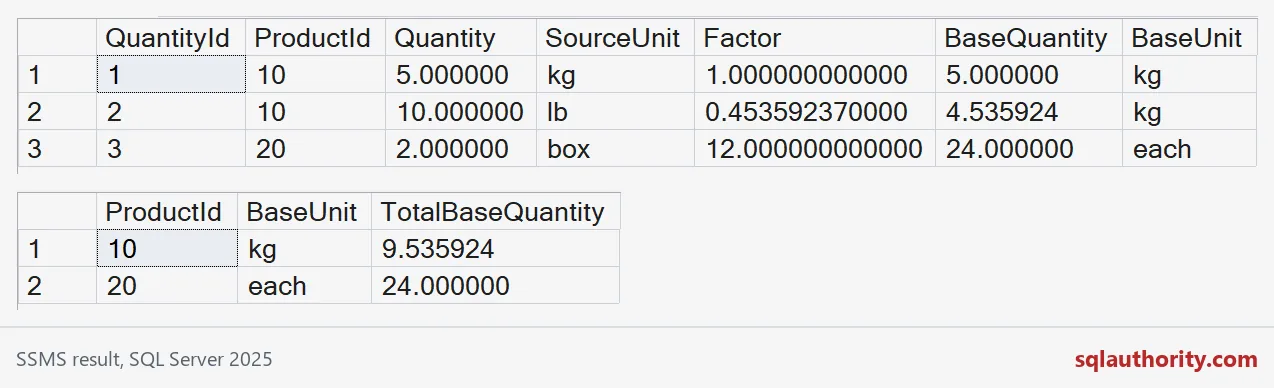

Find the rows that cannot convert
The view uses inner joins, so a quantity with no factor simply disappears. That is the dangerous part. The total still looks fine.
To see it, I add 3 lb of pens. Nobody defined pounds for a counted item. The left join lists the row as unresolved. The last query shows four quantity rows but only three converted. I remove the extra row afterwards.
INSERT dbo.UnitQuantityDemo VALUES (4, 20, 2, 3.0);

SELECT q.QuantityId, q.ProductId, q.SourceUnitId, p.BaseUnitId
FROM dbo.UnitQuantityDemo AS q
JOIN dbo.UnitProductDemo AS p ON p.ProductId = q.ProductId
LEFT JOIN dbo.UnitConversionDemo AS c ON c.ProductId = q.ProductId
                                     AND c.FromUnitId = q.SourceUnitId
                                     AND c.ToUnitId = p.BaseUnitId
WHERE c.Factor IS NULL;

SELECT (SELECT COUNT(*) FROM dbo.UnitQuantityDemo) AS QuantityRows,
       (SELECT COUNT(*) FROM dbo.UnitBaseQuantityDemo) AS ConvertedRows;

DELETE dbo.UnitQuantityDemo WHERE QuantityId = 4;
Treat unresolved rows as unresolved. Never default the factor to one or the quantity to zero. Both make a believable wrong number.
What the factor table cannot do
Multiplication does not cover temperature, which needs an offset. Currency needs a rate and a date. A mass-per-piece rule crosses dimensions and deserves a named rule of its own.
Packaging also changes. If a box goes from twelve to ten, editing the factor rewrites the meaning of every old quantity. Store the factor with the transaction, or use effective dates.
The last block removes the demo objects.
DROP VIEW IF EXISTS dbo.UnitBaseQuantityDemo;
DROP TABLE IF EXISTS dbo.UnitQuantityDemo, dbo.UnitConversionDemo,
                     dbo.UnitProductDemo, dbo.UnitDemo;
Next time a stock total looks odd, check the units before you check the math.
A quantity is not a number, it is a number with a unit.
Published by Pinal Dave on SQLAuthority. More of my work at pinaldave.com.
Discover more from SQL Authority with Pinal Dave
Subscribe to get the latest posts sent to your email.