Running distinct counts answer one question: how many different customers have we seen so far? SQL Server will not run COUNT(DISTINCT) over an ordered window. So you mark each customer’s first appearance, then add up the marks.

The obvious query does not run
Your manager wants a dashboard line: unique customers so far, per region, as orders arrive. You write COUNT(DISTINCT CustomerId) OVER (…) and press F5. SQL Server says no.
Here is a tiny event table. Customer 10 shows up twice in region 1 and once in region 2. Customer 20 shows up once. One event has no customer at all.
DROP TABLE IF EXISTS #DistinctEvents;

CREATE TABLE #DistinctEvents
(
    EventId int PRIMARY KEY,
    RegionId int NOT NULL,
    CustomerId int NULL,
    EventAt datetime2 NOT NULL
);

INSERT #DistinctEvents (EventId, RegionId, CustomerId, EventAt) VALUES
(1, 1, 10,   '2025-01-01T09:00:00'),
(2, 1, 10,   '2025-01-01T10:00:00'),
(3, 1, 20,   '2025-01-02T09:00:00'),
(4, 1, NULL, '2025-01-02T10:00:00'),
(5, 2, 10,   '2025-01-01T11:00:00');
Now the query you wanted. It fails with error 10759, because DISTINCT is not allowed with the OVER clause.
SELECT EventId,
       COUNT(DISTINCT CustomerId) OVER (PARTITION BY RegionId
                                        ORDER BY EventAt, EventId) AS RunningDistinct
FROM #DistinctEvents;
Flag the first time you see each customer
The workaround takes two steps. ROW_NUMBER, partitioned by region and customer, numbers each customer’s events from the earliest. The first non-NULL one gets a flag of 1. Every other event gets 0. Then a running SUM of the flags gives the distinct count so far.
Read the result by region. Region 1 shows 1, 1, 2, 2. The repeat of customer 10 adds nothing, and the NULL customer adds nothing. Region 2 starts again at 1, because customer 10 is new to that region.
WITH Numbered AS
(
    SELECT RegionId, EventId, EventAt, CustomerId,
           ROW_NUMBER() OVER (PARTITION BY RegionId, CustomerId
                              ORDER BY EventAt, EventId) AS CustomerOccurrence
    FROM #DistinctEvents
),
Flagged AS
(
    SELECT *,
           CASE WHEN CustomerId IS NOT NULL AND CustomerOccurrence = 1
                THEN 1 ELSE 0 END AS FirstSeen
    FROM Numbered
)
SELECT RegionId, EventId, EventAt, CustomerId, FirstSeen,
       SUM(FirstSeen) OVER (PARTITION BY RegionId ORDER BY EventAt, EventId
                            ROWS UNBOUNDED PRECEDING) AS RunningDistinctCustomers
FROM Flagged
ORDER BY RegionId, EventAt, EventId;
Notice that I wrote ROWS UNBOUNDED PRECEDING. If you leave the frame out, SQL Server groups rows with equal timestamps as peers. Two events at the same moment then show the same running value. This tiny test has two events at the same moment. The first column leaves out the frame.
SELECT v.EventId,
       SUM(1) OVER (ORDER BY v.EventAt) AS DefaultFrame,
       SUM(1) OVER (ORDER BY v.EventAt, v.EventId
                    ROWS UNBOUNDED PRECEDING) AS RowsFrame
FROM (VALUES (1, CAST('2025-01-03T09:00:00' AS datetime2)),
             (2, CAST('2025-01-03T09:00:00' AS datetime2))) AS v(EventId, EventAt)
ORDER BY v.EventId;
DefaultFrame says 2 and 2. RowsFrame says 1 and 2, which is what you wanted.

One row per day
Dashboards often want one row per day, not per event. Find each customer’s first date, count new customers per date, and run a SUM over those counts. Region 1 gets one new customer on each of two days, so the totals are 1 and 2.
Days with no new customers will not appear. Join to a calendar table if the chart needs those days.
WITH FirstDates AS
(
    SELECT RegionId, CustomerId, MIN(CONVERT(date, EventAt)) AS FirstDate
    FROM #DistinctEvents
    WHERE CustomerId IS NOT NULL
    GROUP BY RegionId, CustomerId
),
Daily AS
(
    SELECT RegionId, FirstDate, COUNT_BIG(*) AS NewCustomers
    FROM FirstDates
    GROUP BY RegionId, FirstDate
)
SELECT RegionId, FirstDate, NewCustomers,
       SUM(NewCustomers) OVER (PARTITION BY RegionId ORDER BY FirstDate
                               ROWS UNBOUNDED PRECEDING) AS DistinctCustomersSoFar
FROM Daily
ORDER BY RegionId, FirstDate;
A partition total is not a running total
You will also see the DENSE_RANK trick. Rank ascending, rank descending, add them, subtract one. That gives the number of distinct values in the whole partition, repeated on every row. It is a total, not a running count.
NULL gets a rank like any other value, but COUNT(DISTINCT) ignores it. So the query subtracts one when the partition contains a NULL.
SELECT RegionId, EventId, CustomerId,
       DENSE_RANK() OVER (PARTITION BY RegionId ORDER BY CustomerId)
     + DENSE_RANK() OVER (PARTITION BY RegionId ORDER BY CustomerId DESC) - 1
     - MAX(CASE WHEN CustomerId IS NULL THEN 1 ELSE 0 END)
           OVER (PARTITION BY RegionId) AS PartitionDistinctNonNullCustomers
FROM #DistinctEvents
ORDER BY RegionId, EventId;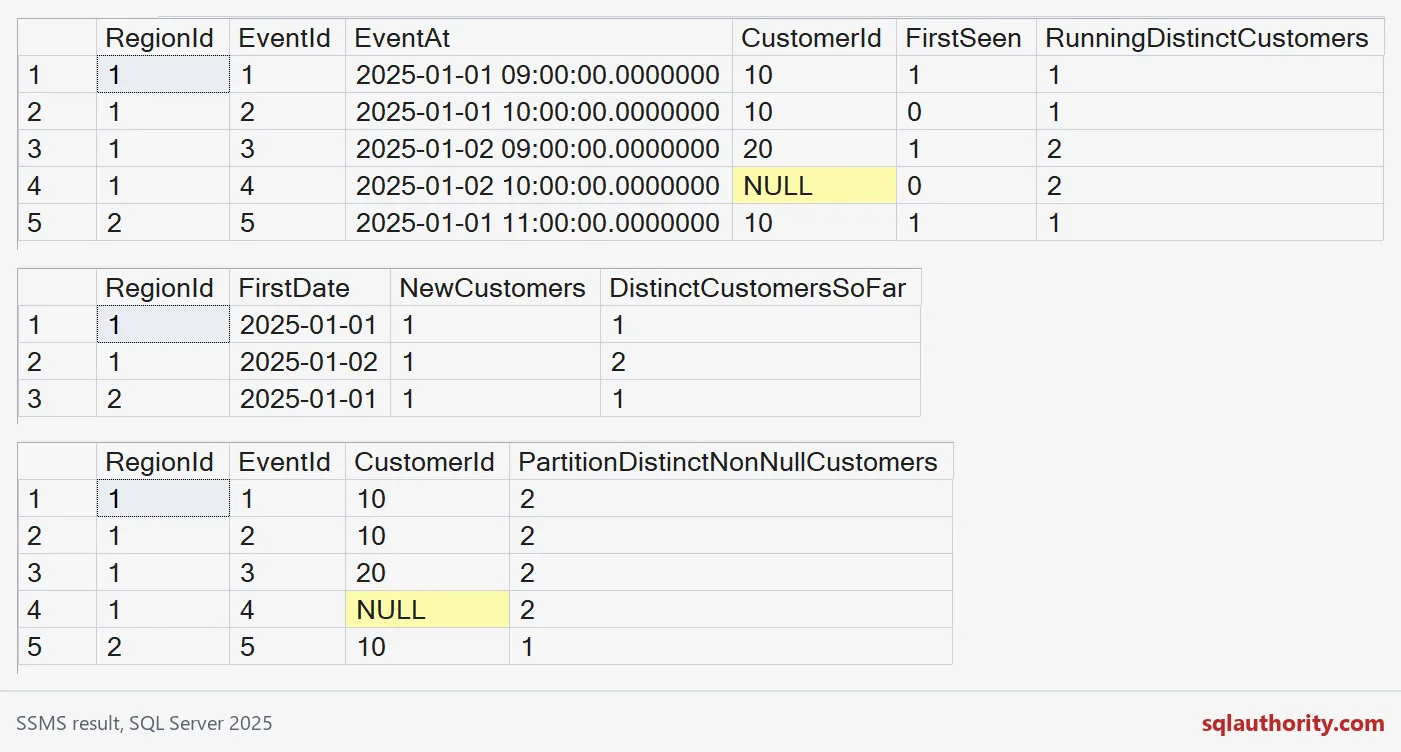
Check it against the slow, obvious query
A correlated subquery can do the same job. For each event, it counts distinct customers up to that event. It is easy to read and returns the same numbers as before: 1, 1, 2, 2 and 1.
It rereads earlier rows for every event, so it gets slower as history grows. Compare the plan and reads of both versions on your own data before you choose.
SELECT e.RegionId, e.EventId,
       (SELECT COUNT(DISTINCT p.CustomerId)
        FROM #DistinctEvents AS p
        WHERE p.RegionId = e.RegionId
          AND (p.EventAt < e.EventAt
               OR (p.EventAt = e.EventAt AND p.EventId <= e.EventId))
       ) AS RunningDistinctCustomers
FROM #DistinctEvents AS e
ORDER BY e.RegionId, e.EventAt, e.EventId;
When history changes
A late event can move a customer’s first appearance to an earlier day. If you store daily first-seen rows, you need a rule to recompute them. Customer merges can also change who counts as distinct, even without new activity.
The last block removes the temp table.
DROP TABLE IF EXISTS #DistinctEvents;Next time a report asks for “unique so far,” you will know where to put the flag.
A running distinct count is not an event count, it is a count of first appearances.
Published by Pinal Dave on SQLAuthority. More of my work at pinaldave.com.
Discover more from SQL Authority with Pinal Dave
Subscribe to get the latest posts sent to your email.