Implicit transactions make SQL Server open a transaction for you, and the transaction stays open until someone commits it.
That sounds harmless. A session that forgets the commit keeps its locks, and every other session that needs those rows waits.

What the Setting Does
SQL Server runs in autocommit mode by default. Each statement is its own transaction, and it commits when it finishes. SET IMPLICIT_TRANSACTIONS ON changes that for one session. Now the first data statement starts a transaction, and nothing ends it until you run COMMIT or ROLLBACK. Implicit transactions are off by default.
Not every statement starts one. INSERT, UPDATE, DELETE, TRUNCATE TABLE and the CREATE, ALTER and DROP statements do. A SELECT does when it reads a table. A SELECT of a constant does not. The demo below uses a small visitor log to show each case.
IF DB_ID(N'ImplicitTranDemo') IS NULL CREATE DATABASE ImplicitTranDemo;
GO
USE ImplicitTranDemo;
GO
DROP TABLE IF EXISTS dbo.Visits;
CREATE TABLE dbo.Visits (VisitID int IDENTITY(1,1) PRIMARY KEY, Visitor nvarchar(40) NOT NULL);
INSERT dbo.Visits (Visitor) VALUES (N'Maya'), (N'Leo');
First the default. The setting is a bit in @@OPTIONS, and @@TRANCOUNT counts the open transactions of the session.
SELECT CASE WHEN @@OPTIONS & 2 = 2 THEN N'ON' ELSE N'OFF' END AS ImplicitTransactions, @@TRANCOUNT AS OpenTransactions;
INSERT dbo.Visits (Visitor) VALUES (N'Priya');
SELECT @@TRANCOUNT AS OpenAfterInsert;
| ImplicitTransactions | OpenTransactions |
|---|---|
| OFF | 0 |
| OpenAfterInsert |
|---|
| 0 |
The insert committed itself, so nothing is open. Now switch the setting on and run the statements below.
SET IMPLICIT_TRANSACTIONS ON;
SELECT 1 AS Value, @@TRANCOUNT AS OpenAfterConstant;
INSERT dbo.Visits (Visitor) VALUES (N'Sam');
SELECT @@TRANCOUNT AS OpenAfterFirstInsert;
INSERT dbo.Visits (Visitor) VALUES (N'Nora');
SELECT @@TRANCOUNT AS OpenAfterSecondInsert;
UPDATE dbo.Visits SET Visitor = N'Maya R' WHERE VisitID = 1;
SELECT @@TRANCOUNT AS OpenAfterUpdate;
ROLLBACK TRANSACTION;
SELECT COUNT(*) AS Visits FROM dbo.Visits;
SELECT @@TRANCOUNT AS OpenAfterSelect;
COMMIT TRANSACTION;
SET IMPLICIT_TRANSACTIONS OFF;
| Step | @@TRANCOUNT |
|---|---|
| SELECT of a constant | 0 |
| First INSERT | 1 |
| Second INSERT | 1 |
| UPDATE | 1 |
| SELECT from the table after the ROLLBACK | 1 |
The inserts and the update share one transaction, so the count stays at 1. One ROLLBACK undoes Sam, Nora and the new name for Maya together. The table holds 3 visits afterward: Maya, Leo and Priya. The next table read then opens a new transaction, which the script ends with a COMMIT. That is how the setting leaves work open: the next statement of those kinds after a commit starts another transaction.
What a Forgotten Transaction Costs
An open transaction holds its locks. Under the default read committed level, a reader that touches the locked rows waits for the writer. Read committed snapshot changes that, and Azure SQL Database turns it on by default. Open two query windows to see it. The first window inserts a row and does not commit.
USE ImplicitTranDemo;
SET IMPLICIT_TRANSACTIONS ON;
INSERT dbo.Visits (Visitor) VALUES (N'Jordan');
The second window reads the table. A lock timeout of three seconds keeps the window from waiting forever.
USE ImplicitTranDemo;
SET LOCK_TIMEOUT 3000;
SELECT COUNT(*) AS Visits FROM dbo.Visits;
Msg 1222, Level 16, State 51, Line 3
Lock request time out period exceeded.
Without the timeout, the second window keeps waiting. Close the first window with a ROLLBACK and the read returns at once. The open transaction also pins the log. Log space behind it cannot be reused. That is one of the reasons in Log File Not Shrinking: Read log_reuse_wait_desc First. To see the log space behind an open transaction, read How an Open Transaction Uses Free Log Space.
Find the Sessions With Open Work
A session with an open transaction and no running request shows the status sleeping. These two queries find such sessions. The first lists every user session with an open transaction and how long it has been idle. The second shows the transactions that touch the current database.
SELECT s.session_id, s.status, s.open_transaction_count, DATEDIFF(SECOND, s.last_request_end_time, GETDATE()) AS IdleSeconds
FROM sys.dm_exec_sessions AS s
WHERE s.is_user_process = 1 AND s.open_transaction_count > 0;

SELECT st.session_id, DB_NAME(dt.database_id) AS DatabaseName, dt.database_transaction_log_record_count AS LogRecords, DATEDIFF(SECOND, at.transaction_begin_time, GETDATE()) AS SecondsOpen
FROM sys.dm_tran_session_transactions AS st
JOIN sys.dm_tran_database_transactions AS dt ON dt.transaction_id = st.transaction_id
JOIN sys.dm_tran_active_transactions AS at ON at.transaction_id = st.transaction_id
WHERE dt.database_id = DB_ID();
The numbers below come from a connection that ran the insert with the setting on and then went idle. Session IDs and times differ on your server, and the first query also lists other sessions that hold a transaction. Both queries need the VIEW SERVER STATE permission.
| session_id | status | open_transaction_count | IdleSeconds |
|---|---|---|---|
| 94 | sleeping | 1 | 8 |
| session_id | DatabaseName | LogRecords | SecondsOpen |
|---|---|---|---|
| 94 | ImplicitTranDemo | 2 | 8 |
A session that sits at one open transaction while its idle time grows is the one to ask about. To see who waits on it, read blocking_session_id in sys.dm_exec_requests.
Where the Setting Comes From
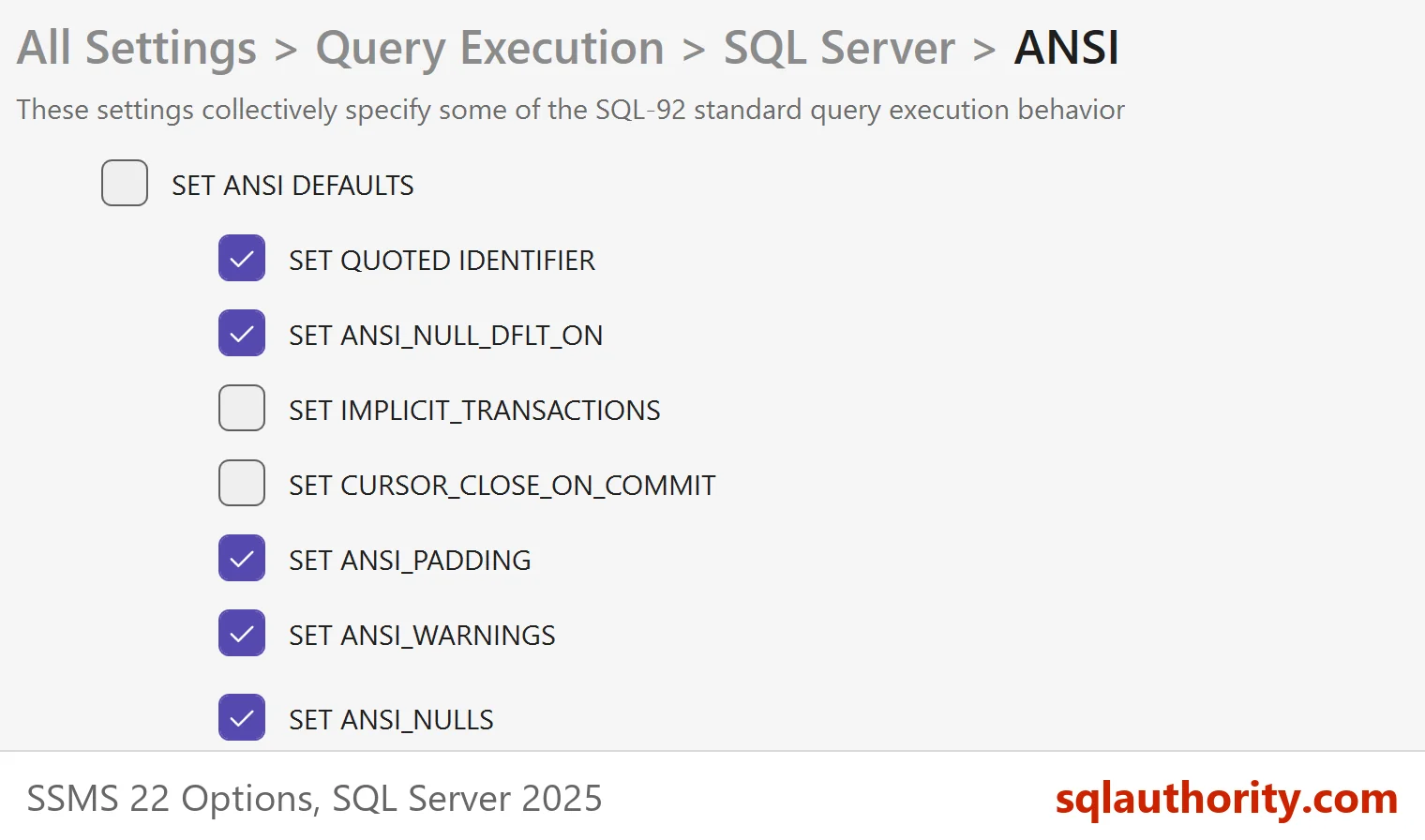
Most people never type this statement. Implicit transactions arrive through the connection. ODBC and JDBC drivers send it when an application turns autocommit off, and some tools do the same. In Management Studio, the check box sits under Tools, Options, Query Execution, SQL Server, ANSI. It is named SET IMPLICIT_TRANSACTIONS and is off by default.
A second trap is the nested transaction. With the setting on, an INSERT starts a transaction and counts as level 1. A later BEGIN TRANSACTION raises the count to 2. One COMMIT brings it back to 1, and the transaction is still open. Only the second commit ends it. Code written for autocommit mode leaves work open this way.
DDL starts one as well. With the setting on, a CREATE TABLE opened a transaction, and a ROLLBACK removed the table again.
The Fix
Turn the setting off in the connection or the driver, and commit after every group of writes. Keep each transaction short. If a session is stuck right now, ask its owner to commit or roll back. As a last resort, KILL the session ID, which rolls the work back.
You could argue that implicit transactions are a safety net, because nothing is saved until you say so. For a script you run by hand, that is true. For an application that forgets the final commit, the net becomes a lock.
What to Remember
Check @@TRANCOUNT when a query waits for no visible reason. Watch for sessions that stay sleeping with an open transaction. Treat implicit transactions as a decision made for a whole session. The first statement after a commit starts the next transaction.
When you finish, run the cleanup script.
USE master;
GO
IF DB_ID(N'ImplicitTranDemo') IS NOT NULL
BEGIN
    ALTER DATABASE ImplicitTranDemo SET SINGLE_USER WITH ROLLBACK IMMEDIATE;
    DROP DATABASE ImplicitTranDemo;
END;
A transaction nobody commits is not a safety net, it is a lock with a long memory.
Published by Pinal Dave on SQLAuthority. More of my work at pinaldave.com.
Discover more from SQL Authority with Pinal Dave
Subscribe to get the latest posts sent to your email.