
Altering Column nullability to NOT NULL requires resolving existing NULLs under an approved data rule. My earlier script replaced them with empty strings.

CREATE TABLE #NullabilityExample (ID int NOT NULL,Value varchar(100) NULL);
INSERT #NullabilityExample VALUES (1,'Known'),(2,NULL);
-- Demonstration-only replacement; choose a valid business value in real data.
UPDATE #NullabilityExample SET Value='Unknown' WHERE Value IS NULL;
ALTER TABLE #NullabilityExample ALTER COLUMN Value varchar(100) NOT NULL;
SELECT ID,Value FROM #NullabilityExample ORDER BY ID;
DROP TABLE #NullabilityExample;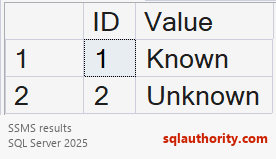
Empty text differs from unknown or absent data. It can be an invalid replacement. This temporary-table example uses an explicit demonstration value. Production corrections need the data owner’s approved rule and preserved evidence.
Preserve datatype, length and collation during alteration. Review indexes, constraints and dependencies. The old varchar(100) example is not a universal target type.
Prevent new NULLs between cleanup and validation through a controlled migration. A default alone does not block explicit NULL inputs. Validate changed data and application behavior before normal writes resume.
Resolve meaning before enforcing the contract. The constraint should express the approved rule. It should not conceal unknown data with an arbitrary placeholder.
Related reading
- Comprehensive Database Performance Health Check
- SQL in Sixty Seconds
- Read Only Tables – Is it Possible? – SQL in Sixty Seconds #179
- One Scan for 3 Count Sum – SQL in Sixty Seconds #178
- SUM(1) vs COUNT(1) Performance Battle – SQL in Sixty Seconds #177
- COUNT(*) and COUNT(1): Performance Battle – SQL in Sixty Seconds #176
- COUNT(*) and Index – SQL in Sixty Seconds #175
- Index Scans – Good or Bad? – SQL in Sixty Seconds #174
- Optimize for Ad Hoc Workloads – SQL in Sixty Seconds #173
- Avoid Join Hints – SQL in Sixty Seconds #172
- One Query Many Plans – SQL in Sixty Seconds #171
A non-NULL replacement is not automatically meaningful data, it is a value that needs business approval.
Published by Pinal Dave on SQLAuthority. More of my work at pinaldave.com.
Discover more from SQL Authority with Pinal Dave
Subscribe to get the latest posts sent to your email.




1 Comment. Leave new
Hello good sir… I am trying this and despite verifying that there are currently NO ROWS that currently have a NULL value in the column, and also dropping any indexes referencing the column I am trying to alter, I get the following very scary error:
Msg 596, Level 21, State 1, Line 6
Cannot continue the execution because the session is in the kill state.
Msg 0, Level 20, State 0, Line 6
A severe error occurred on the current command. The results, if any, should be discarded.
Any suggestions would be greatly appreciated!