The rows_sampled column tells you how many rows a statistics update really looked at. A recent last_updated date does not mean the update saw everything. Check both numbers before you blame the optimizer.
A fresh statistic can still be a small sample
A query is slow, and the plan guessed far too few rows for one rare value. You check the statistic. “Updated last night,” says the maintenance log. Case closed? Not yet.
An update can be recent and still be built from a small slice of the table. The DMF sys.dm_db_stats_properties gives you the proof: rows is the table size, and rows_sampled is how many rows went into the statistic. I read them side by side with last_updated.
Ask for 10 percent and see what you get
The demo table has 100,000 rows. About one row in a thousand has CategoryId 99, and the rest have 1. That makes 99 a rare value. I ask for a 10 percent sample. GENERATE_SERIES needs SQL Server 2022 or later.
DROP TABLE IF EXISTS dbo.StatsSampleDemo;
GO
CREATE TABLE dbo.StatsSampleDemo (ItemId int PRIMARY KEY, CategoryId int NOT NULL, Payload char(100));

INSERT dbo.StatsSampleDemo
SELECT value, CASE WHEN value % 997 = 0 THEN 99 ELSE 1 END, 'Sample'
FROM GENERATE_SERIES(1, 100000);

CREATE STATISTICS ST_Category ON dbo.StatsSampleDemo (CategoryId) WITH SAMPLE 10 PERCENT;

SELECT N'Requested sample' AS Stage, p.rows, p.rows_sampled, p.steps
FROM sys.stats AS s
CROSS APPLY sys.dm_db_stats_properties(s.object_id, s.stats_id) AS p
WHERE s.object_id = OBJECT_ID(N'dbo.StatsSampleDemo') AND s.name = N'ST_Category';
I asked for 10 percent. SQL Server sampled 70,192 rows in my run. On a small table it takes far more than you request, so do not assume the percentage you typed is the percentage you got. Always read rows_sampled.
Now read every row
Next I rebuild the statistic with FULLSCAN, which reads the whole table, and check the same columns. Then an independent count tells me how many rare rows really exist.
UPDATE STATISTICS dbo.StatsSampleDemo ST_Category WITH FULLSCAN;

SELECT N'Full scan' AS Stage, p.rows, p.rows_sampled, p.steps
FROM sys.stats AS s
CROSS APPLY sys.dm_db_stats_properties(s.object_id, s.stats_id) AS p
WHERE s.object_id = OBJECT_ID(N'dbo.StatsSampleDemo') AND s.name = N'ST_Category';
SELECT COUNT_BIG(*) AS RareRows FROM dbo.StatsSampleDemo WHERE CategoryId = 99;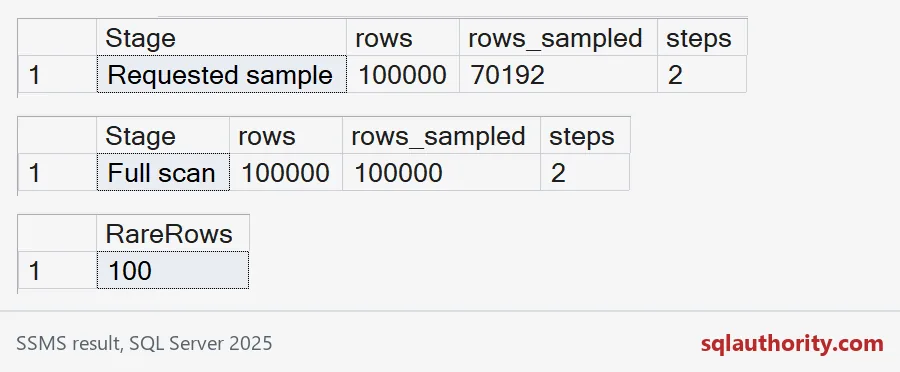
FULLSCAN shows rows_sampled equal to rows. The last grid is the truth: exactly 100 rows have CategoryId 99. Now let me see what the sample believed about that value.
What the sample did to the estimate
The histogram stores, for each step, an equal_rows number. That is the estimate for a query that asks for exactly that value. I rebuild the sampled version, read its histogram, then do the same after FULLSCAN.
UPDATE STATISTICS dbo.StatsSampleDemo ST_Category WITH SAMPLE 10 PERCENT;

SELECT N'Sampled' AS Stage, h.range_high_key, h.equal_rows
FROM sys.stats AS s
CROSS APPLY sys.dm_db_stats_histogram(s.object_id, s.stats_id) AS h
WHERE s.object_id = OBJECT_ID(N'dbo.StatsSampleDemo') AND s.name = N'ST_Category'
ORDER BY h.step_number;

UPDATE STATISTICS dbo.StatsSampleDemo ST_Category WITH FULLSCAN;

SELECT N'Full scan' AS Stage, h.range_high_key, h.equal_rows
FROM sys.stats AS s
CROSS APPLY sys.dm_db_stats_histogram(s.object_id, s.stats_id) AS h
WHERE s.object_id = OBJECT_ID(N'dbo.StatsSampleDemo') AND s.name = N'ST_Category'
ORDER BY h.step_number;
For the rare value 99, the sampled statistic says about 83 rows. The full scan says exactly 100. That is a small miss on a small table. On a big skewed table the same gap can turn a seek into a scan. But look at the common value 1 too: the sampled number is close. Samples hurt rare values most.

Review the statistics on your own server
This query lists every user statistic in a database with its sampled percent and its modification counter. Sort by the lowest percent and ask whether the table is skewed. The output depends on your database. In my run the primary key statistic shows NULLs, because it has not been built yet. That is missing metadata, not an empty table.
SELECT OBJECT_NAME(s.object_id) AS TableName, s.name AS StatName, p.rows, p.rows_sampled,
       CONVERT(decimal(5,1), 100.0 * p.rows_sampled / NULLIF(p.rows, 0)) AS SampledPercent,
       p.last_updated, p.modification_counter
FROM sys.stats AS s
OUTER APPLY sys.dm_db_stats_properties(s.object_id, s.stats_id) AS p
WHERE OBJECTPROPERTY(s.object_id, 'IsUserTable') = 1
ORDER BY SampledPercent, TableName, StatName;
Two cautions. A filtered statistic covers only its subset, so compare rows_sampled with that statistic’s own rows. And FULLSCAN is not a universal repair. It will not fix a predicate on the wrong column, or correlated columns that the optimizer treats as independent. Raise the sample only where the estimate hurts a real query.
DROP TABLE IF EXISTS dbo.StatsSampleDemo;Next time someone says the statistics are fresh, ask how many rows they saw.
A recent statistic is not complete coverage, it is an update with a sample.
Published by Pinal Dave on SQLAuthority. More of my work at pinaldave.com.
Discover more from SQL Authority with Pinal Dave
Subscribe to get the latest posts sent to your email.