Rows, Columns and Tables are the three ideas behind how a database holds information. A table holds one kind of thing. Each row is one of those things, and each column is one fact about it.

How Rows, Columns and Tables Fit Together
Picture the catalog of a small bookshop. Every book has a title, a category, a price and a stock count. You could keep those facts on index cards, one card per book. A table is the database version of that card box, with rules about what every card must contain.
A table holds one kind of thing. Books go in one table, customers in another, and orders in a third. If you mix them, each row becomes harder to read and each change becomes harder to make.
Columns Describe, Rows Record
A column is one fact you keep about every item, such as Price. It has a name and a data type, and every value in the column must fit that type. You choose the columns when you create the table. You can add one later with ALTER TABLE, but it changes the shape of the whole table.
A row is one item: one book, with a value in every column. People also say record for a row and field for a single value. SQL Server’s own tools say row and column, so I use those words here.
The number of columns stays fixed, and the number of rows grows. A Books table with five columns can hold five rows or five million. Adding a book adds a row. Adding a page count for every book changes the table itself.
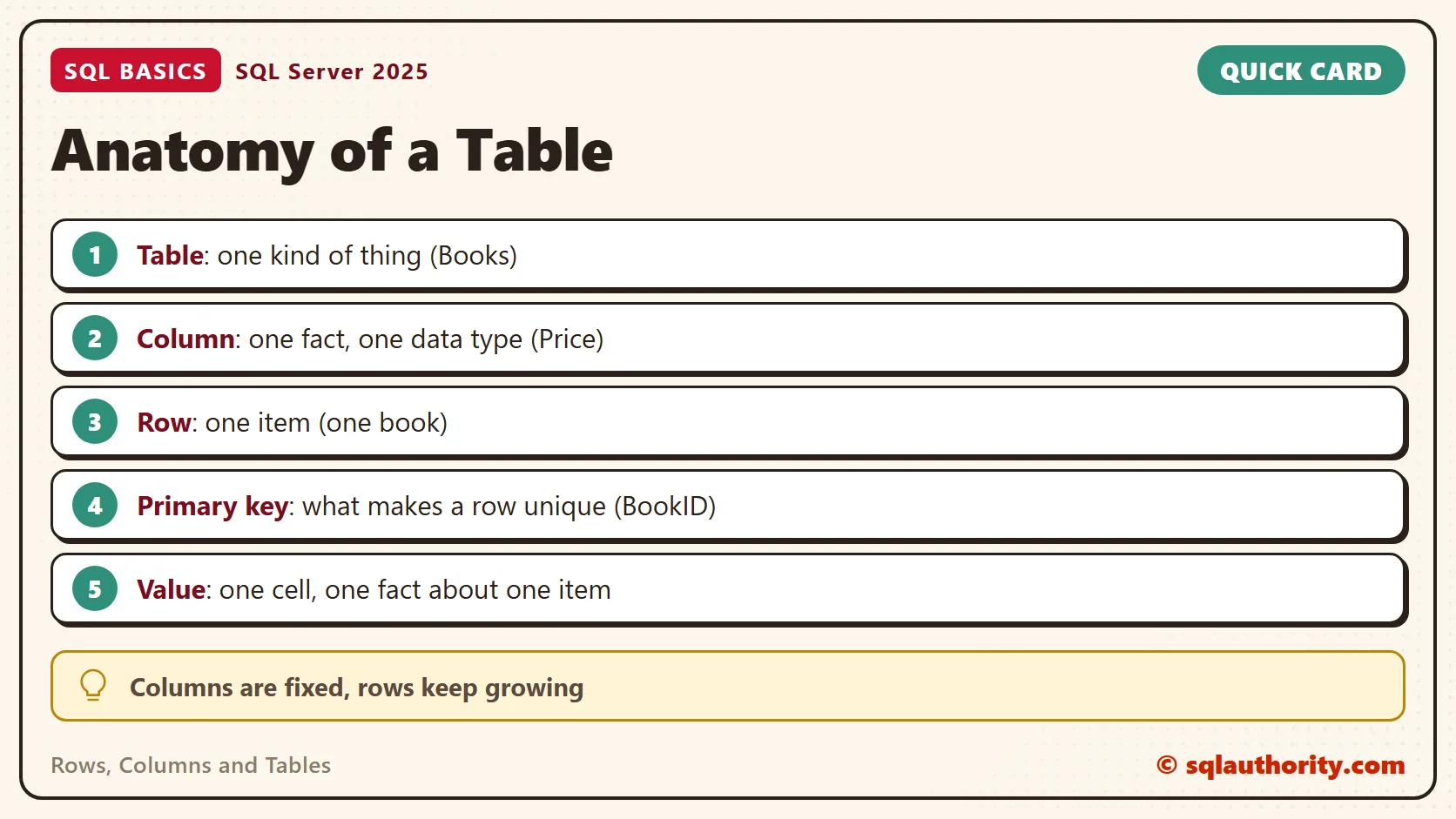
The spot where a row meets a column is a cell, and a cell holds one value. Keep it that way. If a book fits two categories, don’t type both into one cell. A list inside a cell can’t be filtered or counted cleanly. It also breaks the idea of a column as one fact.
Create the Table and Add Rows
The script creates a database named SqlBasicsTables if it’s missing, used only for this example. It then drops and rebuilds the demo Books table inside it and adds five rows. Run it on a test instance. Running it twice is safe. The name dbo is a schema, a namespace that groups tables and other objects.
IF DB_ID(N'SqlBasicsTables') IS NULL CREATE DATABASE SqlBasicsTables;
GO
USE SqlBasicsTables;
GO
DROP TABLE IF EXISTS dbo.Books;
CREATE TABLE dbo.Books (
    BookID   int            NOT NULL,
    Title    nvarchar(100)  NOT NULL,
    Category nvarchar(40)   NOT NULL,
    Price    decimal(6,2)   NOT NULL,
    InStock  int            NOT NULL,
    CONSTRAINT PK_Books PRIMARY KEY (BookID)
);
INSERT INTO dbo.Books (BookID, Title, Category, Price, InStock)
VALUES (1, N'Garden Notes', N'Gardening', 12.50, 14),
       (2, N'Tea Around the World', N'Travel', 18.00, 6),
       (3, N'Quiet Mornings', N'Lifestyle', 9.00, 22),
       (4, N'Seasonal Soups', N'Cooking', 15.75, 9),
       (5, N'Fruit Tree Basics', N'Gardening', 21.00, 3);
Read the column list line by line. Each line has a name, a data type and NOT NULL. The type nvarchar holds text in any language. The type decimal(6,2) holds up to six digits, two of them after the point. The type int holds whole numbers. NOT NULL means every row must supply a value.
Reading Rows and Columns Back
Three small queries show how the pieces work. The first asks for everything. The second names two columns. The third picks one row by its key.
SELECT * FROM dbo.Books;

SELECT Title, Price FROM dbo.Books;

SELECT * FROM dbo.Books WHERE BookID = 4;
The first query returns five rows and all five columns. The second still returns five rows, but only two columns. The third returns one row, Seasonal Soups. So the column list chooses which facts you see, and WHERE chooses which items you see. Every query on a table is a mix of those two choices.
Why Every Row Needs an Identity
Look at the BookID column. It has a different value in every row, and the PRIMARY KEY constraint enforces that. A primary key column can’t repeat and can’t hold NULL. Without a key, two identical rows can sit side by side. No query can point at only one of them.
The danger shows up on the day you change data. An UPDATE or DELETE that targets a twin row hits both twins. A key gives each row an address, so you can say “this one” and mean it.
One more point about rows: they have no built-in order. Without an ORDER BY clause, SQL Server doesn’t guarantee which row comes first. Don’t rely on the order you inserted the rows. If order matters, ask for it.
Test the Rules With a Bad Row
Rows, Columns and Tables work together to protect your data. The columns set the rules, and the table applies them to every new row. Try two inserts that break a rule. Run the setup script first. Then run these one at a time, because each one fails on purpose.
INSERT INTO dbo.Books (BookID, Title, Category, Price, InStock)
VALUES (3, N'Another Quiet Mornings', N'Lifestyle', 9.00, 5);

INSERT INTO dbo.Books (BookID, Category, Price, InStock)
VALUES (6, N'Cooking', 11.00, 4);
The first one reuses BookID 3, so the primary key refuses it with error 2627. The second leaves out Title, a NOT NULL column, so SQL Server refuses it with error 515. In both cases the table stays at five rows. These two bad rows never get a chance to confuse a later query.
See the Table in SSMS
Open Object Explorer and expand Databases, SqlBasicsTables, Tables and dbo.Books. Then expand Columns. You’ll see each column with its data type and whether it allows NULL. If the new table doesn’t appear, refresh the Tables folder.
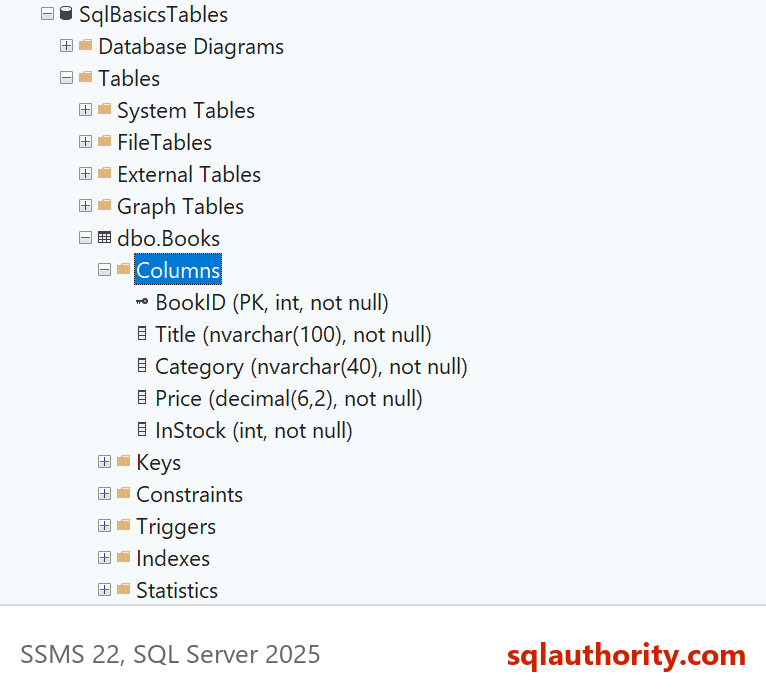
A query can show the same list. The catalog view sys.columns holds one row per column, and sys.types names the data type of each.
SELECT c.column_id, c.name AS ColumnName, t.name AS DataType, c.is_nullable
FROM sys.columns AS c
INNER JOIN sys.types AS t
    ON t.user_type_id = c.user_type_id
WHERE c.object_id = OBJECT_ID(N'dbo.Books')
ORDER BY c.column_id;
The result has five rows, one per column, and is_nullable is 0 for all of them. That list is the table’s shape. Every row you ever insert has to fit it. When a design question comes up later, come back to this view and ask what each column is for.
One Table, One Subject
A good test for any table is whether it has one subject. The Books table describes books and nothing else. Customer addresses don’t belong in it, and neither do order dates. Those facts describe other things, so they get their own tables.
The reason is upkeep. Suppose a customer’s city sat inside every order row. A move would mean editing dozens of rows. One missed row would leave two cities for the same person. With a Customers table, the city lives in one row. You change it once, and every query sees the new value.
Related Reading
- What Is a Database Schema in SQL Server?
- What Is a Primary Key, and What Happens Without One?
- What Is a Data Type, and Why the Wrong One Costs You
- Designing Your First Table: Columns, Keys and Data Types
A table is not a spreadsheet tab, it is a promise about what every row will look like.
Published by Pinal Dave on SQLAuthority. More of my work at pinaldave.com.
Discover more from SQL Authority with Pinal Dave
Subscribe to get the latest posts sent to your email.