Reordering a list in SQL Server means changing a sort key, and the best design writes the fewest rows. A user drags an item to a new place. Renumbering every row works, but it touches the whole list for every drag. This post compares three designs by the rows each one writes.
The Sample Table
Task holds 1,000 items, and SortKey decides their order. A plain index on SortKey serves ORDER BY. MoveLog records how many rows each move wrote. That is the row count of its UPDATE, read from @@ROWCOUNT. OrderCheck is used later. Every result in this post comes from SQL Server 2025.
CREATE TABLE dbo.Task (
  TaskID int NOT NULL PRIMARY KEY,
  Title varchar(30) NOT NULL,
  SortKey int NOT NULL
);
CREATE INDEX IX_Task_SortKey ON dbo.Task (SortKey);
INSERT INTO dbo.Task (TaskID, Title, SortKey)
SELECT value, CONCAT('Task ', value), value FROM GENERATE_SERIES(1, 1000);
CREATE TABLE dbo.MoveLog (
  LogID int IDENTITY PRIMARY KEY,
  Approach varchar(10) NOT NULL,
  RowsWritten int NOT NULL
);
CREATE TABLE dbo.OrderCheck (Approach varchar(10) NOT NULL, OrderHash char(64) NOT NULL);
Design One: Renumber Everything
This is the first design most of us write. Rank all the items in their new order with ROW_NUMBER and store the rank. The moved item sorts half a place before or after its target, which puts it in the right slot. It’s simple and it can’t go wrong. Its UPDATE touches every row, even the ones whose number stays the same.
CREATE PROCEDURE dbo.MoveRenumber @TaskID int, @NewPos int
AS
BEGIN
  SET NOCOUNT ON;
  DECLARE @Old int = (SELECT SortKey FROM dbo.Task WHERE TaskID = @TaskID), @n int;
  UPDATE t SET SortKey = o.NewKey
  FROM dbo.Task AS t
  JOIN (SELECT TaskID,
               ROW_NUMBER() OVER (ORDER BY CASE WHEN TaskID = @TaskID
                                                THEN @NewPos + CASE WHEN @NewPos < @Old THEN -0.5 ELSE 0.5 END
                                                ELSE SortKey END) AS NewKey
        FROM dbo.Task) AS o ON o.TaskID = t.TaskID;
  SET @n = @@ROWCOUNT;
  INSERT dbo.MoveLog (Approach, RowsWritten) VALUES ('renumber', @n);
END;
Design Two: Shift the Rows in Between
Only the rows between the old and the new position change. Each one moves by one place, and the moved item takes the target position. A short move writes few rows. A long move writes almost as many as design one.
CREATE PROCEDURE dbo.MoveShift @TaskID int, @NewPos int
AS
BEGIN
  SET NOCOUNT ON;
  DECLARE @Old int = (SELECT SortKey FROM dbo.Task WHERE TaskID = @TaskID), @n int;
  UPDATE dbo.Task
  SET SortKey = CASE WHEN TaskID = @TaskID THEN @NewPos
                     WHEN @NewPos < @Old THEN SortKey + 1
                     ELSE SortKey - 1 END
  WHERE SortKey BETWEEN CASE WHEN @NewPos < @Old THEN @NewPos ELSE @Old END
                    AND CASE WHEN @NewPos < @Old THEN @Old ELSE @NewPos END;
  SET @n = @@ROWCOUNT;
  INSERT dbo.MoveLog (Approach, RowsWritten) VALUES ('shift', @n);
END;
Design Three: Leave Gaps
Here the keys start 1,000 apart. A moved item gets the middle value between its new neighbors, so a move writes one row. After enough moves into the same spot, two neighbors have no whole number between them. The procedure then spreads all the keys out again and tries once more.
CREATE PROCEDURE dbo.MoveGap @TaskID int, @NewPos int
AS
BEGIN
  SET NOCOUNT ON;
  DECLARE @Prev int, @Next int, @New int, @Total int = 0;
  WHILE 1 = 1
  BEGIN
    SELECT @Prev = MAX(CASE WHEN r = @NewPos - 1 THEN SortKey ELSE 0 END),
           @Next = MAX(CASE WHEN r = @NewPos THEN SortKey ELSE 0 END)
    FROM (SELECT SortKey, ROW_NUMBER() OVER (ORDER BY SortKey) AS r
          FROM dbo.Task WHERE TaskID <> @TaskID) AS x;
    IF @Next = 0 SET @Next = @Prev + 2000;
    SET @New = @Prev + (@Next - @Prev) / 2;
    IF @New > @Prev AND @New < @Next
    BEGIN
      UPDATE dbo.Task SET SortKey = @New WHERE TaskID = @TaskID;
      SET @Total += @@ROWCOUNT;
      BREAK;
    END;
    UPDATE t SET SortKey = r.n * 1000
    FROM dbo.Task AS t
    JOIN (SELECT TaskID, ROW_NUMBER() OVER (ORDER BY SortKey) AS n FROM dbo.Task) AS r ON r.TaskID = t.TaskID;
    SET @Total += @@ROWCOUNT;
  END;
  INSERT dbo.MoveLog (Approach, RowsWritten) VALUES ('gap', @Total);
END;
One Move, Three Costs
ResetList puts the list back in its first order, with a step between keys. CompareOne resets the list before each design and runs the same move through all three.
CREATE PROCEDURE dbo.ResetList @Step int
AS
BEGIN
  SET NOCOUNT ON;
  UPDATE dbo.Task SET SortKey = TaskID * @Step;
END;
CREATE PROCEDURE dbo.CompareOne @TaskID int, @NewPos int
AS
BEGIN
SET NOCOUNT ON;
TRUNCATE TABLE dbo.MoveLog;
EXEC dbo.ResetList @Step = 1;
EXEC dbo.MoveRenumber @TaskID, @NewPos;
EXEC dbo.ResetList @Step = 1;
EXEC dbo.MoveShift @TaskID, @NewPos;
EXEC dbo.ResetList @Step = 1000;
EXEC dbo.MoveGap @TaskID, @NewPos;
SELECT Approach, RowsWritten FROM dbo.MoveLog ORDER BY LogID;
END;Start with the worst move for design two, the last item to the top. Then try a move across the middle, and then a move of one place.
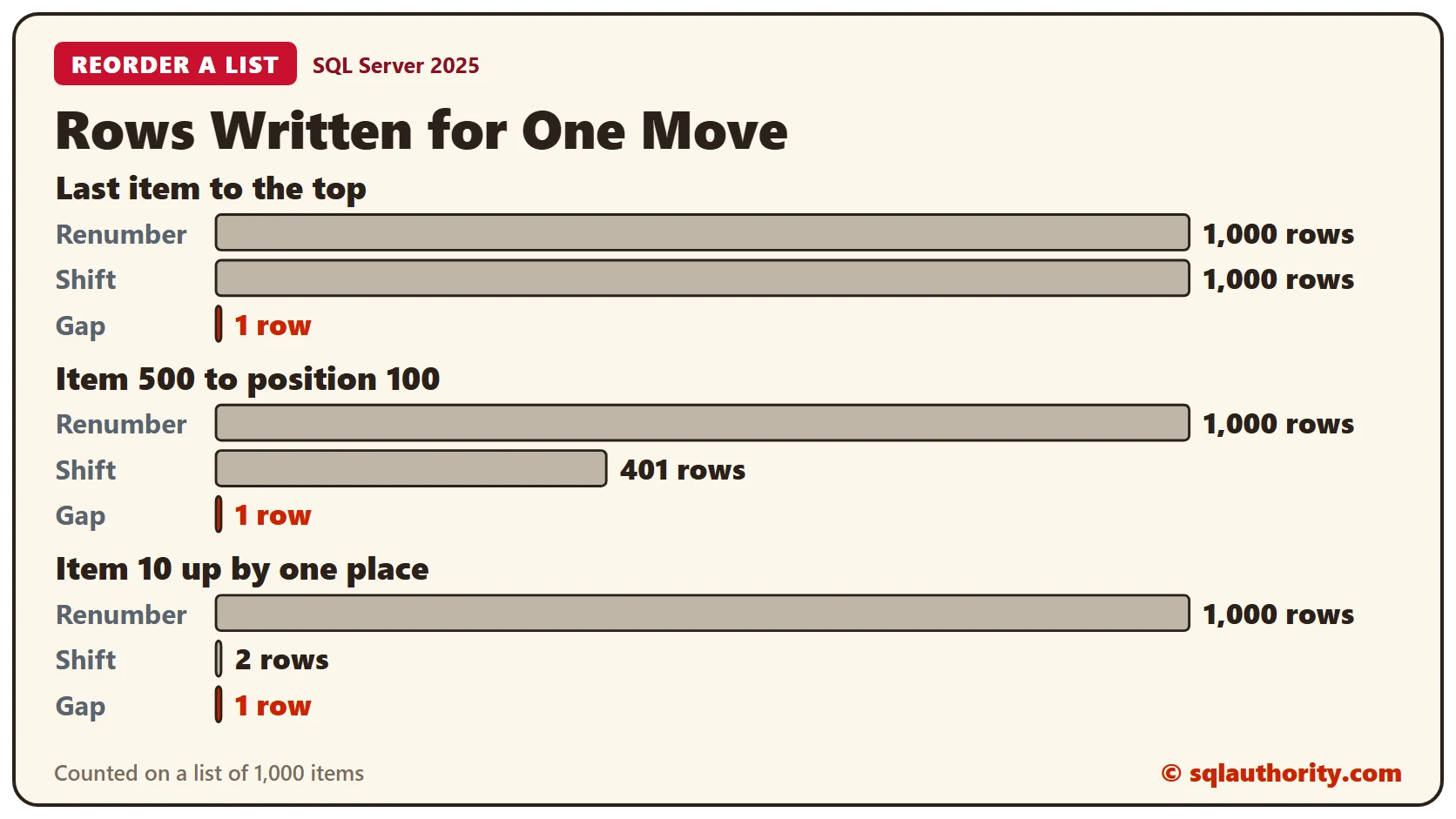
EXEC dbo.CompareOne @TaskID = 1000, @NewPos = 1;EXEC dbo.CompareOne @TaskID = 500, @NewPos = 100;EXEC dbo.CompareOne @TaskID = 10, @NewPos = 9;Renumbering writes 1,000 rows every time. Shifting writes 1,000 rows for the long move, 401 for the middle move and 2 for the short one. Gaps write 1 row each time. Shifting wins only when the move is short, and even then the gap design is one row against 2.
After the first gap move, Task 1000 holds the key 500, halfway between 0 and the 1,000 of Task 1. Nothing else changed.
EXEC dbo.ResetList @Step = 1000;
EXEC dbo.MoveGap @TaskID = 1000, @NewPos = 1;
SELECT TOP (3) TaskID, Title, SortKey FROM dbo.Task ORDER BY SortKey;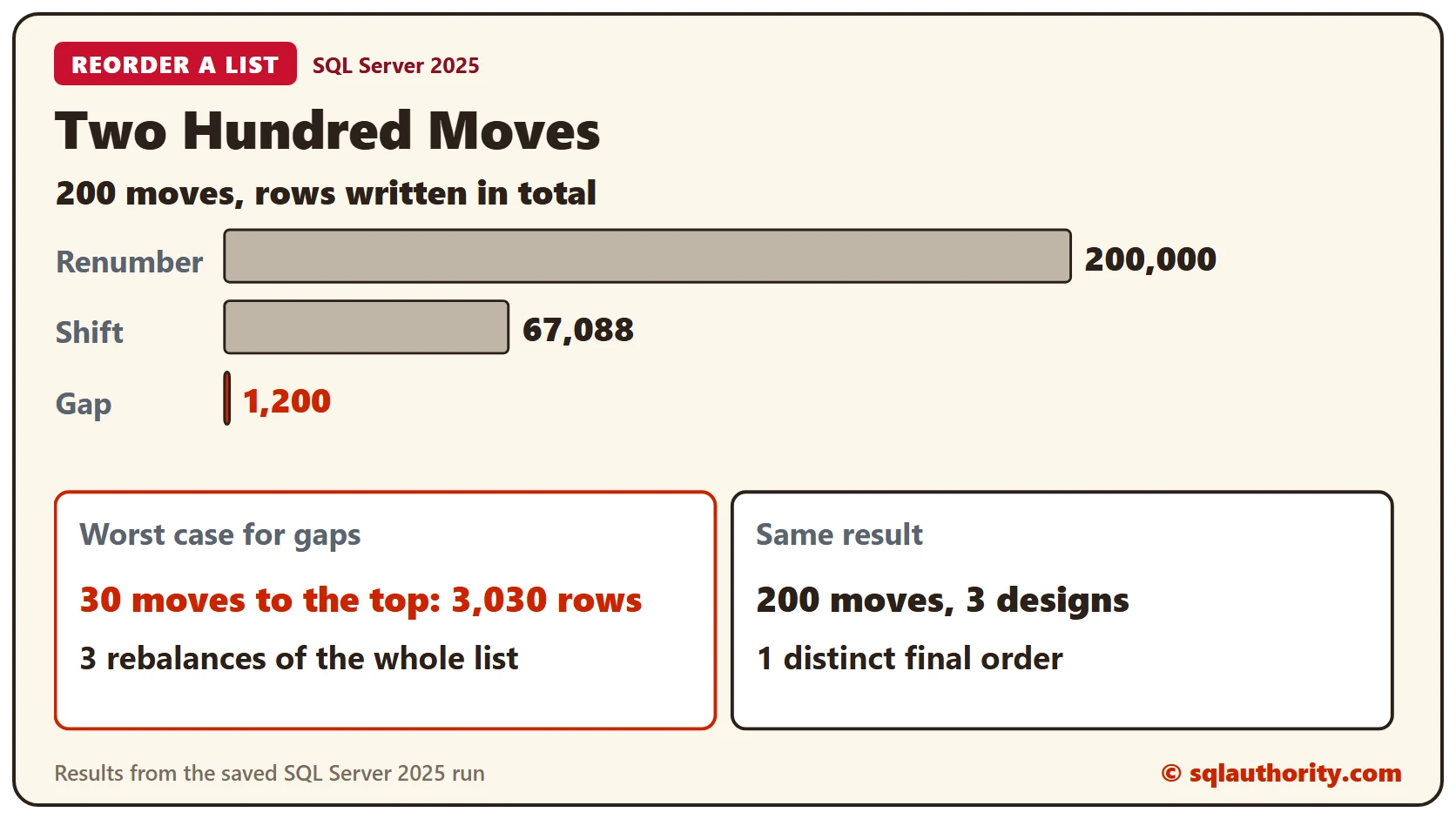
Two Hundred Moves
One move proves little. This procedure runs the same 200 moves through a design. A fixed formula picks the positions, and a hash of the final order is stored. Run it for all three, then read the log.
CREATE PROCEDURE dbo.Simulate @Approach varchar(10), @Moves int
AS
BEGIN
  SET NOCOUNT ON;
  DECLARE @k int = 1, @p int, @q int, @id int, @Step int = CASE WHEN @Approach = 'gap' THEN 1000 ELSE 1 END;
  EXEC dbo.ResetList @Step;
  WHILE @k <= @Moves
  BEGIN
    SET @p = (@k * 37) % 1000 + 1;
    SET @q = (@k * 91) % 1000 + 1;
    IF @p <> @q
    BEGIN
      SELECT @id = TaskID FROM dbo.Task ORDER BY SortKey OFFSET @p - 1 ROWS FETCH NEXT 1 ROWS ONLY;
      IF @Approach = 'renumber' EXEC dbo.MoveRenumber @id, @q
      ELSE IF @Approach = 'shift' EXEC dbo.MoveShift @id, @q
      ELSE EXEC dbo.MoveGap @id, @q;
    END;
    SET @k += 1;
  END;
  INSERT dbo.OrderCheck (Approach, OrderHash)
  SELECT @Approach, CONVERT(char(64), HASHBYTES('SHA2_256', STRING_AGG(CONVERT(varchar(10), TaskID), ',') WITHIN GROUP (ORDER BY SortKey)), 2)
  FROM dbo.Task;
END;
TRUNCATE TABLE dbo.MoveLog;
EXEC dbo.Simulate 'renumber', 200;
EXEC dbo.Simulate 'shift', 200;
EXEC dbo.Simulate 'gap', 200;
SELECT Approach, COUNT(*) AS Moves, SUM(RowsWritten) AS RowsWritten, MAX(RowsWritten) AS Largest
FROM dbo.MoveLog GROUP BY Approach ORDER BY RowsWritten DESC;Renumbering wrote 200,000 rows. Shifting wrote 67,088, and its largest move wrote 903. Gaps wrote 1,200 rows. That total holds one rebalance, which rewrote all 1,000 rows in a single move. Without it, every move wrote one row.
The three designs must also do the same job. This query counts the distinct final orders among the three stored hashes.
SELECT COUNT(DISTINCT OrderHash) AS DifferentFinalOrders FROM dbo.OrderCheck;The answer is 1, so all three end with the identical list. Only the cost differs.
The Worst Case for Gaps
Gaps hurt when every move goes to the same spot, because each move halves the room there. This script moves the last item to the top, 30 times in a row.
TRUNCATE TABLE dbo.MoveLog;
EXEC dbo.ResetList @Step = 1000;
DECLARE @k int = 0, @id int;
WHILE @k < 30
BEGIN
  SET @id = 1000 - @k;
  EXEC dbo.MoveGap @TaskID = @id, @NewPos = 1;
  SET @k += 1;
END;
SELECT COUNT(*) AS Moves, SUM(RowsWritten) AS RowsWritten, SUM(CASE WHEN RowsWritten > 1 THEN 1 ELSE 0 END) AS Rebalances FROM dbo.MoveLog;
The 30 moves wrote 3,030 rows, and 3 of them triggered a rebalance. That is about 101 rows a move, against the 1,000 rows that shifting wrote for one such move. A rebalance is a rare cost, so gaps stay the cheaper design.
Which One to Use
Renumber a list of a few dozen items, where nobody counts the writes. Shift when lists are short and moves are short. Use gaps for long lists and drag and drop. Reading is the same in every design: ORDER BY SortKey uses the index. None of this handles two people dragging at once. Lost Updates: Optimistic Concurrency With a rowversion Column covers that case.
Clean Up
Remove the procedures and tables when you finish.
DROP PROCEDURE dbo.Simulate;
DROP PROCEDURE dbo.CompareOne;
DROP PROCEDURE dbo.ResetList;
DROP PROCEDURE dbo.MoveGap;
DROP PROCEDURE dbo.MoveShift;
DROP PROCEDURE dbo.MoveRenumber;
DROP TABLE dbo.OrderCheck;
DROP TABLE dbo.MoveLog;
DROP TABLE dbo.Task;
What to Remember
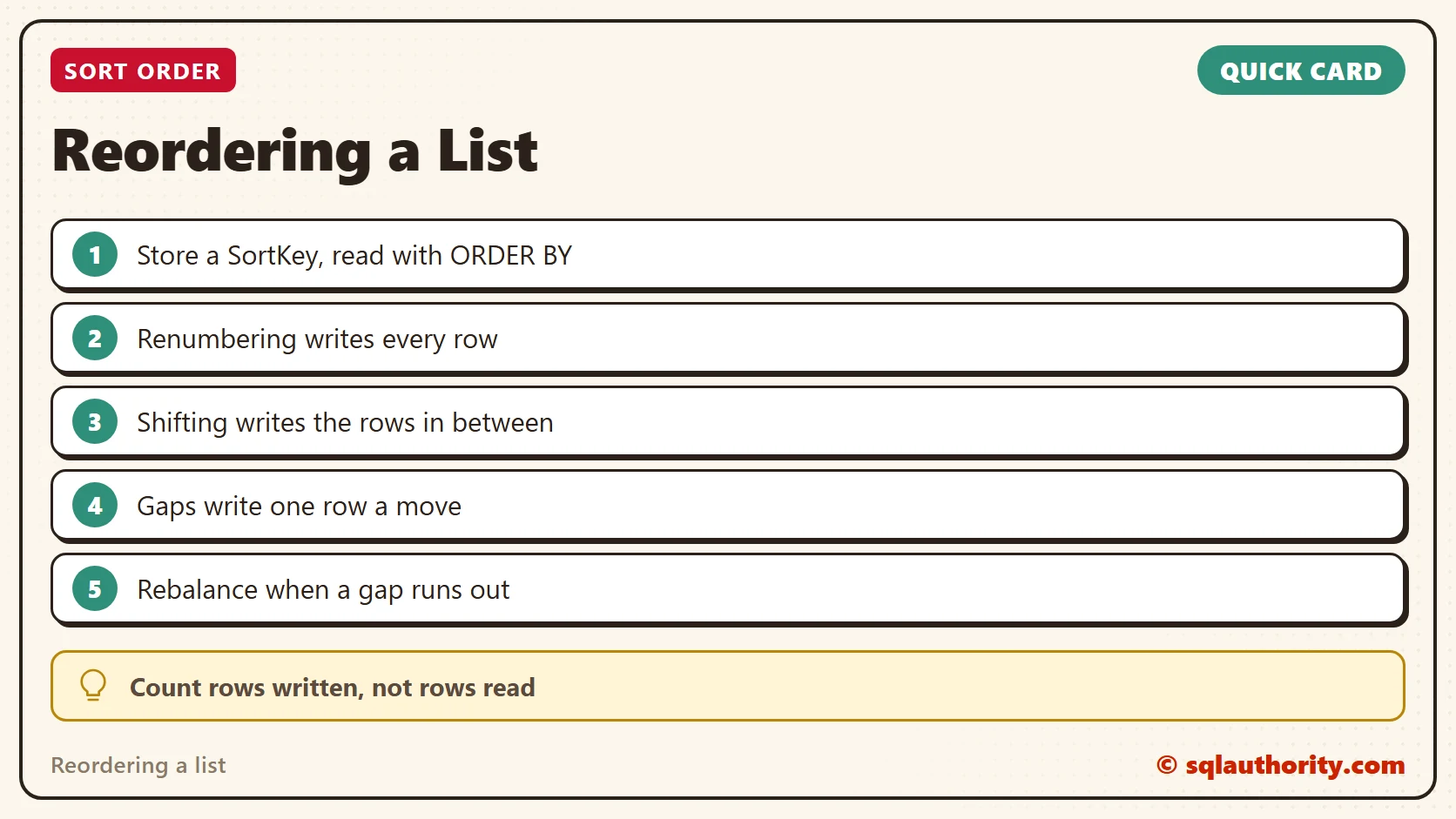
A sort key is a position with room around it. Count the rows each design writes, not only the rows it reads. Gaps write one row a move and rebalance rarely.
To go further, read Lost Updates: Optimistic Concurrency With a rowversion Column and RANK( ), DENSE_RANK( ), and ROW_NUMBER( ): How Each Handles Ties.
A sort order is not a counter to rewrite, it is a position with room around it.
Published by Pinal Dave on SQLAuthority. More of my work at pinaldave.com.
Discover more from SQL Authority with Pinal Dave
Subscribe to get the latest posts sent to your email.