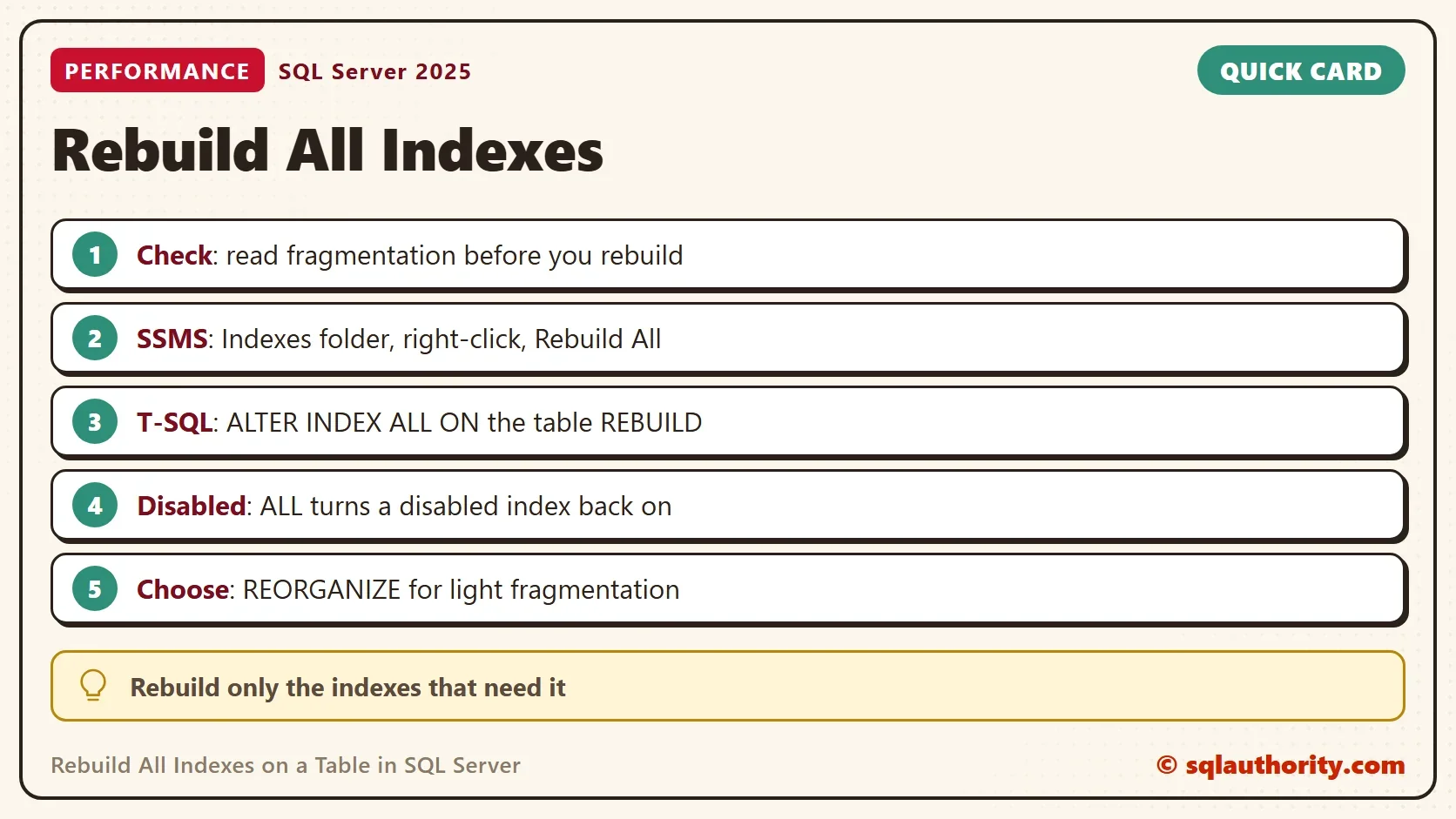
To rebuild all indexes on a table, use Rebuild All in SSMS or ALTER INDEX ALL with REBUILD. Both ways do the same work. Check the fragmentation first, because the command also touches a disabled index.

Check the Fragmentation Before You Rebuild
A rebuild creates each index again from scratch. It removes fragmentation, packs the pages and updates the index statistics. It also costs time, processor and log space. Read the fragmentation first, so you know which indexes need the work.
The demo database RebuildAllDemo holds one table of 60,000 orders with a clustered primary key and three nonclustered indexes. A wide update after the load splits the pages of the clustered index. One index is disabled on purpose. The check below adds a suggestion column. The thresholds follow a common guideline. Leave an index alone below 5 percent fragmentation. Reorganize between 5 and 30 percent. Rebuild above 30 percent. Many guidelines skip indexes under about 1,000 pages. This demo table is small, so the check uses 100.
IF DB_ID(N'RebuildAllDemo') IS NULL CREATE DATABASE RebuildAllDemo;
GO
USE RebuildAllDemo;
GO
DROP TABLE IF EXISTS dbo.Orders;
CREATE TABLE dbo.Orders (
    OrderID      int NOT NULL CONSTRAINT PK_Orders PRIMARY KEY,
    CustomerCode int NOT NULL,
    OrderDate    date NOT NULL,
    Amount       decimal(9,2) NOT NULL,
    Note         varchar(120) NOT NULL
);
CREATE INDEX IX_Orders_CustomerCode ON dbo.Orders (CustomerCode);
CREATE INDEX IX_Orders_OrderDate ON dbo.Orders (OrderDate);
CREATE INDEX IX_Orders_Amount ON dbo.Orders (Amount);
INSERT INTO dbo.Orders (OrderID, CustomerCode, OrderDate, Amount, Note)
SELECT n, ABS(CHECKSUM(n * 7919)) % 50000, DATEADD(DAY, n % 365, '2025-01-01'), 5 + n % 90, 'new'
FROM (SELECT TOP (60000) ROW_NUMBER() OVER (ORDER BY (SELECT NULL)) AS n
      FROM sys.all_objects AS a CROSS JOIN sys.all_objects AS b) AS nums;
UPDATE dbo.Orders SET Note = REPLICATE('x', 100) WHERE OrderID % 3 = 0;
ALTER INDEX IX_Orders_Amount ON dbo.Orders DISABLE;
SELECT i.name AS IndexName,
       i.is_disabled AS IsDisabled,
       CAST(ps.avg_fragmentation_in_percent AS decimal(5,1)) AS FragmentationPercent,
       ps.page_count AS Pages,
       CASE WHEN i.is_disabled = 1 THEN N'disabled'
            WHEN ps.page_count < 100 THEN N'skip, small'
            WHEN ps.avg_fragmentation_in_percent >= 30 THEN N'REBUILD'
            WHEN ps.avg_fragmentation_in_percent >= 5 THEN N'REORGANIZE'
            ELSE N'leave alone' END AS Suggestion
FROM sys.indexes AS i
LEFT JOIN sys.dm_db_index_physical_stats(DB_ID(), OBJECT_ID(N'dbo.Orders'), NULL, NULL, 'LIMITED') AS ps
       ON ps.object_id = i.object_id AND ps.index_id = i.index_id
WHERE i.object_id = OBJECT_ID(N'dbo.Orders')
ORDER BY i.index_id;| IndexName | IsDisabled | FragmentationPercent | Pages | Suggestion |
|---|---|---|---|---|
| PK_Orders | 0 | 99.2 | 796 | REBUILD |
| IX_Orders_CustomerCode | 0 | 1.0 | 104 | leave alone |
| IX_Orders_OrderDate | 0 | 1.0 | 97 | skip, small |
| IX_Orders_Amount | 1 | NULL | NULL | disabled |
Only the primary key needs a rebuild. The two healthy indexes would only be rebuilt for nothing. The page counts and percentages come from one run, so yours will differ a little. The disabled index has no physical statistics at all, because it holds no data.
Rebuild All Indexes on a Table in SSMS
To rebuild all indexes on a table in SSMS, follow these steps. The steps follow SSMS 22 and were not run here. In Object Explorer, expand the server, the Databases folder, the database and its Tables folder. Expand the table, and right-click its Indexes folder. Choose Rebuild All. A dialog lists every index of the table with its fragmentation. Select OK, and SSMS rebuilds them one by one.
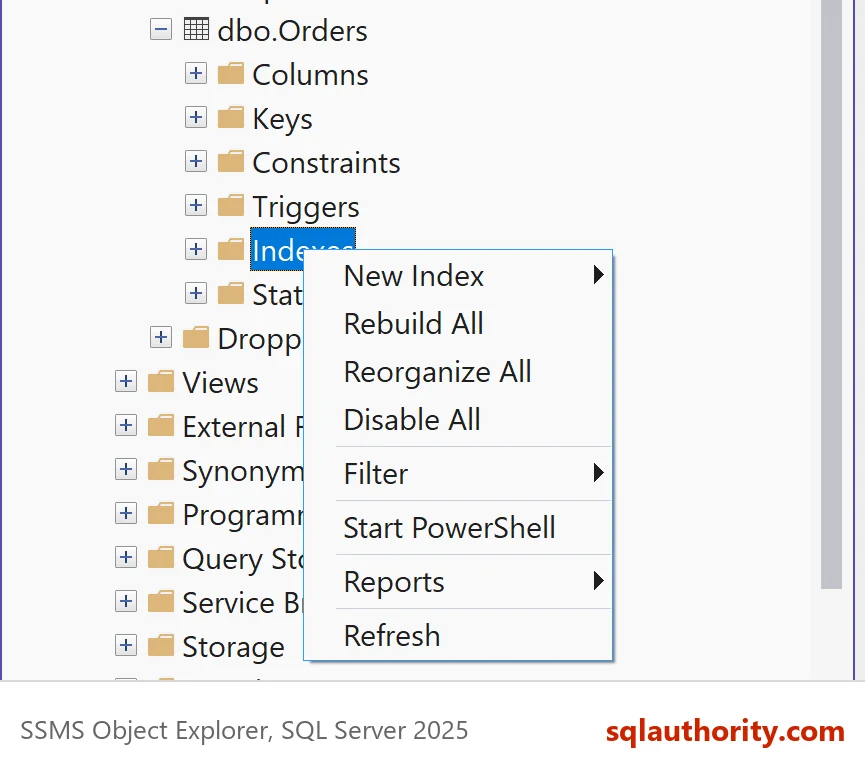
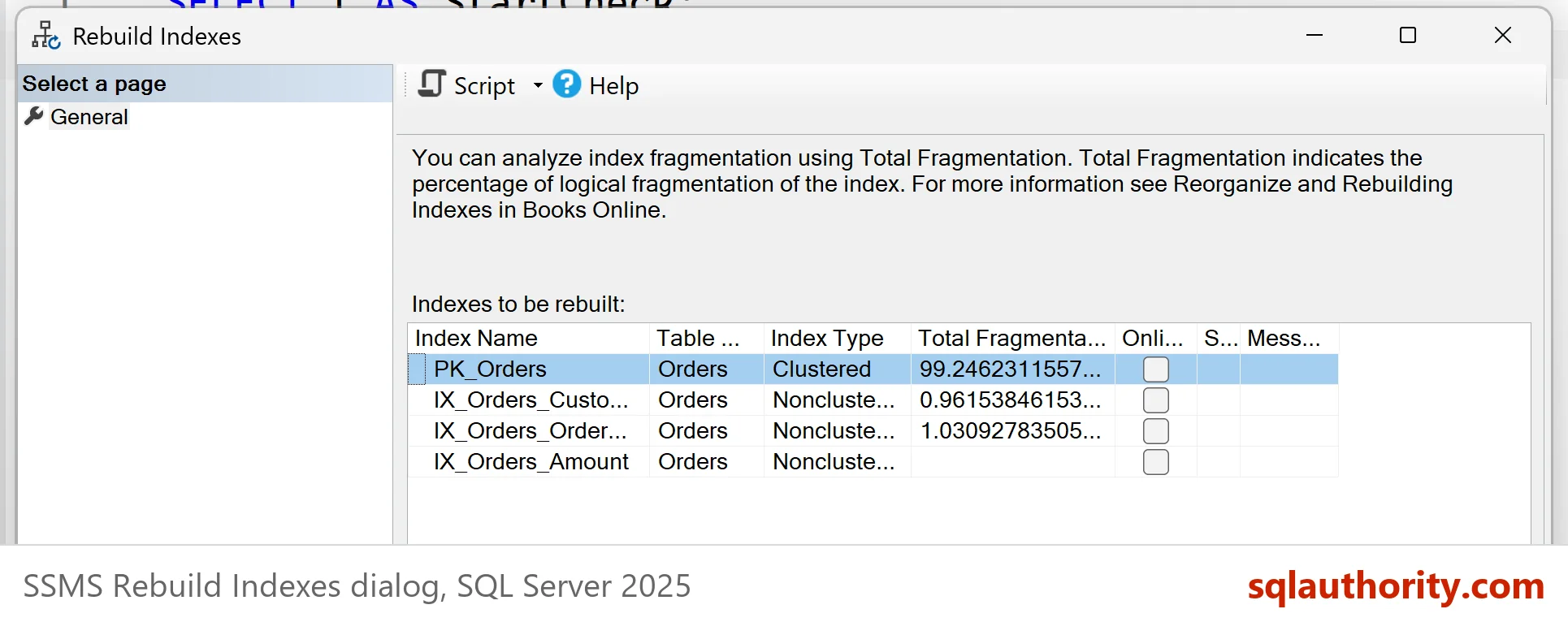
The menu command is the fastest way for a single table and a one-off job. It gives you no options and no preview of the statements. For a scheduled job, or when you need ONLINE or MAXDOP, use T-SQL.
Rebuild All Indexes on a Table With T-SQL
To rebuild all indexes on a table with T-SQL, one statement is enough. ALTER INDEX with the keyword ALL covers every index of the table, the clustered one included. The second query repeats the check, so you can compare the two results.
ALTER INDEX ALL ON dbo.Orders REBUILD;
SELECT i.name AS IndexName,
       i.is_disabled AS IsDisabled,
       CAST(ps.avg_fragmentation_in_percent AS decimal(5,1)) AS FragmentationPercent,
       ps.page_count AS Pages
FROM sys.indexes AS i
LEFT JOIN sys.dm_db_index_physical_stats(DB_ID(), OBJECT_ID(N'dbo.Orders'), NULL, NULL, 'LIMITED') AS ps
       ON ps.object_id = i.object_id AND ps.index_id = i.index_id
WHERE i.object_id = OBJECT_ID(N'dbo.Orders')
ORDER BY i.index_id;| IndexName | IsDisabled | FragmentationPercent | Pages |
|---|---|---|---|
| PK_Orders | 0 | 0.0 | 480 |
| IX_Orders_CustomerCode | 0 | 0.0 | 104 |
| IX_Orders_OrderDate | 0 | 0.0 | 97 |
| IX_Orders_Amount | 0 | 0.0 | 112 |
The primary key shrank from 796 pages to 480. Its fragmentation fell from 99.2 percent to 0 on the test server. A parallel rebuild can leave a few percent, which is normal. The other two indexes stayed the same size, because they were healthy. Look at the last row. The disabled index now shows IsDisabled 0. A rebuild enables a disabled index, so ALL brought it back to life. Every insert and update must now maintain it. To leave a disabled index alone, rebuild the other indexes by name.
Options Worth Knowing
The WITH clause adds control. ONLINE = ON keeps the table available for reads and writes during the rebuild. It needs Enterprise or Developer edition, and other editions reject it. For what ONLINE = ON locks, read Create an Index Online in SQL Server: What ONLINE = ON Locks. SORT_IN_TEMPDB = ON moves the sort work into tempdb. MAXDOP limits the processors. The statement below runs all three on the demo table.
ALTER INDEX ALL ON dbo.Orders REBUILD WITH (ONLINE = ON, SORT_IN_TEMPDB = ON, MAXDOP = 2);
REORGANIZE is the lighter choice for fragmentation between 5 and 30 percent. It works in small steps, can be stopped, and doesn’t update statistics. REBUILD does update them. The check below reads the statistics date of the primary key before and after each command. The new statistics come from a full scan of the index. Plans that depend on them can change, so choose a quiet hour for a large table.
DECLARE @before datetime = STATS_DATE(OBJECT_ID(N'dbo.Orders'), 1);
WAITFOR DELAY '00:00:02';
ALTER INDEX PK_Orders ON dbo.Orders REORGANIZE;
SELECT CASE WHEN STATS_DATE(OBJECT_ID(N'dbo.Orders'), 1) = @before THEN N'not updated' ELSE N'updated' END AS AfterReorganize;
SET @before = STATS_DATE(OBJECT_ID(N'dbo.Orders'), 1);
WAITFOR DELAY '00:00:02';
ALTER INDEX PK_Orders ON dbo.Orders REBUILD;
SELECT CASE WHEN STATS_DATE(OBJECT_ID(N'dbo.Orders'), 1) = @before THEN N'not updated' ELSE N'updated' END AS AfterRebuild;
| AfterReorganize |
|---|
| not updated |
| AfterRebuild |
|---|
| updated |
When a Rebuild Is the Wrong Tool
You could argue that a nightly rebuild of every index is the safest habit. It costs a lot and fixes little. The rebuild above touched two healthy indexes for no gain. On a big table it also fills the transaction log. Fragmentation matters less on fast storage, and an unused index is better dropped than rebuilt. I don’t like more than seven indexes on a table, because each one adds to every rebuild and every write.
For the read side of that story, see Index Slows Down SELECT? What an Unused Index Costs You.
What to Remember
Rebuild all indexes on a table only after you read the fragmentation. For fragmented indexes with their row counts, read Check Index Fragmentation With Row Count in SQL Server. Use Rebuild All in SSMS for a quick fix and ALTER INDEX for anything you repeat. Remember that ALL enables disabled indexes. When you finish with the demo, drop the example database.
USE master;
GO
DROP DATABASE IF EXISTS RebuildAllDemo;
A rebuild is not maintenance, it is a repair you should order only when the numbers ask for it.
Published by Pinal Dave on SQLAuthority. More of my work at pinaldave.com.
Discover more from SQL Authority with Pinal Dave
Subscribe to get the latest posts sent to your email.