The quickest way to list objects changed since your last release is the modify_date column in sys.objects. It finds what was altered. It can never find what was dropped, and that is the part people forget.

Why you want this list on Monday morning
Picture a Monday morning. A report that ran fine on Friday now crawls. Someone asks the question every DBA hears: “What did we change over the weekend?” The deployment notes are in an email thread nobody can find.
SQL Server keeps a small clue for every object. Each row in sys.objects has a create_date and a modify_date. Ask for rows whose modify_date is later than the release time and you get a list of leads to chase. I say leads, not proof, and you will see why in a minute.
Let me build a tiny example. It creates one table, dbo.ObjectDateExample, and cleans up after itself. Run every block in the same query window, because the baseline lives in a temp table.
Save a baseline before the release
First I take a snapshot of every user object and note the release time. Both go into temp tables, so they vanish when you close the window. I skip the objects SQL Server ships itself, because they are noise.
DROP TABLE IF EXISTS #ReleaseBaseline, #ReleaseTime;
DROP TABLE IF EXISTS dbo.ObjectDateExample;
GO
CREATE TABLE dbo.ObjectDateExample (ItemId int NOT NULL PRIMARY KEY);

SELECT SCHEMA_NAME(schema_id) AS SchemaName, name, type_desc, create_date, modify_date
INTO #ReleaseBaseline
FROM sys.objects
WHERE is_ms_shipped = 0;

SELECT GETDATE() AS ReleaseTime
INTO #ReleaseTime;
Why bother with a baseline? Because a dropped object leaves no row behind. The catalog describes only what exists right now. Without a picture from before, you cannot say what vanished.
Change a table, then drop it
Now play the release. I wait a second so the dates are clearly apart, then add a column to the table. The first query asks for everything modified since the release time. Then I drop the table and compare the baseline with what exists today.
WAITFOR DELAY '00:00:01';
ALTER TABLE dbo.ObjectDateExample ADD Description nvarchar(80) NULL;

SELECT SCHEMA_NAME(schema_id) AS SchemaName, name, type_desc, create_date, modify_date
FROM sys.objects
WHERE is_ms_shipped = 0
  AND modify_date >= (SELECT ReleaseTime FROM #ReleaseTime)
ORDER BY modify_date DESC, object_id;

DROP TABLE dbo.ObjectDateExample;

SELECT b.SchemaName, b.name AS MissingObject, b.type_desc
FROM #ReleaseBaseline AS b
LEFT JOIN sys.objects AS o
  ON o.name = b.name
 AND SCHEMA_NAME(o.schema_id) = b.SchemaName
 AND o.type_desc = b.type_desc
WHERE o.object_id IS NULL
ORDER BY b.SchemaName, b.name, b.type_desc;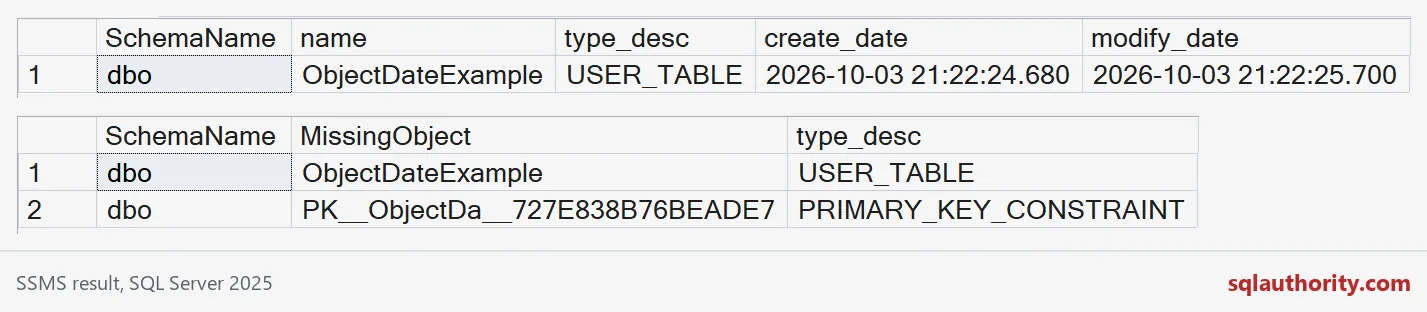
The top grid is the date query. It returns one row, and modify_date is later than create_date because of the ALTER. That is the clue. It does not say which statement ran or who ran it.
The bottom grid is the baseline comparison. It returns two rows, not one. A primary key is an object too, so it shows up beside the dropped table. The key name is generated by SQL Server, so yours will end with different characters. This is why I keep type_desc in the comparison.

A rename looks like a drop plus a new object
Name comparison has one more blind spot. If someone renames a table, the old name is gone and a new name has appeared. Nothing in the catalog says they are the same table. This block shows both sides of that, with one table.
DROP TABLE IF EXISTS dbo.RenameDemo, dbo.RenameDemoV2;
GO
CREATE TABLE dbo.RenameDemo (ItemId int NOT NULL);

SELECT SCHEMA_NAME(schema_id) AS SchemaName, name
INTO #Before
FROM sys.objects
WHERE is_ms_shipped = 0;

EXEC sys.sp_rename N'dbo.RenameDemo', N'RenameDemoV2';

SELECT b.name AS MissingObject
FROM #Before AS b
WHERE NOT EXISTS (SELECT 1 FROM sys.objects AS o
                  WHERE o.name = b.name AND SCHEMA_NAME(o.schema_id) = b.SchemaName);

SELECT o.name AS NewObject
FROM sys.objects AS o
WHERE o.is_ms_shipped = 0
  AND NOT EXISTS (SELECT 1 FROM #Before AS b
                  WHERE b.name = o.name AND b.SchemaName = SCHEMA_NAME(o.schema_id));
One table, two lines in the report: RenameDemo is missing and RenameDemoV2 is new. A human has to connect them. So treat the report as a starting point and read the definitions.
Use it safely on your own server
On a real database, skip the demo table and take the baseline right before the release. Collect it with the same login each time. If that login can see fewer objects, some will look missing when they are not.
For a quick look without any baseline, change the filter to something like modify_date >= DATEADD(DAY, -7, GETDATE()). Just remember what it cannot show: dropped objects, who made the change, and what changed inside the object. For those you need saved definitions or a proper change trail. Here is the cleanup for the demo.
DROP TABLE IF EXISTS #Before, #ReleaseBaseline, #ReleaseTime;
DROP TABLE IF EXISTS dbo.RenameDemoV2, dbo.RenameDemo, dbo.ObjectDateExample;
Next release, save the baseline first and the question gets much easier.
An object date is not change history, it is a current-state clue.
Published by Pinal Dave on SQLAuthority. More of my work at pinaldave.com.
Discover more from SQL Authority with Pinal Dave
Subscribe to get the latest posts sent to your email.