Parameter sniffing fixes compared on one table show a clear order, from a cheap guess to a better index. Some fixes only make the plan predictable. One makes it fit every value. Another makes the problem disappear. This post runs them all against the same table.

The Problem in One Paragraph
SQL Server builds a plan from the parameter values of the first call and caches it. Later calls reuse the plan, whatever their values. When the data is skewed, a plan for a rare value can ruin a popular one. The reverse is also true. Avoiding the sniffing is easy. Getting a plan that is fast for every value is the hard part. The earlier posts of this series cover each fix on its own. This one puts them side by side.
The Contestants
The demo runs six variations of one procedure. The first is the plain procedure, which sniffs.
The second copies the parameter into a local variable, as in Parameter Sniffing Local Variable: What the Trick Fixes. The third adds OPTION (OPTIMIZE FOR UNKNOWN), a hint that asks for the average estimate. The fourth turns the sniffing off for the database, as in Database Scoped Configuration: Turn Off Parameter Sniffing. The fifth adds OPTION (RECOMPILE), covered in OPTION (RECOMPILE) Hint: When a Fresh Plan Pays Off. The sixth leaves the plain procedure alone and adds a covering index.
The script creates a database named SniffCompareDemo. Customer 1 owns 50,000 of 100,000 orders, and a thousand other customers own 50 each. The database runs at compatibility level 150, so the classic behavior is the one on show. One helper procedure runs a technique in both call orders and logs the page reads of every call. Run the script on a test server.
IF DB_ID(N'SniffCompareDemo') IS NULL CREATE DATABASE SniffCompareDemo;
GO
USE SniffCompareDemo;
GO
ALTER DATABASE SniffCompareDemo SET COMPATIBILITY_LEVEL = 150;
DROP TABLE IF EXISTS dbo.Orders;
DROP TABLE IF EXISTS dbo.CallLog;
GO
CREATE TABLE dbo.Orders (OrderID int IDENTITY(1,1) NOT NULL PRIMARY KEY, CustomerID int NOT NULL, Amount decimal(10,2) NOT NULL, Notes nvarchar(100) NOT NULL);
INSERT INTO dbo.Orders (CustomerID, Amount, Notes)
SELECT CASE WHEN n % 2 = 0 THEN 1 ELSE 2 + n % 2000 END, n % 97 + 0.5, REPLICATE(N'x', 100)
FROM (SELECT TOP (100000) ROW_NUMBER() OVER (ORDER BY (SELECT NULL)) AS n
      FROM sys.all_columns AS a CROSS JOIN sys.all_columns AS b) AS t;
CREATE INDEX IX_Orders_CustomerID ON dbo.Orders (CustomerID);
CREATE TABLE dbo.CallLog (CallID int IDENTITY(1,1) PRIMARY KEY, Technique varchar(30), Scenario varchar(20), CustomerID int, LogicalReads bigint);
GO
CREATE OR ALTER PROCEDURE dbo.OrdersPlain @CustomerID int
AS
SELECT COUNT(*) AS OrdersFound, SUM(Amount) AS Total FROM dbo.Orders WHERE CustomerID = @CustomerID;
GO
CREATE OR ALTER PROCEDURE dbo.OrdersLocal @CustomerID int
AS
DECLARE @CID int = @CustomerID;
SELECT COUNT(*) AS OrdersFound, SUM(Amount) AS Total FROM dbo.Orders WHERE CustomerID = @CID;
GO
CREATE OR ALTER PROCEDURE dbo.OrdersUnknown @CustomerID int
AS
SELECT COUNT(*) AS OrdersFound, SUM(Amount) AS Total FROM dbo.Orders WHERE CustomerID = @CustomerID OPTION (OPTIMIZE FOR UNKNOWN);
GO
CREATE OR ALTER PROCEDURE dbo.OrdersRecompile @CustomerID int
AS
SELECT COUNT(*) AS OrdersFound, SUM(Amount) AS Total FROM dbo.Orders WHERE CustomerID = @CustomerID OPTION (RECOMPILE);
GO
CREATE OR ALTER PROCEDURE dbo.RunTechnique @Technique varchar(30), @ProcName sysname
AS
BEGIN
    DECLARE @obj nvarchar(300) = N'dbo.' + QUOTENAME(@ProcName), @sql nvarchar(300), @i int = 1, @scenario varchar(20), @customer int;
    CREATE TABLE #Out (OrdersFound int, Total decimal(18,2));
    WHILE @i <= 4
    BEGIN
        IF @i IN (1, 3) EXEC sys.sp_recompile @obj;
        SELECT @scenario = CASE WHEN @i <= 2 THEN 'Rare first' ELSE 'Popular first' END,
               @customer = CASE WHEN @i IN (1, 4) THEN 3 ELSE 1 END;
        SET @sql = N'EXEC ' + @obj + N' @CustomerID = ' + CAST(@customer AS nvarchar(10)) + N';';
        INSERT #Out EXEC (@sql);
        INSERT dbo.CallLog (Technique, Scenario, CustomerID, LogicalReads)
        SELECT @Technique, @scenario, @customer, last_logical_reads
        FROM sys.dm_exec_procedure_stats
        WHERE database_id = DB_ID() AND object_id = OBJECT_ID(@obj);
        SET @i += 1;
    END;
END;
Run the Contestants
Four techniques need only a procedure call. The scoped setting needs its own batch, because a new setting takes effect at the next batch. It runs on the plain procedure, with the setting off, and the script switches the setting back on afterward.
EXEC dbo.RunTechnique 'Plain', 'OrdersPlain';
EXEC dbo.RunTechnique 'Local variable', 'OrdersLocal';
EXEC dbo.RunTechnique 'OPTIMIZE FOR UNKNOWN', 'OrdersUnknown';
EXEC dbo.RunTechnique 'OPTION (RECOMPILE)', 'OrdersRecompile';
GO
ALTER DATABASE SCOPED CONFIGURATION SET PARAMETER_SNIFFING = OFF;
GO
EXEC dbo.RunTechnique 'Scoped setting OFF', 'OrdersPlain';
GO
ALTER DATABASE SCOPED CONFIGURATION SET PARAMETER_SNIFFING = ON;
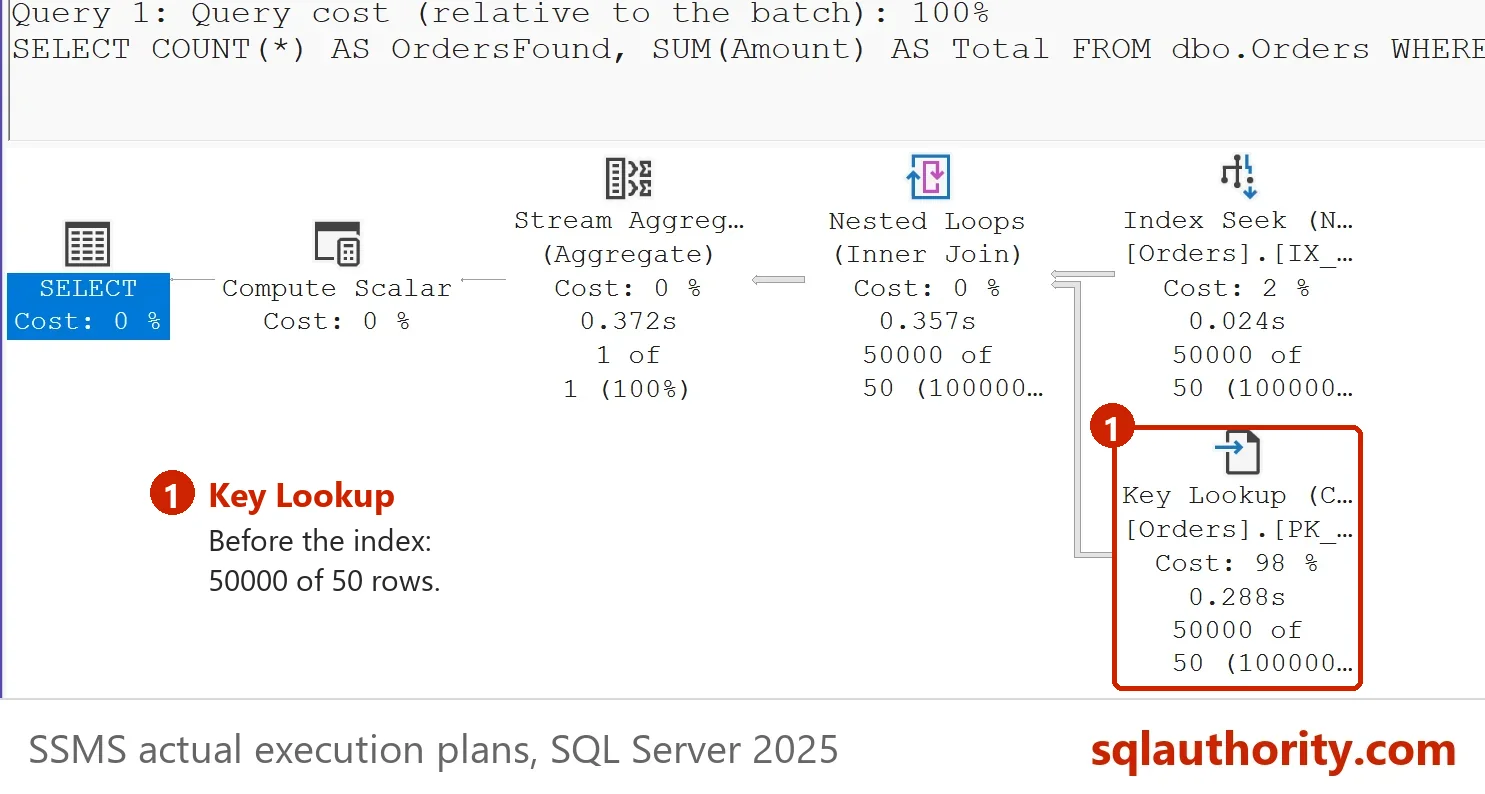
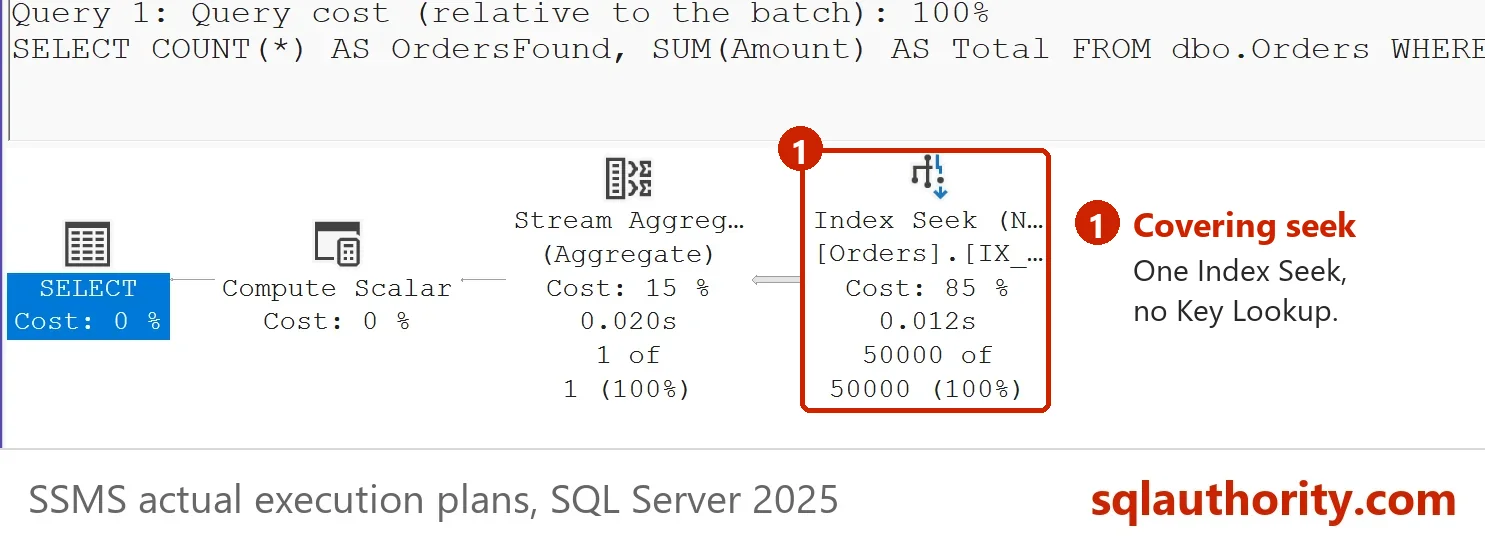
The last contestant changes the table, not the procedure. A covering index holds the Amount column next to the customer key. The plain procedure then needs no lookup, whatever plan it gets. The script also reads the result of all six runs in one table.
CREATE INDEX IX_Orders_CustomerID_Amount ON dbo.Orders (CustomerID) INCLUDE (Amount);
GO
EXEC dbo.RunTechnique 'Covering index', 'OrdersPlain';
GO
SELECT Technique,
       MAX(CASE WHEN Scenario = 'Rare first' AND CustomerID = 3 THEN LogicalReads END) AS RareFirst_Customer3,
       MAX(CASE WHEN Scenario = 'Rare first' AND CustomerID = 1 THEN LogicalReads END) AS RareFirst_Customer1,
       MAX(CASE WHEN Scenario = 'Popular first' AND CustomerID = 1 THEN LogicalReads END) AS PopularFirst_Customer1,
       MAX(CASE WHEN Scenario = 'Popular first' AND CustomerID = 3 THEN LogicalReads END) AS PopularFirst_Customer3
FROM dbo.CallLog
GROUP BY Technique
ORDER BY MIN(CallID);| Technique | RareFirst_Customer3 | RareFirst_Customer1 | PopularFirst_Customer1 | PopularFirst_Customer3 |
|---|---|---|---|---|
| Plain | 194 | 159472 | 2876 | 2876 |
| Local variable | 194 | 159470 | 159497 | 167 |
| OPTIMIZE FOR UNKNOWN | 194 | 159470 | 159497 | 167 |
| OPTION (RECOMPILE) | 194 | 2878 | 2876 | 194 |
| Scoped setting OFF | 194 | 159470 | 159497 | 167 |
| Covering index | 8 | 151 | 151 | 9 |
Reading the Table
Parameter sniffing fixes compared this way show their cost in page reads. Each cell is the page reads of one call. Customer 3 is the rare customer, with 50 orders. Customer 1 is the popular one, with 50,000. Your reads can differ by a few pages.
The plain procedure is hostage to its first caller. A rare caller leaves customer 1 with 159,472 reads. A popular caller leaves customer 3 with 2,876. Three fixes behave alike: the local variable, the unknown hint and the scoped setting. All three use the average estimate, so the plan is the same in both orders. That plan suits the rare customer and punishes the popular one. They remove the surprise, and they leave the cost.
OPTION (RECOMPILE) fits every call. Customer 3 reads 194 pages and customer 1 reads about 2,877, in both orders. The price is a compile on every call, which the sibling post measures. The covering index is the surprise. Without changing a procedure, customer 3 reads 8 or 9 pages and customer 1 reads 151, in either order. All four calls stay far below the 159,000 reads of the bad plan. The index removed the lookups that made the plans so different.
Which One to Use
Start with the index when you choose among parameter sniffing fixes. In this demo a covering index makes every plan cheap, whatever the value. The reason is explained in Query Plan Join: Why a Query With No Join Shows One. It costs write time and space on every insert and delete, so use it for a query that matters.
If an index is not enough, use a hint on the one statement that suffers. OPTION (RECOMPILE) fits the plan to the value. Use it when the statement runs rarely or the saved reads are large. A query that runs thousands of times a second cannot afford it. Use the average estimate when the data is nearly even. The hint DISABLE_PARAMETER_SNIFFING does that for one statement. It goes in that statement’s OPTION clause. It has its own post, DISABLE_PARAMETER_SNIFFING Hint: Turn Off Sniffing for One Query.
Keep the scoped setting for databases whose code you cannot edit. SQL Server 2022 adds a built-in answer. At compatibility level 160 and later, parameter sensitive plan optimization can keep several plans for one query. The demo stays at level 150 so that you can see the classic behavior.
Is This the Whole Answer?
You could argue that the table makes the choice too easy. Real tables have more columns, more indexes and more queries than this one. A covering index for one query does not help the next query. Treat the table as a map. Test the fix on your own data, with a rare value and a popular one, in both call orders.
What to Remember
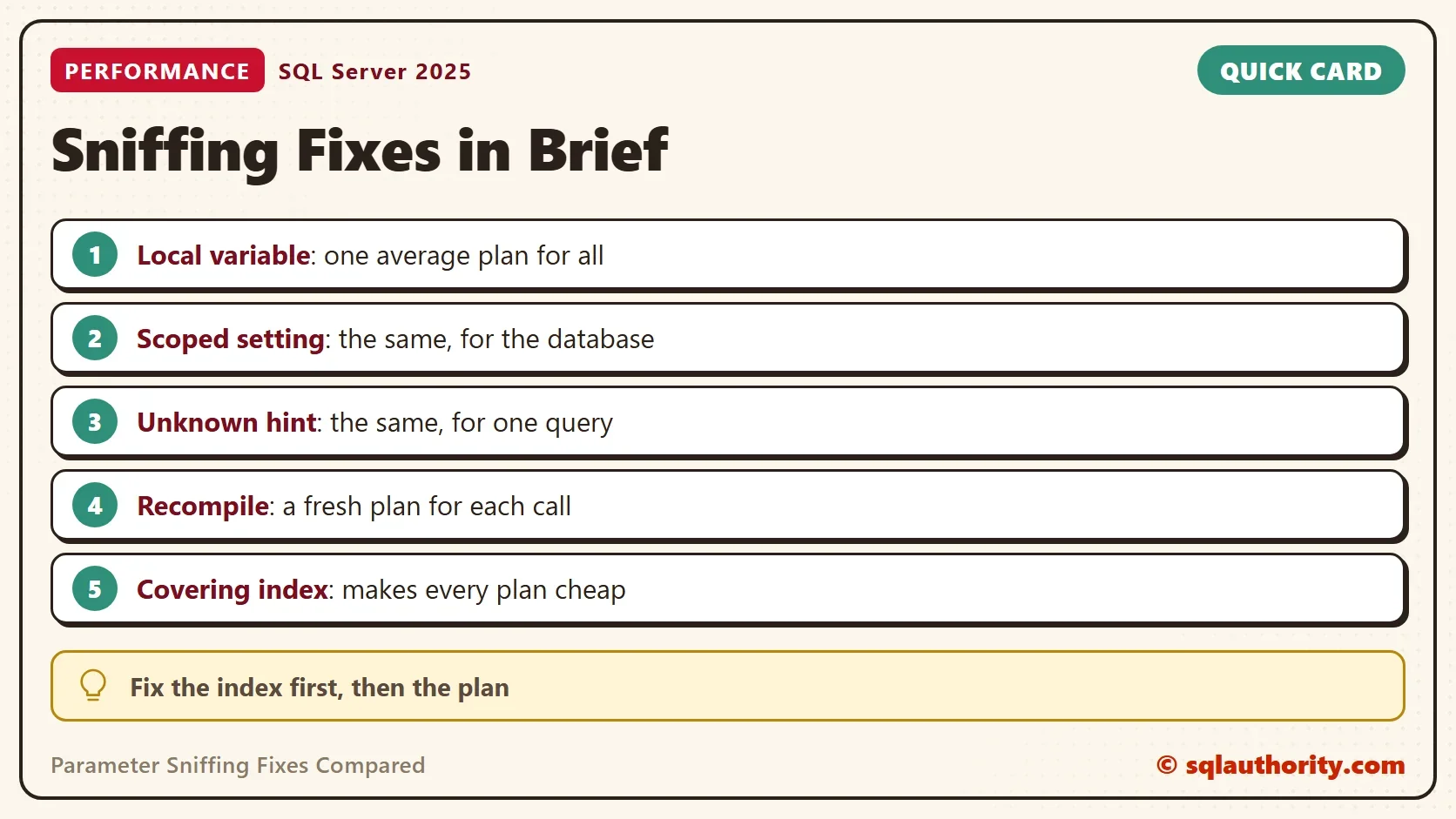
Of the parameter sniffing fixes compared here, three make plans predictable and one makes them fit. A covering index makes them cheap. Fix the index first, hint the statement second, and change the database setting last. When you finish, run the cleanup script.
USE master;
GO
ALTER DATABASE SniffCompareDemo SET SINGLE_USER WITH ROLLBACK IMMEDIATE;
DROP DATABASE SniffCompareDemo;
Avoiding the sniffing is not the goal, it is a plan that is cheap for every value.
Published by Pinal Dave on SQLAuthority. More of my work at pinaldave.com.
Discover more from SQL Authority with Pinal Dave
Subscribe to get the latest posts sent to your email.