
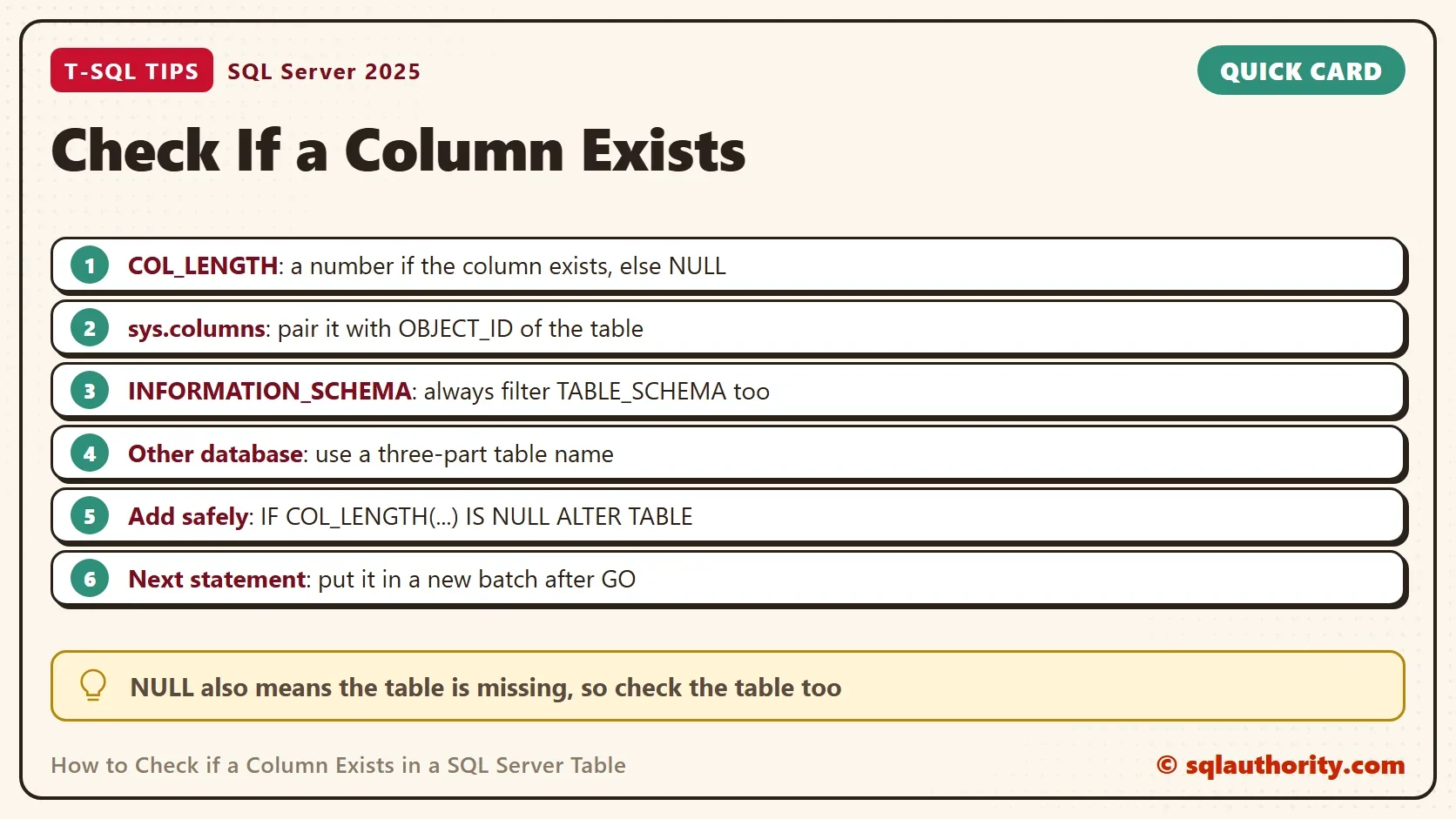
To check if a column exists in a SQL Server table, use COL_LENGTH and test the result for NULL. Two other checks work too. All three have a trap, and it’s rarely the one you expect.

A Demo With Two Tables and Two Databases
The demo database has a table named Gadgets in the dbo schema. Another table named Gadgets sits in a schema called Shop, and only that one has a Price column. A second database holds a Staff table. That setup shows where each check goes wrong.
IF DB_ID(N'ColumnExistsDemo') IS NULL CREATE DATABASE ColumnExistsDemo;
GO
IF DB_ID(N'ColumnExistsOther') IS NULL CREATE DATABASE ColumnExistsOther;
GO
USE ColumnExistsOther;
GO
DROP TABLE IF EXISTS dbo.Staff;
CREATE TABLE dbo.Staff (StaffID int NOT NULL PRIMARY KEY, Active bit NOT NULL DEFAULT 1);
GO
USE ColumnExistsDemo;
GO
DROP TABLE IF EXISTS dbo.Gadgets;
DROP TABLE IF EXISTS Shop.Gadgets;
DROP SCHEMA IF EXISTS Shop;
GO
CREATE SCHEMA Shop;
GO
CREATE TABLE dbo.Gadgets (GadgetID int NOT NULL PRIMARY KEY, Name nvarchar(50) NOT NULL, Notes varchar(max) NULL);
CREATE TABLE Shop.Gadgets (GadgetID int NOT NULL PRIMARY KEY, Price decimal(8,2) NULL);
INSERT INTO dbo.Gadgets VALUES (1, N'Timer', NULL);
Option 1: COL_LENGTH
COL_LENGTH takes a table name and a column name. It returns the column’s length in bytes, or NULL when it can’t find the column. The query below asks five questions at once.
SELECT COL_LENGTH(N'dbo.Gadgets', N'GadgetID') AS IntColumn, COL_LENGTH(N'dbo.Gadgets', N'Name') AS NameColumn, COL_LENGTH(N'dbo.Gadgets', N'Notes') AS MaxColumn,
COL_LENGTH(N'dbo.Gadgets', N'Price') AS MissingColumn, COL_LENGTH(N'dbo.NoSuchTable', N'GadgetID') AS MissingTable;| IntColumn | NameColumn | MaxColumn | MissingColumn | MissingTable |
|---|---|---|---|---|
| 4 | 100 | -1 | NULL | NULL |
An int is 4 bytes and an nvarchar(50) is 100, because each character takes two bytes. A varchar(max) returns -1. So compare the result with IS NULL or IS NOT NULL, never with a number.
Notice the last column. A missing table returns NULL too. So NULL means the column isn’t there, or the table isn’t, or you can’t see it. When the difference matters, check the table first with OBJECT_ID.
Option 2 and 3: sys.columns and INFORMATION_SCHEMA
sys.columns lists every column in the current database. Match it to a table with OBJECT_ID, which understands the schema. INFORMATION_SCHEMA.COLUMNS does the same job in a form other database products also use. It knows the schema only as a separate column. Filter on it, or the check can find a different table with the same name.
IF COL_LENGTH(N'dbo.Gadgets', N'Name') IS NOT NULL PRINT N'Name exists in dbo.Gadgets' ELSE PRINT N'Name is missing from dbo.Gadgets';
IF EXISTS (SELECT 1 FROM sys.columns WHERE object_id = OBJECT_ID(N'dbo.Gadgets') AND name = N'Price') PRINT N'Price exists in dbo.Gadgets' ELSE PRINT N'Price is missing from dbo.Gadgets';
IF EXISTS (SELECT 1 FROM INFORMATION_SCHEMA.COLUMNS WHERE TABLE_SCHEMA = N'Shop' AND TABLE_NAME = N'Gadgets' AND COLUMN_NAME = N'Price') PRINT N'Price exists in Shop.Gadgets' ELSE PRINT N'Price is missing from Shop.Gadgets';
IF EXISTS (SELECT 1 FROM INFORMATION_SCHEMA.COLUMNS WHERE TABLE_NAME = N'Gadgets' AND COLUMN_NAME = N'Price') PRINT N'Without the schema, Price is found in some Gadgets table';
| Messages tab |
|---|
| Name exists in dbo.Gadgets |
| Price is missing from dbo.Gadgets |
| Price exists in Shop.Gadgets |
| Without the schema, Price is found in some Gadgets table |
The last line is the trap. dbo.Gadgets has no Price column, yet the check without a schema says the Price column exists, because Shop.Gadgets has one. Always filter TABLE_SCHEMA.
Check If a Column Exists in Another Database
None of the three checks looks outside the current database, unless you add the database name. COL_LENGTH accepts a three-part table name. With sys.columns, put the database name in front of the view. Put it in front of the table name you give to OBJECT_ID too. The login needs permission to see the other database’s metadata, because a NULL there can also mean no permission.
SELECT COL_LENGTH(N'ColumnExistsOther.dbo.Staff', N'Active') AS OtherDbLength;
IF EXISTS (SELECT 1 FROM ColumnExistsOther.sys.columns WHERE object_id = OBJECT_ID(N'ColumnExistsOther.dbo.Staff') AND name = N'Active') PRINT N'Active exists in the other database';
| OtherDbLength |
|---|
| 1 |
A bit column is 1 byte, so the length is 1. The second statement prints Active exists in the other database.
Add a Column Only When It Is Missing
The most common reason to check is a deployment script that must run twice without an error. The check goes in front of the ALTER TABLE.
IF COL_LENGTH(N'dbo.Gadgets', N'Weight') IS NULL ALTER TABLE dbo.Gadgets ADD Weight decimal(6,2) NULL;
IF COL_LENGTH(N'dbo.Gadgets', N'Weight') IS NULL ALTER TABLE dbo.Gadgets ADD Weight decimal(6,2) NULL;
SELECT COL_LENGTH(N'dbo.Gadgets', N'Weight') AS WeightLength;
| WeightLength |
|---|
| 5 |
The first line adds the column, and the second finds that the column exists and does nothing. The same rule works for removal, since SQL Server 2016 has ALTER TABLE ... DROP COLUMN IF EXISTS Weight. It can run twice with no error.
Test the table first when the script also runs where it doesn’t exist yet. OBJECT_ID(N'dbo.Gadgets', N'U') IS NOT NULL is true only for a user table that exists. Put it in front of the column check with AND. The script then stays quiet on a database that lacks the table.
The Batch Rule That Breaks the Script
A script that adds a column and then uses it in the same batch fails. SQL Server compiles the whole batch before it runs the first line, and the new column doesn’t exist yet.
IF COL_LENGTH(N'dbo.Gadgets', N'Color') IS NULL ALTER TABLE dbo.Gadgets ADD Color nvarchar(20) NULL;
UPDATE dbo.Gadgets SET Color = N'Red';
Msg 207, Level 16, State 1, Line 2
Invalid column name 'Color'.
The ALTER never ran, because the batch didn’t start. Put a GO between the two statements, or wrap the second one in EXEC. The GO is simpler.
IF COL_LENGTH(N'dbo.Gadgets', N'Color') IS NULL ALTER TABLE dbo.Gadgets ADD Color nvarchar(20) NULL;
GO
UPDATE dbo.Gadgets SET Color = N'Red';
SELECT Name, Color FROM dbo.Gadgets;
| Name | Color |
|---|---|
| Timer | Red |
Check the Type Too
Sometimes the name isn’t enough. A script that adds an index or a constraint needs the right type. sys.columns carries it, along with the size and nullability, so one query answers all four questions.
SELECT c.name, TYPE_NAME(c.user_type_id) AS DataType, c.max_length, c.is_nullable
FROM sys.columns c WHERE c.object_id = OBJECT_ID(N'dbo.Gadgets') AND c.name = N'Name';
| name | DataType | max_length | is_nullable |
|---|---|---|---|
| Name | nvarchar | 100 | 0 |
Zero rows mean the column isn’t visible to you: it is missing, or the table is. One row tells you what it is. Column names compare under the database collation, so a case sensitive database needs the exact case.
Temporary Tables
A temporary table lives in tempdb, so give COL_LENGTH the name tempdb..#Scratch. The query returns 40 bytes for the 20 character column, and NULL for a column that doesn’t exist.
CREATE TABLE #Scratch (RowKey int NOT NULL, Label nvarchar(20) NULL);
SELECT COL_LENGTH(N'tempdb..#Scratch', N'Label') AS TempLength, COL_LENGTH(N'tempdb..#Scratch', N'Missing') AS TempMissing;
DROP TABLE #Scratch;
| TempLength | TempMissing |
|---|---|
| 40 | NULL |
Which Check to Use
You could argue that COL_LENGTH is too terse, since it says yes or no and nothing else. That’s its strength in a deployment script. Use sys.columns when you also need the type or nullability. Use INFORMATION_SCHEMA when the same script must run on another database product.
What to Remember
To check if a column exists, compare COL_LENGTH with IS NULL. Filter the schema in every INFORMATION_SCHEMA query. Add a database name for another database, and start a new batch after you add a column. When you finish, drop both test databases.
USE master;
GO
ALTER DATABASE ColumnExistsDemo SET SINGLE_USER WITH ROLLBACK IMMEDIATE;
DROP DATABASE ColumnExistsDemo;
ALTER DATABASE ColumnExistsOther SET SINGLE_USER WITH ROLLBACK IMMEDIATE;
DROP DATABASE ColumnExistsOther;
A missing column is not an error, it is a question your script should ask before it acts.
Published by Pinal Dave on SQLAuthority. More of my work at pinaldave.com.
Discover more from SQL Authority with Pinal Dave
Subscribe to get the latest posts sent to your email.



3 Comments. Leave new
Many thx for the nice article
Option 3 excludes the schema and to be equal to other options I think it should be:
IF EXISTS
(
SELECT *
FROM INFORMATION_SCHEMA.COLUMNS
WHERE table_schema = ‘Person’
AND table_name = ‘Address’
AND column_name = ‘AddressID’
)
PRINT ‘Column Exists’
ELSE
PRINT ‘Column doesn”t Exists’
I want to check From One Database to Another Database Field Exist Or Not , Example My app is Login Database Is “A” and and I want to Check In Database “B” Table –> Employee and Field -> Active