
Batch mode on rowstore lets SQL Server process rows in groups, even when the table has no columnstore index. You don’t create anything to get it. The optimizer chooses it for the right query.

Row Mode and Batch Mode
Row mode is the classic way. Each operator in a plan passes one row to the next. Batch mode passes a group of rows, up to about nine hundred, and works on the whole group at once. That saves work on queries that scan and aggregate millions of rows. Until SQL Server 2019, batch mode needed a columnstore index. Since then, a plain table can get it.
The demo builds a table of one million sales lines in a database named BatchRowstoreDemo. It has a clustered primary key and nothing else. A formula fills it, so every run builds the same rows. Run the script on a test server. The sections below show how to see batch mode. For timings, read Row Mode vs Batch Mode: Measuring the Speed Difference.
IF DB_ID(N'BatchRowstoreDemo') IS NULL CREATE DATABASE BatchRowstoreDemo;
GO
USE BatchRowstoreDemo;
GO
DROP TABLE IF EXISTS dbo.SalesLines;
CREATE TABLE dbo.SalesLines (
    LineID    int          NOT NULL PRIMARY KEY,
    ProductID int          NOT NULL,
    Qty       smallint     NOT NULL,
    UnitPrice decimal(8,2) NOT NULL
);
INSERT INTO dbo.SalesLines (LineID, ProductID, Qty, UnitPrice)
SELECT n, 1 + (n % 40), 1 + (n % 5), 5 + (n % 20)
FROM (SELECT TOP (1000000) ROW_NUMBER() OVER (ORDER BY (SELECT NULL)) AS n
      FROM sys.all_objects AS a CROSS JOIN sys.all_objects AS b CROSS JOIN sys.all_objects AS c) AS x;
Check the Two Settings First
Batch mode on rowstore needs compatibility level 150 or higher. A database scoped setting named BATCH_MODE_ON_ROWSTORE can switch it off, and it is on by default. The next block shows both values. Its last statement saves the level in a temp table, so that later steps can restore it.
SELECT name, compatibility_level FROM sys.databases WHERE name = DB_NAME();
SELECT name, value FROM sys.database_scoped_configurations WHERE name = N'BATCH_MODE_ON_ROWSTORE';
SELECT compatibility_level INTO #OriginalLevel FROM sys.databases WHERE name = DB_NAME();
| name | compatibility_level |
|---|---|
| BatchRowstoreDemo | 170 |
| name | value |
|---|---|
| BATCH_MODE_ON_ROWSTORE | 1 |
Level 170 is the default on SQL Server 2025, and the setting is on. Nothing else is needed. Next, read the mode from a plan.
Read the Execution Mode From the Plan
Every operator in a plan carries its execution mode, Row or Batch. The function below reads the cached plan of a query and lists its operators with their modes. It finds the query by a tag in a comment. Create it once.
CREATE OR ALTER FUNCTION dbo.PlanModes (@Tag nvarchar(40))
RETURNS TABLE
AS
RETURN
WITH XMLNAMESPACES (DEFAULT 'http://schemas.microsoft.com/sqlserver/2004/07/showplan')
SELECT r.value('@NodeId', 'int') AS NodeId,
       r.value('@PhysicalOp', 'nvarchar(60)') AS Operator,
       r.value('@EstimatedExecutionMode', 'nvarchar(10)') AS ExecMode
FROM sys.dm_exec_query_stats AS qs
CROSS APPLY sys.dm_exec_sql_text(qs.sql_handle) AS st
CROSS APPLY sys.dm_exec_query_plan(qs.plan_handle) AS qp
CROSS APPLY qp.query_plan.nodes('//RelOp') AS n(r)
WHERE st.text LIKE N'%' + @Tag + N'%'
  AND st.text NOT LIKE N'%PlanModes%';
Now run an aggregate query over the whole table. The hint MAXDOP 1 keeps the plan to a single thread, so the plan stays short. Then list the modes in a separate batch.
SELECT /* mode-A */ ProductID, SUM(Qty * UnitPrice) AS Revenue
FROM dbo.SalesLines
GROUP BY ProductID
OPTION (MAXDOP 1);
SELECT Operator, ExecMode
FROM dbo.PlanModes(N'mode-A')
ORDER BY NodeId;
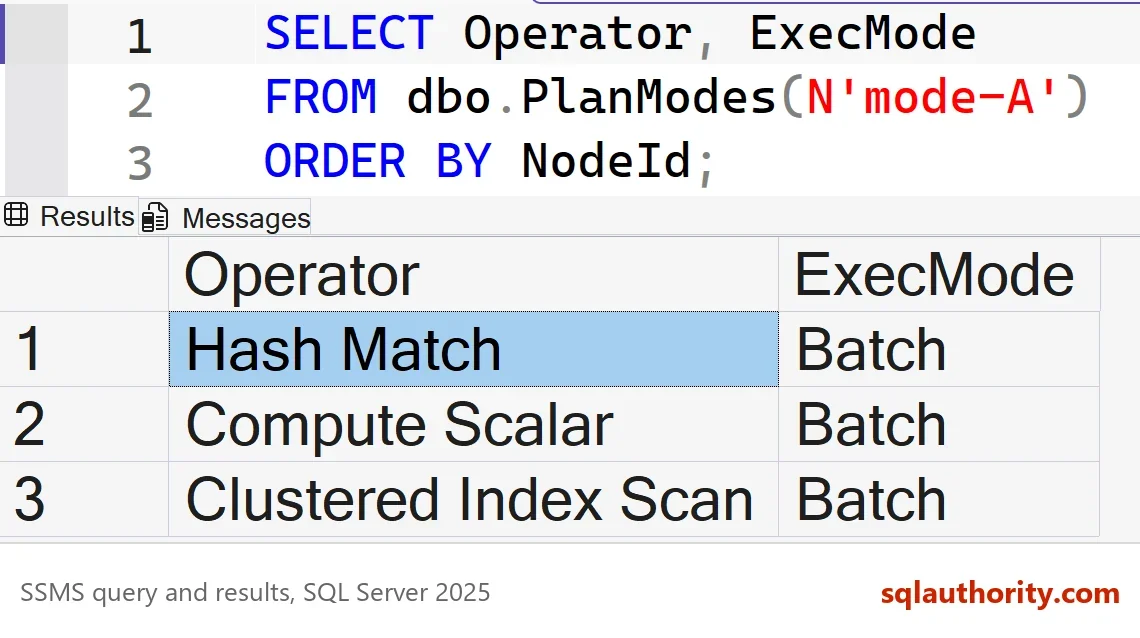
| Operator | ExecMode |
|---|---|
| Hash Match | Batch |
| Compute Scalar | Batch |
| Clustered Index Scan | Batch |
All three operators run in batch mode, and the table has no columnstore index. The scan itself is a batch operator, which is new in SQL Server 2019. The companion post measures what that saves.
Four Ways to Get Row Mode Back
Each switch below turns batch mode off for the same query, and the plan shows Row again. The first is a query hint. It affects one query and nothing else.
SELECT /* mode-C */ ProductID, SUM(Qty * UnitPrice) AS Revenue
FROM dbo.SalesLines
GROUP BY ProductID
OPTION (MAXDOP 1, USE HINT('DISALLOW_BATCH_MODE'));
GO
SELECT Operator, ExecMode
FROM dbo.PlanModes(N'mode-C')
ORDER BY NodeId;
The second is the compatibility level. Setting it below 150 removes the feature for the whole database. The ALTER also clears the cached plans of that database. The last statement of the next script restores the level saved by the first check, which was 170 here. It works on SQL Server 2019 and later, because it restores whatever level the database had.
ALTER DATABASE BatchRowstoreDemo SET COMPATIBILITY_LEVEL = 140;
GO
SELECT /* mode-B */ ProductID, SUM(Qty * UnitPrice) AS Revenue
FROM dbo.SalesLines
GROUP BY ProductID
OPTION (MAXDOP 1);
GO
SELECT Operator, ExecMode
FROM dbo.PlanModes(N'mode-B')
ORDER BY NodeId;
GO
DECLARE @undo nvarchar(max) = N'ALTER DATABASE BatchRowstoreDemo SET COMPATIBILITY_LEVEL = '
    + CONVERT(nvarchar(10), (SELECT compatibility_level FROM #OriginalLevel)) + N';';
EXEC (@undo);
The third is the database scoped setting. It removes the feature but keeps the compatibility level. That helps when a regression appears after an upgrade. You can rule out batch mode without losing the other level 150 features.
ALTER DATABASE SCOPED CONFIGURATION SET BATCH_MODE_ON_ROWSTORE = OFF;
GO
SELECT /* mode-D */ ProductID, SUM(Qty * UnitPrice) AS Revenue
FROM dbo.SalesLines
GROUP BY ProductID
OPTION (MAXDOP 1);
GO
SELECT Operator, ExecMode
FROM dbo.PlanModes(N'mode-D')
ORDER BY NodeId;
GO
ALTER DATABASE SCOPED CONFIGURATION SET BATCH_MODE_ON_ROWSTORE = ON;
The fourth switch is the size of the table. The optimizer considers batch mode on rowstore only for tables of at least 131,072 rows. The next script copies the first 100,000 rows to a small table and runs the query. It then adds 40,000 rows and runs the query again.
DROP TABLE IF EXISTS dbo.SmallLines;
CREATE TABLE dbo.SmallLines (
    LineID    int          NOT NULL PRIMARY KEY,
    ProductID int          NOT NULL,
    Qty       smallint     NOT NULL,
    UnitPrice decimal(8,2) NOT NULL
);
INSERT INTO dbo.SmallLines
SELECT TOP (100000) LineID, ProductID, Qty, UnitPrice FROM dbo.SalesLines ORDER BY LineID;
GO
SELECT /* mode-E */ ProductID, SUM(Qty * UnitPrice) AS Revenue
FROM dbo.SmallLines
GROUP BY ProductID
OPTION (MAXDOP 1);
GO
SELECT Operator, ExecMode FROM dbo.PlanModes(N'mode-E') ORDER BY NodeId;
GO
INSERT INTO dbo.SmallLines
SELECT TOP (40000) LineID, ProductID, Qty, UnitPrice FROM dbo.SalesLines WHERE LineID > 100000 ORDER BY LineID;
GO
SELECT /* mode-F */ ProductID, SUM(Qty * UnitPrice) AS Revenue
FROM dbo.SmallLines
GROUP BY ProductID
OPTION (MAXDOP 1);
GO
SELECT Operator, ExecMode FROM dbo.PlanModes(N'mode-F') ORDER BY NodeId;| Case | Execution mode |
|---|---|
| Defaults, 1,000,000 rows | Batch |
| USE HINT DISALLOW_BATCH_MODE | Row |
| Compatibility level 140 | Row |
| BATCH_MODE_ON_ROWSTORE = OFF | Row |
| Table with 100,000 rows | Row |
| Table with 140,000 rows | Batch |
Why Your Plan Can Stay in Row Mode
If your plan shows only Row after you raise the compatibility level, check the list above. The table can be too small. The query can lack an aggregation, a sort or a join over many rows. A lookup of a few rows stays in row mode on purpose. The edition and the scoped setting matter too. A columnstore index isn’t required for batch mode on rowstore, and its absence is not the reason.
Does It Matter for a Busy OLTP System?
You could argue that batch mode helps only reporting queries, so a transaction system never sees it. That’s right for the transactions. Point lookups and short seeks stay in row mode, and they should. Batch mode targets the scans and aggregations that read many rows. If your system runs a few of those next to the transactions, those queries can change. That’s the part to test.
What to Remember
Batch mode on rowstore needs no columnstore index. It needs compatibility level 150 or higher, and a query and table big enough to benefit. Read the mode from the plan, not from a guess. A hint switches it off for one query. The scoped setting switches it off for one database.
After an upgrade, compare the plans of your heaviest reports before and after. Run the cleanup script when you finish.
USE master;
GO
ALTER DATABASE BatchRowstoreDemo SET SINGLE_USER WITH ROLLBACK IMMEDIATE;
DROP DATABASE BatchRowstoreDemo;
Batch mode is not a new index, it is a new way of reading the index you already have.
Published by Pinal Dave on SQLAuthority. More of my work at pinaldave.com.
Discover more from SQL Authority with Pinal Dave
Subscribe to get the latest posts sent to your email.




1 Comment. Leave new
Hi
I installed SQL Server 2019 Dev edition and CU8
I changed Db compatibility mode 150
I check in query execution plan only showing Row mode
Unable to change Batch mode.
I also tried change BATCH_MODE_ON_ROWSTORE scoped configuration enable\disable
Still not shwoing Batch
Wat was the issue ?