
Converting subqueries to joins requires more than moving a condition into an ON clause. The rewritten query must preserve the same rows, including duplicates and missing matches. A shorter query that changes the answer is not an improvement.

My earlier article on LEFT JOIN and NOT IN compares two ways to find missing matches. Here, let’s work through the conversion itself. We’ll check the result before discussing performance.
Start with data that exposes the difference
Alex has two orders, Blake has one, and Casey has none. A fourth order has no customer assigned. Those extra cases reveal mistakes that a one-to-one example would hide.
Run this setup once in a new SSMS query window. Then run the examples below in that same window. These temporary tables belong to your connection and do not create permanent application tables.
IF OBJECT_ID('tempdb..#Customers') IS NOT NULL
   OR OBJECT_ID('tempdb..#Orders') IS NOT NULL
    THROW 50000, 'Open a new query window before running this example.', 1;
CREATE TABLE #Customers (
    CustomerID int PRIMARY KEY,
    CustomerName varchar(20) NOT NULL
);
CREATE TABLE #Orders (
    OrderID int PRIMARY KEY,
    CustomerID int NULL
);
INSERT INTO #Customers VALUES (1, 'Alex'), (2, 'Blake'), (3, 'Casey');
INSERT INTO #Orders VALUES (101, 1), (102, 1), (103, 2), (104, NULL);
A plain join can introduce extra rows
The first query asks which customers have at least one order. The second joins each customer to every matching order. The Method column labels the result grids so you can compare them.
SELECT 'IN subquery' AS Method, c.CustomerID, c.CustomerName
FROM #Customers AS c
WHERE c.CustomerID IN (SELECT o.CustomerID FROM #Orders AS o)
ORDER BY c.CustomerID;

SELECT 'Plain JOIN' AS Method, c.CustomerID, c.CustomerName
FROM #Customers AS c
INNER JOIN #Orders AS o ON o.CustomerID = c.CustomerID
ORDER BY c.CustomerID, o.OrderID;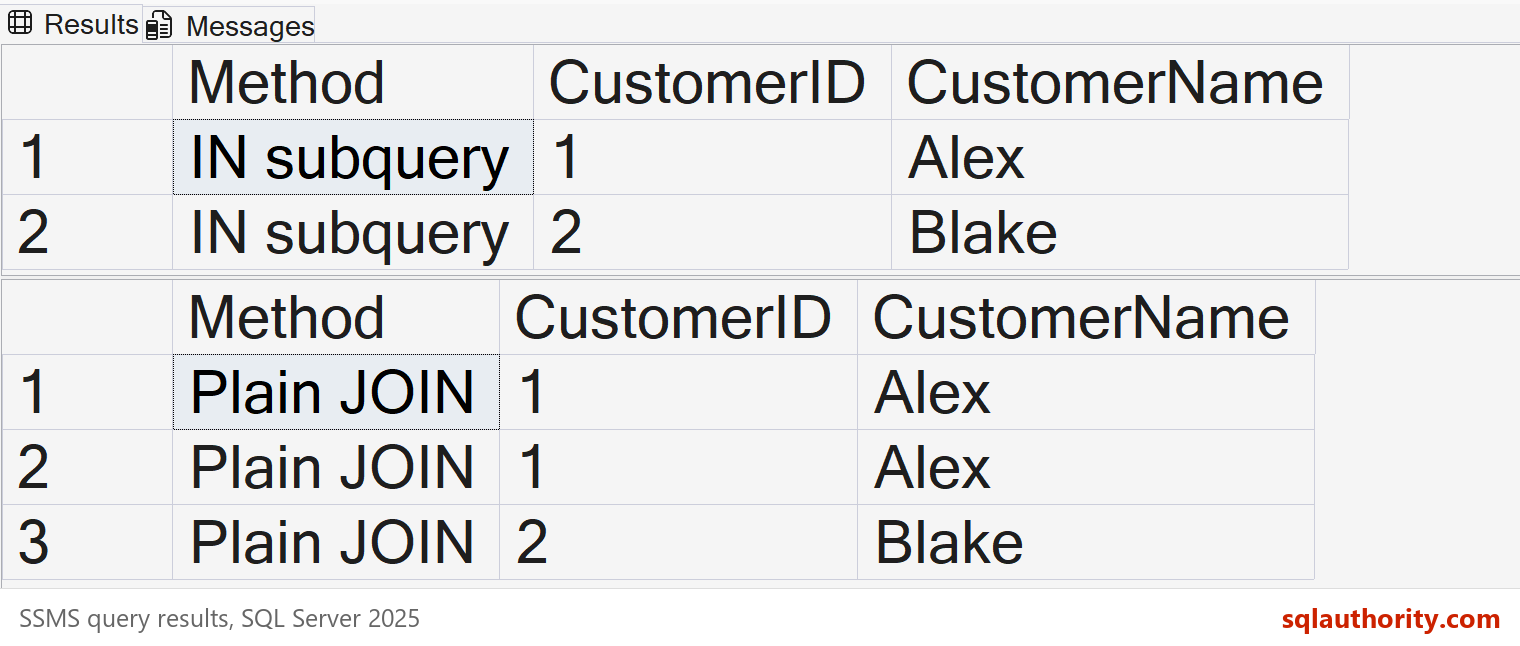
IN tests whether a matching value exists. Multiple orders for Alex do not make that test more true. An inner join produces one row for each matching pair, so Alex appears twice.
Both queries are valid, but they answer different questions. If you need one row per order, the join fits. If you need customers with orders, the extra row changes the result.
Make the join preserve the original result
To keep the customer result, join to a list of unique customer keys from the orders. This removes repeated keys on the matching side before the join. The second query uses EXISTS to express the existence test directly.
SELECT 'Unique-key JOIN' AS Method, c.CustomerID, c.CustomerName
FROM #Customers AS c
INNER JOIN (
    SELECT DISTINCT CustomerID FROM #Orders
) AS o ON o.CustomerID = c.CustomerID
ORDER BY c.CustomerID;

SELECT 'EXISTS' AS Method, c.CustomerID, c.CustomerName
FROM #Customers AS c
WHERE EXISTS (
    SELECT 1 FROM #Orders AS o WHERE o.CustomerID = c.CustomerID
)
ORDER BY c.CustomerID;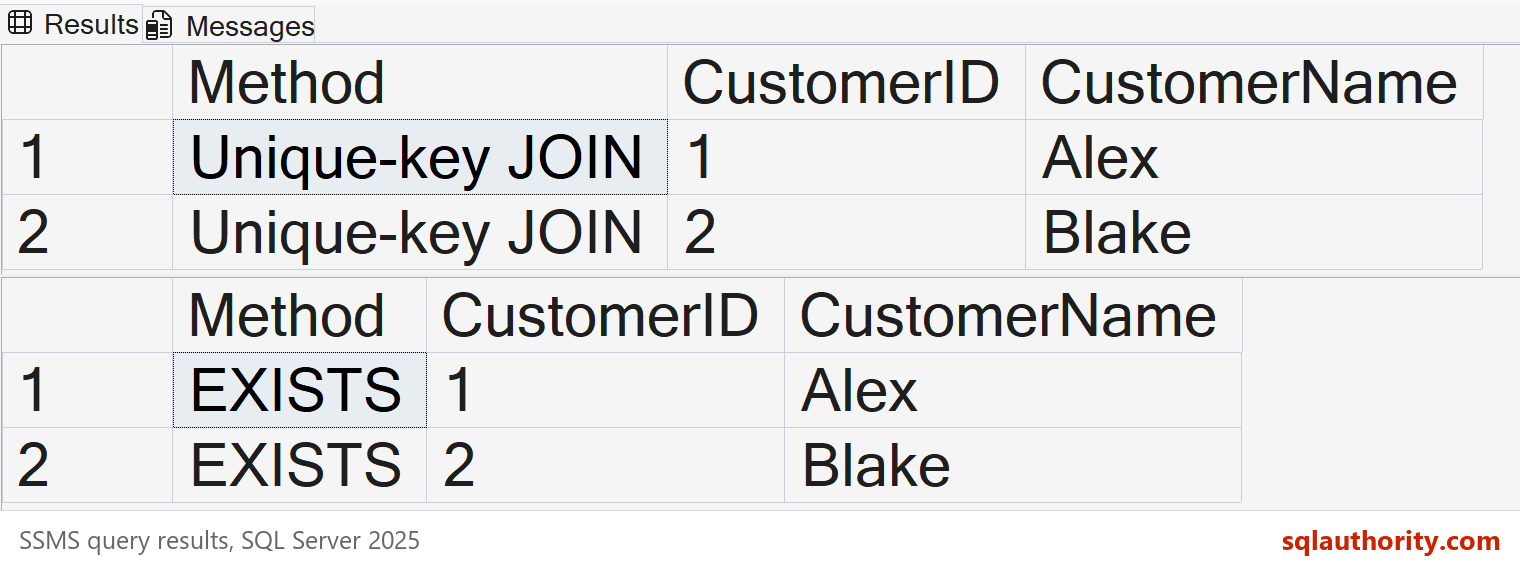
If the joined key is already unique, you do not need the inner DISTINCT. Check a primary key or unique constraint that guarantees it. Do not assume uniqueness because today’s sample happens to contain no duplicates.
Avoid adding DISTINCT to the final result without checking its meaning. Selecting only distinct customer names would merge different customers who share a name. Removing repeated matching keys preserves the outer rows; removing repeated output values can discard them.
For an existence question, I prefer EXISTS because it states the intent. That is a readability choice, not a claim that it always runs faster. Use a join when you also need columns from the matching rows.
NOT IN needs special care with NULL
Now ask which customers have no orders. The unassigned order contains a NULL customer key. Run all three queries and compare their results.
SELECT 'NOT IN' AS Method, c.CustomerID, c.CustomerName
FROM #Customers AS c
WHERE c.CustomerID NOT IN (SELECT o.CustomerID FROM #Orders AS o)
ORDER BY c.CustomerID;

SELECT 'NOT EXISTS' AS Method, c.CustomerID, c.CustomerName
FROM #Customers AS c
WHERE NOT EXISTS (
    SELECT 1 FROM #Orders AS o WHERE o.CustomerID = c.CustomerID
)
ORDER BY c.CustomerID;

SELECT 'LEFT JOIN' AS Method, c.CustomerID, c.CustomerName
FROM #Customers AS c
LEFT JOIN #Orders AS o ON o.CustomerID = c.CustomerID
WHERE o.OrderID IS NULL
ORDER BY c.CustomerID;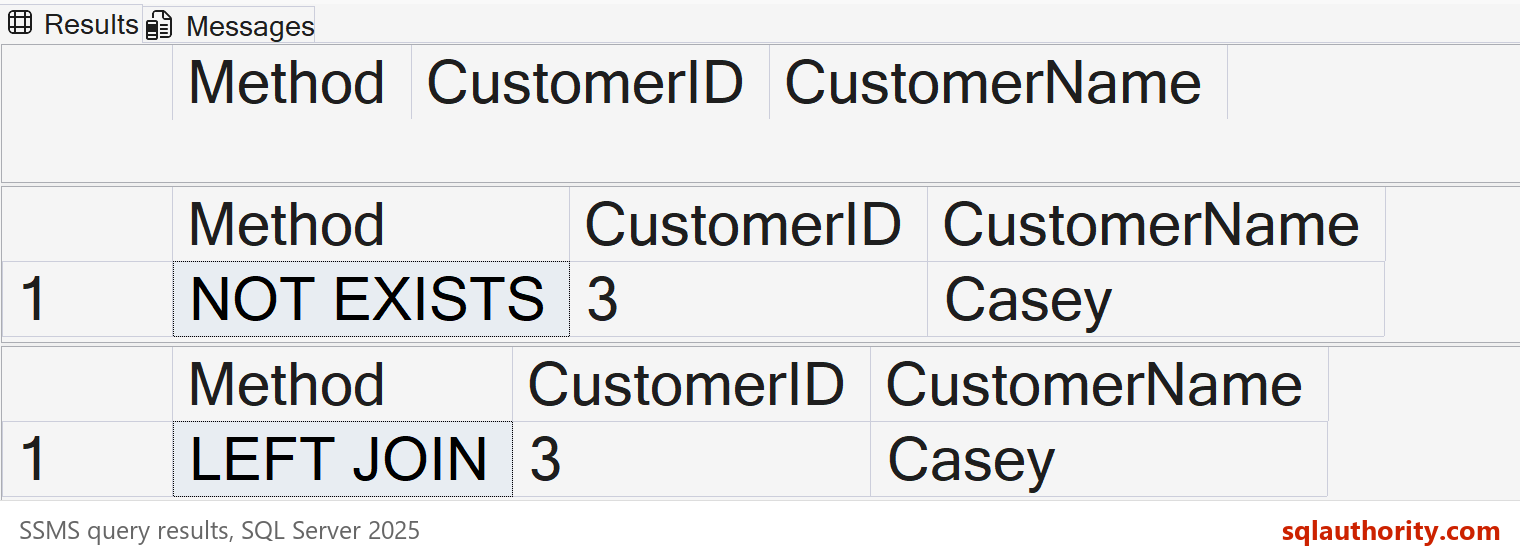
For Casey, NOT IN cannot establish that the ID is absent from a list containing NULL. The condition evaluates to unknown, and WHERE keeps only true conditions. This is why replacing it without checking nullability can change the answer.
NOT EXISTS looks for a matching order and finds none for Casey. The left join keeps Casey and supplies nulls for the missing order. Testing o.OrderID IS NULL is reliable here because a real order has a non-null primary key.
These two rewrites agree for this equality test. They are not equivalent to the original NOT IN on this data. If both compared keys are non-null, that particular difference disappears.
Our outer customer key cannot be null. Excluding null customer keys inside the NOT IN subquery would also make it agree here. When the outer key is nullable, decide explicitly whether those rows should be included.
Do not apply one rewrite to every subquery
A scalar subquery in the SELECT list has different rules. It returns one value, returns null when no row matches, and raises an error for multiple rows. A join can duplicate rows instead of raising that error.
An inner join can also remove rows that the scalar subquery would keep. Check uniqueness and whether a left join is required. For aggregate subqueries, also preserve the grouping and the result for an empty group.
Check performance after checking the rows
SQL Server can produce the same execution strategy for different query forms. A join is not automatically faster than a subquery. The data, indexes, statistics, and predicates determine the useful comparison.
First compare the values and how many times each row appears. A matching row count alone is not enough. Neither is a set comparison that removes duplicates.
Then enable Include Actual Execution Plan in SSMS with Ctrl+M. Use SET STATISTICS IO, TIME ON; to compare reads and timing under the same conditions. This four-order example demonstrates correctness; it is too small to support a performance ranking.
I still write INNER JOIN explicitly for readability. As explained in INNER JOIN versus JOIN, shortening it to JOIN does not change its meaning.
Clean up the example
After testing, run the following in the same query window. Closing the connection also removes these temporary tables.
DROP TABLE #Orders;
DROP TABLE #Customers;
A useful rewrite preserves the answer before it improves the execution.
Related reading
Published by Pinal Dave on SQLAuthority. More of my work at pinaldave.com.
Discover more from SQL Authority with Pinal Dave
Subscribe to get the latest posts sent to your email.




3 Comments. Leave new
very good
Very Good explanation! Helps a lot to reduce the cost of the query
Is there an online tool to convert subqueries to join-queries?