The MAXDOP query hint sets how many processors one query can use, whatever the server setting says. It works in both directions, so it can raise the limit as well as lower it.

Three Places to Set It
Max degree of parallelism has three levels. The server setting applies to every query. The database scoped setting applies to the queries of one database. The MAXDOP query hint applies to one statement, and it wins over the other two. A Resource Governor workload group can still cap the value that a hint reaches.
The demo reads the server setting and never changes it. The first script creates a database named MaxdopHintDemo with a table of two million orders. It then reads the two server settings that matter here.
IF DB_ID(N'MaxdopHintDemo') IS NULL CREATE DATABASE MaxdopHintDemo;
GO
USE MaxdopHintDemo;
GO
DROP TABLE IF EXISTS dbo.Orders;
CREATE TABLE dbo.Orders (
    OrderID    int           NOT NULL PRIMARY KEY,
    CustomerID int           NOT NULL,
    OrderDate  date          NOT NULL,
    Amount     decimal(10,2) NOT NULL
);
INSERT INTO dbo.Orders (OrderID, CustomerID, OrderDate, Amount)
SELECT value, value % 50000 + 1, DATEADD(DAY, value % 1000, '2023-01-01'), value % 500 + 1.25
FROM GENERATE_SERIES(1, 2000000);
GO
SELECT name, value_in_use FROM sys.configurations WHERE name IN (N'max degree of parallelism', N'cost threshold for parallelism') ORDER BY name;| name | value_in_use |
|---|---|
| cost threshold for parallelism | 50 |
| max degree of parallelism | 2 |
On this test server the limit is 2 processors. A plan becomes a candidate for parallelism above a cost of 50. Your server will show other numbers. GENERATE_SERIES needs SQL Server 2022 and compatibility level 160.
The server setting is the blunt tool, because it changes every query on the instance. The statements below are shown for comparison only, and the demo never runs them. They need the advanced options switched on.
EXEC sys.sp_configure N'show advanced options', 1;
RECONFIGURE;
EXEC sys.sp_configure N'max degree of parallelism', 4;
RECONFIGURE;
The undo is a separate block. It puts back the value that you read first, which is 2 on this server. Switch the advanced options off again only if they were off before.
EXEC sys.sp_configure N'max degree of parallelism', 2;
RECONFIGURE;
EXEC sys.sp_configure N'show advanced options', 0;
RECONFIGURE;
Raise It and Lower It
The query ranks all two million rows, and then counts every thousandth rank. The sort makes it expensive enough to go parallel. The comment at the top labels each run. The first batch has no hint, the second raises the limit to 8, and the third lowers it to 1.
/* default */
SELECT COUNT_BIG(*) AS Ranked FROM (SELECT ROW_NUMBER() OVER (ORDER BY Amount DESC, OrderDate) AS rn FROM dbo.Orders) AS x WHERE rn % 1000 = 0;
GO
/* hint8 */
SELECT COUNT_BIG(*) AS Ranked FROM (SELECT ROW_NUMBER() OVER (ORDER BY Amount DESC, OrderDate) AS rn FROM dbo.Orders) AS x WHERE rn % 1000 = 0
OPTION (MAXDOP 8);
GO
/* hint1 */
SELECT COUNT_BIG(*) AS Ranked FROM (SELECT ROW_NUMBER() OVER (ORDER BY Amount DESC, OrderDate) AS rn FROM dbo.Orders) AS x WHERE rn % 1000 = 0
OPTION (MAXDOP 1);
GO
/* cheap */
SELECT SUM(Amount) AS Total FROM dbo.Orders WHERE CustomerID = 7
OPTION (MAXDOP 8);
All four ran. The fourth is a cheap query that you will meet in a moment. Now ask the plan cache what each run used. The column last_dop is the degree of the last execution. The estimated cost comes from the cached plan.
WITH XMLNAMESPACES (DEFAULT N'http://schemas.microsoft.com/sqlserver/2004/07/showplan')
SELECT CASE WHEN st.text LIKE N'%/* hint8 */%' THEN N'OPTION (MAXDOP 8)'
            WHEN st.text LIKE N'%/* hint1 */%' THEN N'OPTION (MAXDOP 1)'
            WHEN st.text LIKE N'%/* cheap */%' THEN N'Cheap query, OPTION (MAXDOP 8)'
            WHEN st.text LIKE N'%/* scoped */%' THEN N'No hint, scoped MAXDOP 4'
            ELSE N'No hint' END AS Query,
       qs.last_dop AS DegreeUsed,
       CONVERT(decimal(10,2), qp.query_plan.value('(//StmtSimple/@StatementSubTreeCost)[1]', 'float')) AS EstimatedCost
FROM sys.dm_exec_query_stats AS qs
CROSS APPLY sys.dm_exec_sql_text(qs.sql_handle) AS st
CROSS APPLY sys.dm_exec_query_plan(qs.plan_handle) AS qp
WHERE (st.text LIKE N'%/* default */%' OR st.text LIKE N'%/* hint8 */%' OR st.text LIKE N'%/* hint1 */%'
       OR st.text LIKE N'%/* cheap */%' OR st.text LIKE N'%/* scoped */%')
  AND st.text NOT LIKE N'%dm_exec_query_stats%'
ORDER BY DegreeUsed DESC, Query;| Query | DegreeUsed | EstimatedCost |
|---|---|---|
| OPTION (MAXDOP 8) | 8 | 8.19 |
| No hint | 2 | 16.74 |
| Cheap query, OPTION (MAXDOP 8) | 1 | 7.87 |
| OPTION (MAXDOP 1) | 1 | 105.05 |
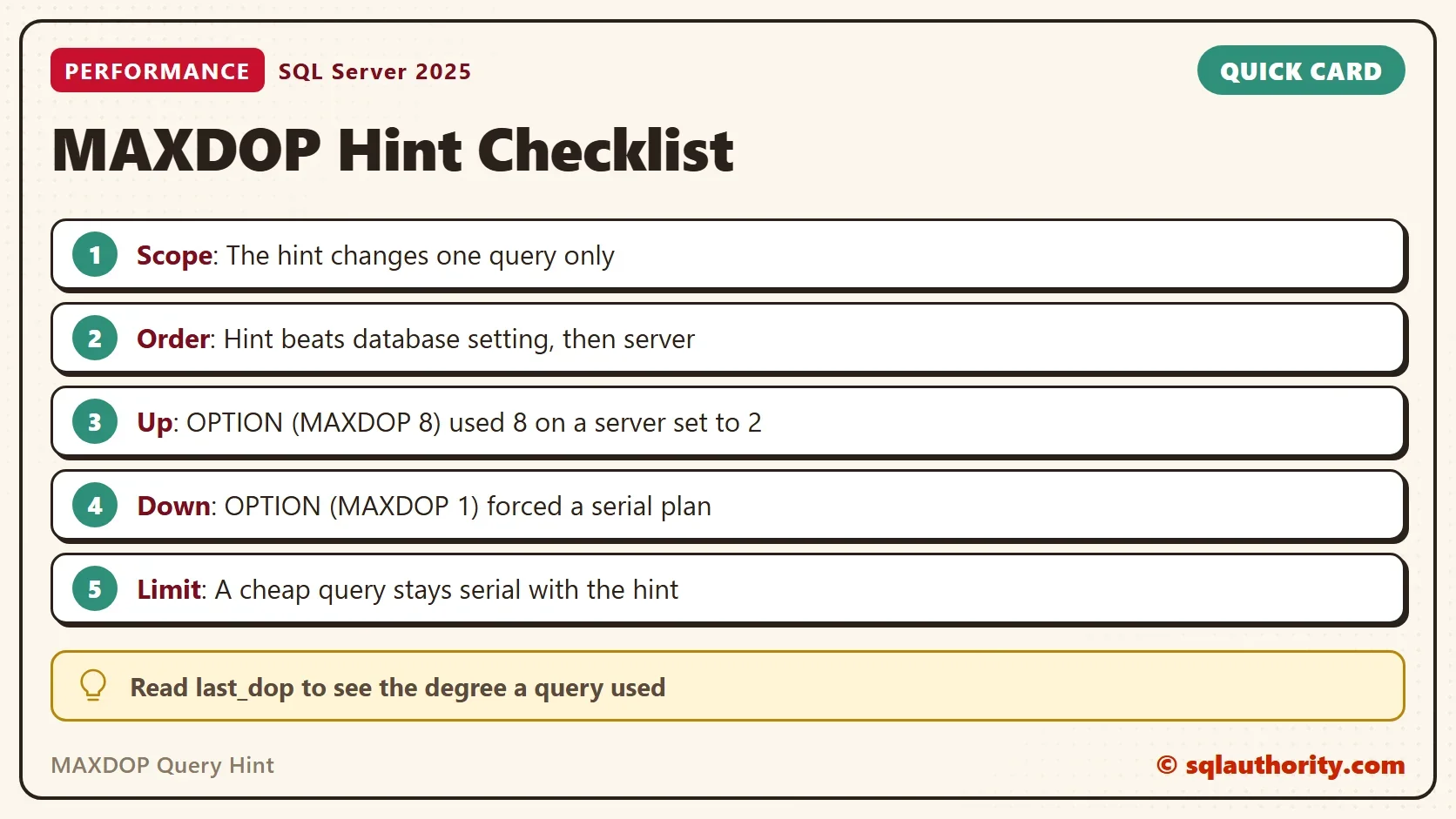
With no hint, the query used the server limit of 2. With OPTION (MAXDOP 8), it used 8 processors on a server set to 2. That needs a machine with at least 8 logical processors, and this one has 16. With OPTION (MAXDOP 1), it ran serially. The hint overrides the setting in both directions.
What the Hint Can’t Do
The cheap query shows the limit of the hint. It asked for 8 processors and used 1. A hint caps the degree of parallelism of a plan that is parallel. It doesn’t make a plan parallel. SQL Server first compares the cost of the serial plan with the cost threshold. The serial plan of the cheap query costs 7.87, which is under 50, so no parallel plan is built.
The MAXDOP 1 row shows the same cost test from the other side. Its serial plan costs 105.05, above 50. That is why the optimizer builds a parallel plan when the hint isn’t there. Costs of parallel plans are lower, so don’t compare those with the threshold.
Set It for a Whole Database
The middle level is the database scoped setting. It applies to every query in one database and needs SQL Server 2016. A query hint still beats it. The script sets 4 and runs the ranking query with no hint.
ALTER DATABASE SCOPED CONFIGURATION SET MAXDOP = 4;
GO
/* scoped */
SELECT COUNT_BIG(*) AS Ranked FROM (SELECT ROW_NUMBER() OVER (ORDER BY Amount DESC, OrderDate) AS rn FROM dbo.Orders) AS x WHERE rn % 1000 = 0;
Run the plan cache query again. SQL Server cleared the cached plans of the database when the setting changed, so the table has one row. The query without a hint now runs at degree 4.
| Query | DegreeUsed | EstimatedCost |
|---|---|---|
| No hint, scoped MAXDOP 4 | 4 | 11.04 |
Put the setting back at 0, the default, so that the server setting rules again.
ALTER DATABASE SCOPED CONFIGURATION SET MAXDOP = 0;
When Not to Use the Hint
You could argue that a hint in the query text is a poor home for a setting. If the server grows, a hard-coded 8 stays at 8. That’s fair. Use the hint for a query that behaves unlike its neighbors. A big report on a busy transaction server is the classic case. Use the scoped setting when a whole database needs another limit.
Other statements take a MAXDOP option too. Read DBCC CHECKDB Running Slow? Check the MAXDOP Option and Update Statistics With FULLSCAN and MAXDOP in SQL Server.
What to Remember
The MAXDOP query hint changes one statement and leaves the server setting alone. It can raise the degree above the setting and lower it below. It can’t turn a cheap plan into a parallel one. Check last_dop to see what a query used.
When you finish, drop the demo database.
USE master;
GO
IF DB_ID(N'MaxdopHintDemo') IS NOT NULL
BEGIN
    ALTER DATABASE MaxdopHintDemo SET SINGLE_USER WITH ROLLBACK IMMEDIATE;
    DROP DATABASE MaxdopHintDemo;
END;
A hint is not a setting, it is an exception for one query.
Published by Pinal Dave on SQLAuthority. More of my work at pinaldave.com.
Discover more from SQL Authority with Pinal Dave
Subscribe to get the latest posts sent to your email.