
The LEFT JOIN ON clause decides which rows are allowed to match, not which rows come back. Once that clicks, every “why did my LEFT JOIN return this?” question gets easy. Let me show you with four customers and a handful of orders.

The question that started it
Yoel from Israel once sent me a lovely question. With an INNER JOIN, Yoel could move a filter between ON and WHERE and nothing changed. With a LEFT JOIN, the same move changed the result. Yoel had read the explanation twice and it still felt slippery.
Here is the one sentence I wish someone had told me early. ON decides which right-side rows may pair up with each left row. WHERE runs later and decides which finished rows survive. An INNER JOIN throws away unmatched rows anyway, so both places look the same. A LEFT JOIN keeps unmatched left rows, so the difference shows up.
Build a tiny example
Four customers, four orders and one shipment. Asha has a shipped and an open order. Ben has only an open order. Chen has a shipped order. Dara has no orders at all. Run each block in order in one query window.
DROP TABLE IF EXISTS #Shipments;
DROP TABLE IF EXISTS #Orders;
DROP TABLE IF EXISTS #Customers;
CREATE TABLE #Customers (CustomerId int PRIMARY KEY, CustomerName varchar(20) NOT NULL, Region varchar(10) NOT NULL);
CREATE TABLE #Orders (OrderId int PRIMARY KEY, CustomerId int NOT NULL, Status varchar(10) NOT NULL);
CREATE TABLE #Shipments (ShipmentId int PRIMARY KEY, OrderId int NOT NULL, Carrier varchar(10) NOT NULL);
INSERT #Customers VALUES (1, 'Asha', 'West'), (2, 'Ben', 'East'), (3, 'Chen', 'West'), (4, 'Dara', 'East');
INSERT #Orders VALUES (101, 1, 'Shipped'), (102, 1, 'Open'), (103, 2, 'Open'), (104, 3, 'Shipped');
INSERT #Shipments VALUES (501, 101, 'FastShip');
A right-side condition: ON keeps everyone
Put the status check in ON and every customer stays. Asha and Chen pair with their shipped orders. Ben and Dara come back with NULL order columns, because no shipped order was allowed to match them. Move the same check to WHERE and only Asha and Chen survive. The count tells the story: 4 rows with the filter in ON, 2 rows with it in WHERE.
SELECT
    (SELECT COUNT(*)
     FROM #Customers AS c
     LEFT JOIN #Orders AS o
         ON o.CustomerId = c.CustomerId
        AND o.Status = 'Shipped') AS FilterInOn,
    (SELECT COUNT(*)
     FROM #Customers AS c
     LEFT JOIN #Orders AS o
         ON o.CustomerId = c.CustomerId
     WHERE o.Status = 'Shipped') AS FilterInWhere;
The WHERE version quietly behaves like an INNER JOIN, and SQL Server even plans it as one. I walked through that plan in A WHERE Filter That Turns Your LEFT JOIN Into an INNER JOIN.
A left-side condition: ON removes nobody
This is the part that surprises people in code reviews. Put a condition on the customer table into ON and you might expect East customers to vanish. They do not. All four customers come back.
SELECT c.CustomerName, c.Region, o.OrderId
FROM #Customers AS c
LEFT JOIN #Orders AS o
    ON o.CustomerId = c.CustomerId
   AND c.Region = 'West'
ORDER BY c.CustomerId, o.OrderId;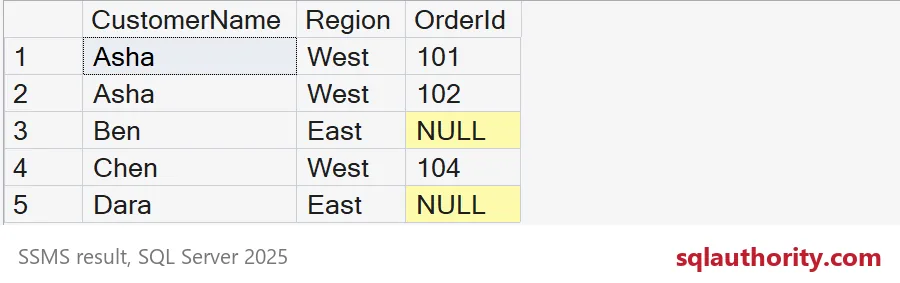
Asha shows orders 101 and 102, and Chen shows 104. Ben and Dara stay with a NULL OrderId. Look at Ben closely: Ben really has order 103, yet it is not shown. The condition was false for that row, so nothing was allowed to match. ON can only block matches. It never throws away a left row. If you want only West customers, that filter belongs in WHERE, where it returns just Asha’s two rows and Chen’s one.
Chained joins: one WHERE undoes two LEFT JOINs
Real reports join more than two tables. Here customers lead to orders, and orders lead to shipments. I want every customer and every order, plus the FastShip carrier where one exists.
SELECT c.CustomerName, o.OrderId, s.Carrier
FROM #Customers AS c
LEFT JOIN #Orders AS o
    ON o.CustomerId = c.CustomerId
LEFT JOIN #Shipments AS s
    ON s.OrderId = o.OrderId
   AND s.Carrier = 'FastShip'
ORDER BY c.CustomerId, o.OrderId;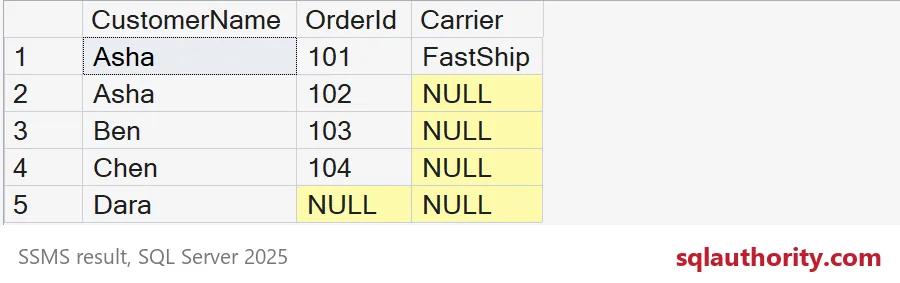
With the carrier check in ON, you get five rows: Asha twice, Ben, Chen and Dara, with FastShip only next to order 101. Move that check to WHERE and the result shrinks to one row, Asha with order 101. A single condition on the last table removed customers and orders from both LEFT JOINs above it. That is the bug I find most often in reports that “lost” data overnight.

Finding the customers with no shipped order
Now the useful payoff. To list customers without a shipped order, keep the status check in ON and test for the missing match in WHERE. Both queries below return Ben and Dara.
SELECT c.CustomerName
FROM #Customers AS c
LEFT JOIN #Orders AS o
    ON o.CustomerId = c.CustomerId
   AND o.Status = 'Shipped'
WHERE o.OrderId IS NULL
ORDER BY c.CustomerId;

SELECT c.CustomerName
FROM #Customers AS c
WHERE NOT EXISTS (SELECT 1
                  FROM #Orders AS o
                  WHERE o.CustomerId = c.CustomerId
                    AND o.Status = 'Shipped')
ORDER BY c.CustomerId;
Put the status check in WHERE next to the IS NULL test and the query returns nothing at all. No row can be both shipped and missing. I like NOT EXISTS here because it reads like the question. The LEFT JOIN form is fine too, once the condition sits in ON.
DROP TABLE IF EXISTS #Shipments;
DROP TABLE IF EXISTS #Orders;
DROP TABLE IF EXISTS #Customers;
Next time a LEFT JOIN surprises you, ask one question of each condition: should it decide the match or the final row?
The ON clause is not a filter, it is the rule for who may match.
Published by Pinal Dave on SQLAuthority. More of my work at pinaldave.com.
Discover more from SQL Authority with Pinal Dave
Subscribe to get the latest posts sent to your email.


34 Comments. Leave new
Hi Pinal,
Firstly, thanks for a great explanation. I have a question related to this topic. Let’s say that the Flag = 1 condition is instead applicable on the left table T1 thus T1.Flag = 1 is added in the ON clause. My understanding was that since this condition is for the left table, only the records matching this condition would be selected from the left table (T1) for the JOIN however that’s not the case. Can you please provide some explanation on this?