Today we will have very simple learning about Building Date and Time with DATETIMEFROMPARTS(). This particular function is still not used as much as it should be. In most of the cases, you will see people building DateTime with the help of converting string to DateTime.

The DATETIMEFROMPARTS() function accepts seven arguments, each for a different part of the date/time. Based on the input it builds a valid datetime value.
Though, I do not like to talk about syntax on this blog post, for this example syntax is very important to know.
DATETIMEFROMPARTS ( year, month, day, hour, minute, seconds, milliseconds )If you pass in a valid date and time inside this function, it will build a DateTime from various parts.
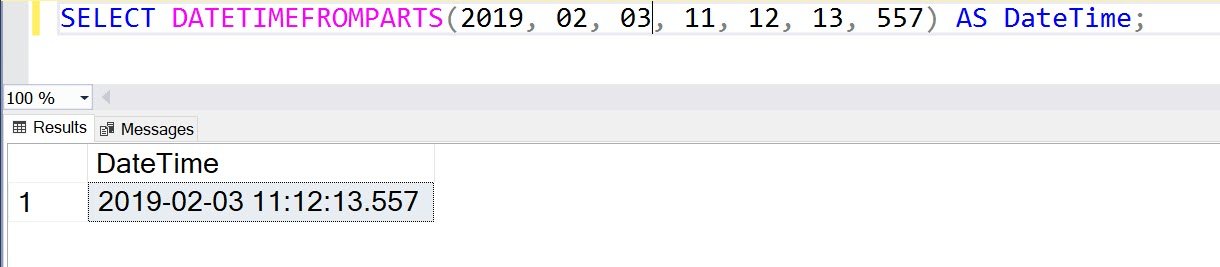
Let us see a few of the examples for the same:
SELECT DATETIMEFROMPARTS(2019, 02, 03, 11, 12, 13, 557) AS DateTime;When we ran above the script, you will see the following result.
Please note that the precision of the DateTime is 0.00333 seconds. So often when you pass some values like the following example, it will automatically round up or round down the values and show you the nearest value for DateTime.
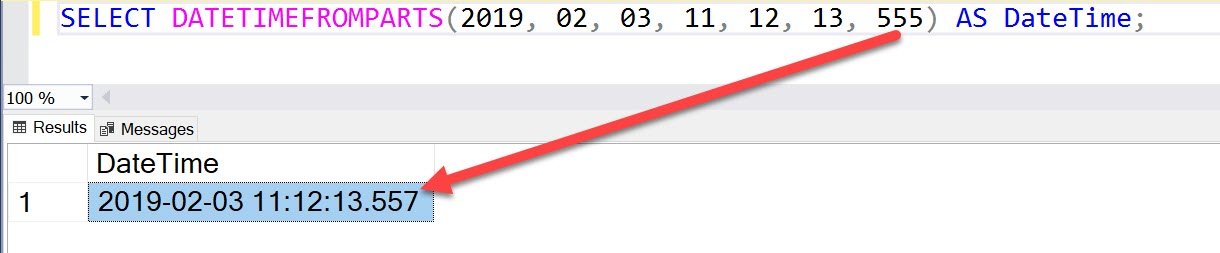
If you pass incorrect values like in the following example, it will give you an error. I am not providing the script here as it will not work and may confuse few who do not read the entire blog.

If any of the value is NULL, it will also convert the entire resultset as NULL as well.

There are also two functions DATEFROMPARTS and DATETIME2FROMPARTS as well, which accepts different values and helps to build different Date and DateTime parts.
Here are a few additional blog posts which are related to this topic:
- SQL SERVER – Adding Datetime and Time Values Using Variables
- How to Trim TIME Part in DATETIME Values? – Interview Question of the Week #200
- SQL SERVER – Difference Between DATETIME and DATETIME2
- MySQL – When to Use TIMESTAMP or DATETIME – Difference Between TIMESTAMP or DATETIME
- SQL SERVER – Display Datetime in Specific Format – SQL in Sixty Seconds #033 – Video
Published by Pinal Dave on SQLAuthority. More of my work at pinaldave.com.