Countdowns in T-SQL go wrong when each unit is calculated on its own. Take one total number of seconds, then split it into days, hours and minutes. That way the pieces always agree.

Why a countdown can say the wrong thing
Say your app shows “Webinar starts in 1 day” at 11:59 PM. A minute later it says “0 days,” and the user wonders if the event moved. Nothing moved. The query counted calendar days, not time.
DATEDIFF counts how many boundaries you cross, not how much time passed. Cross midnight by one second and DATEDIFF with day says 1. For a countdown you want a real duration. So the plan is simple: measure the gap once, in seconds, and do plain arithmetic on that number.
Take one total, then split it
I fix the clock at a known value so you get the same numbers I did. The first query turns the gap into days, hours, minutes and seconds with division and remainders. The second query shows the midnight trap.
DECLARE @Now    datetime2(0) = '2025-01-01T23:59:00';
DECLARE @Starts datetime2(0) = '2025-01-03T01:01:01';
DECLARE @Seconds bigint = DATEDIFF_BIG(second, @Now, @Starts);

SELECT @Seconds AS TotalSeconds,
       @Seconds / 86400        AS Days,
       (@Seconds % 86400) / 3600 AS Hours,
       (@Seconds % 3600) / 60    AS Minutes,
       @Seconds % 60             AS Seconds;

SELECT DATEDIFF(day, '2025-01-01T23:59:59', '2025-01-02T00:00:00') AS CalendarDayBoundaries,
       DATEDIFF_BIG(second, '2025-01-01T23:59:59', '2025-01-02T00:00:00') AS SecondBoundaries;
The total is 90121 seconds. That splits into 1 day, 1 hour, 2 minutes and 1 second. Every unit comes from the same number, so they cannot disagree.
The second result is the trap. Between 23:59:59 and midnight, only 1 second passed. Yet the day count says 1. If you built a countdown from that, you would be a day off.

Settle the time zone before you subtract
A local event time with no zone is half a fact. “10:00 AM” means nothing until you say where. Attach the zone, convert to UTC, and only then compare with a UTC clock. The zone name carries the daylight saving rules too, not only the offset.
DECLARE @Local datetime2(0) = '2030-01-01T10:00:00';

SELECT @Local AT TIME ZONE 'Eastern Standard Time' AT TIME ZONE 'UTC' AS EventUtc;

SELECT name
FROM sys.time_zone_info
WHERE name IN (N'Eastern Standard Time', N'UTC')
ORDER BY name;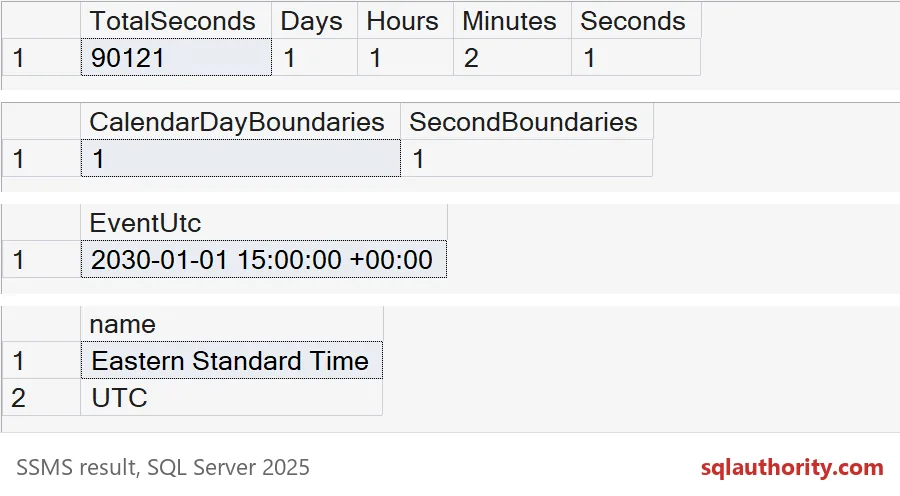
A 10:00 AM event in January becomes 15:00 UTC. The second query confirms that the server knows both zone names. If your zone is missing from that list, fix that before you build anything.
Now try the same clock time in July. The zone name is still “Eastern Standard Time,” but the rules know about daylight saving.
SELECT CAST('2030-07-01T10:00:00' AS datetime2(0))
       AT TIME ZONE 'Eastern Standard Time' AT TIME ZONE 'UTC' AS SummerEventUtc;
The result is 14:00 UTC, one hour earlier than in winter. If you had hard-coded a five-hour offset, your summer countdown would be an hour wrong.
Decide what to show for past events and short gaps
Two cases surprise people. The event may already have started. And a gap under a minute shows zero minutes with seconds left over. Decide the behavior once, in the query.
DECLARE @Now datetime2(0) = '2025-01-01T23:59:00';

SELECT e.EventName, s.TotalSeconds,
       CASE WHEN s.TotalSeconds <= 0 THEN N'Started'
            ELSE CONCAT(s.TotalSeconds / 86400, N'd ',
                        (s.TotalSeconds % 86400) / 3600, N'h ',
                        (s.TotalSeconds % 3600) / 60, N'm ',
                        s.TotalSeconds % 60, N's') END AS Display
FROM (VALUES (N'Maintenance', CAST('2025-01-01T20:00:00' AS datetime2(0))),
             (N'Webinar',     CAST('2025-01-01T23:59:59' AS datetime2(0))),
             (N'Launch call', CAST('2025-01-03T01:01:01' AS datetime2(0)))) AS e(EventName, StartsAt)
CROSS APPLY (SELECT DATEDIFF_BIG(second, @Now, e.StartsAt) AS TotalSeconds) AS s
ORDER BY e.StartsAt;
The maintenance event is in the past, so it says Started. The webinar is 59 seconds away and shows 0d 0h 0m 59s. The launch call shows 1d 1h 2m 1s, matching the earlier result. A past event could instead show how overdue it is. Pick what your users expect and keep it the same in every report.
Read the clock once
In a real query the clock is not fixed. Read it once into a variable, and use that variable everywhere. If you call SYSUTCDATETIME() in several places, the clock can tick between the calls, and the units drift apart.
DECLARE @NowUtc datetime2(0) = SYSUTCDATETIME();
DECLARE @EventUtc datetime2(0) =
    CAST(CAST('2030-01-01T10:00:00' AS datetime2(0)) AT TIME ZONE 'Eastern Standard Time' AT TIME ZONE 'UTC' AS datetime2(0));

SELECT @NowUtc AS CalculatedAtUtc,
       s.TotalSeconds,
       s.TotalSeconds / 86400          AS Days,
       (s.TotalSeconds % 86400) / 3600 AS Hours,
       (s.TotalSeconds % 3600) / 60    AS Minutes
FROM (SELECT DATEDIFF_BIG(second, @NowUtc, @EventUtc) AS TotalSeconds) AS s;
Your numbers depend on when you run it, so they will differ from mine. Notice the shape of the result. It returns plain numbers and the time they were calculated. Let the application build the words, and let the browser tick down without asking the database every second.
Next time a countdown looks off by one, check whether it counted boundaries or time.
A countdown is not a calendar difference, it is one duration split into parts.
Published by Pinal Dave on SQLAuthority. More of my work at pinaldave.com.
Discover more from SQL Authority with Pinal Dave
Subscribe to get the latest posts sent to your email.