Sequence Project and Segment are the two operators a window function leaves in a query plan. Once you can spot them, you know why ROW_NUMBER and a running total cost what they cost. The expensive part turns out to be neither of them.

What a Window Function Asks For
A window function calculates a value for each row by looking at a group of related rows. PARTITION BY splits the rows into groups, here one group per customer. ORDER BY sets the order inside each group. ROW_NUMBER counts 1, 2, 3 in that order, and a running SUM adds as it goes.
To do this, SQL Server needs the rows in order: by customer first, then by date inside each customer. If nothing delivers them that way, the plan adds a Sort. Keep that in mind, because the Sort is where the cost lands.
Build the Test
I ran everything here on SQL Server 2025. The script makes 200,000 orders for 2,000 customers, so every customer has 100 orders.
IF DB_ID(N'SqlWindowPlanDemo') IS NULL CREATE DATABASE SqlWindowPlanDemo;
GO
USE SqlWindowPlanDemo;
GO
DROP TABLE IF EXISTS dbo.Orders;
CREATE TABLE dbo.Orders
(
    OrderID int IDENTITY(1,1) PRIMARY KEY,
    CustomerID int NOT NULL,
    OrderDate date NOT NULL,
    Amount decimal(10,2) NOT NULL
);
INSERT INTO dbo.Orders (CustomerID, OrderDate, Amount)
SELECT s.value % 2000 + 1, DATEADD(DAY, s.value % 365, '2026-01-01'), s.value % 500 + 10.50
FROM GENERATE_SERIES(1, 200000) AS s;
GO
The first query numbers each customer’s orders by date. The outer MAX only keeps the output to one row, so the plan stays short. Turn on the actual plan with Ctrl+M, then run it. The Messages tab will show the reads and CPU time.
SET STATISTICS IO ON;
SET STATISTICS TIME ON;
SELECT MAX(rn) AS MaxRowNumber
FROM (SELECT ROW_NUMBER() OVER (PARTITION BY CustomerID ORDER BY OrderDate, OrderID) AS rn
      FROM dbo.Orders) AS x;
The answer is 100, as expected. The plan is the interesting part.
What SQL Server 2025 Shows by Default
On my server the plan read Clustered Index Scan, Sort, Window Aggregate and Hash Match for the MAX. No Segment and no Sequence Project. The reason is batch mode on rowstore, which arrived in SQL Server 2019. It works on rows in groups instead of one at a time. One operator, Window Aggregate, does the job of several row mode operators.
Row mode plans still run on older compatibility levels. To see one on SQL Server 2025, add a hint that turns batch mode off. Use it to study, not in production code.
SELECT MAX(rn) AS MaxRowNumber
FROM (SELECT ROW_NUMBER() OVER (PARTITION BY CustomerID ORDER BY OrderDate, OrderID) AS rn
      FROM dbo.Orders) AS x
OPTION (USE HINT('DISALLOW_BATCH_MODE'));
Now the plan reads, from right to left: Clustered Index Scan, Sort, Segment, Sequence Project, Stream Aggregate. The Segment operator reads the sorted rows and marks where one partition ends and the next begins. It compares the PARTITION BY column of each row with the row before it.
The Sequence Project operator then computes the value. For ROW_NUMBER it adds 1 for each row and starts again at 1 after every mark from the Segment. While you are in the plan, compare estimated and actual rows on each operator. My post on estimated vs actual rows explains that check.
Now look at the cost. The Sort took 94.8% of the estimated cost of the plan. Those two together took about 0.1%. Both of those pass each row on as soon as they have worked on it. The Sort can’t pass on the first row until it has read all 200,000.
The Running Total and the Window Spool
A running total needs one more operator. This query adds each order to the earlier orders of the same customer. The frame, ROWS BETWEEN UNBOUNDED PRECEDING AND CURRENT ROW, picks the rows to add. It runs from the first row of the group to the current one.
SELECT MAX(running) AS MaxRunning
FROM (SELECT SUM(Amount) OVER (PARTITION BY CustomerID ORDER BY OrderDate, OrderID
                               ROWS BETWEEN UNBOUNDED PRECEDING AND CURRENT ROW) AS running
      FROM dbo.Orders) AS x
OPTION (USE HINT('DISALLOW_BATCH_MODE'));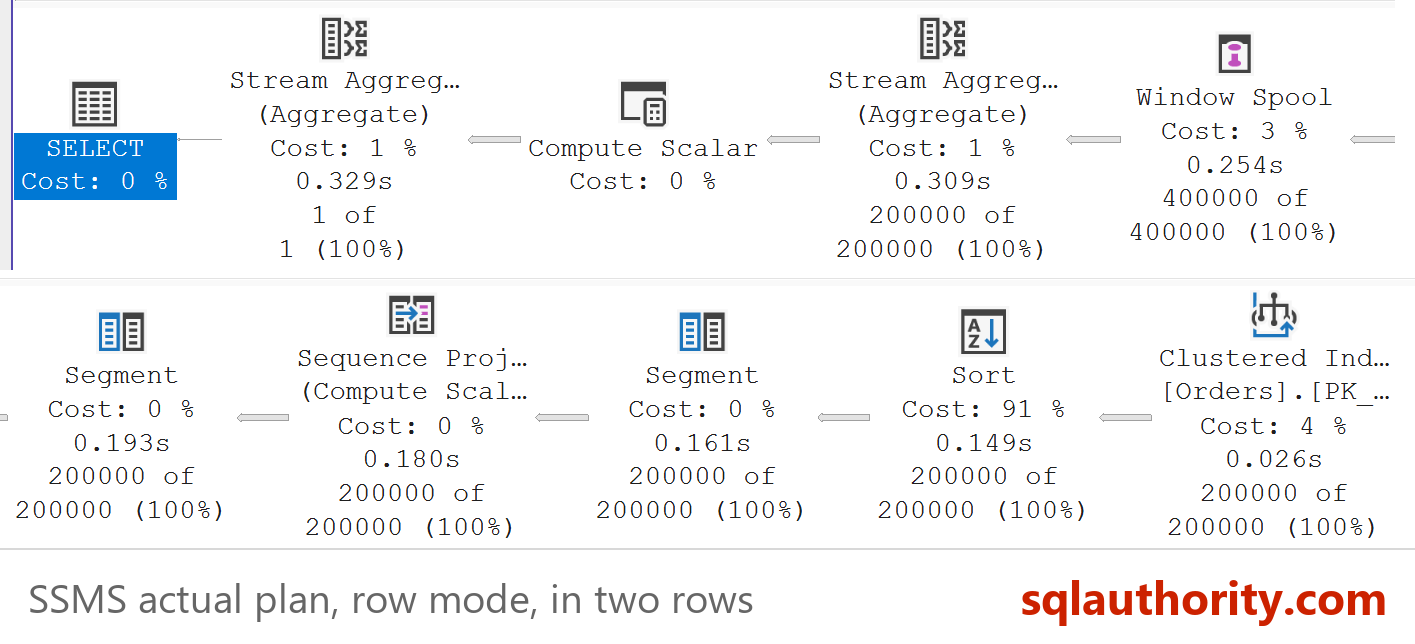
The plan grew. After the Sequence Project come a second Segment and a Window Spool. Then a Stream Aggregate does the adding. The Window Spool holds the rows of the current frame so the aggregate can read them. The Sort is still the biggest piece, at 91.3% of the estimated cost.
The frame matters. If you write ORDER BY and no frame, SQL Server uses RANGE instead of ROWS. In a row mode plan, RANGE spools the frame to a worktable in tempdb.
SELECT MAX(running) AS MaxRunning
FROM (SELECT SUM(Amount) OVER (PARTITION BY CustomerID ORDER BY OrderDate, OrderID) AS running
      FROM dbo.Orders) AS x
OPTION (USE HINT('DISALLOW_BATCH_MODE'));
Both queries return 50950.00, but the cost is not the same. The ROWS version showed zero worktable reads and a median of 234 ms of CPU. The RANGE version showed 1,200,001 worktable reads and 1,735 ms. Batch mode has no such gap: all three queries took about 93 ms.
RANGE and ROWS agree only when no two rows of a group tie on the ORDER BY columns. With ties, RANGE adds the tied rows together. Here OrderID breaks every tie. Write ROWS unless you want the tied rows added together.
Remove the Sort With an Index
The Sort exists because the rows arrive in the wrong order. An index can deliver them in the right order. List the PARTITION BY column first, then the ORDER BY columns, in the same direction as the query. Include the column you add up, so the index covers the query.
CREATE INDEX IX_Orders_Customer_Date
ON dbo.Orders (CustomerID, OrderDate, OrderID)
INCLUDE (Amount);
Now run the three row mode queries again, and the first query without the hint. The Sort is gone from every plan. Rows flow from the index scan straight into the Segment, or into the Window Aggregate in batch mode.
| Query | Grant before | Grant after | CPU before | CPU after |
|---|---|---|---|---|
| ROW_NUMBER, row mode | 16,424 KB | 0 KB | 110 ms | 47 ms |
| Running total ROWS, row mode | 18,888 KB | 0 KB | 234 ms | 203 ms |
| Running total RANGE, row mode | 18,888 KB | 0 KB | 1,735 ms | 1,937 ms |
| ROW_NUMBER, batch mode | 69,840 KB | 3,120 KB | 93 ms | 16 ms |
The memory grant is the clearest gain. Reads of dbo.Orders also fell from 721 to 648, because the index is narrower than the table. But the RANGE query stayed slow, since the index does not touch the spool. The Sort was 91.3% of the estimated cost, yet the ROWS query lost only 31 ms of CPU. Estimated cost is a guess, so measure before you promise a gain.
The direction must match too. This query sorts the newest order first, and the ascending index can’t serve it. The Sort came back with a 16,424 KB grant.
SELECT MAX(rn) AS MaxRowNumber
FROM (SELECT ROW_NUMBER() OVER (PARTITION BY CustomerID ORDER BY OrderDate DESC, OrderID DESC) AS rn
      FROM dbo.Orders) AS x
OPTION (USE HINT('DISALLOW_BATCH_MODE'));
An index with descending keys fixes it. Run the previous query again after creating it, and the Sort disappears with a grant of 0 KB.
CREATE INDEX IX_Orders_Customer_DateDesc
ON dbo.Orders (CustomerID, OrderDate DESC, OrderID DESC)
INCLUDE (Amount);
A Simple Rule
You could say batch mode makes all this moot, since the whole query took only 93 ms of CPU. Fair point. But the 69,840 KB grant hurts when many sessions run it together, and the index cut it to 3,120 KB. An index also costs space and slows every insert. Build one only for a window query that runs all day.
When a window query is slow, read the plan from the right. Find the Sort and check its memory grant. Then compare its key with PARTITION BY and ORDER BY. In my tuning checks, I look at the frame next, and I write ROWS unless ties must be added together.
When you finish testing, remove the example database.
USE master;
GO
ALTER DATABASE SqlWindowPlanDemo SET SINGLE_USER WITH ROLLBACK IMMEDIATE;
DROP DATABASE SqlWindowPlanDemo;
A window function is not costly for what it does, it is costly for the Sort it needs.
Published by Pinal Dave on SQLAuthority. More of my work at pinaldave.com.
Discover more from SQL Authority with Pinal Dave
Subscribe to get the latest posts sent to your email.