
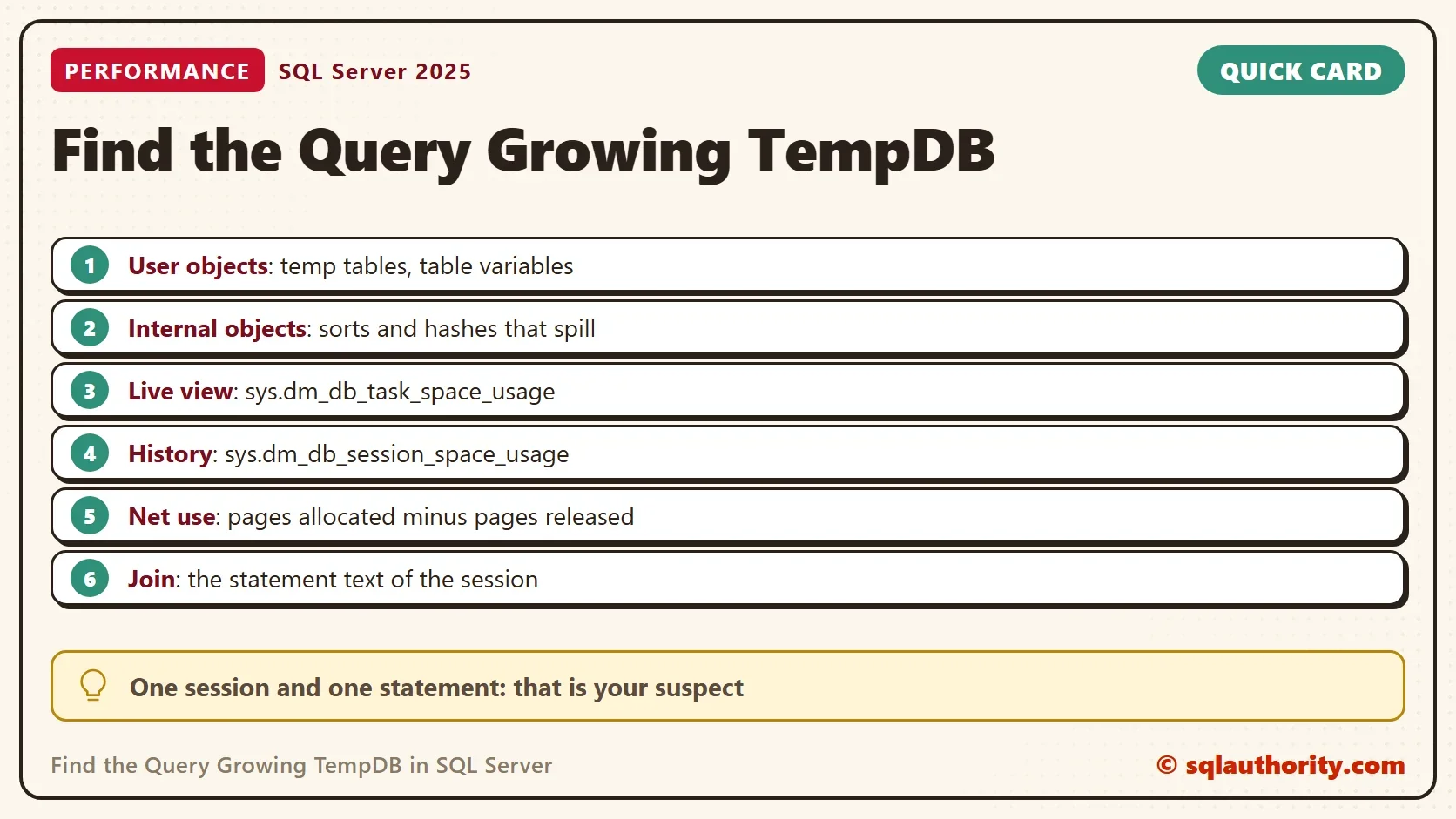
To find the query growing TempDB, read each session’s allocated space and join it to its statement. Two views hold the numbers. One covers tasks that are running now, and the other covers the work a session has finished.

What Fills TempDB
Three kinds of objects use TempDB. User objects are temporary tables and table variables that your code creates. Internal objects belong to SQL Server. A sort or hash join that runs out of memory writes extra rows there. That is called a spill. The version store keeps old row versions for snapshot isolation and a few other features.
A file level view splits the used space into those kinds. The first query reads it. Because TempDB is shared by the whole instance, the numbers include every session and every database.
SELECT CAST(SUM(user_object_reserved_page_count) / 128.0 AS decimal(12,1)) AS UserObjectsMB,
       CAST(SUM(internal_object_reserved_page_count) / 128.0 AS decimal(12,1)) AS InternalObjectsMB,
       CAST(SUM(version_store_reserved_page_count) / 128.0 AS decimal(12,1)) AS VersionStoreMB,
       CAST(SUM(unallocated_extent_page_count) / 128.0 AS decimal(12,1)) AS FreeMB
FROM tempdb.sys.dm_db_file_space_usage;| UserObjectsMB | InternalObjectsMB | VersionStoreMB | FreeMB |
|---|---|---|---|
| 2.0 | 0.4 | 0.1 | 1591.1 |
Your numbers will differ. This view tells you what kind of space is busy. It doesn’t tell you who uses it. For that you need the per session views.
Two Jobs That Use TempDB
The demo database holds one table of a million rows. The first script creates it. The second script runs two jobs in one window. The first job copies 200,000 rows into a temporary table, which uses user object space until the session ends. The second job ranks all rows by a wide column. The hint MAX_GRANT_PERCENT = 0.5 cuts the memory grant to almost nothing, so the sort spills into TempDB. Use that hint only in a demo.
IF DB_ID(N'TempUsageDemo') IS NULL CREATE DATABASE TempUsageDemo;
GO
USE TempUsageDemo;
GO
DROP TABLE IF EXISTS dbo.Events;
CREATE TABLE dbo.Events (EventID int NOT NULL PRIMARY KEY, Payload char(300) NOT NULL);
INSERT INTO dbo.Events (EventID, Payload)
SELECT TOP (1000000) ROW_NUMBER() OVER (ORDER BY (SELECT NULL)),
       REPLICATE(CHAR(65 + ABS(CHECKSUM(NEWID())) % 26), 300)
FROM sys.all_objects AS a CROSS JOIN sys.all_objects AS b CROSS JOIN sys.all_objects AS c;
SELECT EventID, Payload INTO #Staging FROM dbo.Events WHERE EventID <= 200000;
GO
SELECT MAX(x.rn) AS Ranked
FROM (SELECT ROW_NUMBER() OVER (ORDER BY Payload, EventID) AS rn FROM dbo.Events) AS x
OPTION (MAX_GRANT_PERCENT = 0.5);
The Monitor Query
Open a second window while the jobs run, so you can catch the query growing TempDB. The query adds up two views. sys.dm_db_session_space_usage holds the totals of finished tasks. sys.dm_db_task_space_usage holds the tasks that are running now. Each page is 8 KB, so dividing by 128 gives megabytes. The query subtracts the pages a session has released from the pages it allocated. That net number is the space the session holds now.
WITH Usage AS (
    SELECT session_id, user_objects_alloc_page_count AS UserAlloc, user_objects_dealloc_page_count AS UserFree,
           internal_objects_alloc_page_count AS InternalAlloc, internal_objects_dealloc_page_count AS InternalFree
    FROM sys.dm_db_session_space_usage
    UNION ALL
    SELECT session_id, user_objects_alloc_page_count, user_objects_dealloc_page_count,
           internal_objects_alloc_page_count, internal_objects_dealloc_page_count
    FROM sys.dm_db_task_space_usage
)
SELECT u.session_id AS SessionId,
       CAST(SUM(u.UserAlloc - u.UserFree) / 128.0 AS decimal(12,1)) AS UserObjectsMB,
       CAST(SUM(u.InternalAlloc - u.InternalFree) / 128.0 AS decimal(12,1)) AS InternalObjectsMB,
       LEFT(t.text, 70) AS CurrentStatement
FROM Usage AS u
JOIN sys.dm_exec_sessions AS s ON s.session_id = u.session_id AND s.is_user_process = 1
LEFT JOIN sys.dm_exec_requests AS r ON r.session_id = u.session_id
OUTER APPLY sys.dm_exec_sql_text(r.sql_handle) AS t
WHERE u.session_id <> @@SPID
GROUP BY u.session_id, LEFT(t.text, 70)
HAVING SUM(u.UserAlloc - u.UserFree) + SUM(u.InternalAlloc - u.InternalFree) > 0
ORDER BY SUM(u.UserAlloc - u.UserFree) + SUM(u.InternalAlloc - u.InternalFree) DESC;
It joins each session to the statement it is running and lists the biggest users first. The query hides your own session. Other sessions appear in the list when they hold TempDB space. Without such sessions, the query returns no rows. Three snapshots from one run of the demo follow. Yours will differ.
| SessionId | UserObjectsMB | InternalObjectsMB | CurrentStatement |
|---|---|---|---|
| 116 | 26.7 | 0.0 | SELECT EventID, Payload INTO #Staging FROM dbo.Events WHERE EventID <= |
| 116 | 62.6 | 2.4 | SELECT MAX(x.rn) AS Ranked FROM (SELECT ROW_NUMBER() OVER (ORDER BY Pa |
| 116 | 62.6 | 9.6 | SELECT MAX(x.rn) AS Ranked FROM (SELECT ROW_NUMBER() OVER (ORDER BY Pa |
The first row catches the temporary table while it fills. The user object space then holds at 62.6 MB, because the table lives as long as the session. The internal object space starts at zero and grows while the sort spills. When the sort finishes, SQL Server releases it, and the column drops back to zero.
After the Query Ends
The monitor only sees what is held now. A spill that ended a minute ago is gone from the net columns. The session view still keeps the running totals since the session started. Run this in the window that ran the jobs.
SELECT CAST(user_objects_alloc_page_count / 128.0 AS decimal(12,1)) AS UserAllocatedMB,
       CAST(internal_objects_alloc_page_count / 128.0 AS decimal(12,1)) AS InternalAllocatedMB,
       CAST((internal_objects_alloc_page_count - internal_objects_dealloc_page_count) / 128.0 AS decimal(12,1)) AS InternalStillHeldMB
FROM sys.dm_db_session_space_usage
WHERE session_id = @@SPID;| UserAllocatedMB | InternalAllocatedMB | InternalStillHeldMB |
|---|---|---|
| 66.5 | 9.9 | 0.0 |
The sort took about 10 MB of internal space in total, and the held amount returned to zero. This table is one run. The temporary table is still there. A big InternalAllocatedMB next to a small InternalStillHeldMB points to a query that spilled and finished. To catch the culprit by name later, trace the sort and hash warning events with Extended Events.
Fix the Query
Once you have the query growing TempDB, open its plan. A spill means the sort or the hash had too little memory. Look for a warning on the Sort or Hash Match operator. Wrong row estimates are a common cause of spills, so update the statistics first. An index in the sort order removes the sort entirely. Selecting only the columns you need makes every row smaller, and a smaller row needs less memory.
You could argue that a big TempDB isn’t a problem, since it’s only disk space. One runaway query can fill the drive, and then every query that needs TempDB fails. Watching the net columns is cheap, and it finds the problem before the drive fills.
What to Remember
To find the query growing TempDB, read the kind of space first, then the session, then the statement. User objects point to temporary tables, and internal objects point to spills. Compare the net columns across a few snapshots, because one snapshot can miss a short job.
The temporary table disappears when the demo window closes. Run the cleanup script to remove the demo database.
USE master;
GO
IF DB_ID(N'TempUsageDemo') IS NOT NULL
BEGIN
    ALTER DATABASE TempUsageDemo SET SINGLE_USER WITH ROLLBACK IMMEDIATE;
    DROP DATABASE TempUsageDemo;
END;
A big TempDB is not a mystery, it is one session with one statement.
Published by Pinal Dave on SQLAuthority. More of my work at pinaldave.com.
Discover more from SQL Authority with Pinal Dave
Subscribe to get the latest posts sent to your email.



2 Comments. Leave new
Seems like an interesting article but I’m having a really tough time following what is being said. The sentence structures don’t make sense to me!
Thanks, helped solved my problem!