Question: How do I identify the process ID for SQL Server services?
Answer: Query sys.dm_server_services. It returns the services associated with the instance you are connected to, including their Windows process IDs and service accounts.

This question came up during a Comprehensive Database Performance Health Check. Here is the short script I used:
SELECT servicename, status_desc,
       process_id, last_startup_time, service_account
FROM sys.dm_server_services;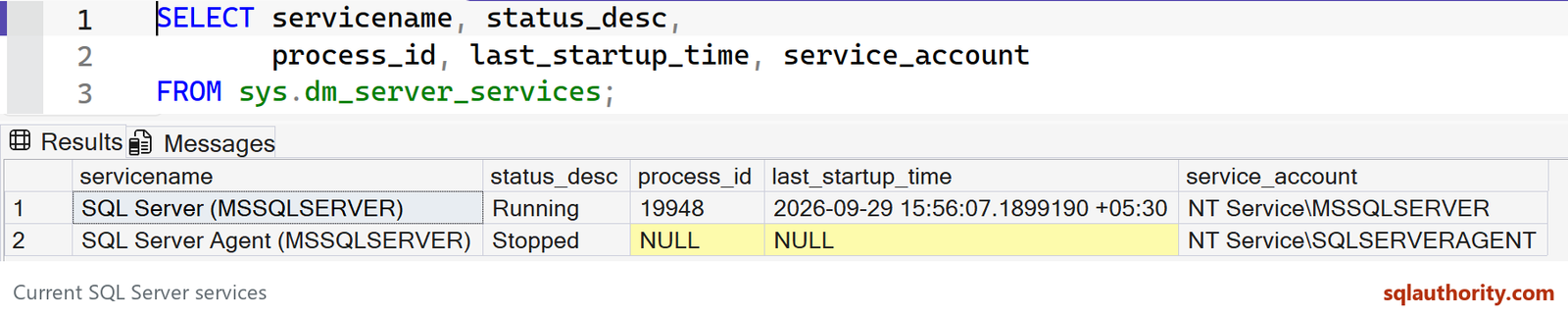
Current SQL Server services. Captured in SSMS on SQL Server 2025.
Match servicename and process_id to the process you see in Task Manager. For the Database Engine alone, SELECT SERVERPROPERTY('ProcessID'); is another direct check.
This result also shows why you should read status_desc: the Agent is stopped and has no active process ID. A PID identifies a particular running process and can change after a service restart. It is not a TCP port number, a SQL Server session ID or a permanent identifier.
On SQL Server 2019 and earlier, this DMV requires VIEW SERVER STATE; from SQL Server 2022 it requires VIEW SERVER SECURITY STATE. It describes the connected instance’s services, rather than inventorying every SQL Server instance on the machine.
Previous interview questions:
- How to Check Status of Instant File Initialization? – Interview Question of the Week #184
- How Old Version of SQL Server Running on Server? – Interview Question of the Week #183
- How to Convert Hex Windows Error Codes to the Meaningful Error Message – 0x80040002 and 0x80040005 and others? – Interview Question of the Week #182
- How to Generate Random Password in SQL Server? – Interview Question of the Week #181
- How to Check Edition Specific Features Enabled In SQL Server? – Interview Question of the Week #180
- How to Find Service Account for SQL Server and SQL Server Agent? – Interview Question of the Week #179
- How Much Work Each Processor (CPU) is Doing in SQL Server? – Interview Question of the Week #178
- How to Find Cardinality or Uniqueness for any Column? – Interview Question of the Week #177
Published by Pinal Dave on SQLAuthority. More of my work at pinaldave.com.
Discover more from SQL Authority with Pinal Dave
Subscribe to get the latest posts sent to your email.