
Question: I found a high virtual log file (VLF) count. How can I reduce it safely?
Answer: After I published a query to count VLFs, this was the question readers sent me most often. First ask whether the count is actually causing a problem and why the log grew in small steps. Shrinking a log that the workload needs will only make it grow again. In this older WideWorldImporters example, the before and after SQL Server results still show exactly what happened, so I am keeping all four original screenshots.

Inspect the log before changing it
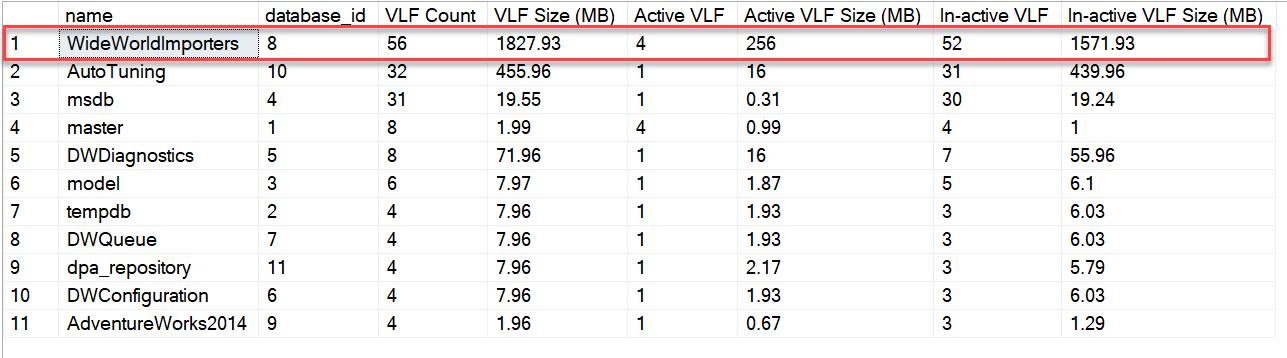
The first result in my original demonstration showed 56 VLFs in a log of about 1,828 MB, with four active VLFs. That is a measurement, not yet a diagnosis. Check the database’s recovery model, backup schedule, log reuse wait, actual peak log use, and whether long transactions or other features prevent log truncation.
Next identify the logical log-file name. I used sp_helpfile in WideWorldImporters; the saved result shows WWI_Log. You could also inspect sys.database_files.
USE [WideWorldImporters];
EXEC sys.sp_helpfile;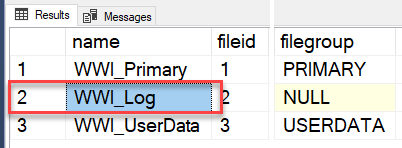
Understand the original shrink demonstration
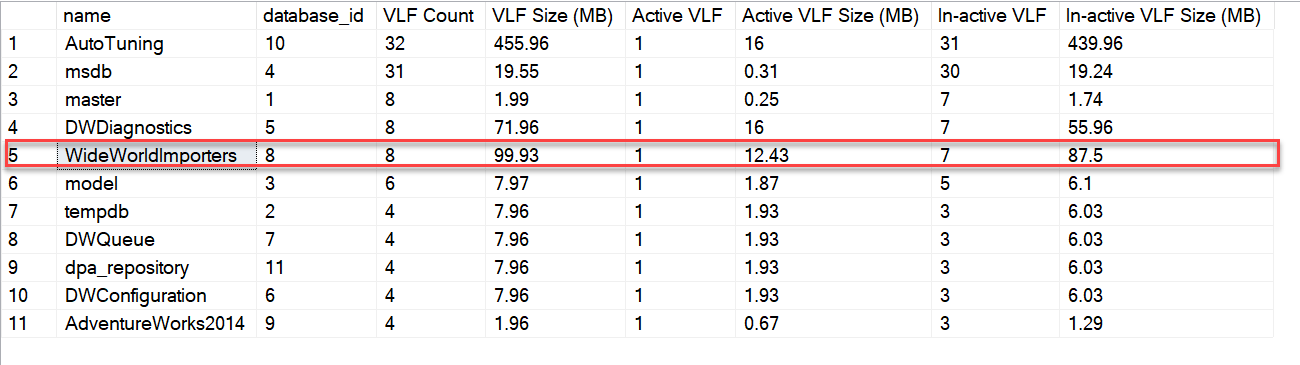
My original run used CHECKPOINT followed by DBCC SHRINKFILE (N'WWI_Log', 0). The result below shows the log at 12,800 pages, about 100 MB. This is a historical demonstration, not a recurring maintenance job or a target size for your production log. In the full or bulk-logged recovery model, a log backup may be needed to make inactive VLFs reusable; a checkpoint alone does not replace that backup. Long-running transactions or other reuse waits can still prevent truncation.
-- Historical demo only. Inspect log reuse and choose a real target first.
USE [WideWorldImporters];
CHECKPOINT;
DBCC SHRINKFILE (N'WWI_Log', 0);
The later result showed eight VLFs, one active, in roughly 100 MB. SQL Server can remove inactive VLFs from the end of the log file; it cannot promise that every inactive VLF anywhere in the file disappears. The before and after counts describe this specific run, not a guaranteed result for another database.
Size the log for the real workload
If a one-time shrink is justified, do it in a quiet maintenance window after finding why truncation is delayed, then grow the file deliberately to a size that supports normal peak work. Set a sensible fixed growth increment and monitor it. My old article showed SIZE = 1024MB while describing an autogrowth change. That was wrong: SIZE sets the current file size; FILEGROWTH sets future growth. The numbers below are examples only, not universal recommendations.
-- Example values only. Choose both from measured peak log usage.
ALTER DATABASE [WideWorldImporters]
MODIFY FILE
(
    NAME = N'WWI_Log',
    SIZE = 1024MB,
    FILEGROWTH = 256MB
);
My earlier VLF reduction example provides historical context. Have you found a growth setting that kept your own log stable?
Published by Pinal Dave on SQLAuthority. More of my work at pinaldave.com.
Discover more from SQL Authority with Pinal Dave
Subscribe to get the latest posts sent to your email.




2 Comments. Leave new
May wanna add some caveats about iteratively growing the log depending on version as well as the caveat that post sql 2014, if the t-log is over 4.5gb, only 1 vlf will be created with your autogrowth setting.
Hah ran into this again… Your script is also wrong, if you’re trying to change growth you need to set “FILEGROWTH” not the full size of the log. This article needs to be cleaned up with post sql2014 growth considerations.