Question: What is Lock Pages in Memory?
Answer: Lock Pages in Memory, or LPIM, is a Windows user right. It lets the SQL Server Database Engine allocate eligible memory pages that Windows will not page out to disk.

That protection can help when Windows memory pressure would otherwise trim SQL Server’s working set. It is not a promise that every query will become faster, and it does not lock every allocation made by the process. The original warning is worth keeping: leave enough memory for Windows and the other services, and configure max server memory deliberately.
Enable the right for the Database Engine
First identify the actual Database Engine service account or service SID. The account you use to open SSMS is not necessarily that account. Microsoft recommends assigning the right to the service SID so the grant survives a service-account change.
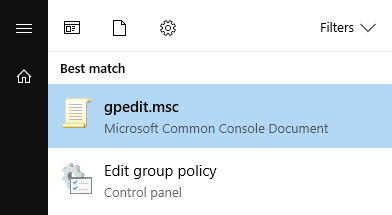
- Open
gpedit.mscwith the appropriate administrator access.
- Go to Computer Configuration, Windows Settings, Security Settings, Local Policies, User Rights Assignment.
- Open Lock pages in memory, choose Add User or Group, and select the Database Engine service account or SID.
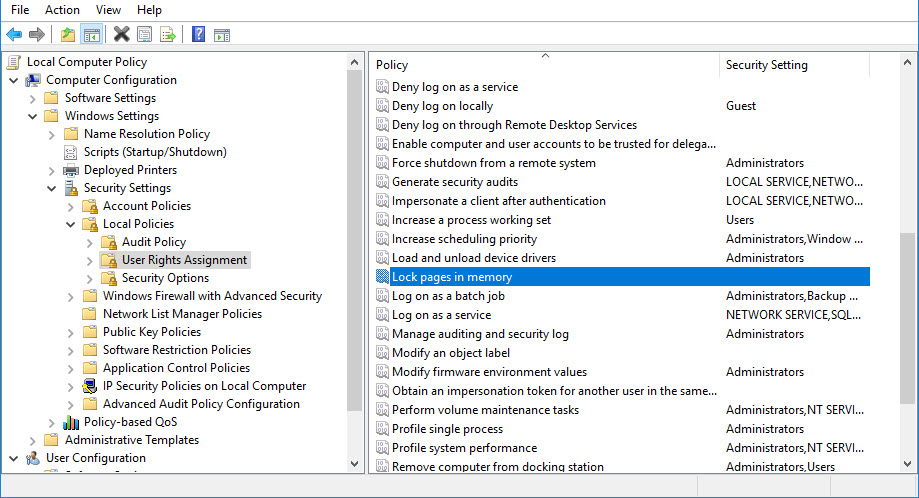
- Save the policy and restart the SQL Server instance in an agreed maintenance window. Logging out of your own desktop session does not restart the Database Engine service.
A domain policy can govern the assignment, so confirm the effective setting with the Windows administrator rather than assuming a local change will persist.
Check what the engine is using
On supported builds that expose sql_memory_model_desc, inspect the active memory model and allocation counters:
SELECT sql_memory_model_desc
FROM sys.dm_os_sys_info;

SELECT locked_page_allocations_kb,
       large_page_allocations_kb,
       physical_memory_in_use_kb
FROM sys.dm_os_process_memory;
A memory model such as LOCK_PAGES or LARGE_PAGES, together with the relevant allocations and startup information, helps verify the engine is using the intended model. The memory model is more useful than checking only whether somebody appears in a Windows policy dialog. For these DMVs, SQL Server 2022 and later require VIEW SERVER PERFORMANCE STATE; earlier versions require VIEW SERVER STATE.
Published by Pinal Dave on SQLAuthority. More of my work at pinaldave.com.
Discover more from SQL Authority with Pinal Dave
Subscribe to get the latest posts sent to your email.