
Question: How do we turn a hexadecimal Windows error, such as 0x80070070, into a meaningful message?
Answer: Identify the error family first. For an HRESULT built from a Win32 error, the low 16 bits contain the Win32 error number. You can convert that part to decimal and look up its message. That shortcut is not valid for every HRESULT.

I started looking at this after encountering hexadecimal errors in a SQL Server ERRORLOG. The digits were easy to copy; knowing what they meant took a little more work. Take 0x80070070: the facility is Win32, the low part is hexadecimal 0070, and hexadecimal 70 is decimal 112.
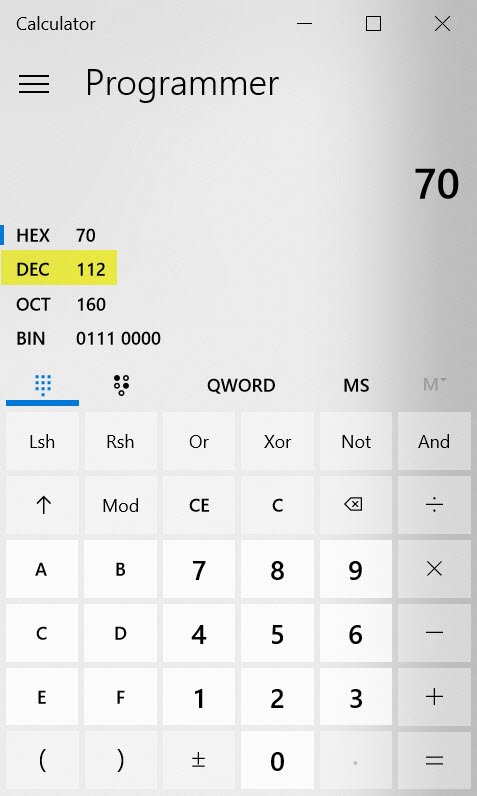
In Command Prompt, look up that decimal code:
NET HELPMSG 112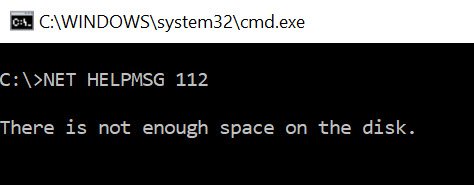
The result identifies insufficient disk space. The calculator and Command Prompt captures show the same conversion, so they remain useful together.
Check the facility before decoding the low part
You can do both steps in Windows PowerShell:
$hex = '80070070' # HRESULT without the 0x prefix
$value = [uint32]::Parse($hex, [Globalization.NumberStyles]::HexNumber)
$facility = ($value -shr 16) -band 0x1fff
if ($facility -ne 7) {
    throw 'This is not a FACILITY_WIN32 HRESULT. Look up the complete code.'
}
$win32Code = [int]($value -band 0xffff)
[pscustomobject]@{
    HResult = '0x' + $hex
    Win32Code = $win32Code
    Message = ([ComponentModel.Win32Exception]::new($win32Code)).Message
}
The facility check is the important part. For 0x80070070, it is 7, which represents FACILITY_WIN32. The script returns Win32 code 112 and its local Windows message. With 80040005, it refuses that shortcut: this is an OLE/interface error, and interpreting the last digits as Win32 error 5 would incorrectly suggest access denied.
| Complete HRESULT | Meaning |
|---|---|
0x80040002 | OLE_E_ENUM_NOMORE: enumeration cannot continue because associated data is missing. |
0x80040003 | OLE_E_ADVISENOTSUPPORTED: this implementation does not support advise operations. |
0x80040005 | OLE_E_NOTRUNNING: the operation requires the object to be running. |
0x80070005 | Win32 access denied. |
0x80070490 | Win32 element not found. |
0x8007054F | Win32 internal error. |
0x80070BC2 | Win32 restart required for changes to take effect. |
0x80070070 | Win32 insufficient disk space. |
0x80070643 | Win32 fatal installation error. |
The earlier table incorrectly assigned file, path and access errors to the 0x800400xx OLE codes, including a duplicate entry for 0x80040005. Keep the complete value and the surrounding ERRORLOG message when troubleshooting. The same last few digits in another facility can describe a different problem.
Published by Pinal Dave on SQLAuthority. More of my work at pinaldave.com.
Discover more from SQL Authority with Pinal Dave
Subscribe to get the latest posts sent to your email.




5 Comments. Leave new
Wow I never knew this! I feel like Neo after his first training session “I know Kung Fu”.
Hi Pinal Dave,
There are 2 error messages given for the same Hex Windows error code (0x80040005) in the blog.
0x80040005 – Access is denied.
0x80040005 – Not enough memory resources are available to process this command.
Can you please let us know which is appropriate error message from the two for 0x80040005 error code?
Thanks,
Srini
net helpmsg works for windows error codes. It explicitly does NOT work on HRESULTs. You might get an HRESULT that is a windows error code, but they are not equivalent.
If you want to know what an HRESULT is, the best option is to use Err.exe (which is available from https://www.microsoft.com/en-us/download/details.aspx?id=985 , where it still claims to be the “Exchange error lookup tool,” even though it works across a wide array of products).
My previous comment should have included examples:
For 0x800*4*0002:
# for hex 0x80040002 / decimal -2147221502 :
TAPI_E_NOITEMS tapi3err.h
OLE_E_ENUM_NOMORE winerror.h
# Can’t enumerate any more, because the associated data is
# missing
# 2 matches found for “0x80040002”
—–
For 0x800*7*0002:
# for hex 0x80070002 / decimal -2147024894 :
COR_E_FILENOTFOUND corerror.h
# MessageText:
DIERR_NOTFOUND dinput.h
DIERR_OBJECTNOTFOUND dinput.h
STIERR_OBJECTNOTFOUND stierr.h
# 4 matches found for “0x80070002”
Searching for more updates regarding Error Code 0xc0000225 as I faced this Error while trying to update Windows 7 on my Hp Notebook.