
Question: How do you generate the first 1,000 Fibonacci values in SQL Server? Start by asking whether the values must be exact.

I asked this because examples tend to stop when the numbers outgrow a numeric type. The familiar sequence begins 0, 1, 1, 2, 3, 5. Each next value is the sum of the previous two.
My earlier answer used POWER, SQRT and rounding. It produced large values quickly, but I treated approximate output as an exact answer. That was my mistake.
The numeric type is part of the question
float stores approximate numbers, with about 15 decimal digits of precision at its usual setting. Printing a large result in scientific notation doesn’t preserve all its digits. Even decimal(38,0) cannot hold a 209-digit Fibonacci number.
Here I mean 1,000 terms, indexed from F0 through F999. To retain every digit in T-SQL, store the values as strings. Add them one digit at a time, carrying to the next position.
DECLARE @Values table (n int PRIMARY KEY, Fibonacci varchar(250));
DECLARE @a varchar(250) = '0', @b varchar(250) = '1';
DECLARE @sum varchar(250), @n int = 2;
DECLARE @ia int, @ib int, @carry int, @digit int;
INSERT @Values VALUES (0, @a), (1, @b);
WHILE @n < 1000
BEGIN
    SELECT @ia = LEN(@a), @ib = LEN(@b), @carry = 0, @sum = '';
    WHILE @ia > 0 OR @ib > 0 OR @carry > 0
    BEGIN
        SET @digit = @carry;
        IF @ia > 0
            SET @digit += ASCII(SUBSTRING(@a, @ia, 1)) - 48;
        IF @ib > 0
            SET @digit += ASCII(SUBSTRING(@b, @ib, 1)) - 48;
        SET @sum = CHAR(48 + @digit % 10) + @sum;
        SET @carry = @digit / 10;
        SET @ia -= 1;
        SET @ib -= 1;
    END;
    SET @a = @b;
    SET @b = @sum;
    INSERT @Values VALUES (@n, @b);
    SET @n += 1;
END;
SELECT n, Fibonacci
FROM @Values
ORDER BY n;
For the compact result shown below, replace the final result query with these two queries. The calculation still generates all 1,000 terms.
SELECT n, Fibonacci
FROM @Values
WHERE n < 10
ORDER BY n;

SELECT COUNT(*) AS TermsGenerated,
       MAX(n) AS LastIndex,
       MAX(LEN(Fibonacci)) AS LastValueDigits
FROM @Values;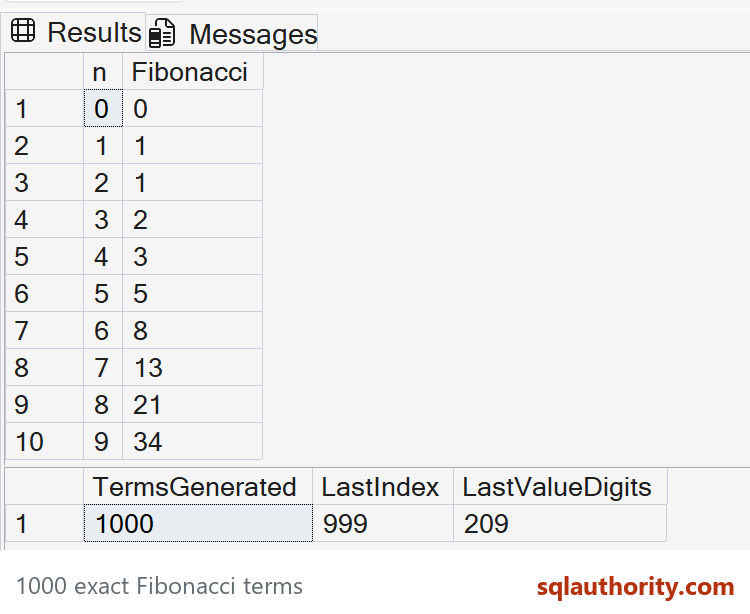
1000 exact Fibonacci terms. Captured in SSMS on SQL Server 2025.
The inner loop adds digits from right to left. Each digit calculation stays small, so it uses integer arithmetic safely. The 250-character buffers cover this example’s 209-digit final value; don’t extend the term count without reviewing that capacity.
Check the output
The first ten values should be 0, 1, 1, 2, 3, 5, 8, 13, 21, 34. There should be exactly 1,000 rows. Row n = 999 should contain 209 digits.
I wouldn’t choose this T-SQL loop for a large arbitrary-precision workload. An application language with a big-integer type is easier to maintain. For this interview question, the important answer is preserving exactness before comparing speed.
Have a cleaner exact solution? I’d enjoy seeing it in the comments, along with how you verified the final digits.
Published by Pinal Dave on SQLAuthority. More of my work at pinaldave.com.
Discover more from SQL Authority with Pinal Dave
Subscribe to get the latest posts sent to your email.




2 Comments. Leave new
with cte as (
select convert(float, 1) as PreviousValue, convert(float, 1) as Value
union all
select Value as PreviousValue, Value + PreviousValue as Value from cte)
select * from cte
option (maxrecusion 1000)
SELECT 0 AS Fibonacci
UNION ALL
SELECT
FLOOR(POWER(( 1.0 + SQRT(5.0)) / 2.0, number) / SQRT(5.0) + 0.5)
FROM (
select
ROW_NUMBER() over(order by (select 1)) as [number] from sys.all_columns
) c
WHERE c.number < 1475
(1476 results in arithmatic overflow)
spt_values is a poorly document sort of lookup table inhereted from Sybase.
Roow_Number is handy for numbering records, sys.allcoumns will allways exist in mssql and holds several thousends of records…
NB (SELECT 1) is a trick to fool the window function which does not accept integer indices…