
During Comprehensive Database Performance Health Check we always go over various SQL Server properties. Lots of people do not know that there are quite a few SQL Server settings which can help us improve our SQL Server performance many folds. While I was discussing SQL Server properties, someone asked me if there are similar settings for SQL Server Agent available which users can tune. Here is how to see all SQL Server Agent properties.
This is indeed a very interesting question as there are lots of SQL Server Agent properties but not many people are aware of the same. There are two different ways to check various properties of SQL Server Agent.
Method 1: Right click on SQL Server Agent node and explore various properties.
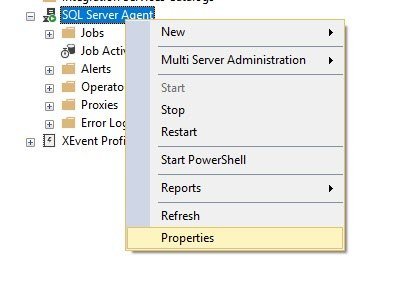
Method 2: With T-SQL
EXEC msdb.dbo.sp_get_sqlagent_propertiesHere is the T-SQL command which you can run on SQL Server Management Studio new query windows to get all the properties of Agent.
Please note if your Agent is turned off or the services are not installed, you will get empty resultset for this query.
Let me know if you have ever changed any of the SQL Server Agent’s properties and if the answer is yes, I would like to know what was the business reason behind it.
SQL Server Agent Properties I Always Review
When I look at the output, a few settings get my attention first:
- Job history size. The history log has a limit on total rows and on rows per job. On a server with many frequent jobs, the defaults can purge the history before you get a chance to read a failure.
- Auto restart. Check that the options to restart SQL Server and the Agent after an unexpected stop are set the way your team expects.
- Alert system. Make sure a mail profile and a fail-safe operator are set, or alerts and job failure notices may never reach anyone.
For changes, I prefer the Properties window in SSMS, which shows each option with its label and is the safer route than editing values by script. Before any change, note the old value, so you can put it back if needed.
Published by Pinal Dave on SQLAuthority. More of my work at pinaldave.com.
Discover more from SQL Authority with Pinal Dave
Subscribe to get the latest posts sent to your email.



1 Comment. Leave new
How can you change the properties?