
To Split Comma Separated Value String inputs, I use STRING_SPLIT with CROSS APPLY. The example associates each class with its student.

DECLARE @StudentClasses TABLE (ID int, Student varchar(100), Classes varchar(100));
INSERT @StudentClasses VALUES
 (1, 'Mark', 'Maths,Science,English'),
 (2, 'John', 'Science,English'),
 (3, 'Robert', 'Maths,English');
SELECT s.ID, s.Student, c.value AS Class
FROM @StudentClasses AS s
CROSS APPLY STRING_SPLIT(s.Classes, ',') AS c
ORDER BY s.ID, c.value;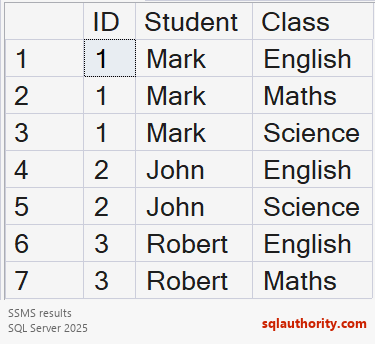


The example produces seven class rows. STRING_SPLIT requires SQL Server 2016 or later with compatibility level 130 or higher. An older engine or lower level can report Invalid object name STRING_SPLIT.
The basic function doesn’t preserve token order. This query sorts classes alphabetically within each student. SQL Server 2022 added optional ordinal output. Use STRING_SPLIT(Classes, ‘,’, 1) and ORDER BY ordinal when source order matters.
Enabling ordinal alone doesn’t sort the result. Comma-delimited columns also have limitations, including empty tokens and embedded commas. A related table with one class per row is often a better storage design. Splitting remains useful for existing inputs.
Reference: STRING_SPLIT versions and ordering.
Related reading
Splitting a delimited column is not a full CSV parser, it is token extraction with version and ordering rules.
Published by Pinal Dave on SQLAuthority. More of my work at pinaldave.com.
Discover more from SQL Authority with Pinal Dave
Subscribe to get the latest posts sent to your email.



7 Comments. Leave new
Can we create same function by copying from SQL server 2016 or higher to SQL server version lower than 2016.
Hi Dave, excelent report.
i have a question… this example only works if all records have a “,” comma delimiter in classes field. But in my example, some records dont have value in clases, in this case dont appears the result.
how can i do?
Thanks
Heelo, this function “STRING_SPLIT”, works in SQL Server 2008 r2 ??. Thanks
STRING_SPLIT() works fine, but does not honour the order in which the items appeared in the original string…
SQL Server 2016 and later
Thank you. It’s working fine
How to handle an column value in a comma separated string?