Converting float to text safely means using CONVERT with style 3. That style writes enough digits for SQL Server to read the very same value back. The default conversion does not, and nobody tells you when it quietly drops digits.

The 7th digit that went missing
Picture this. You export a table to a CSV file and load it into another system. A week later someone notices that a few values are off in the seventh digit. Nobody touched the data. The export used a plain CONVERT to varchar, and that conversion keeps only about six significant digits.
Before blaming the export, remember what a float is. It stores an approximate binary number, not the decimal you typed. Ask SQL Server for the exact value behind 0.1 with the query below. The answer begins 0.1000000000000000055 and carries on. More digits on screen will not bring back a decimal that was never stored.
SELECT CAST(0.1e0 AS decimal(28,28)) AS what_float_really_stores;So the real question for an export is simple. Does the receiver get enough text to rebuild the same stored value? That is different from picking a pretty number of decimals for a report.
Test the round trip
The first query below uses five test values: ordinary, huge, tiny, zero and NULL. It converts each float to varchar(60) with style 3, converts the text back to float, and compares the result with the original.
Every non-NULL row returns same_stored_value equal to 1. The NULL row stays NULL, which is what you want. The second query puts three outputs of one number side by side: default text, style 3 text and a decimal display.
DECLARE @Values table (Id int PRIMARY KEY, StoredValue float);
INSERT @Values VALUES (1, 1234567.8901234567), (2, 1e308), (3, -2.5e-300), (4, 0), (5, NULL);

SELECT v.Id, v.StoredValue, t.ExportedText,
       CASE WHEN v.StoredValue IS NULL THEN NULL
            WHEN CONVERT(float, t.ExportedText) = v.StoredValue THEN 1
            ELSE 0 END AS same_stored_value
FROM @Values AS v
CROSS APPLY (VALUES (CONVERT(varchar(60), v.StoredValue, 3))) AS t (ExportedText)
ORDER BY v.Id;

DECLARE @f float = 1234567.8901234567;
SELECT CONVERT(varchar(60), @f, 0) AS default_text,
       CONVERT(varchar(60), @f, 3) AS round_trip_text,
       CONVERT(varchar(60), CONVERT(decimal(28,8), @f)) AS rounded_decimal_display;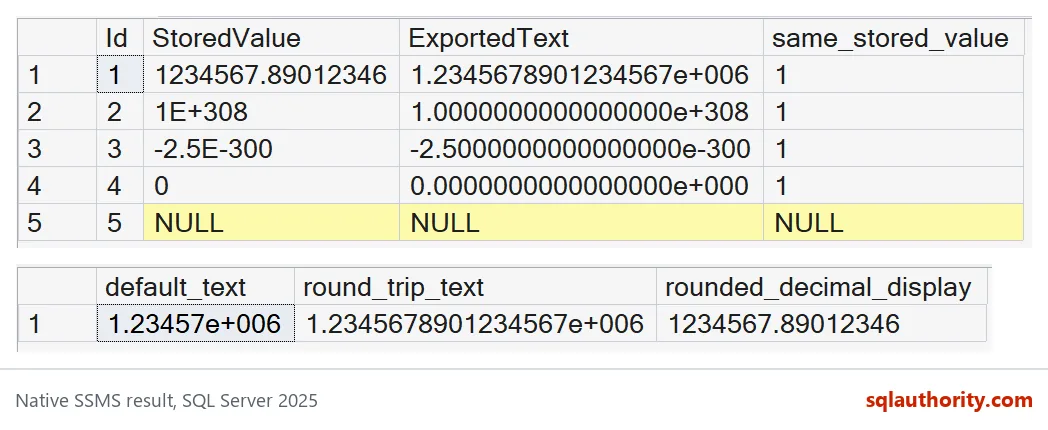
Look at the second grid. The default text is 1.23457e+006, only six digits. The style 3 text is 1.2345678901234567e+006, seventeen digits. The decimal display shows 1234567.89012346, which is tidy and readable but rounded to eight decimals.
Why not style 1 or style 2
CONVERT has several float styles, and they look alike. Style 0 gives six digits. Style 1 gives eight. Style 2 gives sixteen. Only style 3 gives seventeen, and seventeen is what a float needs to come back exactly. This query tries all four on the same number and asks whether each one converts back to the original.
DECLARE @g float = 1234567.8901234567;

SELECT s.style_id, t.txt,
       CASE WHEN CONVERT(float, t.txt) = @g THEN 1 ELSE 0 END AS same_stored_value
FROM (VALUES (0), (1), (2), (3)) AS s (style_id)
CROSS APPLY (SELECT CONVERT(varchar(60), @g, s.style_id)) AS t (txt)
ORDER BY s.style_id;
Styles 0, 1 and 2 all return 0. Style 3 returns 1. Style 2 is the sneaky one, because sixteen digits looks generous and still fails here.

Give the text enough room
Style 3 text has an exponent and a sign, so it is longer than the number looks. The tiny value -2.5e-300 needs 24 characters. A column sized for “normal” values will not hold it. SQL Server does not truncate quietly here. It stops with an error.
DECLARE @e float = -2.5e-300;

SELECT CONVERT(varchar(60), @e, 3) AS full_text,
       LEN(CONVERT(varchar(60), @e, 3)) AS text_length;

BEGIN TRY
    SELECT CONVERT(varchar(10), @e, 3) AS short_text;
END TRY
BEGIN CATCH
    SELECT ERROR_NUMBER() AS error_number, ERROR_MESSAGE() AS error_message;
END CATCH;
The first result shows 24 characters. The second is error 232, an arithmetic overflow for type varchar. That is a loud failure, which is better than a silent one. Size the receiving column from your real largest and smallest values.
A display is not an export
Rounding to a fixed scale is fine for a report. It is a bad plan for a file another system must read. Try 1e-12 with a decimal(28,8) display and you get 0.00000000. The style 3 text keeps it as 9.9999999999999998e-013. That looks odd, but it converts back to the stored value.
DECLARE @tiny float = 1e-12;

SELECT CONVERT(varchar(60), CONVERT(decimal(28,8), @tiny)) AS tiny_as_decimal,
       CONVERT(varchar(60), @tiny, 3) AS tiny_as_style3;
Also check the other side. The system that reads your file must accept exponent notation, and not every spreadsheet or API does. Test the real import path. And if you need exact decimal math, such as money, store decimal, not float. A lossless float export keeps an approximation, nothing more.
Next time you export floats, run the round-trip check on your own data first.
A longer float string is not restored decimal accuracy, it is a representation of the stored approximation.
Published by Pinal Dave on SQLAuthority. More of my work at pinaldave.com.
Discover more from SQL Authority with Pinal Dave
Subscribe to get the latest posts sent to your email.