
Question: How can I list the space used by each index in a database?

A client asked me for this during a SQL Server performance tuning session. I like questions like that because they show what the team is trying to understand. But the size of an index is not a verdict on whether it’s useful. First measure it; then look at workload and maintenance cost.
Answer: Use sys.dm_db_partition_stats. It counts the used and reserved pages for every partition of every index. Joining sys.allocation_units on partition_id alone is a common mistake, because in-row data uses the partition’s HoBT ID and that join can miss space. Partition statistics avoid the problem:
SELECT SCHEMA_NAME(t.schema_id) AS SchemaName,
       t.name AS TableName,
       i.name AS IndexName,
       i.index_id AS IndexID,
       SUM(ps.used_page_count) * 8 AS UsedKB,
       SUM(ps.reserved_page_count) * 8 AS ReservedKB
FROM sys.dm_db_partition_stats AS ps
JOIN sys.indexes AS i
  ON i.object_id = ps.object_id
 AND i.index_id = ps.index_id
JOIN sys.tables AS t
  ON t.object_id = ps.object_id
WHERE i.index_id > 0
  AND i.is_hypothetical = 0
GROUP BY t.schema_id, t.name, i.name, i.index_id
ORDER BY SchemaName, TableName, IndexID;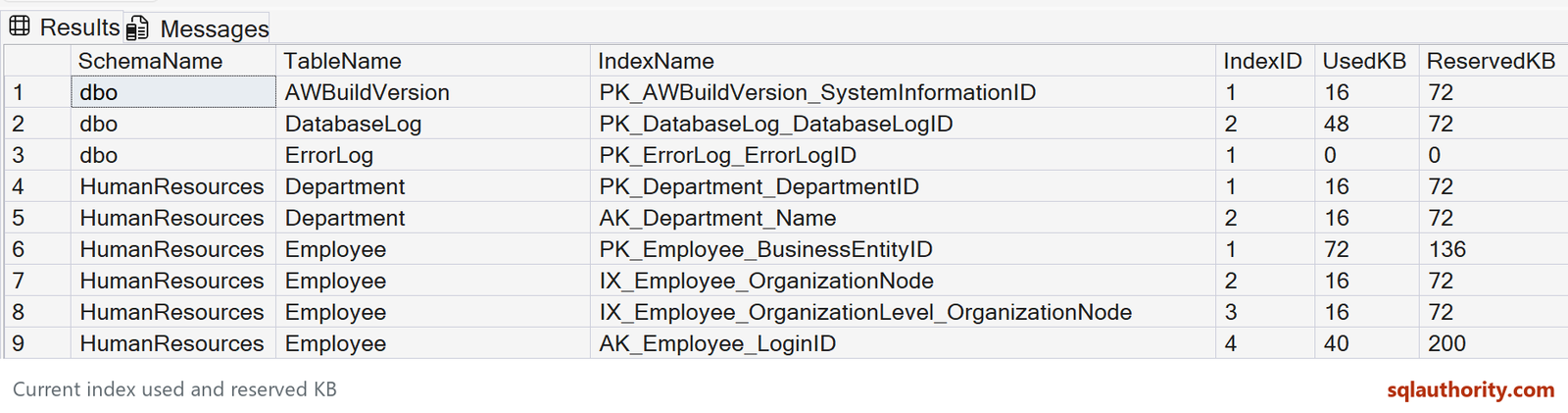
Run it in the database you want to inspect. SQL Server 2022 and later require VIEW DATABASE PERFORMANCE STATE and VIEW SECURITY DEFINITION for this DMV; older versions require VIEW DATABASE STATE and VIEW DEFINITION. One row is returned per nonhypothetical index on a user table. Heaps and indexed views are outside this query’s scope.
The DMV has one row per partition, so SUM gives an index total even when it’s partitioned. Each SQL Server page is 8 KB. UsedKB includes in-row, large-object and row-overflow used pages; ReservedKB includes allocated pages that may not yet be used. The clustered index row includes the base table’s clustered storage, so don’t add it to a separate table-size figure as though it were an independent copy of every row.
Don’t read this list as a deletion list. A large index that prevents an expensive scan may earn its space, while a smaller index may add write cost without helping the workload. Size answers the first question, not the final decision.
As I tell clients in an index review, size is a starting observation. Before removing anything, examine query plans, reads, writes, uniqueness, and whether the index supports a constraint. If you want a guided review of your indexes, see my SQL Server performance tuning work.

Index size is not a verdict, it is the first measurement, and the workload decides what stays.
Published by Pinal Dave on SQLAuthority. More of my work at pinaldave.com.
Discover more from SQL Authority with Pinal Dave
Subscribe to get the latest posts sent to your email.


10 Comments. Leave new
Although deprecated, the famous [sysindexes] contains both [dpages] and [rowcount] value which makes the query much easier
I believe there is something wrong. If I go to Index Properties -> Fragmentation -> General -> Pages. And multiply the total pages by 8, that number doesn’t match with the Indexsize(KB) of this query
we should run profiler and check source of information in UI.
First, @roncansan, you used the term query instead of index which is not correct.
Second, @Pinal Dave, I think @roncansan is right about there is a something wrong.
I run your script on my database it says that the PK of one of my table related to attachments is about 41 GB.
I checked the table properties and under storage I noticed the Index space is 0.055 MB and the Data space is 40 387 523 MB. There is no included columns in the index however it appears that the fragmentation is really huge (>30%) and take more than 17min to rebuild…any update for this script?
Is the PK also a clustered index? If so, then that is why it shows the index as being so large. Clustered indexes are in actuality all of the data in the table. Otherwise, without a clustered index, you would just have a heap. This script needs to exclude clustered indexes if you are wanting to see just the other types of indexes such as non-clustered.
@AMax : My PK is a default clustered index created by SQL Server. So you mean that because each row have one PK column, the size of the PK should include the size of other columns? I can understand the relation but it doesn’t make sens for me to say the index is the same size than his relative table…but well…I will do as you mentionned and will exclude the clustered indexes. Thank you!
You will also need to exclude the heaps themselves. Below is the query modified to exclude heaps and clustered indexes.
SELECT
OBJECT_SCHEMA_NAME(i.OBJECT_ID) AS SchemaName,
OBJECT_NAME(i.OBJECT_ID) AS TableName,
i.name AS IndexName,
i.index_id AS IndexID,
8 * SUM(a.used_pages) AS ‘Indexsize(KB)’
FROM sys.indexes AS i
JOIN sys.partitions AS p ON p.OBJECT_ID = i.OBJECT_ID AND p.index_id = i.index_id
JOIN sys.allocation_units AS a ON a.container_id = p.partition_id
WHERE i.index_id NOT IN (0,1) –exclude heaps and clustered indexes
GROUP BY i.OBJECT_ID,i.index_id,i.name
ORDER BY 5 DESC
Thanks for sharing.
I have 1 million records in my table. how to create quickly nonclustered index…?If Any one know let me know
I ran into the heap issue as well. It does show NULL as the IndexName but that wasn’t before I told the developer they had a 368 GB index on their “backup” table (my fault to not double check). Maybe you should update to exclude “NULL” in the IndexName or put a *warning* message the blog post to watch out for this. Thanks for all you do for the community Pinal!