XML Namespaces are part of element identity, so a matching tag name alone can still miss a node. I compare three paths against one document. The namespace URI stays the same while the query binding changes.
The document uses a default namespace rather than visible prefixes on its elements. Its catalog and item elements still belong to that namespace. An unqualified path in a query with no default binding looks elsewhere.

Use one document for both queries
The fixed XML contains a catalog element and one item with identifier seven. The item’s text is Blue. A default namespace declaration places both elements in urn:demo:catalog.
The first query binds that URI to the prefix d. It checks both an unqualified path and a prefix-qualified path. It also extracts the item identifier through the qualified path.
The second query binds the URI as the query’s default element namespace. Its path can then omit the prefix while retaining the correct namespace. The result includes the matched item’s text.
WITH XMLNAMESPACES ('urn:demo:catalog' AS d), Input AS
(
    SELECT CAST('<catalog xmlns="urn:demo:catalog"><item id="7">Blue</item></catalog>' AS xml) AS Doc
)
SELECT Doc.exist('/catalog/item') AS UnqualifiedMatch,
       Doc.exist('/d:catalog/d:item') AS PrefixMatch,
       Doc.value('(/d:catalog/d:item/@id)[1]', 'int') AS ItemId
FROM Input;

WITH XMLNAMESPACES (DEFAULT 'urn:demo:catalog'), Input AS
(
    SELECT CAST('<catalog xmlns="urn:demo:catalog"><item id="7">Blue</item></catalog>' AS xml) AS Doc
)
SELECT Doc.exist('/catalog/item') AS DefaultNamespaceMatch,
       Doc.value('(/catalog/item/text())[1]', 'varchar(10)') AS ItemText
FROM Input;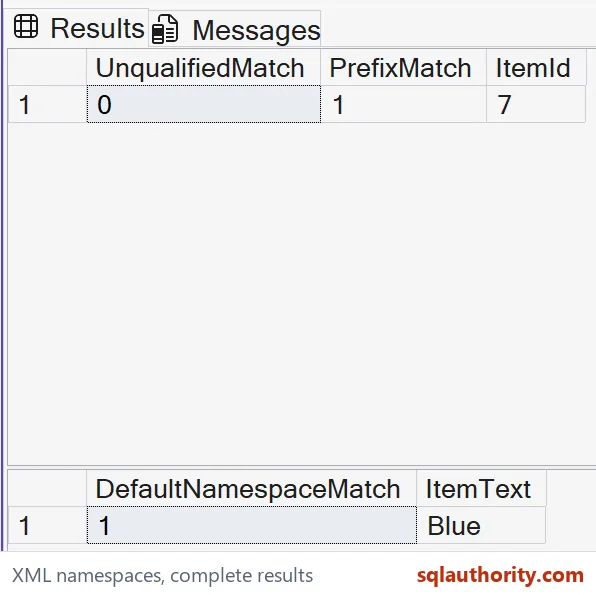
Read the namespace-sensitive results
The first result should report zero for UnqualifiedMatch and one for PrefixMatch. ItemId should be seven. The failing path has the same visible local names, but lacks the required namespace binding.
The second result should report DefaultNamespaceMatch one and ItemText Blue. It uses the same source document. The default query binding changes the meaning of its unprefixed element names.
The attribute id has no prefix in the source or query. An ordinary unprefixed attribute is not assigned the document’s default element namespace. Keep that distinction in mind when qualifying element and attribute paths.
I don’t strip the namespace from the document to make the first path succeed. That would change the input’s element identities. A suitable query binding solves the actual lookup problem without rewriting the source.

Treat prefixes as query shorthand
The prefix d is a local query choice linked to the namespace URI. It does not need to appear in the source document. The bound URI is what makes the qualified element names correspond.
Two documents can use different prefixes for elements in the same namespace. Conversely, identical visible prefixes can be bound to different URIs. A query should rely on the binding rather than a visual prefix comparison.
WITH XMLNAMESPACES supplies namespace mappings to XML data type methods in the statement. It also supports XML construction scenarios. This example only uses it for lookup and scalar extraction.
A query prolog can declare namespace bindings inside an XML method as well. Keep the declaration method consistent for readability. Repeated methods can share a statement-level binding when that suits the query.
Keep the missing-match diagnostic clear
A zero existence result does not establish that the source has no item element. It means that the specified path found none. Checking the namespace is one concrete step before changing the data.
The example uses a non-NULL XML value and one known item. Missing documents and multiple matching items need separate rules. The singleton extraction syntax is explicit because this fixed document has one identifier.
No XML index or performance behavior is claimed. The example isolates element identity from display spelling. Preserve the namespace in an interface and test qualified paths against actual representative documents.
Bind the namespace first, and the path usually just works.
A tag name is not an element identity, it is only half of one without its namespace.
Published by Pinal Dave on SQLAuthority. More of my work at pinaldave.com.
Discover more from SQL Authority with Pinal Dave
Subscribe to get the latest posts sent to your email.