
Question: How many foreign key references can one SQL Server table have?

I answered 253 at a SQLPASS presentation. It was a quick answer, and after I checked it at home, I realized it left out the most important word in the question: direction.
Start with one table, say dbo.Customer. If Customer has a foreign key to dbo.Region, that is an outgoing reference from Customer. If dbo.Orders has a foreign key to Customer, that is an incoming reference to Customer. The foreign key is defined on the child table in both cases, but the direction changes what limit you are asking about.
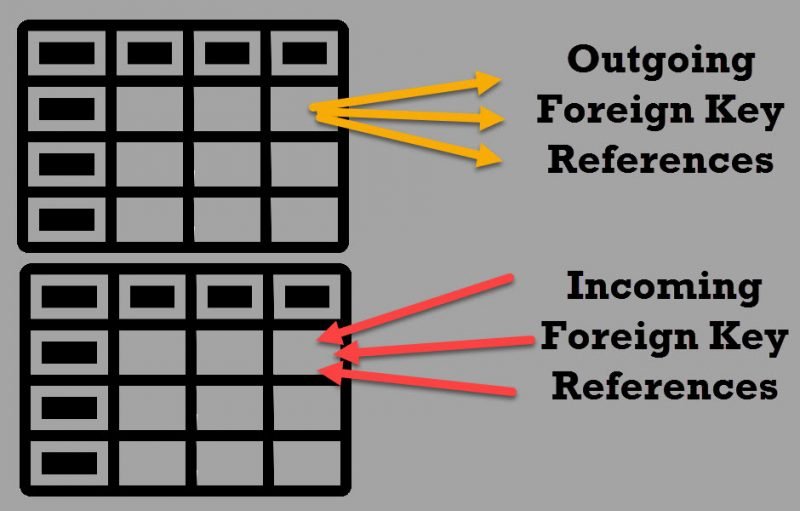
| Direction for one table | Limit | Meaning |
|---|---|---|
| Outgoing | 253 | How many foreign key references this table makes to other tables or columns |
| Incoming, SQL Server 2014 and earlier | 253 | How many references from other tables point to it |
| Incoming, SQL Server 2016 and later with compatibility level 130 or above | Up to 10,000, subject to restrictions | How many references from other tables point to it |
The increase does not remove every restriction. A self-referencing foreign key still counts under the 253 limit. More than 253 incoming references are not supported for MERGE, and the documentation lists additional table and index restrictions. Check those before designing for thousands of references. The two current Microsoft documentation pages differ in their wording about UPDATE beyond 253, so I would not promise that operation without testing the exact SQL Server build and design.
That is the interview answer I wish I had given: 253 outgoing; up to 10,000 incoming from SQL Server 2016 onward when the compatibility level and restrictions permit it. For an actual design, the number of foreign keys is also a maintenance and DML-cost question, not simply a capacity target.
Published by Pinal Dave on SQLAuthority. More of my work at pinaldave.com.
Discover more from SQL Authority with Pinal Dave
Subscribe to get the latest posts sent to your email.




11 Comments. Leave new
In theory, if the table has (n) non-null columns, then all possible subsets could be possible could be potential foreign keys. This is called a Catalan number and the formula is given by:
C(n) = (2n)!/ ((n+1)! n!)
The exponential expressions tell you that this number gets big pretty fast. The series is actually 1, 1, 2, 5, 14, 42, 132, 429, 1430, 4862, 16796, etc.
Thank you sir – that is very correct.
And what about indexed views, do they count as indexes on the base tables?
Sorry, read that as indexes rather than FKs, please delete comment.
What is the use cases for a self referencing FK?
Kuznetsov’s History Table is a SQL idiom which builds a temporal chain from the current row to the previous row. This is easier to show with code:
CREATE TABLE Tasks
(task_id INTEGER NOT NULL,
task_score CHAR(1) NOT NULL,
previous_end_date DATE, — null means first task
current_start_date DATE DEFAULT CURRENT_TIMESTAMP NOT NULL,
CONSTRAINT previous_end_date_and_current_start_in_sequence
CHECK (prev_end_date <= current_start_date),
current_end_date DATE, — null means unfinished current task
CONSTRAINT current_start_and_end_dates_in_sequence
CHECK (current_start_date <= current_end_date),
CONSTRAINT end_dates_in_sequence
CHECK (previous_end_date current_end_date)
PRIMARY KEY (task_id, current_start_date),
UNIQUE (task_id, previous_end_date), — null first task
UNIQUE (task_id, current_end_date), — one null current task
FOREIGN KEY (task_id, previous_end_date) — self-reference
REFERENCES Tasks (task_id, current_end_date));
Well, that looks complicated! Let’s look at it column by column. Task_id explains itself. The previous_end_date will not have a value for the first task in the chain, so it is NULL-able. The current_start_date and current_end_date are the same data elements, temporal sequence and PRIMARY KEY constraints we had in the simple history table schema.
The two UNIQUE constraints will allow one NULL in their pairs of columns and prevent duplicates. Remember that UNIQUE is not like PRIMARY KEY, which implies UNIQUE NOT NULL.
Finally, the FOREIGN KEY is the real trick. Obviously, the previous task has to end when the current task started for them to abut., so there is another constraint. This constraint is a self-reference that makes sure this is true. Modifying data in this type of table is easy, but requires some thought.. Fortunately, Alex has written a Simple Talk article to explain in more detail how it is done.
Disabling Constraints
Just one little problem with that FOREIGN KEY constraint. It will not let you put the first task into the table. There is nothing for the constraint to reference. In Standard SQL, we can declare constraints to be DEFERABLE with some other options. The idea is that you can turn a constraint ON or OFF during a session so the database can be in state that would otherwise be illegal. But at the end of the session all constraints have to be TRUE. or UNKNOWN.
In SQL Server, you can disable constraints and then turn them back on. It actually is restricted to disabling FOREIGN KEY constraint, and CHECK constraints. PRIMARY KEY, UNIQUE, and DEFAULT constraints are always enforced. The syntax for this is part of the ALTER TABLE statement. The syntax is simple:
ALTER TABLE NOCHECK CONSTRAINT [ | ALL];
This is why you want to name the constraints; without user given names, you have to look up what the system gave you and they are always long and messy.. The ALL option will disable all of the constraints in the entire schema. Be careful with it.
To re-enable, the syntax is similar and explains itself:
ALTER TABLE CHECK CONSTRAINT [ | ALL];
When a disabled constraint is re-enabled, the database does not check to ensure any of the existing data meets the constraints. So for this table, The body of a procedure to get things started would look like this:
BEGIN
ALTER TABLE Tasks NOCHECK CONSTRAINT ALL;
INSERT INTO Tasks (task_id, task_score, current_start_date, current_end_date, previous_end_date)
VALUES (1, ‘A’, ‘2010-11-01’, ‘2010-11-03’, NULL);
ALTER TABLE Tasks CHECK CONSTRAINT ALL;
END;
Parent-Child relationships.
I think I am bit confused by Outgoing(this is clear) vs Incoming(not clear) FKs. Could you give some real live examples? Thanks!
Parent – Child relationship.
Ok, I understand it is Parent-Child in both cases, the difference is just about the direction of FK relationship. By the way I was surprised to see that there is a limit on how many FKs can reference given table. Thanks for bringing this up!
Thanks Rafal. You are right, its just a direction and both are FK.