
Question: What is the performance difference between SELECT and SET for variable assignment? SELECT can assign several variables in one statement; SET assigns one. That can reduce statement overhead in a tight loop, but choose the intended assignment behavior before choosing the apparent faster spelling.

The original experiment compared three SET statements with one SELECT assigning the same three values. It reported a faster loop with SELECT. That result illustrates the smaller statement count; it does not establish that SELECT is always the faster choice for every query or workload.
DECLARE @foo1 int, @foo2 int, @foo3 int;
SET @foo1=1; SET @foo2=2; SET @foo3=3;
SELECT @foo1 AS foo1,@foo2 AS foo2,@foo3 AS foo3;
SELECT @foo1=1,@foo2=2,@foo3=3;
SELECT @foo1 AS foo1,@foo2 AS foo2,@foo3 AS foo3;

DECLARE @Rows TABLE(Value int);
DECLARE @SetValue int=99,@SelectValue int=99,@ScalarSelect int=99;
SET @SetValue=(SELECT Value FROM @Rows);
SELECT @SelectValue=Value FROM @Rows;
SELECT @ScalarSelect=(SELECT Value FROM @Rows);
SELECT @SetValue AS SetNoRows,@SelectValue AS SelectNoRows,
       @ScalarSelect AS ScalarSelectNoRows;
INSERT @Rows VALUES(1),(2);
BEGIN TRY
 SET @SetValue=(SELECT Value FROM @Rows);
END TRY
BEGIN CATCH
 SELECT ERROR_NUMBER() AS MultipleRowError;
END CATCH;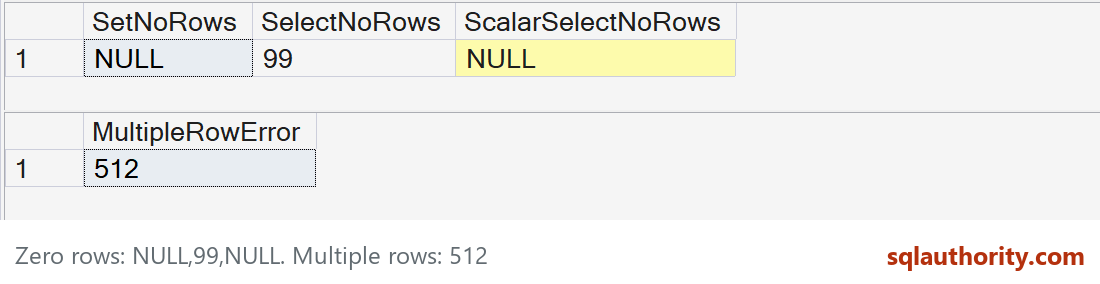
The differences that cause real bugs
Both first result grids contain 1, 2, 3. The empty-table test then returns NULL, 99, NULL. SELECT assigning from rows leaves its variable unchanged when no rows qualify. SELECT assigning a scalar subquery sets NULL when that subquery is empty, just like SET.
The two-row scalar SET reports error 512. A direct SELECT assignment from several rows instead keeps one returned value, with no useful ordering guarantee unless the query is deliberately constrained. It should not hide a violation of the application’s one-value expectation.
SET is the standard variable-assignment form and Microsoft’s recommended default. Use a multi-variable SELECT when its single-row semantics are deliberate and clear. Resetting a variable before a direct SELECT can avoid stale values, but it does not fix an unexpectedly multirow source.
Do not rely on the order of assignments within one SELECT to make one variable depend on another newly assigned variable. This question is about statement overhead and semantics, not a reason to introduce loops into a set-based task.
Published by Pinal Dave on SQLAuthority. More of my work at pinaldave.com.
Discover more from SQL Authority with Pinal Dave
Subscribe to get the latest posts sent to your email.




3 Comments. Leave new
ANSI versus Microsoft dialect is messier than just this. In ANSI, the construction is always “SELECT .. FROM..” ; there is never a SELECT without a FROM clause. The SET operator can use a row constructor to do what T-SQL proprietary syntax does.
SET (a,b,c) = (x,y,z);
But it can also do more complex assignments.
When using the row constructor, does it still execute each individually (making it still slower than SELECT)?
I would say that it is better to use SET if you want to assign a value to a variable. Some more examples at