
Error 3136 means the differential backup does not match the restored database state. During a customer visit in 2014, I was asked to investigate this restore error. The backup files existed, but the selected full backup was the wrong base for the differential.

What Error 3136 Is Telling You
Msg 3136, Level 16, State 1
This differential backup cannot be restored because the database
has not been restored to the correct earlier state.
A differential database backup contains changes since its base full backup. It does not contain only the changes since the previous differential. In the example below, D1 and D2 belong to F1. A new ordinary full backup, F2, establishes a new base, so D3 belongs to F2.
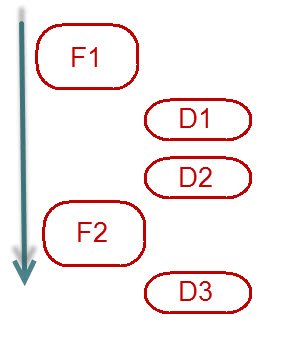
Restoring F1 and then D3 is the mismatch. Restore F2 and then D3 instead. You do not need to restore every earlier differential. A copy-only full backup does not reset the differential base, so do not choose the base by timestamp alone.
Check the Backup History and the Actual Files
This read-only query lists full database backups (D) and differential database backups (I). Replace the database name and run it with permission to read the relevant msdb backup history.
DECLARE @DatabaseName sysname = N'YourDatabase';
SELECT backup_start_date, backup_finish_date, type,
       is_copy_only, checkpoint_lsn, database_backup_lsn,
       differential_base_lsn, position
FROM msdb.dbo.backupset
WHERE database_name = @DatabaseName
  AND type IN ('D', 'I')
ORDER BY backup_finish_date DESC, backup_set_id DESC;
History may have been purged, and a restore server may not have the source server’s history. Inspect the actual backup media too. The paths below are examples on the SQL Server host. The service account needs access, and the login needs the required restore permissions.
RESTORE HEADERONLY FROM DISK = N'D:\SQLBackups\Full.bak';
RESTORE HEADERONLY FROM DISK = N'D:\SQLBackups\Differential.bak';
RESTORE FILELISTONLY FROM DISK = N'D:\SQLBackups\Full.bak'
WITH FILE = 1;
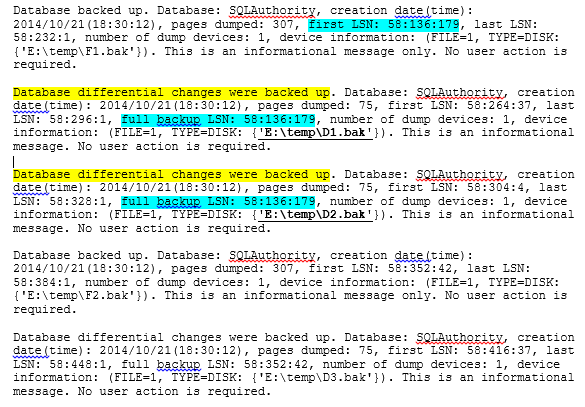
For an ordinary single-base differential database backup, compare its DifferentialBaseGUID with the full backup’s BackupSetGUID, and its DifferentialBaseLSN with the full backup’s CheckpointLSN. Also confirm the source database, backup type and backup-set position. Do not select an unrelated backup just because its filename looks right. File, partial and multi-base differential restores need their own restore plan.
Restore the Matching Pair to a Separate Database
Rehearse on a separate test instance or a new database name with enough disk space. Replace the paths, logical file names and FILE values using the header and file-list results. Add a MOVE for every file in the backup. This template assumes one data file and one log file; it deliberately does not use WITH REPLACE.
USE master;
GO
IF DB_ID(N'RestoreCheck3136') IS NOT NULL
    THROW 50001, 'Choose a new restore-check database name.', 1;

RESTORE DATABASE RestoreCheck3136
FROM DISK = N'D:\SQLBackups\Full.bak'
WITH FILE = 1, NORECOVERY,
     MOVE N'YourDataLogicalName' TO N'D:\SQLData\RestoreCheck3136.mdf',
     MOVE N'YourLogLogicalName' TO N'D:\SQLData\RestoreCheck3136_log.ldf';

RESTORE DATABASE RestoreCheck3136
FROM DISK = N'D:\SQLBackups\Differential.bak'
WITH FILE = 1, RECOVERY;
Keep the full restore in NORECOVERY so another backup can be applied. Use RECOVERY only on the final restore. If the recovery plan requires later log backups, keep the differential restore in NORECOVERY as well, then apply the required logs in order.
In a separate disposable test, F1 followed by D3 produced error 3136. F2 followed by D3 restored the expected rows. This confirms the mismatch example; it does not validate a production backup chain. Check the recovered data and application requirements before making a real recovery decision.
Related posts cover the full-recovery backup timeline, the SSMS Backup and Restore Events report and backup history for one database.
Error 3136 is not a reason to force a restore, it is a reason to find the matching differential base.
Published by Pinal Dave on SQLAuthority. More of my work at pinaldave.com.
Discover more from SQL Authority with Pinal Dave
Subscribe to get the latest posts sent to your email.




6 Comments. Leave new
Is there any way to trick SQL into letting you restore a differential without the Full? I’m trying to recover from a disaster, and there is no good Full backup, but we do have a really big differential which we hope could be used to recover what data there is. But of course get that error when we try to restore it without the Full first. Is there anyway to trick SQL into letting your restore it anyway?
Nope. Differential backup has changes since last full backup. If you don’t have base backup, how can SQL restore apply the differential.
we are geeting same error, it’s not happening fix.
Senario: Two sql server on availability group. Db01, Db02
Full backup form secondary server: Db02
Differentials backup from primary server: Db01
restore time:
— this is full backup
RESTORE DATABASE dbnew01
FROM Disk=’G:\AdventureWorks2014_backup_2016_02_08_134030_9954289.bak’
WITH NORECOVERY
GO
— this is differentials backup
RESTORE DATABASE dbnew01
FROM DISK=’G:\AdventureWorks2014_Full_2016_02_08_20_10_00.bak’
WITH RECOVERY
GO
after executing this script we are getting below error:
Processed 23752 pages for database ‘dbnew01’, file ‘AdventureWorks2014_Data’ on file 1.
Processed 1 pages for database ‘dbnew01’, file ‘AdventureWorks2014_Log’ on file 1.
RESTORE DATABASE successfully processed 23753 pages in 5.018 seconds (36.979 MB/sec).
Msg 3136, Level 16, State 3, Line 10
This differential backup cannot be restored because the database has not been restored to the correct earlier state.
Msg 3013, Level 16, State 1, Line 10
RESTORE DATABASE is terminating abnormally.
Database showing : Restoring….
Very Helpful. Thanks
we are geeting same error, it’s not happening fix.
Senario: Two sql server on availability group. Db01, Db02
Full backup form secondary server: Db02
Differentials backup from primary server: Db01
restore time:
— this is full backup
RESTORE DATABASE dbnew01
FROM Disk=’G:\AdventureWorks2014_backup_2016_02_08_134030_9954289.bak’
WITH NORECOVERY
GO
— this is differentials backup
RESTORE DATABASE dbnew01
FROM DISK=’G:\AdventureWorks2014_Full_2016_02_08_20_10_00.bak’
WITH RECOVERY
GO
after executing this script we are getting below error:
Processed 23752 pages for database ‘dbnew01’, file ‘AdventureWorks2014_Data’ on file 1.
Processed 1 pages for database ‘dbnew01’, file ‘AdventureWorks2014_Log’ on file 1.
RESTORE DATABASE successfully processed 23753 pages in 5.018 seconds (36.979 MB/sec).
Msg 3136, Level 16, State 3, Line 10
This differential backup cannot be restored because the database has not been restored to the correct earlier state.
Msg 3013, Level 16, State 1, Line 10
RESTORE DATABASE is terminating abnormally.
Database showing : Restoring….
Hi Guys,
Nice post. Is there a way to restore D3 on top of F1.