
This ISNUMERIC puzzle shows two statements that look empty but return different answers. One returns 0 and the other returns 1. The difference is an invisible character.

The Original Puzzle
Watch the original SQL in Sixty Seconds #076 video below. What is inside the second string? The visible space in the first string is the clue.
The Answer Is a Tab
The hidden character is a tab, character code 9. Many readers supplied this answer, and Hien was first. Writing NCHAR(9) makes the character visible in the SQL itself.
A space returns 0 from ISNUMERIC. A tab returns 1. That does not mean the tab converts successfully to an int.
See the Character and the Conversion
The comparison below was tested on SQL Server 2025, build 17.0.5015.4. It uses Unicode strings, marked by the N prefix. The query reads literal values and changes no data.
SET NOCOUNT ON;
SELECT v.Example,
       ISNUMERIC(v.InputText) AS IsNumeric,
       TRY_CONVERT(int, v.InputText) AS AsInteger,
       UNICODE(v.InputText) AS FirstCode,
       DATALENGTH(v.InputText) AS Bytes
FROM (VALUES
    (N'space', N' '),
    (N'tab', NCHAR(9)),
    (N'plus sign', N'+'),
    (N'leading tab', NCHAR(9) + N'5'),
    (N'leading space', N' 5'),
    (N'exponent', N'9E5'),
    (N'integer', N'12'),
    (N'int overflow', N'2147483648')
) AS v(Example, InputText);| Example | IsNumeric | AsInteger | FirstCode | Bytes |
|---|---|---|---|---|
| space | 0 | 0 | 32 | 2 |
| tab | 1 | NULL | 9 | 2 |
| plus sign | 1 | 0 | 43 | 2 |
| leading tab | 1 | NULL | 9 | 4 |
| leading space | 1 | 5 | 32 | 4 |
| exponent | 1 | NULL | 57 | 6 |
| integer | 1 | 12 | 49 | 4 |
| int overflow | 1 | NULL | 50 | 20 |
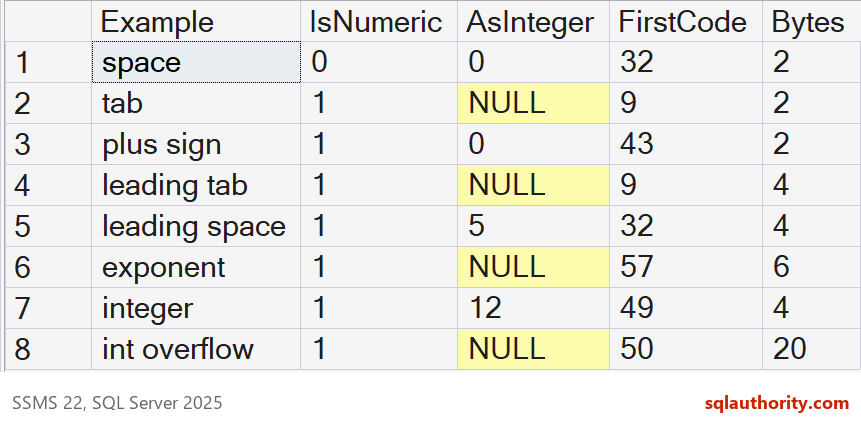
FirstCode shows the first Unicode character code: 32 for space and 9 for tab. DATALENGTH reports bytes. These nvarchar examples use two bytes per ordinary character, so the single tab occupies two bytes.
What the Results Mean
The lone plus sign returns 1 from ISNUMERIC, while conversion to int returns 0. Space also converts to 0, although ISNUMERIC returns 0. Conversion success does not enforce your chosen text format.
The leading tab and the leading space also behave differently in this test. The tab followed by 5 returns NULL from TRY_CONVERT(int, ...). The space followed by 5 converts to 5.
The exponent text 9E5 passes ISNUMERIC but does not convert to int here. The digits in 2147483648 also pass ISNUMERIC. That value exceeds the range of int.
More Strings ISNUMERIC Accepts
The tab is not the only surprise. I ran twelve more strings through the same functions, and added a decimal conversion. A lone dollar sign, comma or period all passed. So did a lone minus sign. Neither a comma nor a currency symbol survived the conversion to int.
SELECT v.Example, ISNUMERIC(v.InputText) AS IsNumeric,
       TRY_CONVERT(int, v.InputText) AS AsInt,
       TRY_CONVERT(decimal(18,2), v.InputText) AS AsDecimal
FROM (VALUES
    (N'dollar sign', N'$'),
    (N'currency amount', N'$12.50'),
    (N'thousands comma', N'1,234'),
    (N'only a comma', N','),
    (N'only a period', N'.'),
    (N'minus only', N'-'),
    (N'parentheses', N'(5)'),
    (N'empty', N''),
    (N'letters', N'abc'),
    (N'hex text', N'0x1A'),
    (N'decimal', N'12.5'),
    (N'trailing minus', N'5-')
) AS v(Example, InputText);
Seven of the twelve passed ISNUMERIC, and only 12.5 converted to a decimal. Two results deserve a second look. A lone minus sign converted to 0 as an int. An empty string also converted to 0, although ISNUMERIC returned 0. A column of empty strings loads as zeros.
Find the Invisible Character
When a value fails and looks fine, print the code of every character. This query lists each position with its code. A tab shows up as code 9, and a line break shows up as 13 and 10.
DECLARE @InputText nvarchar(50) = N'12' + NCHAR(9) + N'5';
SELECT n.Position, SUBSTRING(@InputText, n.Position, 1) AS CharacterShown, UNICODE(SUBSTRING(@InputText, n.Position, 1)) AS CharacterCode
FROM (SELECT TOP (LEN(@InputText)) ROW_NUMBER() OVER (ORDER BY (SELECT NULL)) AS Position FROM sys.all_objects) AS n
ORDER BY n.Position;
SELECT ISNUMERIC(@InputText) AS IsNumeric, TRY_CONVERT(int, @InputText) AS AsInteger;
The output has four rows, with codes 49, 50, 9 and 53. The third row is the tab. The second result shows what it does to the number: ISNUMERIC returned 0 and TRY_CONVERT returned NULL. Position matters. A leading tab returned 1 in the first test. A trailing tab returned 0 in the table test below.
Find Bad Rows in a Table
Imported text can carry tabs and line breaks. I loaded eight values and compared ISNUMERIC, TRY_CONVERT and a test for control characters. A control character is any code from 1 to 31.
CREATE TABLE dbo.Imported (RowId int PRIMARY KEY, Amount varchar(20) NOT NULL);
INSERT dbo.Imported (RowId, Amount) VALUES
 (1, '125'), (2, ' 80'), (3, '40' + CHAR(9)), (4, CHAR(9) + '15'), (5, '7' + CHAR(13) + CHAR(10)), (6, '2147483648'), (7, '12.5'), (8, '$9');
SELECT RowId, Amount, ISNUMERIC(Amount) AS IsNumeric, TRY_CONVERT(int, Amount) AS AsInteger,
       CASE WHEN Amount LIKE '%[' + CHAR(1) + '-' + CHAR(31) + ']%' THEN 'control character' ELSE '' END AS Control
FROM dbo.Imported ORDER BY RowId;
The control test flagged rows 3, 4 and 5, the trailing tab, the leading tab and the line break. Row 4 shows the trap: ISNUMERIC said 1 and the conversion returned NULL.
Check the Type You Need
Use TRY_CONVERT with the exact destination type. A returned NULL means this conversion did not produce a value. Decide separately whether missing input is acceptable. If your rule requires unsigned digits, test the format first and the range second.
SELECT RowId, Amount,
       CASE WHEN Amount NOT LIKE '%[^0-9]%' AND Amount <> '' AND TRY_CONVERT(int, Amount) IS NOT NULL THEN 'valid int'
            WHEN Amount NOT LIKE '%[^0-9]%' AND Amount <> '' THEN 'digits but out of range'
            ELSE 'rejected' END AS Verdict
FROM dbo.Imported ORDER BY RowId;
Only 125 was valid. The value 2147483648 was all digits but out of range. Every other row was rejected, including the space-padded 80, which would have converted. That is an input policy, not a universal definition of a number. Signed integers are valid integers too.
Clean First, Then Convert
If the stray characters are harmless, remove them before you convert. TRIM with a list of characters needs SQL Server 2022 or later. With the tab, line break and space in the list, all five clean values converted.
SELECT RowId, Amount, TRY_CONVERT(int, TRIM(CHAR(9) + CHAR(10) + CHAR(13) + CHAR(32) FROM Amount)) AS AfterTrim
FROM dbo.Imported ORDER BY RowId;
Rows 1 to 5 returned 125, 80, 40, 15 and 7. Rows 6, 7 and 8 stayed NULL, because they are out of range, decimal and currency text. Cleaning fixes the invisible problems and leaves the real ones visible.
ISNUMERIC is not a check for your destination type, it is a broader numeric classification.
Published by Pinal Dave on SQLAuthority. More of my work at pinaldave.com.
Discover more from SQL Authority with Pinal Dave
Subscribe to get the latest posts sent to your email.




53 Comments. Leave new
SELECT ISNUMERIC(”)
SELECT ISNUMERIC(‘ ‘) if u r space using Tab key then u got Output 0 but u r use Tab key for Space then u got ans 1
Hi Pinal,
2 possibilities here.
1. tab character which return value 1
2. ascii null character which is possible to add via alt + 255 numer.
select ISNUMERIC(‘ ‘)
select ISNUMERIC(‘ ‘)
select ISNUMERIC(‘ ‘)
check this query…
select ISNUMERIC(CHAR(9))
this is also giving value as 1
TAB key ASCII value is 9
the above query is equivalent to select ISNUMERIC(‘ ‘)
The invisible characters are:
First Statement: ‘ ‘ is Space
&
Second Statement: ‘ ‘ is Tab
nice
Welcome.
Hi Dave,
Yes this can be ‘Tab’ but I still am unsure of the reason why it gives 1. The replies above are saying because we can succesfully convert ‘tab’ to money type.
Select cast(char(9) as money) — gives 0.00
But so does this
Select cast(char(32) as money) –gives 0.00
where char(32) is of course a ‘space’. But still ISNUMERIC(char(32)) gives 0 while ISNUMRERIC(char(9)) gives 1.
–Here you used space that ASCII Value IS 32 So it’s giving “0”
SELECT ISNUMERIC(‘ ‘) —This is SPACE
SELECT ‘THIRMAL’+CHAR(32)+’SANGISETTI’ –This is SPACE ASCII
–O/P: ‘THIRMAL SANGISETTI’
–Second one is TAB, ASCII Value is 9 it’s giving 1
SELECT ISNUMERIC(‘ ‘)
SELECT ‘THIRMAL’+CHAR(9)+’SANGISETTI’
–O/P: ‘THIRMAL SANGISETTI’
Good.. next question is why?
any non-visible character that implicitly converts to numeric