In SQL Server, column aliases name your results, but WHERE and GROUP BY cannot use them. The alias is born in the SELECT list, and those clauses run before it exists. ORDER BY runs after, so it can use the alias.

The five o’clock error
A junior DBA writes a nice report query. Quantity times UnitPrice becomes TotalAmount, and now they only want rows where TotalAmount is above 10. They add WHERE TotalAmount > 10, press F5, and get a red error. “But I just named it!”
Yes, but SQL Server does not run your query in the order you wrote it. Let me build a tiny table and show you what happens at each step.
DROP TABLE IF EXISTS #AliasSales;

CREATE TABLE #AliasSales (id int, Quantity int, UnitPrice decimal(12,2));

INSERT #AliasSales (id, Quantity, UnitPrice) VALUES (1, 2, 10), (2, 1, 5);
ORDER BY can see the alias
Think of the order as FROM, then WHERE, then GROUP BY and HAVING, then SELECT, and last ORDER BY. The alias exists only after SELECT. So ORDER BY can use it. Both forms of naming work: AS, and the name = expression style.
SELECT Quantity * UnitPrice AS TotalAmount FROM #AliasSales ORDER BY TotalAmount, id;

SELECT TotalAmount = Quantity * UnitPrice FROM #AliasSales ORDER BY id;
The first query sorts by the alias and returns 5.00, then 20.00. The second uses the other naming style and returns 20.00, then 5.00 because it sorts by id. Same names, same math.

WHERE and GROUP BY cannot
Now the failing filter. I run it through sp_executesql inside TRY/CATCH, so the error comes back as a result you can read instead of a red message.
BEGIN TRY
    EXEC sys.sp_executesql N'SELECT Quantity * UnitPrice AS TotalAmount FROM #AliasSales WHERE TotalAmount > 10;';
END TRY
BEGIN CATCH
    SELECT ERROR_MESSAGE() AS alias_error;
END CATCH;
The message is Invalid column name ‘TotalAmount’. GROUP BY runs before SELECT too, so it fails the same way.
BEGIN TRY
    EXEC sys.sp_executesql N'SELECT Quantity * UnitPrice AS TotalAmount, COUNT(*) AS rows_in_group FROM #AliasSales GROUP BY TotalAmount;';
END TRY
BEGIN CATCH
    SELECT ERROR_MESSAGE() AS group_by_error;
END CATCH;
Name the expression in CROSS APPLY
The first fix is to create the name earlier, in FROM. CROSS APPLY with a VALUES list builds a column that WHERE can see. Think of it as a relational calculation. It does not promise that SQL Server computes the math only once.
SELECT s.id, v.TotalAmount
FROM #AliasSales AS s
CROSS APPLY (VALUES (s.Quantity * s.UnitPrice)) AS v (TotalAmount)
WHERE v.TotalAmount > 10
ORDER BY s.id;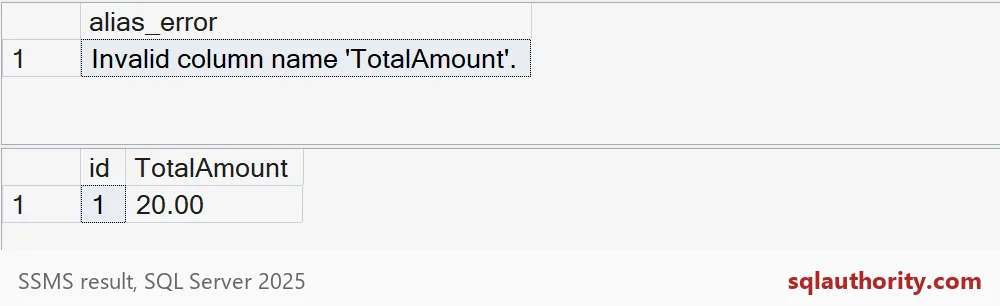
Only id 1 survives, with 20.00. Id 2 is 5.00, so the filter drops it. The picture shows the WHERE error first and the APPLY result below it.
Use a CTE for another query level
The second fix is a CTE. It turns the calculation into a column of an inner query, and the outer query can filter, group and sort on it. I pick whichever form makes the rows easiest to read.
WITH Calculated AS (
    SELECT id, Quantity * UnitPrice AS TotalAmount
    FROM #AliasSales
)
SELECT TotalAmount, COUNT(*) AS matching_rows
FROM Calculated
WHERE TotalAmount > 1
GROUP BY TotalAmount
ORDER BY TotalAmount;
You get 5.00 with one row and 20.00 with one row. The outer WHERE and GROUP BY both used the name.
Watch for aliases that shadow real columns
Here is the quiet trap. Give an alias the same name as a real column, and WHERE binds to the real column, not your alias. No error. Just a surprising answer.
SELECT id, UnitPrice AS Quantity
FROM #AliasSales
WHERE Quantity > 1
ORDER BY id;
Both unit prices are above 1, so you might expect two rows. You get only id 1. WHERE tested the real Quantity column, where id 2 has 1. That is worse than an error because it looks right. Pick alias names that no column already uses, and test each clause on its own.
The last block drops the temporary table.
DROP TABLE IF EXISTS #AliasSales;Pick the query level first, then give the calculation a name that nothing else uses.
An alias is not a variable, it is a name that lives at one query level.
Published by Pinal Dave on SQLAuthority. More of my work at pinaldave.com.
Discover more from SQL Authority with Pinal Dave
Subscribe to get the latest posts sent to your email.