
To ORDER BY a parameter, write one CASE expression for each column and each direction. The pattern is short. The traps are the data types, DISTINCT and the plan, and they are easy to avoid once you know them.

The Problem With One Procedure and Many Sorts
A report wants to sort its rows by a column and a direction that the user picks. The procedure receives both as parameters. ORDER BY accepts a column or an expression. It does not accept a column name held in a variable.
The usual way to ORDER BY a parameter is a CASE expression inside ORDER BY. It works. A naive version fails with a type error. A careless one scans the whole table to return five rows. The demo builds a table of 50,000 invoices in a database named OrderParamDemo to show both.
IF DB_ID(N'OrderParamDemo') IS NULL CREATE DATABASE OrderParamDemo;
GO
USE OrderParamDemo;
GO
SET NOCOUNT ON;
DROP TABLE IF EXISTS dbo.Invoices;
CREATE TABLE dbo.Invoices (
    InvoiceID int NOT NULL CONSTRAINT PK_Invoices PRIMARY KEY,
    CustomerName varchar(40) NOT NULL,
    InvoiceDate date NOT NULL,
    Amount decimal(9,2) NOT NULL
);
INSERT INTO dbo.Invoices (InvoiceID, CustomerName, InvoiceDate, Amount)
SELECT n, CHOOSE(n % 6 + 1, 'Alma Bakery', 'Birch Cafe', 'Cedar Market', 'Dune Juice Bar', 'Elm Garden', 'Fern Books'),
       DATEADD(DAY, n % 365, '2026-01-01'), (n * 7919) % 5000 / 10.0
FROM (SELECT TOP (50000) ROW_NUMBER() OVER (ORDER BY (SELECT NULL)) AS n FROM sys.all_objects AS a CROSS JOIN sys.all_objects AS b) AS x;
The first attempt is the obvious one. It puts the variable in ORDER BY and hopes that SQL Server reads the name.
DECLARE @SortBy varchar(20) = 'CustomerName';
SELECT TOP (3) InvoiceID, CustomerName FROM dbo.Invoices ORDER BY @SortBy;
Msg 1008, Level 16, State 1, Line 2
The SELECT item identified by the ORDER BY number 1 contains a variable as part of the expression identifying a column position. Variables are only allowed when ordering by an expression referencing a column name.
SQL Server reads a variable in ORDER BY as a column position and refuses it. The variable has to appear inside an expression that names columns. That is what a CASE does.
Why One CASE Fails With Mixed Types
The tempting version puts every column into one CASE. A CASE returns one data type. SQL Server picks the type with the highest precedence among the branches and converts the others to it. An int outranks a varchar, so a name is converted to a number, and the conversion fails.
DECLARE @SortBy varchar(20) = 'CustomerName';
SELECT TOP (3) InvoiceID, CustomerName FROM dbo.Invoices
ORDER BY CASE WHEN @SortBy = 'InvoiceID' THEN InvoiceID WHEN @SortBy = 'CustomerName' THEN CustomerName END;
Msg 245, Level 16, State 1, Line 2
Conversion failed when converting the varchar value 'Birch Cafe' to data type int.
A date has the same effect. A date outranks a varchar, so a name is converted to a date. A reader hit this error when sorting a title and a submitted date in one CASE.
DECLARE @SortBy varchar(20) = 'CustomerName';
SELECT TOP (3) InvoiceID, InvoiceDate, CustomerName FROM dbo.Invoices
ORDER BY CASE WHEN @SortBy = 'InvoiceDate' THEN InvoiceDate WHEN @SortBy = 'CustomerName' THEN CustomerName END;
Msg 241, Level 16, State 1, Line 2
Conversion failed when converting date and/or time from character string.
One CASE for Each Column and Direction
The fix is one CASE per column and direction. Each CASE has one branch, so it keeps the type of its column. The branches that do not match return NULL, and NULL sorts the same for every row. The last key, the primary key, makes the order stable.
CREATE OR ALTER PROCEDURE dbo.GetInvoices @SortBy varchar(20), @Descending bit = 0
AS
SELECT TOP (5) InvoiceID, CustomerName, InvoiceDate, Amount
FROM dbo.Invoices
ORDER BY
    CASE WHEN @SortBy = 'InvoiceID' AND @Descending = 0 THEN InvoiceID END ASC,
    CASE WHEN @SortBy = 'InvoiceID' AND @Descending = 1 THEN InvoiceID END DESC,
    CASE WHEN @SortBy = 'CustomerName' AND @Descending = 0 THEN CustomerName END ASC,
    CASE WHEN @SortBy = 'CustomerName' AND @Descending = 1 THEN CustomerName END DESC,
    CASE WHEN @SortBy = 'InvoiceDate' AND @Descending = 0 THEN InvoiceDate END ASC,
    CASE WHEN @SortBy = 'InvoiceDate' AND @Descending = 1 THEN InvoiceDate END DESC,
    InvoiceID;
CREATE OR ALTER needs SQL Server 2016 SP1. Call the procedure with each kind of column. The first call sorts the integer down, the second sorts the name up, and the third sorts the date down.
EXEC dbo.GetInvoices @SortBy = 'InvoiceID', @Descending = 1;

EXEC dbo.GetInvoices @SortBy = 'CustomerName';

EXEC dbo.GetInvoices @SortBy = 'InvoiceDate', @Descending = 1;
| Call | First five InvoiceID values |
|---|---|
| InvoiceID, descending | 50000, 49999, 49998, 49997, 49996 |
| CustomerName, ascending | 6, 12, 18, 24, 30 (all Alma Bakery) |
| InvoiceDate, descending | 364, 729, 1094, 1459, 1824 (all 2026-12-31) |
What the CASE Costs
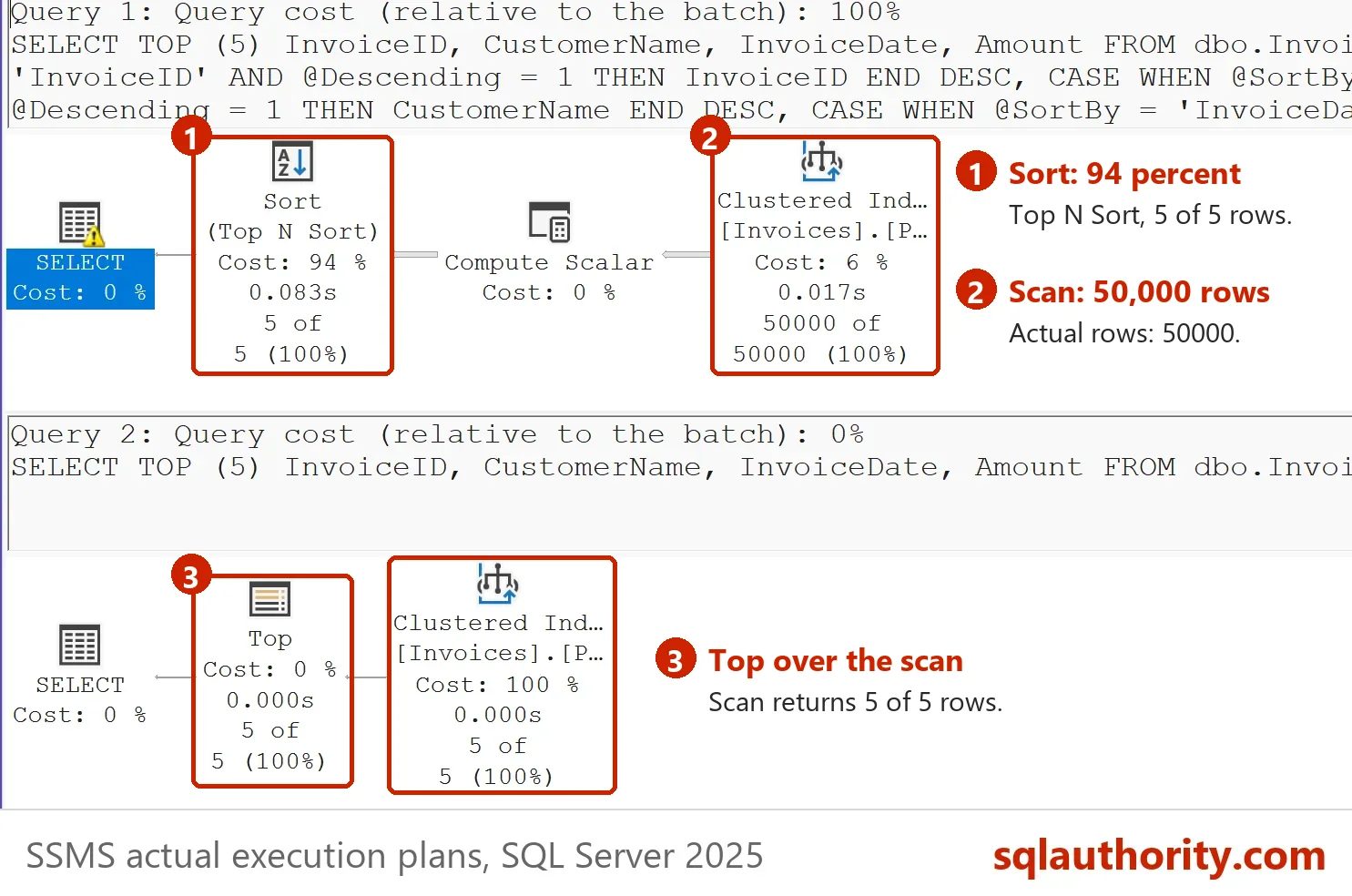
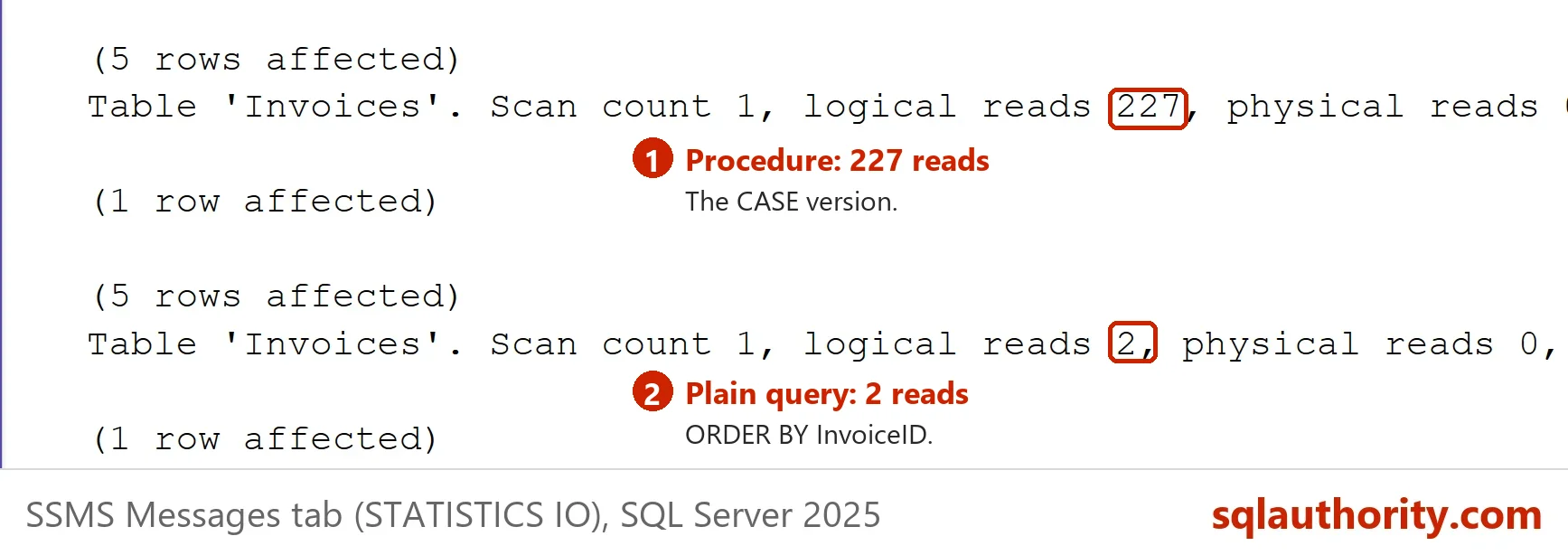
The sort order of a CASE is not known until the procedure runs. The plan cannot use the clustered index to deliver rows in order. It reads the whole table, calculates the CASE for every row, and sorts them to keep five. A plain ORDER BY InvoiceID reads two pages. Compare the logical reads.
SET STATISTICS IO ON;

EXEC dbo.GetInvoices @SortBy = 'InvoiceID';

SELECT TOP (5) InvoiceID, CustomerName, InvoiceDate, Amount FROM dbo.Invoices ORDER BY InvoiceID;

SET STATISTICS IO OFF;
The procedure read 227 pages and the plain query read 2. The gap grows with the table. On a table of millions of rows, the CASE version scans every one of them for a page of results.
Two Ways to Keep the Plan Cheap
The first way is OPTION (RECOMPILE) on the statement. The optimizer then sees the real parameter values and folds the CASE expressions to the one that applies. For InvoiceID the order matches the clustered index, so the sort disappears. A sort by CustomerName still has to read the table, because no index supports it.
CREATE OR ALTER PROCEDURE dbo.GetInvoicesRecompile @SortBy varchar(20), @Descending bit = 0
AS
SELECT TOP (5) InvoiceID, CustomerName, InvoiceDate, Amount
FROM dbo.Invoices
ORDER BY
    CASE WHEN @SortBy = 'InvoiceID' AND @Descending = 0 THEN InvoiceID END ASC,
    CASE WHEN @SortBy = 'InvoiceID' AND @Descending = 1 THEN InvoiceID END DESC,
    CASE WHEN @SortBy = 'CustomerName' AND @Descending = 0 THEN CustomerName END ASC,
    CASE WHEN @SortBy = 'CustomerName' AND @Descending = 1 THEN CustomerName END DESC,
    CASE WHEN @SortBy = 'InvoiceDate' AND @Descending = 0 THEN InvoiceDate END ASC,
    CASE WHEN @SortBy = 'InvoiceDate' AND @Descending = 1 THEN InvoiceDate END DESC,
    InvoiceID
OPTION (RECOMPILE);
SET STATISTICS IO ON;

EXEC dbo.GetInvoicesRecompile @SortBy = 'InvoiceID';

EXEC dbo.GetInvoicesRecompile @SortBy = 'InvoiceID', @Descending = 1;

EXEC dbo.GetInvoicesRecompile @SortBy = 'CustomerName';

SET STATISTICS IO OFF;
| Call | Logical reads |
|---|---|
| SELECT TOP (5) … ORDER BY InvoiceID | 2 |
| GetInvoices, InvoiceID | 227 |
| GetInvoicesRecompile, InvoiceID ascending | 2 |
| GetInvoicesRecompile, InvoiceID descending | 2 |
| GetInvoicesRecompile, CustomerName | 227 |
The recompile costs a little CPU on every call. That is a fair price for a report that runs a few times a minute. It is a poor price for a query that runs a thousand times a second.
The second way is dynamic SQL. The procedure checks the column name against sys.columns, and QUOTENAME wraps it. Only a real column can get through, so there is no injection risk. The statement then has a plain ORDER BY, and each sort gets its own plan.
CREATE OR ALTER PROCEDURE dbo.GetInvoicesDynamic @SortBy sysname, @Descending bit = 0
AS
BEGIN
    DECLARE @Column sysname = (SELECT c.name FROM sys.columns AS c WHERE c.object_id = OBJECT_ID(N'dbo.Invoices') AND c.name = @SortBy);
    IF @Column IS NULL THROW 50001, 'Unknown sort column.', 1;
    DECLARE @sql nvarchar(max) = N'SELECT TOP (5) InvoiceID, CustomerName, InvoiceDate, Amount FROM dbo.Invoices ORDER BY '
        + QUOTENAME(@Column) + CASE WHEN @Descending = 1 THEN N' DESC' ELSE N' ASC' END
        + CASE WHEN @Column <> N'InvoiceID' THEN N', InvoiceID' ELSE N'' END + N';';
    EXEC sys.sp_executesql @sql;
END;
EXEC dbo.GetInvoicesDynamic @SortBy = N'InvoiceID';

EXEC dbo.GetInvoicesDynamic @SortBy = N'CustomerName';

EXEC dbo.GetInvoicesDynamic @SortBy = N'Amount; DROP TABLE dbo.Invoices';
Msg 50001, Level 16, State 1, Procedure dbo.GetInvoicesDynamic, Line 5
Unknown sort column.
The first call returned the right rows with 2 reads. The second call tried to smuggle in a DROP TABLE. The procedure refused it and the table survived. The second call returned 6, 12, 18, 24 and 30, the same rows as the CASE version. The statement adds InvoiceID as a tie breaker.
DISTINCT and ORDER BY
A DISTINCT query can sort only by items in its select list. A CASE in ORDER BY is a new expression. It is not in the list, even when every column inside it is. That is the error behind a reader question: all the fields were listed, and it failed anyway.
DECLARE @SortBy varchar(20) = 'InvoiceID';
SELECT DISTINCT CustomerName, InvoiceDate FROM dbo.Invoices
ORDER BY CASE WHEN @SortBy = 'InvoiceID' THEN CustomerName END;
Msg 145, Level 15, State 1, Line 2
ORDER BY items must appear in the select list if SELECT DISTINCT is specified.
Move the DISTINCT into a derived table and put the CASE in the outer query. The outer query has no DISTINCT, so the rule does not apply.
DECLARE @SortBy varchar(20) = 'CustomerName';
SELECT TOP (3) d.CustomerName, d.InvoiceDate
FROM (SELECT DISTINCT CustomerName, InvoiceDate FROM dbo.Invoices) AS d
ORDER BY CASE WHEN @SortBy = 'CustomerName' THEN d.CustomerName END, d.InvoiceDate;
| CustomerName | InvoiceDate |
|---|---|
| Alma Bakery | 2026-01-01 |
| Alma Bakery | 2026-01-02 |
| Alma Bakery | 2026-01-03 |
Is CASE the Right Tool?
You could argue that a list of CASE expressions is ugly, and that dynamic SQL is cleaner. It is shorter, and its plans are better for a column that has an index. It is also the version where a mistake becomes an injection hole. The CASE form needs no string building and no permission to run dynamic code. Pick the one your team can review.
What to Remember
To ORDER BY a parameter, write one CASE for each column and direction, so each keeps its own type. Add OPTION (RECOMPILE) when the report runs rarely, or use dynamic SQL with a checked column name. Keep DISTINCT in a derived table.
When you finish the demo, remove the database.
USE master;
GO
IF DB_ID(N'OrderParamDemo') IS NOT NULL
BEGIN
    ALTER DATABASE OrderParamDemo SET SINGLE_USER WITH ROLLBACK IMMEDIATE;
    DROP DATABASE OrderParamDemo;
END;
A sort order is not a value, it is a decision SQL Server must be able to see.
Published by Pinal Dave on SQLAuthority. More of my work at pinaldave.com.
Discover more from SQL Authority with Pinal Dave
Subscribe to get the latest posts sent to your email.




7 Comments. Leave new
Good info.
Sorry, got it now…
Excelente
Hello,
I have two issues with this
1. That “select * ” works perfect, but when I add “distinct” and list of fields I get error “ORDER BY items must appear in the select list if SELECT DISTINCT is specified.” even so all fields listed.
2. I need to sort either by ID or by Name
In your example both sorting fields are integers. In my case one integer and another one is varchar. And when I switch to the second one I get an error :”Conversion failed when converting the varchar value….. to data type int.”
I would love to hear from you
Evelyn, long term subscriber :)
if want sort by date at a once & string at a once, if is throwing error as below
CODE:
ORDER BY
CASE WHEN @P_ShortDirection = ‘asc’ THEN
CASE
WHEN @P_ShortBy = ‘Title’ THEN Title
WHEN @P_ShortBy = ‘SubmittedDate’ THEN SubmittedDate
END
END ASC
, CASE WHEN @P_ShortDirection = ‘desc’ THEN
CASE
WHEN @P_ShortBy = ‘Title’ THEN Title
WHEN @P_ShortBy = ‘SubmittedDate’ THEN SubmittedDate
END
END DESC
ERROR:
Conversion failed when converting date and/or time from character string.
If you’re mixing datatypes in your sort you’ll have to create case statements for each type e.g.
ORDER BY
CASE WHEN @SortBy = ‘OrderID’ AND @SortDirection = ‘A’ THEN OrderID END ASC,
CASE WHEN @SortBy = ‘InvoiceID’ AND @SortDirection = ‘A’ THEN InvoiceID END ASC,
CASE WHEN @SortBy = ‘OrderID’ AND @SortDirection = ‘D’ THEN OrderID END DESC,
CASE WHEN @SortBy = ‘InvoiceID’ AND @SortDirection = ‘D’ THEN InvoiceID END DESC
Hi @gmb, you saved my life. It does indeed need each case statements for each type when then are different datatypes