Coding standards work best when a team can explain, follow and review them. Start with a few important rules. Add an exception process before adding more rules.

Keep the Standard Short
The aim is maintainable SQL Server code with a manageable set of important rules. A long document full of minor preferences is harder to follow. Keep rules that prevent errors or help another developer understand the code.
These guidelines are a starting point for your organization. Review them against your SQL Server version, workload and existing applications.
Turn one convention into a review query
Naming rules provide a small example. The report below checks an approved-schema list, user procedures starting with sp_, and table names containing spaces. Each returned row explains its rule.
The schema list and space rule are example policies. Replace them with your team’s decisions. An object can appear more than once if it breaks several rules. Run the query in the database you intend to review.
SELECT DB_NAME() AS DatabaseName;
SELECT s.name AS SchemaName,o.name AS ObjectName,o.type_desc,r.RuleName
FROM sys.objects AS o
JOIN sys.schemas AS s ON s.schema_id=o.schema_id
CROSS APPLY (VALUES
 (CASE WHEN s.name NOT IN (N'dbo',N'admin',N'reporting')
       THEN N'Schema outside the example approved list' END),
 (CASE WHEN o.type='P' AND o.name LIKE N'sp[_]%'
       THEN N'User procedure uses the sp_ prefix' END),
 (CASE WHEN o.type='U' AND o.name LIKE N'% %'
       THEN N'Table name contains a space' END)
) AS r(RuleName)
WHERE o.is_ms_shipped=0 AND r.RuleName IS NOT NULL
ORDER BY s.name,o.name,r.RuleName;
Catalog visibility depends on your permissions. An empty report may mean no visible exceptions, rather than a complete inventory. It does not prove that the code follows every guideline.
Make the underscore literal
I avoid the sp_ prefix for ordinary user procedures. In LIKE, an underscore matches one character. Brackets in sp[_]% require the literal underscore. This separate test makes that distinction visible.
SELECT v.ProcedureName,
       CASE WHEN v.ProcedureName LIKE N'sp[_]%'
            THEN N'Flag' ELSE N'No prefix match' END AS PrefixReview
FROM (VALUES(N'sp_Report'),(N'spXReport'),(N'ReportList'))
     AS v(ProcedureName);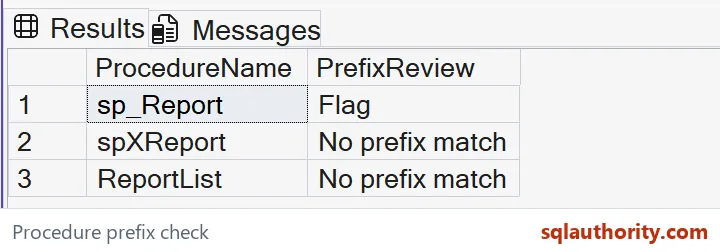
Only sp_Report matches this prefix. Matching still follows the expression’s collation, including its case rules. Choose case behavior deliberately if your policy distinguishes uppercase and lowercase names.
Review exceptions before changing working code
A naming report does not authorize a rename. Applications, dynamic SQL, reports and scheduled jobs may depend on the existing name. Document deliberate exceptions, identify callers and test any approved change.
Keep the review query alongside the written policy. Give each rule a reason and an owner. Tighten enforcement only after the team agrees on how exceptions will be handled.

Use a short standard that your team can explain and revisit.
A coding standard is not a rulebook, it is a shared habit a team can explain.
Published by Pinal Dave on SQLAuthority. More of my work at pinaldave.com.
Discover more from SQL Authority with Pinal Dave
Subscribe to get the latest posts sent to your email.