PARSENAME splits a dotted value into up to four parts and counts them from the right. That makes it handy for build numbers like 17.0.1000.7. But the parts come back as text, and text sorts in a way that surprises people.
Parts are numbered from the right
Say your server inventory has a column of build numbers, and your manager asks, “Which server has the newest build?” You sort the column. The result is wrong, and nobody notices until the wrong server is patched.
PARSENAME is the tool for taking the number apart. Part 1 is the rightmost piece and part 4 is the leftmost. That backward numbering trips up almost everyone once. The build values below are made up for the demo. They are not a patch baseline.
DECLARE @Build nvarchar(128) = N'17.0.1000.7';

SELECT PARSENAME(@Build, 4) AS MajorPart,
       PARSENAME(@Build, 3) AS MinorPart,
       PARSENAME(@Build, 2) AS BuildPart,
       PARSENAME(@Build, 1) AS RevisionPart;
You get 17, 0, 1000 and 7, one per column. Each one is a string, not a number. Remember that, because it is the root of the next problem.
Text sorting puts 12 before 7
Two builds that differ only in the last part: revision 7 and revision 12. First sort them as text, then sort by the converted numbers.
DROP TABLE IF EXISTS #Builds;
CREATE TABLE #Builds (BuildText nvarchar(128));
INSERT #Builds (BuildText) VALUES (N'17.0.1000.7'), (N'17.0.1000.12');

SELECT BuildText FROM #Builds ORDER BY BuildText;

SELECT BuildText, TRY_CONVERT(int, PARSENAME(BuildText, 1)) AS RevisionNumber
FROM #Builds
ORDER BY TRY_CONVERT(int, PARSENAME(BuildText, 4)),
         TRY_CONVERT(int, PARSENAME(BuildText, 3)),
         TRY_CONVERT(int, PARSENAME(BuildText, 2)),
         TRY_CONVERT(int, PARSENAME(BuildText, 1));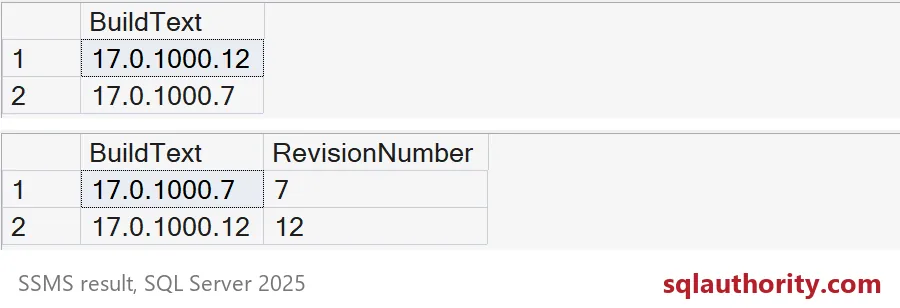
The first grid is sorted as text. The character 1 comes before the character 7, so revision 12 lands above revision 7. The second grid sorts each part as a number, and 7 comes before 12, as you would expect. The fix is to convert every part before you sort, not just the last one.
Messy values need a plan
Real inventories contain surprises. Here are four on one line. A value with five parts returns NULL. A bad numeric piece gives NULL when you convert it. An empty piece between two dots also gives NULL. And an object name in brackets keeps its inner dot, because PARSENAME understands identifiers.
SELECT PARSENAME(N'[SalesDB].[dbo].[Order.Header]', 1) AS BracketedObject,
       PARSENAME(N'17.0.1000.7.1', 4) AS TooManyParts,
       TRY_CONVERT(int, PARSENAME(N'17.0.bad.7', 2)) AS InvalidNumericPart,
       PARSENAME(N'17..1000.7', 3) AS EmptyPart;
All three problems come back as NULL, and the bracketed name returns Order.Header as one part. That is useful, because a NULL is easy to test for. Your job is to test for it, and not to turn it into a zero.

Reject the bad rows on purpose
Here is a small inventory with good and bad values. The query converts each part, marks a row as rejected when any part is missing, and sorts only by real numbers. The source text stays in the output so someone can correct it.
DROP TABLE IF EXISTS #Inventory;
CREATE TABLE #Inventory (ServerName varchar(20), BuildText nvarchar(128));
INSERT #Inventory (ServerName, BuildText)
VALUES ('Alpha', N'17.0.1000.12'), ('Bravo', N'17.0.1000.7'), ('Charlie', N'17.0.900.30'),
       ('Delta', N'17.0.1000'), ('Echo', N'17.0.abc.7'), ('Foxtrot', N'17..1000.7');

SELECT i.ServerName, i.BuildText, b.MajorPart, b.MinorPart, b.BuildPart, b.RevisionPart,
       CASE WHEN b.MajorPart IS NULL OR b.MinorPart IS NULL OR b.BuildPart IS NULL OR b.RevisionPart IS NULL
            THEN 'rejected' ELSE 'ok' END AS Status
FROM #Inventory AS i
CROSS APPLY (SELECT TRY_CONVERT(int, PARSENAME(i.BuildText, 4)) AS MajorPart,
                    TRY_CONVERT(int, PARSENAME(i.BuildText, 3)) AS MinorPart,
                    TRY_CONVERT(int, PARSENAME(i.BuildText, 2)) AS BuildPart,
                    TRY_CONVERT(int, PARSENAME(i.BuildText, 1)) AS RevisionPart) AS b
ORDER BY Status, b.MajorPart, b.MinorPart, b.BuildPart, b.RevisionPart, i.ServerName;
Three servers pass and sort correctly: Charlie, Bravo, then Alpha. Delta has too few parts, Echo has a letter where a number belongs, and Foxtrot has an empty part. All three are rejected, not guessed.
Look closely at Delta. Because PARSENAME counts from the right, its three parts shift. The 17 lands in MinorPart, and MajorPart is NULL. Those numbers are wrong, so never use them. Do not fill the gaps with zero, because that hides the bad data.
Know what PARSENAME is not
It does not check that an object exists, and it stops at four parts. Do not use it as a general string splitter by swapping commas for dots. And parsing a build says nothing about whether the server is patched. Compare the number with your approved baseline for that product branch. Parsed input is still input.
DROP TABLE IF EXISTS #Inventory, #Builds;Next time a dotted value sorts strangely, convert every part before you compare.
A dotted string is not a number, it is a format with parts to check.
Published by Pinal Dave on SQLAuthority. More of my work at pinaldave.com.
Discover more from SQL Authority with Pinal Dave
Subscribe to get the latest posts sent to your email.