
Custom date format strings tell FORMAT exactly which parts of a date to show. CONVERT picks from a list of numbered styles. FORMAT builds the text from letters, such as MMMM for the month name. One letter of the wrong case turns a month into minutes.
The Sample Table
Six members and the date each one joined. Run this in any test database. Every result in this post comes from SQL Server 2025.
CREATE TABLE Members (MemberID INT NOT NULL PRIMARY KEY, FirstName VARCHAR(10) NOT NULL, JoinDate DATETIME NOT NULL);
GO

INSERT INTO Members (MemberID, FirstName, JoinDate) VALUES
  (1, 'Asha', '2024-01-05'), (2, 'Ben', '2024-08-12'), (3, 'Chen', '2023-09-01'),
  (4, 'Dara', '2022-03-16'), (5, 'Eli', '2024-11-15'), (6, 'Fay', '2024-08-30');
GO
CONVERT: Numbered Styles
CONVERT takes a style number as its third argument. Style 101 gives month first, as in the US. Style 103 gives day first. Style 109 also adds the time.
SELECT FirstName,
  CONVERT(NVARCHAR, JoinDate, 101) AS Style101,
  CONVERT(NVARCHAR, JoinDate, 103) AS Style103,
  CONVERT(NVARCHAR, JoinDate, 109) AS Style109
FROM Members
WHERE MemberID IN (2, 4);
Ben joined on August 12. Style 101 shows 08/12/2024, and style 103 shows 12/08/2024. The same digits can read as August 12 or December 8, so a numbered style needs a note beside it. Style 109 returns Aug 12 2024 12:00:00:000AM in full.
To keep only the date part of style 109, give the text a length of 11.
SELECT CONVERT(NVARCHAR(11), JoinDate, 109) AS Style109Short FROM Members WHERE MemberID = 2;That returns Aug 12 2024. Without the length, the whole 26 character text comes back.
FORMAT: Pick a Culture
FORMAT takes a format and an optional culture. The letter d asks for the short date pattern of the culture. It doesn’t mean day. Here are three cultures next to style 101.
SELECT FirstName,
  CONVERT(NVARCHAR, JoinDate, 101) AS Style101,
  FORMAT(JoinDate, 'd', 'en-us') AS EnUs,
  FORMAT(JoinDate, 'd', 'en-gb') AS EnGb,
  FORMAT(JoinDate, 'd', 'de-de') AS DeDe
FROM Members
WHERE MemberID IN (2, 4);
For Ben, d with the en-us culture returns 8/12/2024, and style 101 returned 08/12/2024. The digits match, but FORMAT drops the leading zero, so the two strings aren’t identical. With en-gb the day comes first, and with de-de the parts are separated by dots.
One-Letter Standard Formats
A single letter is a standard format, and the culture decides its shape.
SELECT FORMAT(JoinDate, 'd', 'en-us') AS d,
  FORMAT(JoinDate, 'D', 'en-us') AS D,
  FORMAT(JoinDate, 'm', 'en-us') AS m,
  FORMAT(JoinDate, 'M', 'en-us') AS M,
  FORMAT(JoinDate, 'y', 'en-us') AS y
FROM Members
WHERE MemberID = 2;
d is the short date. D adds the weekday and spells the month: Monday, August 12, 2024. Both m and M give the month and day, so the case of that letter doesn’t matter. y gives August 2024.
Custom Strings Build Your Own
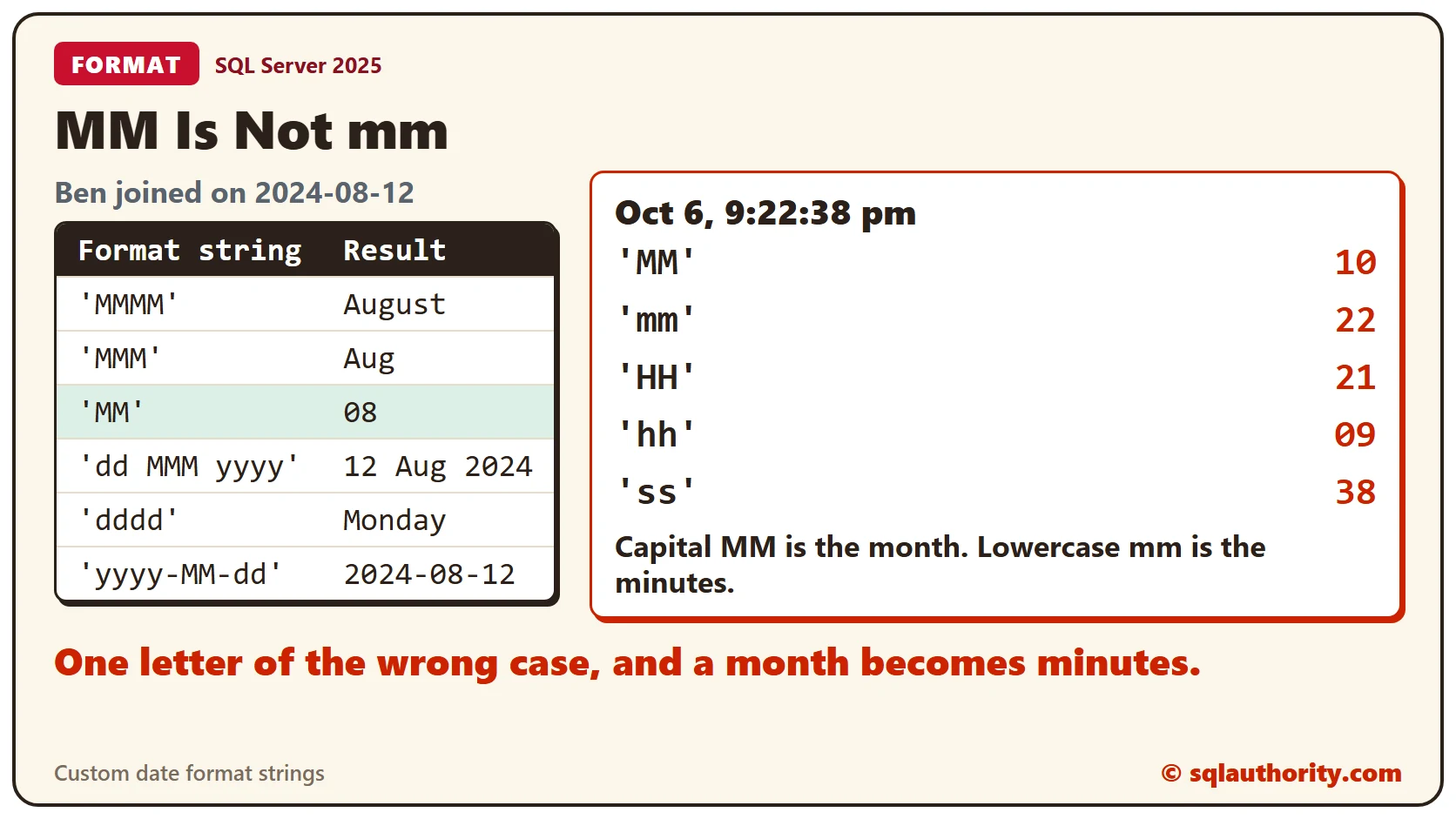
Two or more letters make a custom string. MMMM is the month name in full, MMM is three letters, and MM is two digits. dd is the day of the month, dddd is the weekday name, and yyyy is the year.
SELECT FORMAT(JoinDate, 'MMMM', 'en-us') AS MMMM,
  FORMAT(JoinDate, 'MMM', 'en-us') AS MMM,
  FORMAT(JoinDate, 'MM', 'en-us') AS MM,
  FORMAT(JoinDate, 'dd MMM yyyy', 'en-us') AS DdMmmYyyy,
  FORMAT(JoinDate, 'dddd', 'en-us') AS Dddd,
  FORMAT(JoinDate, 'yyyy-MM-dd', 'en-us') AS Iso
FROM Members
WHERE MemberID = 2;
MM Is Not mm
Case changes the meaning. Capital MM is the month. Lowercase mm is the minutes. HH is the hour on a 24-hour clock, and hh is the hour on a 12-hour clock. This test uses a fixed date and time.
DECLARE @When DATETIME = '2026-10-06 21:22:38';
SELECT FORMAT(@When, 'MM', 'en-us') AS UpperMM,
  FORMAT(@When, 'mm', 'en-us') AS LowerMM,
  FORMAT(@When, 'HH', 'en-us') AS UpperHH,
  FORMAT(@When, 'hh', 'en-us') AS LowerHH,
  FORMAT(@When, 'ss', 'en-us') AS Seconds;
The moment is October 6 at 9:22 and 38 seconds in the evening. MM returns 10, but mm returns 22. HH returns 21, and hh returns 09. A date stored without a time has no minutes, so mm gives 00 for it.
SELECT FORMAT(JoinDate, 'mm', 'en-us') AS MinutesPart FROM Members WHERE MemberID = 2;The YYYY Trap
FORMAT doesn’t complain about letters it doesn’t know. It prints them as they are.
SELECT FORMAT(JoinDate, 'YYYY-MM-DD', 'en-us') AS UpperCase,
  FORMAT(JoinDate, 'yyyy-MM-dd', 'en-us') AS LowerCase
FROM Members
WHERE MemberID = 2;
The first string returns YYYY-08-DD. MM worked, but YYYY and DD aren’t format codes, so they came back as plain text. No error appears. Use yyyy for the year and dd for the day.
Labels for Reports
FORMAT returns text, so the result sorts as text. This query counts joins per month name and sorts by that name.
SELECT FORMAT(JoinDate, 'MMMM', 'en-us') AS MonthName, COUNT(*) AS Joined
FROM Members
GROUP BY FORMAT(JoinDate, 'MMMM', 'en-us')
ORDER BY FORMAT(JoinDate, 'MMMM', 'en-us');
August comes first and January second. A name sorts alphabetically, not by the calendar. Use a label that sorts the way the calendar does, such as yyyy-MM.
SELECT FORMAT(JoinDate, 'yyyy-MM', 'en-us') AS YearMonth, COUNT(*) AS Joined
FROM Members
GROUP BY FORMAT(JoinDate, 'yyyy-MM', 'en-us')
ORDER BY YearMonth;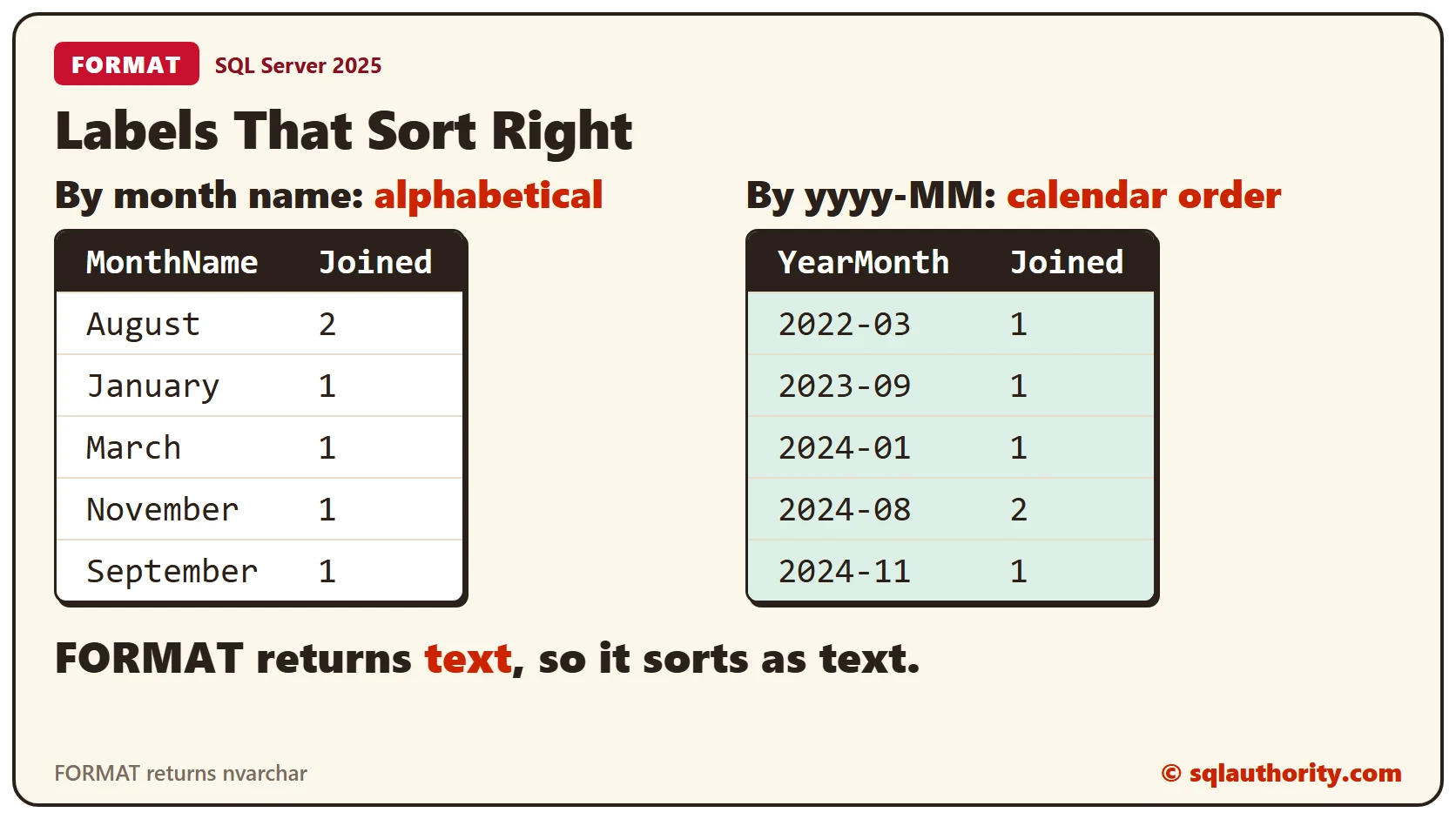
Now the months run from 2022-03 to 2024-11 in calendar order.
Name the Culture
Without a culture, FORMAT follows the language of your session. This test switches the session to British and back.
SET LANGUAGE British;
SELECT FORMAT(JoinDate, 'd') AS NoCulture, FORMAT(JoinDate, 'd', 'en-us') AS EnUs
FROM Members
WHERE MemberID = 2;
SET LANGUAGE us_english;
With no culture, Ben’s date reads 12/08/2024 under British. Naming en-us returns 8/12/2024 under both languages. Name the culture whenever the output must not change.
Clean Up
Remove the sample table when you finish.
DROP TABLE Members;What to Remember
Use a CONVERT style when a fixed list is enough, and FORMAT when you need a custom shape. Match the case of every letter, name the culture, and sort by a label that sorts. Speed isn’t covered here. The CPU cost of FORMAT against CONVERT is measured in the second post below.
To go further, read CONVERT Date Styles: Use Explicit Numeric Formats, FORMAT vs CONVERT: The CPU Cost of Pretty Dates and FORMAT Function in SQL Server: Dates, Numbers and Speed.
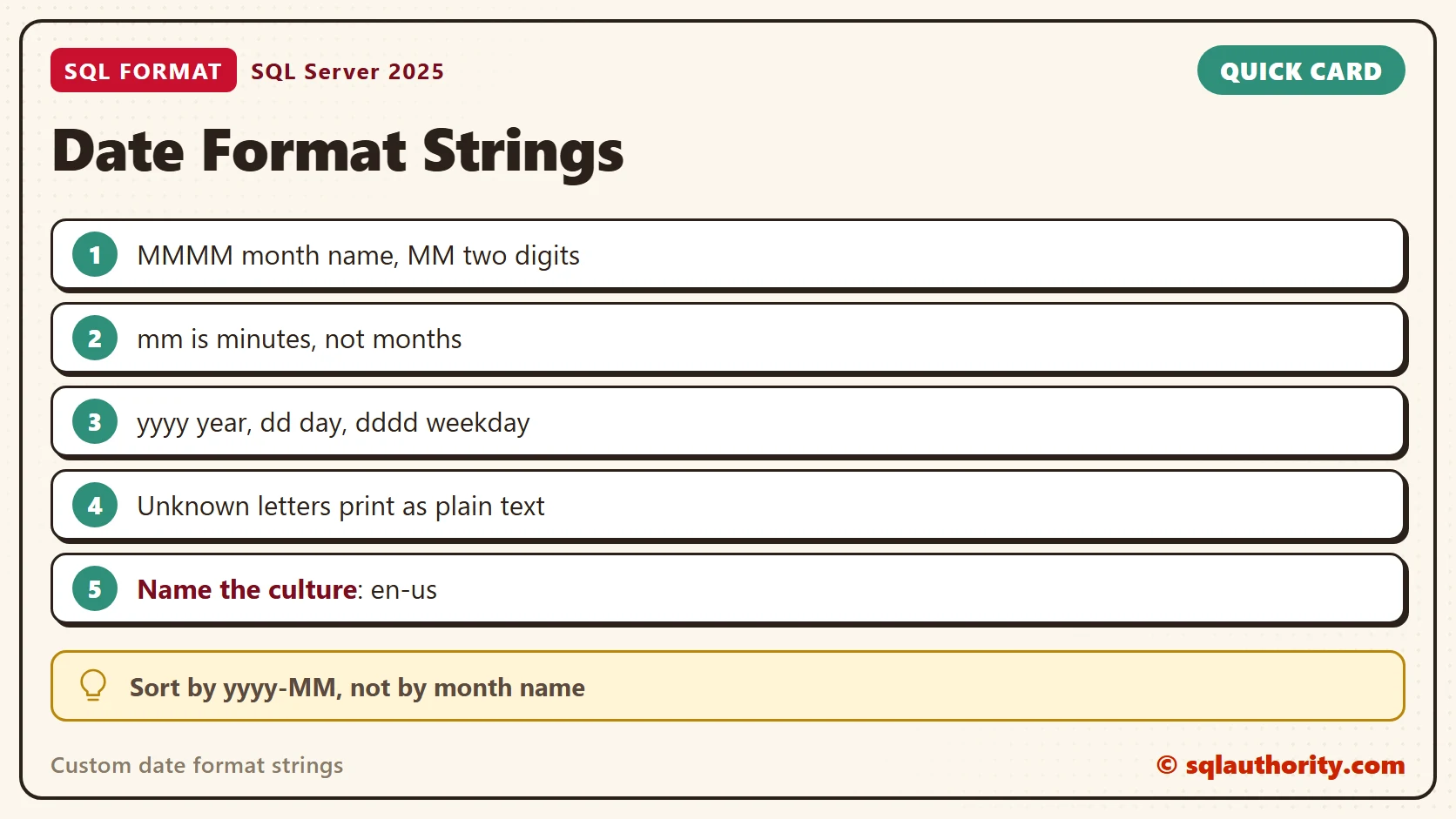
Case is not a style choice in a format string, it is part of the meaning.
Published by Pinal Dave on SQLAuthority. More of my work at pinaldave.com.
Discover more from SQL Authority with Pinal Dave
Subscribe to get the latest posts sent to your email.




2 Comments. Leave new
Thanks for shared with us 2012 FORMATE().
This function is for converting numbers and strings to proper DATETIME values