Spatial unions merge shapes that touch or overlap into one shape. In SQL Server, STUnion merges two shapes, and UnionAggregate merges the shapes in many rows. This post uses a small map of land parcels, so you can check every area by hand.
The Sample Parcels
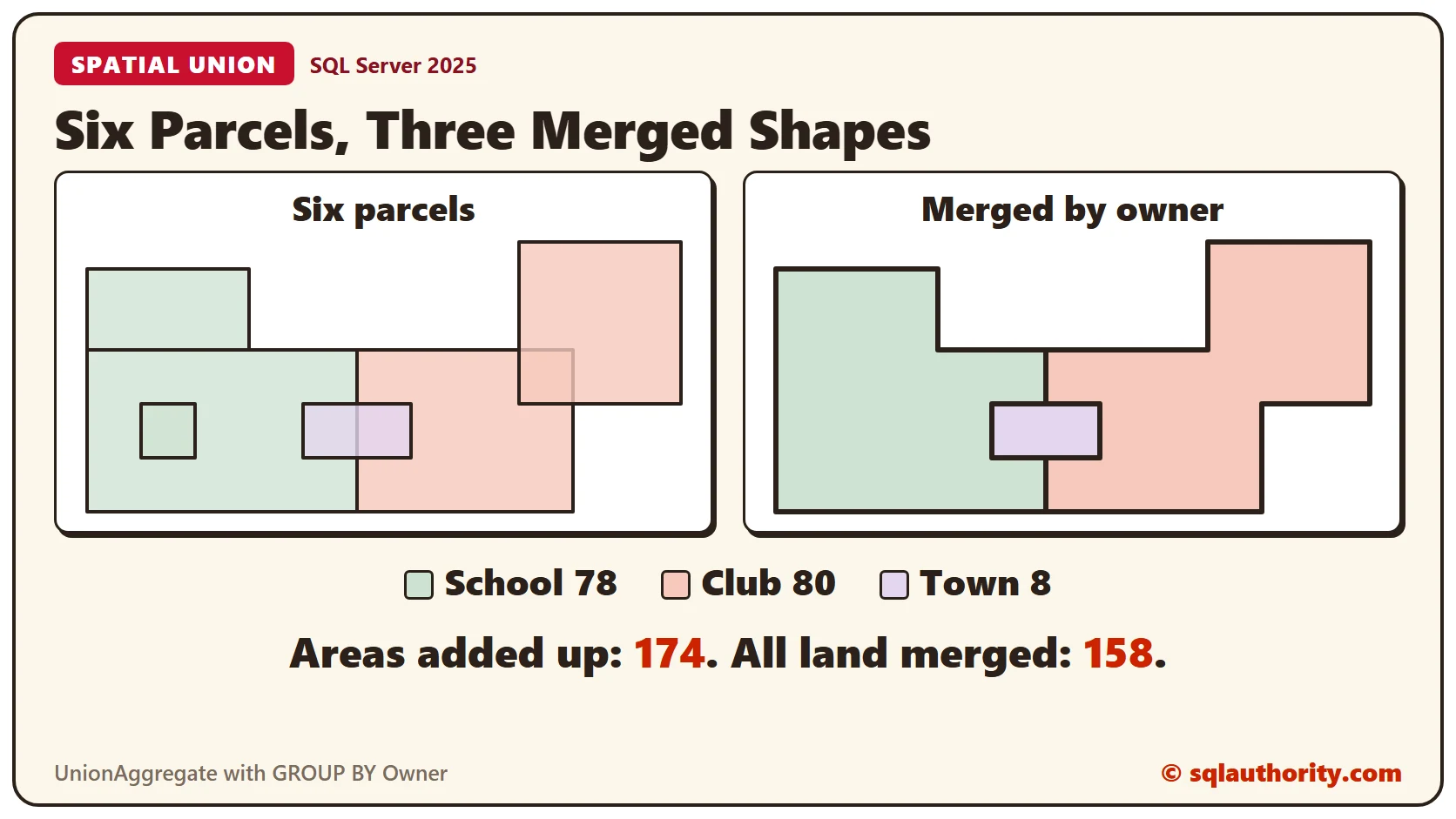
Six parcels on a flat grid. The School owns a field, a reading garden and a pond. The Club owns a yard and an orchard. The Town owns a shed. The field and the yard share an edge. The orchard overlaps the yard, and the shed sits across the line between the field and the yard.
The Shape column uses the geometry type, which works on a flat plane. The 0 at the end of each shape is its SRID, and it means a plain grid. Areas are in square grid units. Run this in any test database. Every result in this post comes from SQL Server 2025.
CREATE TABLE Parcels (
  ParcelID INT NOT NULL PRIMARY KEY,
  Name VARCHAR(20) NOT NULL,
  Owner VARCHAR(10) NOT NULL,
  Shape GEOMETRY NOT NULL
);
GO

INSERT INTO Parcels (ParcelID, Name, Owner, Shape) VALUES
  (1, 'School Field', 'School', GEOMETRY::STGeomFromText('POLYGON ((0 0, 10 0, 10 6, 0 6, 0 0))', 0)),
  (2, 'Reading Garden', 'School', GEOMETRY::STGeomFromText('POLYGON ((0 6, 6 6, 6 9, 0 9, 0 6))', 0)),
  (3, 'Club Yard', 'Club', GEOMETRY::STGeomFromText('POLYGON ((10 0, 18 0, 18 6, 10 6, 10 0))', 0)),
  (4, 'Orchard', 'Club', GEOMETRY::STGeomFromText('POLYGON ((16 4, 22 4, 22 10, 16 10, 16 4))', 0)),
  (5, 'Shed', 'Town', GEOMETRY::STGeomFromText('POLYGON ((8 2, 12 2, 12 4, 8 4, 8 2))', 0)),
  (6, 'Pond', 'School', GEOMETRY::STGeomFromText('POLYGON ((2 2, 4 2, 4 4, 2 4, 2 2))', 0));
GO
STArea gives the area of each parcel. The six areas add up to 174, and the merges below will come out lower.
SELECT ParcelID, Name, Owner, Shape.STArea() AS Area FROM Parcels ORDER BY ParcelID;SSMS can draw these shapes. Run a query that returns a geometry column, and open the Spatial results tab.
Who Holds the Shed?
STContains asks whether one shape lies entirely inside another. A shape that only partly overlaps doesn’t count. The pond sits inside the field, so that answer is 1. The shed straddles the field and the yard, so neither holds it alone.
DECLARE @Field GEOMETRY = (SELECT Shape FROM Parcels WHERE Name = 'School Field');
DECLARE @Yard GEOMETRY = (SELECT Shape FROM Parcels WHERE Name = 'Club Yard');
DECLARE @Shed GEOMETRY = (SELECT Shape FROM Parcels WHERE Name = 'Shed');
DECLARE @Pond GEOMETRY = (SELECT Shape FROM Parcels WHERE Name = 'Pond');
SELECT @Field.STContains(@Pond) AS FieldHoldsPond,
  @Field.STContains(@Shed) AS FieldHoldsShed,
  @Yard.STContains(@Shed) AS YardHoldsShed,
  @Field.STUnion(@Yard).STContains(@Shed) AS BothHoldShed;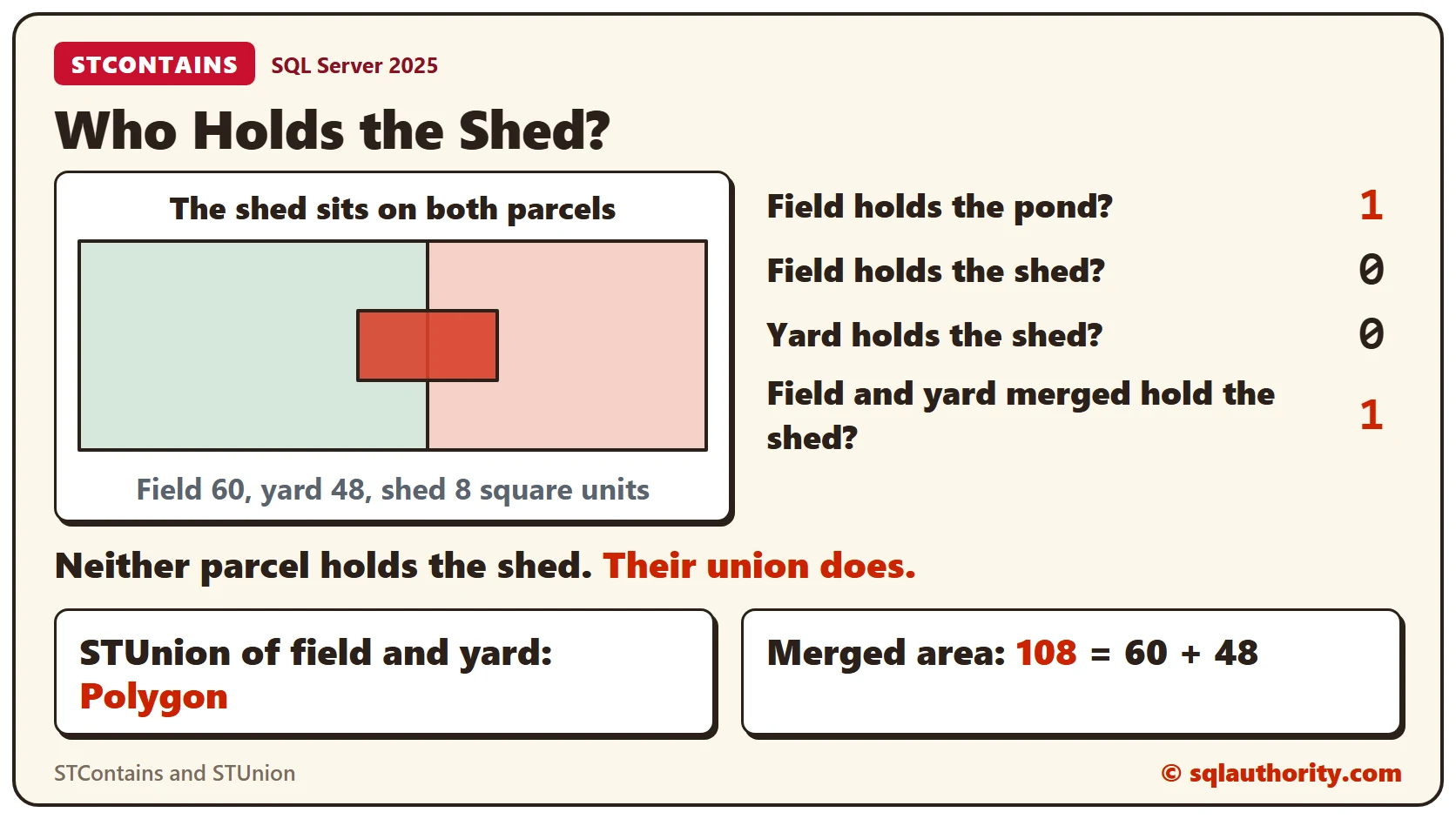
FieldHoldsShed and YardHoldsShed are both 0. The union of the two parcels does hold the shed, so BothHoldShed is 1. A union can answer a question that neither shape can.
STUnion for Two Shapes
Shapes that touch can become one polygon. Here the field and the yard share an edge.
DECLARE @Field GEOMETRY = (SELECT Shape FROM Parcels WHERE Name = 'School Field');
DECLARE @Yard GEOMETRY = (SELECT Shape FROM Parcels WHERE Name = 'Club Yard');
SELECT @Field.STUnion(@Yard).STAsText() AS MergedShape,
  @Field.STUnion(@Yard).STGeometryType() AS ShapeType,
  @Field.STUnion(@Yard).STArea() AS MergedArea;
One polygon comes back, with an area of 108. That’s 60 plus 48, so nothing was lost and nothing was counted twice.
Three Shapes: Chain STUnion
STUnion takes two shapes, but chaining handles three. Each call returns a shape, and that shape has its own STUnion method.
DECLARE @Field GEOMETRY = (SELECT Shape FROM Parcels WHERE Name = 'School Field');
DECLARE @Yard GEOMETRY = (SELECT Shape FROM Parcels WHERE Name = 'Club Yard');
DECLARE @Orchard GEOMETRY = (SELECT Shape FROM Parcels WHERE Name = 'Orchard');
SELECT ROUND(@Field.STUnion(@Yard).STUnion(@Orchard).STArea(), 2) AS MergedArea,
  @Field.STArea() + @Yard.STArea() + @Orchard.STArea() AS AreasAddedUp;
The merged area is 140, and the three areas added up make 144. The difference of 4 is the part where the yard and the orchard overlap. A union counts shared land once.
UnionAggregate for Many Rows
Chaining gets long when you have many shapes. UnionAggregate is an aggregate like SUM. It merges the shape in every row it receives, with no variables.
SELECT ROUND(GEOMETRY::UnionAggregate(Shape).STArea(), 2) AS MergedArea,
  SUM(Shape.STArea()) AS AreasAddedUp,
  GEOMETRY::UnionAggregate(Shape).STGeometryType() AS ShapeType
FROM Parcels;
All six parcels merge into one polygon with an area of 158. The areas add up to 174. The difference of 16 is shared land. The pond inside the field accounts for 4, and the yard and orchard overlap for 4. The shed lies over the two parcels around it, for 8.
Merge by Owner With GROUP BY
A company groups its sales by quarter and applies SUM to each group. UnionAggregate works with GROUP BY the same way. This query merges the land of each owner.
SELECT Owner, COUNT(*) AS Parcels,
  SUM(Shape.STArea()) AS AreasAddedUp,
  ROUND(GEOMETRY::UnionAggregate(Shape).STArea(), 2) AS MergedArea,
  GEOMETRY::UnionAggregate(Shape).STNumGeometries() AS Pieces
FROM Parcels
GROUP BY Owner
ORDER BY Owner;
Each owner’s land is one piece. The School’s three parcels add up to 82 but merge to 78, because the pond sits inside the field. The Club’s two add up to 84 and merge to 80.
The merged shape is plain text like any other geometry. This is the School’s land.
SELECT GEOMETRY::UnionAggregate(Shape).STAsText() AS SchoolLand FROM Parcels WHERE Owner = 'School';The field and the reading garden touch along the line from 0,6 to 6,6, so they form one L-shaped outline. The pond is inside the field, so it leaves no mark on the outline.
Collections Keep the Shapes Apart
CollectionAggregate also takes many rows, but it doesn’t merge them. It wraps the shapes in a collection and keeps every one.
SELECT GEOMETRY::CollectionAggregate(Shape).STGeometryType() AS CollectionType,
  GEOMETRY::CollectionAggregate(Shape).STNumGeometries() AS CollectionPieces,
  GEOMETRY::UnionAggregate(Shape).STGeometryType() AS UnionType,
  GEOMETRY::UnionAggregate(Shape).STNumGeometries() AS UnionPieces
FROM Parcels;
The collection holds 6 pieces, and the union holds 1. Use a union when you need the combined outline or area. Use a collection when you only need to carry the shapes together.
Round the Merged Area
Merging shapes can leave tiny floating point noise. Without ROUND, the Club’s merged area comes back with a long tail.
SELECT GEOMETRY::UnionAggregate(Shape).STArea() AS MergedArea FROM Parcels WHERE Owner = 'Club';The answer is 80.000000000000028, not 80. That’s why the earlier queries wrap the area in ROUND.
Clean Up
Remove the sample table when you finish.
DROP TABLE Parcels;What to Remember
STContains is 0 when a shape only partly overlaps another. STUnion merges two shapes, and chaining handles more. UnionAggregate merges the shapes in many rows, and GROUP BY gives one merged shape per group. Round the areas you show.
To go further, read geometry STUnion: Merge the Shared Area Only Once, geometry STContains: Check Boundary Membership and geometry STArea: Measure the Polygon Interior.
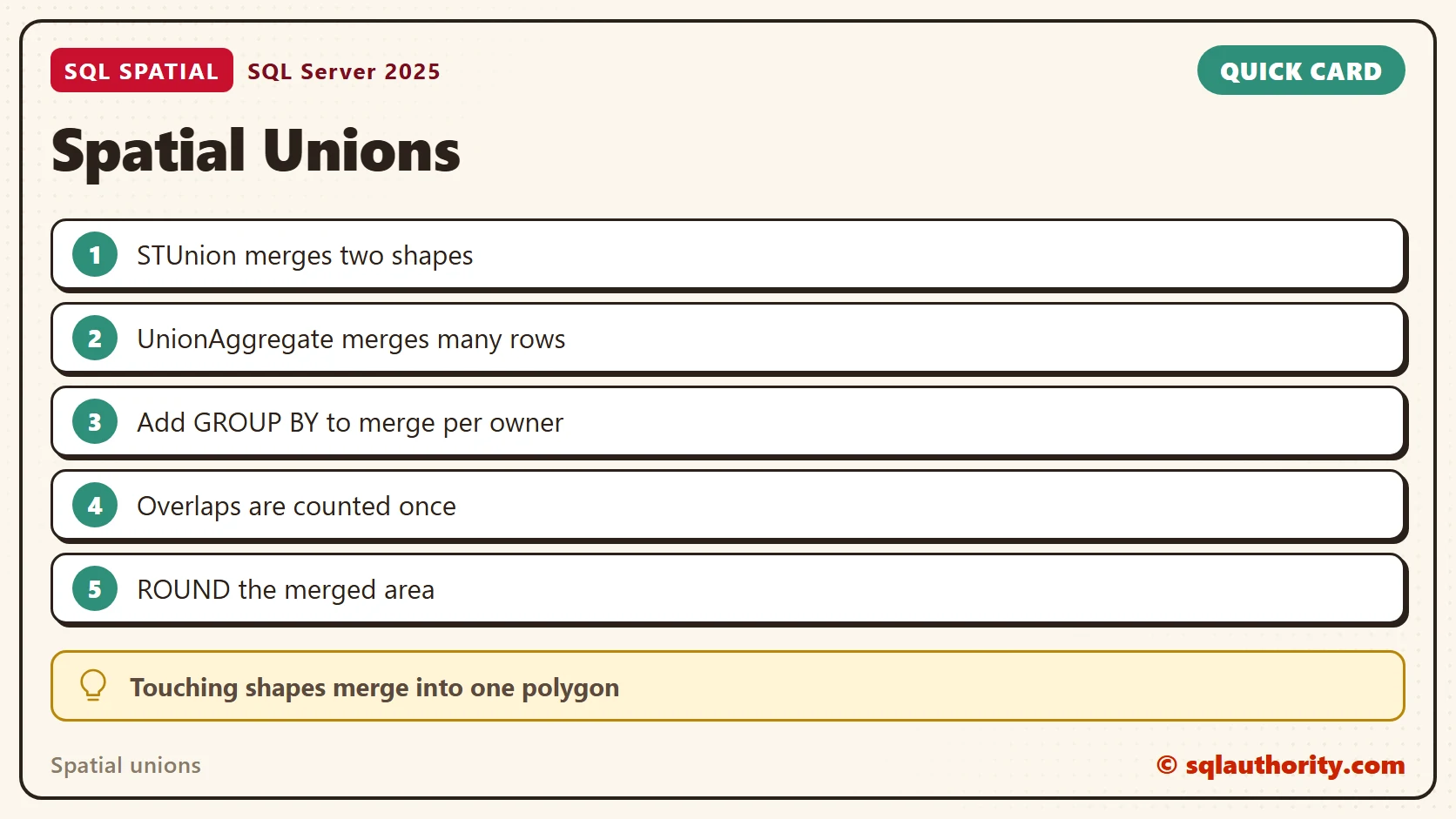
A union is not a stack of shapes, it is one shape with the overlaps counted once.
Published by Pinal Dave on SQLAuthority. More of my work at pinaldave.com.
Discover more from SQL Authority with Pinal Dave
Subscribe to get the latest posts sent to your email.