FORMAT vs CONVERT is a trade between flexible patterns and plain speed. FORMAT can print any date pattern in any culture. CONVERT is limited to its built-in styles, but it is far cheaper per row. Pick by how many rows you return.

The export that burned CPU
Picture a nightly export. It writes a few hundred thousand rows to a file, and each row has a date. Someone wrapped the date in FORMAT so it looks nice. The job used to be quick. Now the CPU graph looks like a mountain range.
Nothing is wrong with the query’s logic. It is just doing a lot of decorating. Let me show you how much. First, I check that both functions give the same text.
Match the output first
A speed test means nothing if the two sides print different things. For the ISO shape, FORMAT with yyyy-MM-dd and CONVERT with style 23 both return 2026-09-26. The last two columns show where FORMAT earns its keep: a long date, in two cultures.
DECLARE @d datetime2(3) = '2026-09-26T14:15:16.123';

SELECT FORMAT(@d, 'yyyy-MM-dd', 'en-US') AS formatted_date,
       CONVERT(char(10), @d, 23) AS converted_date,
       FORMAT(@d, 'D', 'en-US') AS us_long_date,
       FORMAT(@d, 'D', 'de-DE') AS german_long_date;
The English column reads Saturday, September 26, 2026. The German one reads Samstag, 26. September 2026. CONVERT cannot do that. So FORMAT is not bad. It is just not free.
Measure the CPU
Now the same job at scale. The block builds 100,000 dates, then runs the two versions one after the other. It assigns each result to a variable, so no grid rendering gets in the way. SET STATISTICS TIME prints the cost of each.
DROP TABLE IF EXISTS #Dates;
CREATE TABLE #Dates (EventDate date NOT NULL);
INSERT #Dates (EventDate)
SELECT DATEADD(day, value % 3650, '20200101')
FROM GENERATE_SERIES(1, 100000);

DECLARE @display varchar(10);
SET STATISTICS TIME ON;
SELECT @display = FORMAT(EventDate, 'yyyy-MM-dd', 'en-US') FROM #Dates;
SELECT @display = CONVERT(char(10), EventDate, 23) FROM #Dates;
SET STATISTICS TIME OFF;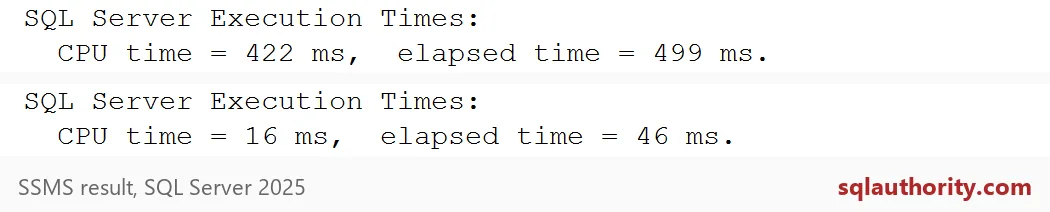
The first Execution Times line is FORMAT. The second is CONVERT. In my capture, FORMAT used 422 ms of CPU and CONVERT used 16 ms. On a second run, FORMAT still cost hundreds of milliseconds and CONVERT almost nothing. Your numbers will differ. The shape will not.
FORMAT goes through .NET formatting, and that costs something on every row. A hundred thousand rows is a small export. Imagine a few million.

Never format the search column
There is a worse place to use FORMAT: the WHERE clause. People write FORMAT(EventDate, ‘yyyy-MM-dd’) = ‘2026-09-26’ to find one day. It works. It also formats every row before it can compare.
Index the date, then compare. Both queries below return 27 rows. In my run, the FORMAT version read 245 pages and spent real CPU. The range version read 3 pages.
CREATE CLUSTERED INDEX IX_Dates ON #Dates (EventDate);
GO
SET STATISTICS IO ON;

SELECT COUNT(*) AS by_format FROM #Dates
WHERE FORMAT(EventDate, 'yyyy-MM-dd', 'en-US') = '2026-09-26';

DECLARE @StartDate date = '20260926';
SELECT COUNT(*) AS by_range FROM #Dates
WHERE EventDate >= @StartDate AND EventDate < DATEADD(day, 1, @StartDate);

SET STATISTICS IO OFF;
The range version keeps the column bare, so the index can seek. An attractive string is a poor search key.
Keep FORMAT for the last step
Use FORMAT when the result is small, the pattern has no CONVERT style, or the culture matters. Do it as late as you can, close to what the user sees. Better still, return a typed date and let the report layer format it.
One warning before you change an existing export. Callers may expect text, not a date. Agree on the contract first, then test the whole path. Clean up the demo table when you are done.
DROP TABLE IF EXISTS #Dates;Next time a date export feels slow, measure the formatting before you tune anything else.
A formatted date is not a faster date, it is presentation with a processing cost.
Published by Pinal Dave on SQLAuthority. More of my work at pinaldave.com.
Discover more from SQL Authority with Pinal Dave
Subscribe to get the latest posts sent to your email.