Time between workflow steps is the gap between two timestamps, so you need both endpoints. LEAD finds the next one for you. When there is no next step, the honest answer is NULL, not zero.
One timestamp is not a duration
Your manager asks, “How long do orders sit in each step?” You open the order history table. Every row has a status and a time. There is no duration column anywhere.
That is normal. A status row says when something started. The duration is the time until the next row for the same order. To get it, you look one row ahead, and LEAD does exactly that.
Here is a small history. Order 10 is complete. Order 11 is still waiting after payment. Order 12 has two events at the very same second, which is the tricky one.
DROP TABLE IF EXISTS #OrderEvents;

CREATE TABLE #OrderEvents (
    EventId       int PRIMARY KEY,
    OrderId       int,
    StatusName    varchar(20),
    OccurredAtUtc datetime2);

INSERT #OrderEvents VALUES
    (1, 10, 'placed',  '2026-01-01T08:00:00'), (2, 10, 'paid',    '2026-01-01T08:15:00'),
    (3, 10, 'packed',  '2026-01-01T09:00:00'), (4, 10, 'shipped', '2026-01-01T10:00:00'),
    (5, 11, 'placed',  '2026-01-02T08:00:00'), (6, 11, 'paid',    '2026-01-02T08:05:00'),
    (7, 12, 'placed',  '2026-01-02T09:00:00'), (8, 12, 'paid',    '2026-01-02T09:00:00');
Look one row ahead with LEAD
The window is partitioned by order, so each order only looks at its own rows. The ORDER BY inside it has two columns: the time and EventId. That second column is a tie-breaker. Without it, order 12 could be read in either order, because both rows have the same time.
WITH Steps AS (
    SELECT *,
           LEAD(OccurredAtUtc) OVER (PARTITION BY OrderId
                                     ORDER BY OccurredAtUtc, EventId) AS NextAt
    FROM #OrderEvents)
SELECT OrderId, EventId, StatusName, OccurredAtUtc, NextAt,
       DATEDIFF_BIG(second, OccurredAtUtc, NextAt) AS StageSeconds
FROM Steps
ORDER BY OrderId, OccurredAtUtc, EventId;
Order 10 shows 900, 2,700 and 3,600 seconds for its first three steps. That is 15 minutes, 45 minutes and one hour. The tied pair for order 12 gives 0 seconds for placed, which is correct. Both events happened together.
The last row of each order has NULL in NextAt and StageSeconds. For order 10, that is shipped, so the NULL just means the journey ended. For orders 11 and 12, it means paid has not been followed by anything yet.

Waiting age is a different question
A completed stage and an open stage answer different questions. The open ones need “how long has this been waiting until now?” I fix the as-of time in a variable so you get the same numbers I did. In a live report you would use the current UTC time.
DECLARE @AsOf datetime2 = '2026-01-02T10:00:00';

WITH Latest AS (
    SELECT *,
           ROW_NUMBER() OVER (PARTITION BY OrderId
                              ORDER BY OccurredAtUtc DESC, EventId DESC) AS rn
    FROM #OrderEvents)
SELECT OrderId, StatusName,
       DATEDIFF_BIG(second, OccurredAtUtc, @AsOf) AS WaitingSeconds
FROM Latest
WHERE rn = 1 AND StatusName NOT IN ('shipped', 'canceled')
ORDER BY OrderId;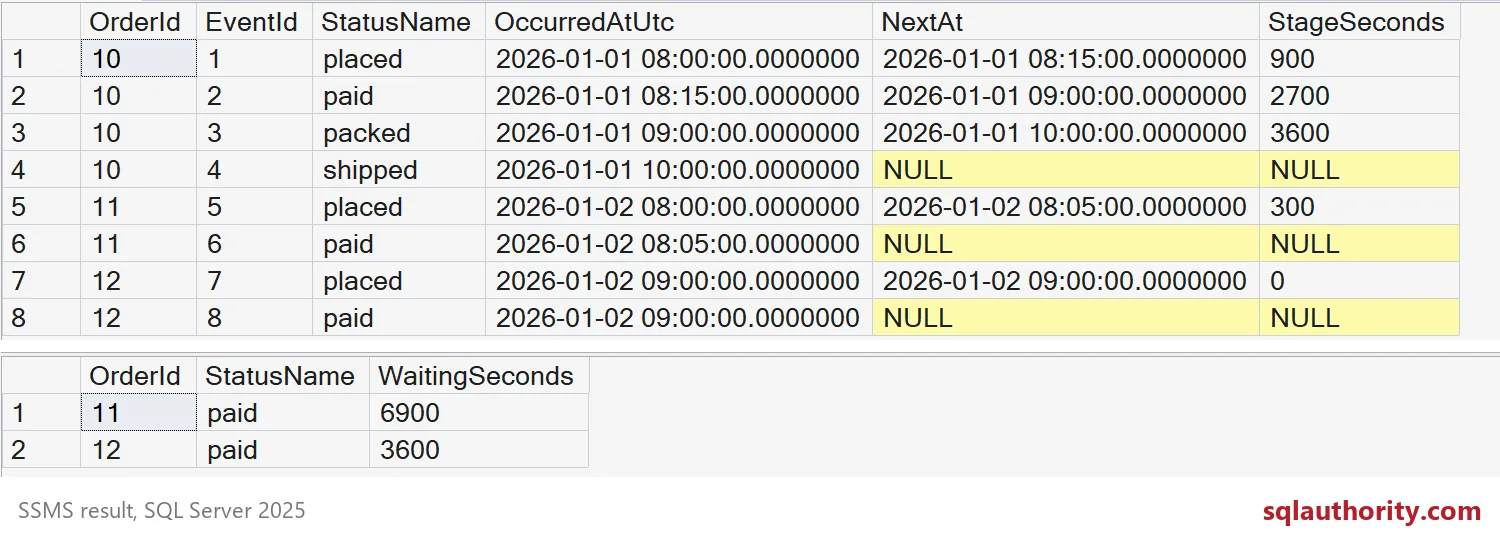
Order 11 has waited 6,900 seconds since it was paid. Order 12 has waited 3,600. Order 10 is missing because shipped is a final status. Your own workflow decides which statuses count as final, so check that list.
Why NULL beats zero
Someone will want to wrap StageSeconds in ISNULL and make the NULLs zero. It makes the grid look tidy. It also wrecks the averages, as this query shows.
WITH Steps AS (
    SELECT *,
           LEAD(OccurredAtUtc) OVER (PARTITION BY OrderId
                                     ORDER BY OccurredAtUtc, EventId) AS NextAt
    FROM #OrderEvents)
SELECT StatusName,
       COUNT(NextAt) AS CompletedStages,
       AVG(DATEDIFF_BIG(second, OccurredAtUtc, NextAt)) AS AvgSeconds,
       AVG(ISNULL(DATEDIFF_BIG(second, OccurredAtUtc, NextAt), 0)) AS AvgIfNullBecomesZero
FROM Steps
GROUP BY StatusName
ORDER BY StatusName;
Look at the paid row. Only one paid stage is complete, and it took 2,700 seconds. AVG skips NULLs, so it reports 2,700. With zeros it reports 900, because two open stages are counted as instant. That is a very flattering lie.
One last note. If a status repeats for an order, each repeat is its own row and its own stretch of time. Decide up front whether you count visits or total time per status, and write the answer down.
DROP TABLE IF EXISTS #OrderEvents;Keep the NULLs visible, and your averages will stay honest.
A status timestamp is not a duration, it is one end of an interval.
Published by Pinal Dave on SQLAuthority. More of my work at pinaldave.com.
Discover more from SQL Authority with Pinal Dave
Subscribe to get the latest posts sent to your email.